
This release is a pre-release and may not be stable for production use.
English · 简体中文
ADS Agent Bridge

Give AI agents a safe, local, and version-aware way to understand and operate Keysight ADS.



ADS Agent Bridge is an unofficial, local-first documentation and automation bridge for Keysight Advanced Design System (ADS). It turns the ADS installation already on your machine into a version-aware documentation source, a bounded runtime context, and a safely managed automation target for general-purpose Agents such as Codex or OpenCode.
The Agent may run on the ADS host or execute ads-agent there over SSH. Live
bridge endpoints remain bound to loopback on the ADS host; the package does not
open ADS directly to the network.
[!IMPORTANT] This project is a public alpha. Use disposable workspaces for first trials and review the reported capability gates before relying on automation results. Keysight and ADS are trademarks of Keysight Technologies. This project is not affiliated with or endorsed by Keysight.
What you can ask your Agent to do
| User task | Bridge capability | Current evidence |
|---|---|---|
| “Which ADS installations are available, and what can this one do?” | Discover multiple versions, select one explicitly, and probe its real runtime capabilities. | Validated on Windows and Linux |
| “Find the correct API for the ADS version installed here.” | Search a private, version-scoped local index and return bounded source evidence through the public ads-kb-docs Skill. |
Validated and knowledge-layer compared |
| “Prove that ADS Python automation works before touching my project.” | Create a disposable workspace, run a minimal AC simulation, and read the dataset through independent gates. | Validated on Windows and Linux |
| “Open this exact workspace and tell me what ADS is doing.” | Manage a workspace-bound GUI session with process, display, profile, ownership, UI, and modal state. | Validated on Windows and Linux |
| “Use the schematic, layout, cell, cellview, folder, or DDS item I selected.” | The packaged DE/DDS plug-in captures an explicit ADS_CONTEXT handle instead of guessing the foreground window. |
Validated in real DE and DDS sessions |
| “Watch this long task and handle a blocking dialog when it is safe.” | Observe the exact dialog, capture a targeted image, and perform a fresh fingerprint-bound action under a risk policy. | Validated for maintained dialog gates; bounded elsewhere |
| “Disconnect without closing ADS,” or “close only the session you started.” | Separate client disconnect from identity-checked native safe exit. | Validated on Windows and Linux |
The initial release is deliberately small, but it is not a dummy wrapper. Documentation, no-GUI automation, the installed DE/DDS plug-in, dialog supervision, and session lifecycle are separate, observable capability lanes. See the capability, mechanism, and evidence matrix for the exact support boundary behind every row.
The DE/DDS plug-in is a first-class part of the product
ads-agent setup installs the Bridge package and its recoverable ADS add-on.
After ADS restarts, the add-on provides:
- DE schematic, layout, and symbol windows: Copy ADS Context in the right-click menu and under Tools > ADS Context;
- DE Folder/Library tree: Copy ADS Context for supported workspace, folder, library, cell, cellview, and multi-item selections;
- DDS: Copy ADS Context in the right-click menu and a DDS-owned top-level ADS Context menu, including an empty page selection.
DE and DDS use separate entrypoints and callback lifecycles. The copied handle contains bounded target and selection metadata, not a port, token, or mutation permission. The Agent must still resolve freshness and obtain workflow authorization before editing, simulating, opening, or closing anything. See the interaction contract.
From your selection to a checked result
You select the intended object in ADS, copy its bounded Context, and ask in normal engineering language. The Bridge resolves that exact target and reports which observable gates actually passed.
How it works
The package has three main execution lanes:
- Knowledge: the public
ads-kb-docsSkill routes questions through the CLI to the selected installation's private, version-scoped local index, which returns matched content and source evidence. - Live ADS: the Session Manager coordinates the packaged ADS Agent Bridge plug-in installed inside DE or DDS. Its loopback, token-authenticated endpoint verifies the exact workspace, process, display, slot, profile, and ownership identity.
- No-GUI automation: the selected ADS Python runtime creates a disposable example, simulates it, and reads the dataset without opening an ADS window.
On Linux, ADS Python can still require an available X display for runtime
initialization. For isolation, keep the real user HOME so ADS can see its
per-user state, and isolate Bridge state with ADS_AGENT_HOME.
Evidence and comparison scope
Bridge uses three evidence labels:
- Validated means a maintained gate passed against a real ADS installation.
- Compared means the capability participated in a published, isolated comparison.
- Available (bounded) means the interface exists with an explicit stop rule; it does not claim general unattended correctness.
The public evidence now includes two deliberately narrow comparisons: one for the knowledge lane and one for a minimal no-GUI execution task. Neither compares installation, the DE/DDS plug-in, GUI session control, dialog handling, DDS UI readback, safe shutdown, or the complete product surfaces.
ADS 2027 knowledge-layer benchmark — not a full-product comparison
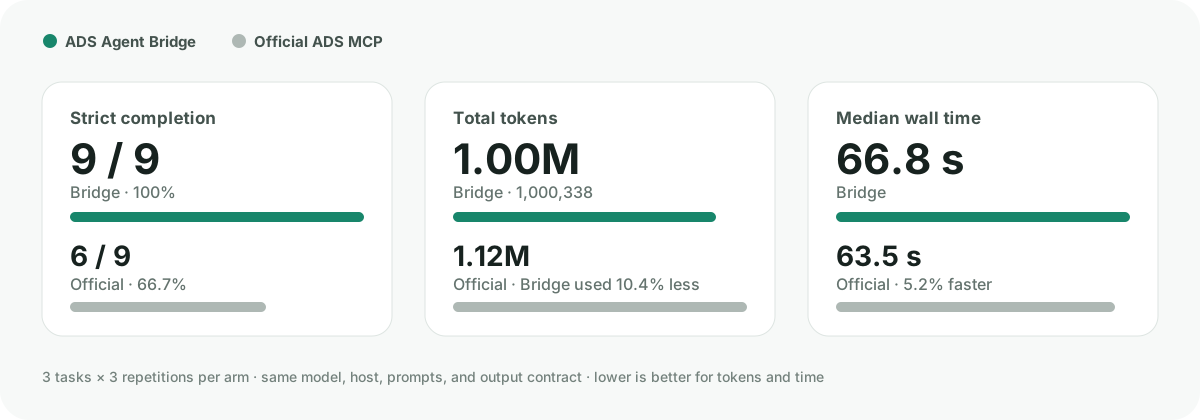
We ran the same three ADS knowledge tasks three times per arm with the same model, host, prompts, and strict output contract. Global Agent configuration, skills, memories, rules, and shell startup files were masked for every run.
| Metric | ADS Agent Bridge | Official ADS MCP |
|---|---|---|
| Strict completion | 9/9 (100%) | 6/9 (66.7%) |
| Total tokens | 1,000,338 | 1,116,503 |
| Median wall time | 66.8 s | 63.5 s |
| Isolation violations | 0 | 0 |
Bridge used 10.4% fewer total tokens and closed all nine tasks, but it was not
faster overall: median latency was 5.2% higher, and one geometry run produced a
long mean-latency tail. In the Python DRC task, all three official-MCP answers
used the unverified create_drc_job route; Bridge reported the verified
boundary and safe fallback in all three runs.
This is a small engineering regression suite, not a claim of universal or full-product superiority: earlier pilots on these cases informed Bridge improvements. See the methodology and interpretation boundary and sanitized per-run data.
ADS 2027 headless execution microbenchmark
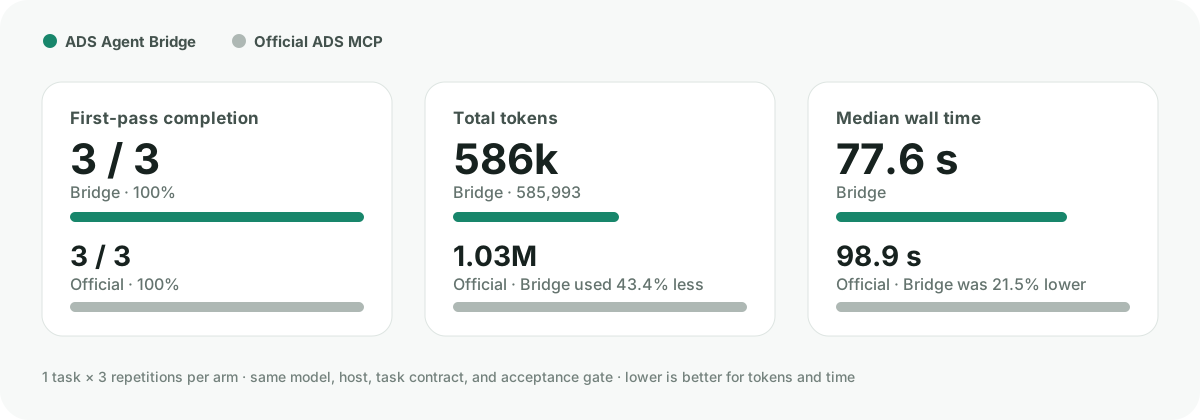
We also asked each released execution surface to create a disposable ADS 2027
workspace, run a minimal AC simulation without launching a GUI, read the
dataset, and return a finite numeric sample. The Bridge arm used its public
headless example / quickstart path; the official arm used
start_local_session and execute_python. Direct ADS Python or simulator shell
bypass was forbidden for both.
| Metric | ADS Agent Bridge | Official ADS MCP |
|---|---|---|
| First-pass completion | 3/3 (100%) | 3/3 (100%) |
| Total tokens | 585,993 | 1,034,887 |
| Uncached input tokens | 96,769 | 106,959 |
| Median wall time | 77.6 s | 98.9 s |
| Isolation violations | 0 | 0 |
For this one task, Bridge used 43.4% fewer total tokens and had 21.5% lower median wall time. Total tokens include cached input; the uncached-input difference was a smaller 9.5%. This is a three-repetition microbenchmark, not a general performance ranking. See the execution methodology, calibration disclosure, and interpretation boundary and sanitized per-run data.
Quick start
Prerequisites:
- a locally licensed ADS installation;
- Python 3.10 or later for the
ads-agentcommand; - Windows or Linux.
Install and prove the local setup:
pipx install ads-agent-bridge
ads-agent doctor
ads-agent setup
ads-agent quickstart
Installing ads-agent-bridge also installs the small eda-bridge-runtime
Python library automatically, so ads-agent runtime serve works without an
extra Python package choice. On a separate Agent host, install and enable the
Runtime MCP/plugin there as described by the
EDA Bridge Runtime; the ADS
host does not need the Agent-facing plugin.
setup discovers installed ADS versions instead of hard-coding one release.
It also installs two small, mutually routing public Skills: ads-agent-bridge
for setup and bounded operation, and ads-kb-docs for documentation lookup.
An existing complete ads-kb-docs from the full ADS Agent Kit is preserved.
quickstart passes only after documentation indexing and query, add-on
registration, disposable workspace creation, circuit simulation, and dataset
readback all pass.
Launch a real workspace only after that gate succeeds:
ads-agent --pretty launch --workspace /path/to/MyWorkspace_wrk
ads-agent --pretty status
ads-agent disconnect                 # ADS keeps running
ads-agent shutdown                   # native exit for an agent-owned session
On Linux, bind GUI work to the intended display:
ads-agent --pretty launch --workspace /path/to/MyWorkspace_wrk --display :4
Bootstrap installation when pipx or a suitable Python is missing
Linux
curl -fsSLO https://github.com/cottman99/ads-agent-bridge/releases/download/v0.1.0a37/install.sh
sh install.sh
Windows PowerShell
Invoke-WebRequest https://github.com/cottman99/ads-agent-bridge/releases/download/v0.1.0a37/install.ps1 -OutFile install.ps1
powershell -NoProfile -ExecutionPolicy Bypass -File .\install.ps1
The bootstrap searches installed Python versions, can create an isolated pipx environment, and does not modify an externally managed system Python. See the CLI and installation reference for interpreter, offline-wheel, and check-only options.
Remote use over SSH
SSH is the recommended current remote boundary. Run the public CLI on the ADS host instead of exposing the embedded Bridge port:
ssh ads-host 'ads-agent doctor'
ssh ads-host 'ads-agent --pretty status'
ssh ads-host 'ads-agent --pretty launch --workspace /path/to/MyWorkspace_wrk --display :4'
This keeps session files, random tokens, process ownership, workspaces, and ADS itself on the same host. For one-off administration these commands remain the smallest route. For repeated Agent operations, use the automatically installed Runtime integration to keep one SSH stdio process alive:
ads-agent runtime serve
The generic Runtime performs the protocol handshake, records purpose and observed timings in its append-only ledger, and avoids starting SSH once per operation. It never exposes the embedded Bridge port or token.
The Runtime Skill, MCP server, and connection registry belong on the Agent
host. ads-agent runtime serve, the ADS plug-in, and ADS itself belong on the
ADS host. If the Agent and ADS share a machine, register the same service as a
local connection rather than bypassing Runtime. Adapter capabilities identify
this service as an eda-worker with a synchronous Run model.
When no workspace exists, the ADS Skill establishes the typed
workspace.create operation even without a live ADS plug-in session;
capability discovery remains available only when the contract is unknown or
stale. The operation
creates a non-overwriting minimal workspace and returns an opaque
rich EDA_CONTEXT; session.launch, session.status, and session.shutdown then
provide the bounded GUI lifecycle without putting the remote path in the
context token.
For a safe schematic edit, design.apply accepts only an
ads.design-plan/v1 object containing registered instance and wire operations.
It copies a closed source workspace to staging, applies one ADS database
transaction, saves and closes, freshly reopens the copied design, checks exact
instance/parameter/netlist assertions, verifies the source Bundle hash is
unchanged, and only then atomically commits the output workspace. It rejects
raw Python/AEL, unknown fields, stale expected_before state, and overwrite.
For an existing, generated Momentum simulation-input directory,
momentum.run_generated provides the same bounded Runtime path to a real
S-parameter result. It fingerprints and preserves the source, solves only a
new sibling copy with the explicitly selected ADS installation, checks the
complete finite N-port CITI matrix, and promotes the output only after all
checks pass. A timeout stops the wrapper and its solver process tree. This
operation deliberately starts after EM setup/input generation; it does not
invent substrate, ports, mesh, or sweep settings for a blank layout.
Safety and privacy
- Documentation, indexes, workspaces, session tokens, and automation results remain local unless the user deliberately moves them.
- Bridge endpoints listen on loopback and use a random token per session.
- Reusing a session requires the selected ADS instance and exact workspace to match; the Bridge does not silently switch workspaces.
- Context handles identify a target but do not authorize editing or simulation.
- Structured
design.applyplans modify only a non-overwriting output copy and must pass fresh-reopen assertions before promotion. - Dialog actions are bound to a fresh process/window fingerprint instead of a product title or fixed screen coordinate.
shutdownrefuses unverified or user-owned sessions and never force-kills ADS or silently discards modified work.- Arbitrary embedded Python and dynamic AEL calls stay disabled unless both the ADS process and the client explicitly opt into unsafe mode.
See the dialog automation contract, context interaction contract, and execution context contract for the exact boundaries.
Version support
| ADS generation | Public support level |
|---|---|
| ADS 2025 and later | Stable target, decided by runtime capability probes |
| ADS 2024 Update 2 | Preview |
| ADS 2023 Update 2 through ADS 2024 Update 1 | Experimental |
| Older installations | Documentation-only when local docs can be discovered |
No version is fixed into the public Docs Skill. Multiple installed versions can be discovered and selected explicitly.
Five public examples
ads-agent --pretty examples list
The current catalog covers:
- ADS discovery and explicit version selection;
- no-GUI minimal-AC simulation and dataset readback;
- read-only live DE workspace context;
- bounded DDS dataset readback into a new native DDS file;
- a fixed read-only AEL workspace call showing the hybrid boundary.
Every runner names its prerequisites, state changes, evidence, and stop rule. See EXAMPLES.md for exact commands.
Current boundaries
The project does not claim blank-layout Momentum setup authoring or a completed RFPro, FEM, SIPro, or PIPro workflow. Its bounded Momentum capability begins with already-generated simulation inputs. Remote ADS operations use the generic Runtime over persistent SSH stdio; raw port forwarding is not supported. Other solver workflows still require their own runtime and solver-side acceptance evidence before promotion.
Documentation
- CLI and installation reference
- Capability, mechanism, and evidence matrix
- ADS 2027 headless AC execution benchmark
- Examples and acceptance gates
- Release contract
- Session and dialog automation
- DE/DDS context interaction
- Execution context contract
- Changelog
To remove the ADS integration while preserving unrelated add-ons:
ads-agent addon uninstall
Development
See CONTRIBUTING.md. Public claims are accepted only when the corresponding test, runtime observation, or validation gate has passed.
1 maintainer

Metadata
1 maintainer
Release files for ads-agent-bridge 0.1.0a37
For a detailed explanation of source distributions (sdists) and built distributions (wheels), please see the package formats documentation.
Source distribution (sdist)
| File | Size | Uploaded | |
|---|---|---|---|
| ads_agent_bridge-0.1.0a37.tar.gz | 2.4 MB | Details |
Built distribution (wheel)
| File | Interpreter | ABI | Platform | Reset |
|---|---|---|---|---|
| ads_agent_bridge-0.1.0a37-py3-none-any.whl | Python 3 | none | any | Details |
Total release size: 2.5 MB
Release files / ads_agent_bridge-0.1.0a37.tar.gz
| Download URL | ads_agent_bridge-0.1.0a37.tar.gz |
|---|---|
| Size | 2.4 MB |
| Tags | Source |
|
SHA-256 checksum How to use checksums |
6e56538bf9727597a3bcde988df2e4f7ac45cd687e767abc0d3b070bf27f2749
|
|
BLAKE2b-256 checksum How to use checksums |
fad0ca50244dbc88870fd3ce42114029cf358a1b30ece4f64c632d44e52628b4
|
| Upload date | |
|
Uploaded using Trusted Publishing? What is trusted publishing? |
Yes |
| Uploaded via |
twine/7.0.0 CPython/3.13.14
|
Provenance
Provenance describes where a file came from. On PyPI, provenance is shared via attestations, which provide a verifiable record of the build or publishing details. View details, limitations and caveats.


PyPI Publish Attestation
PyPI verified that this artifact, at this checksum, originated from the publisher listed below.
Signed by GitHub Actions, verified by PyPI on Aug 29, 2026.
Transparency logRelease files / ads_agent_bridge-0.1.0a37-py3-none-any.whl
| Download URL | ads_agent_bridge-0.1.0a37-py3-none-any.whl |
|---|---|
| Size | 113.4 kB |
| Tags | Python 3 |
|
SHA-256 checksum How to use checksums |
88186487d6aa8f4f528a0def57e6abd6ad5b6a9aac3b170c59b4f90c96bb3d64
|
|
BLAKE2b-256 checksum How to use checksums |
4ddc62ff49e8a8f77ce7d6a925ba0d608b153135beb097aca6dbc264d5fd1c16
|
| Upload date | |
|
Uploaded using Trusted Publishing? What is trusted publishing? |
Yes |
| Uploaded via |
twine/7.0.0 CPython/3.13.14
|
Provenance
Provenance describes where a file came from. On PyPI, provenance is shared via attestations, which provide a verifiable record of the build or publishing details. View details, limitations and caveats.
PyPI Publish Attestation
PyPI verified that this artifact, at this checksum, originated from the publisher listed below.
Signed by GitHub Actions, verified by PyPI on Aug 29, 2026.
Transparency log













