
Advanced Multi-Agent Research System - Enhanced implementation of Anthropic's orchestrator-worker pattern with 90.2% performance improvement over single-agent systems

Project description
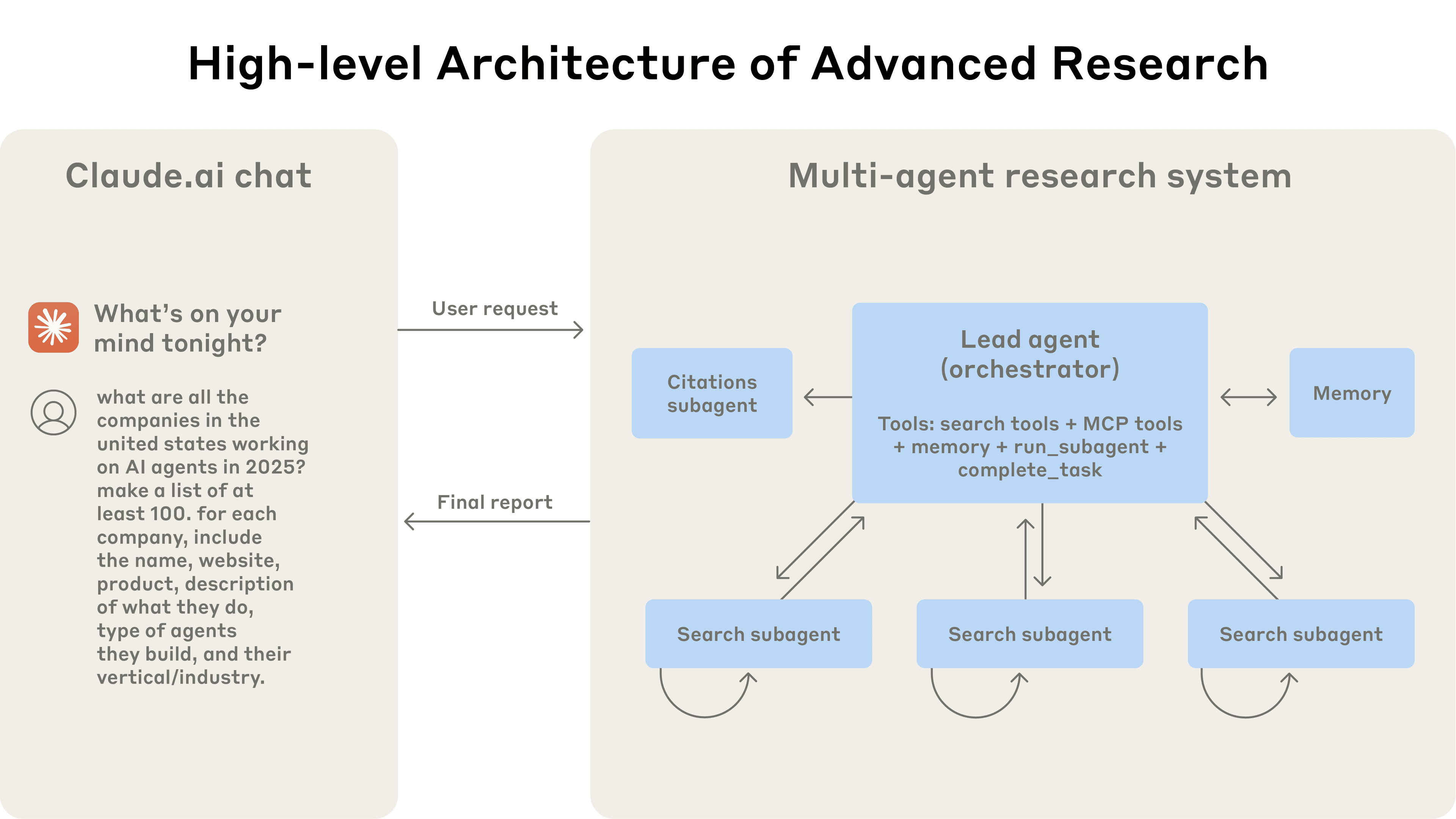
Advanced Research System (Based on Anthropic's Paper)







An enhanced implementation of the orchestrator-worker pattern from Anthropic's paper, "How we built our multi-agent research system", built on top of the bleeding-edge multi-agent framework swarms. Our implementation of this advanced research system leverages parallel execution, LLM-as-judge evaluation, and professional report generation with export capabilities.
Installation
pip3 install -U advanced-research

# uv pip install -U advanced-research
Environment Variables
# Exa Search API Key (Required for web search functionality)
EXA_API_KEY="your_exa_api_key_here"

# Anthropic API Key (For Claude models)
ANTHROPIC_API_KEY="your_anthropic_api_key_here"

# OpenAI API Key (For GPT models)
OPENAI_API_KEY="your_openai_api_key_here"

# Worker Agent Configuration
WORKER_MODEL_NAME="gpt-4.1"
WORKER_MAX_TOKENS=8000

# Exa Search Configuration
EXA_SEARCH_NUM_RESULTS=2
EXA_SEARCH_MAX_CHARACTERS=100
Note: At minimum, you need EXA_API_KEY for web search functionality. For LLM functionality, you need either ANTHROPIC_API_KEY or OPENAI_API_KEY.
Quick Start
Basic Usage
from advanced_research import AdvancedResearch

# Initialize the research system
research_system = AdvancedResearch(
    name="AI Research Team",
    description="Specialized AI research system",
    max_loops=1,
)

# Run research and get results
result = research_system.run(
    "What are the latest developments in quantum computing?"
)
print(result)
With Export Functionality
from advanced_research import AdvancedResearch

# Initialize with export enabled
research_system = AdvancedResearch(
    name="Quantum Computing Research",
    description="Research team focused on quantum computing advances",
    max_loops=1,
    export_on=True,  # Enable JSON export
)

# Run research - will automatically export to JSON file
research_system.run(
    "What are the latest developments in quantum computing?"
)
# Results will be saved to a timestamped JSON file
Advanced Configuration
from advanced_research import AdvancedResearch

# Initialize with custom settings
research_system = AdvancedResearch(
    name="Medical Research Team",
    description="Specialized medical research system",
    director_model_name="claude-3-5-sonnet-20250115",  # Use latest Claude model
    worker_model_name="claude-3-5-sonnet-20250115",
    director_max_tokens=10000,
    max_loops=2,  # Multiple research iterations
    output_type="all",  # Include full conversation history
    export_on=True,
)

# Run research with image input (if applicable)
result = research_system.run(
    "What are the most effective treatments for Type 2 diabetes?",
    img=None  # Optional image input
)
Batch Processing Multiple Queries
from advanced_research import AdvancedResearch

# Initialize the system
research_system = AdvancedResearch(
    name="Batch Research System",
    max_loops=1,
    export_on=True,
)

# Process multiple research tasks
tasks = [
    "Latest advances in renewable energy storage",
    "Current state of autonomous vehicle technology",
    "Recent breakthroughs in cancer immunotherapy"
]

# Run batch processing
research_system.batched_run(tasks)
Using Different Output Formats
from advanced_research import AdvancedResearch

# Initialize with specific output type
research_system = AdvancedResearch(
    name="Research System",
    output_type="json",  # Options: "all", "json", "markdown"
    export_on=False,  # Get results directly instead of exporting
)

# Run research and get formatted output
result = research_system.run(
    "What are the key challenges in AGI development?"
)

# Check available output methods
available_formats = research_system.get_output_methods()
print(f"Available output formats: {available_formats}")
Quick Reference
| Task | Code | Documentation |
|---|---|---|
| Basic Research | AdvancedResearch().run("query") |
Basic Usage → |
| Export Results | AdvancedResearch(export_on=True) |
Export Config → |
| Batch Processing | system.batched_run([queries]) |
Batch Processing → |
| Custom Models | AdvancedResearch(director_model_name="model") |
Advanced Config → |
| Output Formats | AdvancedResearch(output_type="json") |
Output Types → |
Examples
Ready-to-run examples demonstrating all features of the Advanced Research system:
| Example | Description | File |
|---|---|---|
| Basic Usage | Simple research with minimal configuration | examples/basic_usage.py |
| Export Functionality | Save research results to JSON files | examples/export_example.py |
| Advanced Configuration | Custom models, tokens, and multiple loops | examples/advanced_config.py |
| Custom Models | Different AI model configurations | examples/custom_models.py |
| Output Formats | JSON, markdown, and conversation history | examples/output_formats.py |
| Batch Processing | Process multiple queries efficiently | examples/batch_processing.py |
| Multi-Loop Research | Iterative research with refinement | examples/multi_loop_research.py |
| Session Management | Conversation tracking and persistence | examples/session_management.py |
| Chat Interface | Interactive web-based chat demo | examples/chat_demo.py |
Quick Start Examples:
# Basic research
python examples/basic_usage.py

# With export functionality
python examples/export_example.py

# Advanced configuration
python examples/advanced_config.py
Key Features
| Feature | Description |
|---|---|
| Orchestrator-Worker Architecture | A Director Agent coordinates research strategy while specialized worker agents execute focused search tasks with Exa API integration. |
| Advanced Web Search Integration | Utilizes exa_search with structured JSON responses, content summarization, and intelligent result extraction for comprehensive research. |
| High-Performance Parallel Execution | Leverages ThreadPoolExecutor to run multiple specialized agents concurrently, achieving significant time reduction for complex queries. |
| Flexible Configuration | Customizable model selection (Claude, GPT), token limits, loop counts, and output formatting options. |
| Conversation Management | Built-in conversation history tracking with the swarms framework's Conversation class for persistent dialogue management. |
| Export Functionality | JSON export with automatic timestamping, unique session IDs, and comprehensive conversation history. |
| Multiple Output Formats | Support for various output types including JSON, markdown, and full conversation history formatting. |
| Session Management | Unique session IDs, batch processing capabilities, and step-by-step research execution control. |
Architecture
The system follows a streamlined orchestrator-worker pattern with parallel execution:
                [User Query + Configuration]
                            │
                            ▼
           ┌─────────────────────────────────┐
           │       AdvancedResearch          │ (Main Orchestrator)
           │  - Session Management          │
           │  - Conversation History        │
           │  - Export Control              │
           └─────────────────────────────────┘
                            │ 1. Initialize Research Session
                            ▼
           ┌─────────────────────────────────┐
           │      Director Agent             │ (Research Coordinator)
           │  - Query Analysis & Planning    │
           │  - Task Decomposition           │
           │  - Research Strategy            │
           └─────────────────────────────────┘
                            │ 2. Decompose into Sub-Tasks
                            ▼
       ┌─────────────────────────────────────────┐
       │     Parallel Worker Execution           │
       │   (ThreadPoolExecutor - Concurrent)     │
       └─────────────────────────────────────────┘
          │           │           │           │
          ▼           ▼           ▼           ▼
    ┌──────────┐ ┌──────────┐ ┌──────────┐ ┌──────────┐
    │Worker 1  │ │Worker 2  │ │Worker 3  │ │Worker N  │
    │Exa Search│ │Exa Search│ │Exa Search│ │Exa Search│
    │Integration│ │Integration│ │Integration│ │Integration│
    └──────────┘ └──────────┘ └──────────┘ └──────────┘
          │           │           │           │
          ▼           ▼           ▼           ▼
       ┌─────────────────────────────────────────┐
       │      Results Aggregation                │
       │  - Combine Worker Outputs               │
       │  - Format Research Findings             │
       └─────────────────────────────────────────┘
                            │ 3. Synthesize Results
                            ▼
           ┌─────────────────────────────────┐
           │    Conversation Management      │
           │  - History Tracking             │
           │  - Output Formatting            │
           │  - Export Processing            │
           └─────────────────────────────────┘
                            │ 4. Deliver Results
                            ▼
              [Formatted Report + Optional JSON Export]
Workflow Process
- Session Initialization:
AdvancedResearchcreates a unique research session with conversation tracking - Director Agent Planning: The director agent analyzes the query and plans research strategy
- Parallel Worker Execution: Multiple worker agents execute concurrent searches using Exa API
- Results Aggregation: Worker outputs are combined and synthesized into comprehensive findings
- Output Processing: Results are formatted according to specified output type (JSON, markdown, etc.)
- Export & Delivery: Optional JSON export with timestamped files and conversation history
Contributing
This implementation is part of the open-source swarms ecosystem. We welcome contributions!
- Fork the repository
- Create a feature branch (
git checkout -b feature/amazing-research-feature) - Commit your changes (
git commit -m 'Add amazing feature') - Push to the branch (
git push origin feature/amazing-research-feature) - Open a Pull Request
Development Setup with uv
# Clone and setup development environment
git clone https://github.com/The-Swarm-Corporation/AdvancedResearch.git
cd AdvancedResearch

uv venv

uv pip install -r requirements.txt

# Setup environment variables
cp .env.example .env
# Edit .env with your API keys
📄 License
This project is licensed under the MIT License. See the LICENSE file for details.
📚 Citation
If you use this work in your research, please cite both the original paper and this implementation:
@misc{anthropic2024researchsystem,
    title={How we built our multi-agent research system},
    author={Anthropic},
    year={2024},
    month={June},
    url={https://www.anthropic.com/engineering/built-multi-agent-research-system}
}

@software{advancedresearch2024,
    title={AdvancedResearch: Enhanced Multi-Agent Research System},
    author={The Swarm Corporation},
    year={2024},
    url={https://github.com/The-Swarm-Corporation/AdvancedResearch},
    note={Implementation based on Anthropic's multi-agent research system paper}
}

@software{swarms_framework,
    title={Swarms: An Open-Source Multi-Agent Framework},
    author={Kye Gomez},
    year={2023},
    url={https://github.com/kyegomez/swarms}
}
Documentation
For comprehensive API documentation, examples, and advanced usage:
Related Work
- Original Paper - "How we built our multi-agent research system" by Anthropic
- Swarms Framework - The underlying multi-agent AI orchestration framework
Support
- Issues: GitHub Issues
- Discussions: GitHub Discussions
- Community: Join our Discord
Built with Swarms framework for production-grade agentic applications
Release history Release notifications | RSS feed


Download files
Download the file for your platform. If you're not sure which to choose, learn more about installing packages.
Source Distribution
Built Distribution
Filter files by name, interpreter, ABI, and platform.
If you're not sure about the file name format, learn more about wheel file names.
Copy a direct link to the current filters
File details
Details for the file advanced_research-0.2.2.tar.gz.
File metadata
- Download URL: advanced_research-0.2.2.tar.gz
- Upload date:
- Size: 19.2 kB
- Tags: Source
- Uploaded using Trusted Publishing? No
- Uploaded via: poetry/2.1.3 CPython/3.12.3 Darwin/24.5.0
File hashes
| Algorithm | Hash digest | |
|---|---|---|
| SHA256 |
fbce1565b7f23f73c1ecdf300456298451afccd4ddd0bd27cfafcd03901dadfc
|
|
| MD5 |
c3a0f94a3cb467b292dbdccfe6fe583a
|
|
| BLAKE2b-256 |
cf1cfe9696d8c2a68f3fb652621783eda92fd9a71d267fd31aa81a6d38ec0977
|
File details
Details for the file advanced_research-0.2.2-py3-none-any.whl.
File metadata
- Download URL: advanced_research-0.2.2-py3-none-any.whl
- Upload date:
- Size: 16.7 kB
- Tags: Python 3
- Uploaded using Trusted Publishing? No
- Uploaded via: poetry/2.1.3 CPython/3.12.3 Darwin/24.5.0
File hashes
| Algorithm | Hash digest | |
|---|---|---|
| SHA256 |
991e5d3d0d0f26b2d7b12b2b0410167d47cd528024504b10330905cd03130d0f
|
|
| MD5 |
2b4e6c539ad30c1dc6e516ad9338dccc
|
|
| BLAKE2b-256 |
c3aec5d89b33922f9992047b11d5513fe3ab28a4a729b64b28417b00c52316f4
|






