

🎨 Affinity CLI
Universal Linux Installer for Affinity Products
Professional, One-Command Installation for Creative Professionals





Features • Quick Start • Installation • Documentation • Contributing
🐧 Linux users deserve professional creative tools.
🌟 What is Affinity CLI?
Affinity CLI is a powerful, open-source command-line tool that automates the complete installation of Affinity Photo, Designer, and Publisher on Linux distributions. Version v1.0.0 is the first polished milestone—distilled from months of late-night Wine experiments, community streams, and field engagements.
📌 Everything visible here is served straight from
release/v1.0.0-clean. To keep the release snapshot pristine, add future commits to that branch instead ofmasterso the landing view stays tidy for everyone.
# One command to rule them all
affinity-cli install
No more manual Wine configuration. No more dependency hunting. Just professional creative tools on Linux. 🚀
🔥 Why creators are hyped about v1.0.0
- Battle-tested automation – the same playbook we ran internally is now a single
affinity-cli installcommand. - Cross-distro parity – Ubuntu, Fedora, Arch, SUSE, and more all follow the exact same installer story.
- Confidence-first UX – installer discovery, verbose status, and
--dry-runshow every step before touching a Wine prefix.
✨ Transform your Linux system into a creative powerhouse
New hero artwork highlights the v1.0.0 release energy—swap the file at .github/assets/affinity-cli-hero.png whenever you refresh the brand.
🎯 Features
🖼️ Supported Products
| Product | Versions | Status |
|---|---|---|
| 📸 Affinity Photo | v1 • v2 • v3 | ✅ Supported |
| 🎨 Affinity Designer | v1 • v2 • v3 | ✅ Supported |
| 📄 Affinity Publisher | v1 • v2 • v3 | ✅ Supported |
🚀 Quick Start
⚡ Installation (3 simple steps)
# 1️⃣ Clone the repository
git clone https://github.com/ind4skylivey/affinity-cli.git
cd affinity-cli

# 2️⃣ Install the CLI tool
pip install -e .

# 3️⃣ Check your system status
affinity-cli status
🎬 Launch Affinity Products
# Install Affinity products (interactive mode)
affinity-cli install

# Or specify installer location
affinity-cli install --installer-path ~/Downloads
🎉 That's it! Launch from:
# Terminal
affinity-photo          # Launch Affinity Photo
affinity-designer       # Launch Affinity Designer
affinity-publisher      # Launch Affinity Publisher

# Or from your application menu! 🎨
In under five minutes you can go from a clean Linux install to launching Affinity as if it shipped with your distro. That same moment of disbelief people share on streams and meetups? This workflow makes it repeatable.
🐧 Supported Distributions

Ubuntu 20.04 • 22.04 • 24.04 |

Debian 11 • 12 (Bookworm) |

Fedora 38 • 39 • 40+ |

Arch Linux Rolling Release |

Linux Mint 20.x • 21.x |
Manjaro All versions |

openSUSE Leap • Tumbleweed |
More! Pop!_OS • Elementary |
💎 Why Choose Affinity CLI?
| Feature | 🎨 Affinity CLI | Lutris | Bottles | Manual Wine |
|---|---|---|---|---|
| One-command install | ✅ | ❌ | ❌ | ❌ |
| Auto distro detection | ✅ | ❌ | ❌ | ❌ |
| Auto dependency install | ✅ | ❌ | ❌ | ❌ |
| Desktop integration | ✅ | ✅ | ✅ | ❌ |
| No external managers | ✅ | ❌ | ❌ | ✅ |
| Lightweight | ✅ | ❌ | ❌ | ✅ |
| Built for Affinity | ✅ | ❌ | ❌ | ❌ |
| CLI + GUI launcher | ✅ | ✅ | ✅ | ❌ |
| Open source | ✅ | ✅ | ✅ | ✅ |
📚 Documentation
📖 Installation Methods
From Source (Development)
git clone https://github.com/ind4skylivey/affinity-cli.git
cd affinity-cli
pip install -e .
From PyPI (Coming Soon)
pip install affinity-cli
From AUR (Arch Users - Coming Soon)
yay -S affinity-cli
⚙️ Command Reference
Installation Commands
# Interactive installation
affinity-cli install

# Specify installer path
affinity-cli install --installer-path ~/Downloads

# Install specific products
affinity-cli install --products photo,designer

# Custom Wine prefix
affinity-cli install --prefix ~/.my-affinity

# Skip dependency check (advanced)
affinity-cli install --skip-dependencies
Management Commands
# Check system status
affinity-cli status
affinity-cli status --verbose

# Repair broken installation
affinity-cli repair
affinity-cli repair --product photo

# Uninstall products
affinity-cli uninstall
affinity-cli uninstall --purge  # Complete removal

# Generate system report
affinity-cli report
affinity-cli report --output report.json
Information Commands
# Show version
affinity-cli --version

# Show help
affinity-cli --help
affinity-cli install --help

# Welcome message
affinity-cli welcome
🔧 Advanced Configuration
Custom Configuration File
Location: ~/.config/affinity-cli/config.yml
wine:
  version: "latest"
  prefix_path: "~/.wine-affinity"
  graphics_api: "vulkan"

affinity:
  products:
    - photo
    - designer
  auto_detect_installers: true

system:
  enable_multiarch: true
  install_dependencies: true
🐛 Troubleshooting
Common Issues
Issue: Installation fails on dependency step
# Update package lists first
sudo apt update      # Ubuntu/Debian
sudo dnf update      # Fedora
sudo pacman -Sy      # Arch
Issue: Products don't appear in menu
# Rebuild desktop database
affinity-cli repair
Issue: Wine prefix creation hangs
# Kill wine processes and retry
pkill wine
affinity-cli repair
Performance issues?
- Check GPU drivers:
vulkaninfo - Monitor resources:
htop - See logs:
~/.config/affinity-cli/logs/
🛠️ How It Works
graph LR
    A[🚀 Start] --> B[🐧 Detect Distro]
    B --> C[📦 Install Dependencies]
    C --> D[🍷 Setup Wine]
    D --> E[⚙️ Create Prefix]
    E --> F[🎨 Install Affinity]
    F --> G[🖥️ Desktop Integration]
    G --> H[✅ Done!]

    style A fill:#4CAF50,stroke:#2E7D32,color:#fff
    style H fill:#4CAF50,stroke:#2E7D32,color:#fff
    style B fill:#2196F3,stroke:#1565C0,color:#fff
    style C fill:#FF9800,stroke:#E65100,color:#fff
    style D fill:#9C27B0,stroke:#6A1B9A,color:#fff
    style E fill:#F44336,stroke:#C62828,color:#fff
    style F fill:#E91E63,stroke:#AD1457,color:#fff
    style G fill:#00BCD4,stroke:#00838F,color:#fff
🔄 Installation Pipeline
- 🐧 Detection Phase - Identifies your Linux distro and package manager
- 📦 Preparation Phase - Installs system dependencies (wine, libraries, fonts)
- 🍷 Wine Setup Phase - Downloads and configures optimized Wine build
- ⚙️ Configuration Phase - Creates isolated Wine prefix with .NET Framework
- 🎨 Installation Phase - Silently installs Affinity products
- 🖥️ Integration Phase - Creates menu entries and bash aliases
- ✅ Verification Phase - Tests installation and generates report
🎯 Requirements
💻 System Requirements
|
📥 What You Need
|
🏗️ Project Architecture
📂 Click to view project structure
affinity-cli/
├── 📦 affinity_cli/          # Main package
│   ├── 🧠 core/               # Core functionality
│   │   ├── distro_detector.py     # OS detection
│   │   ├── dependency_manager.py  # Package management
│   │   ├── wine_manager.py        # Wine setup
│   │   ├── prefix_manager.py      # Wine prefix config
│   │   ├── affinity_installer.py  # Product installation
│   │   └── desktop_integration.py # Desktop entries
│   │
│   ├── 🎮 commands/           # CLI commands
│   │   ├── install.py         # Install command
│   │   ├── status.py          # Status command
│   │   ├── uninstall.py       # Uninstall command
│   │   ├── repair.py          # Repair command
│   │   └── report.py          # Report command
│   │
│   └── 🛠️ utils/              # Utilities
│       └── logger.py          # Logging
│
├── 🧪 tests/                  # Unit tests (27 passing)
├── 🤖 .github/workflows/      # CI/CD automation
├── 📖 README.md               # This file
├── 📜 LICENSE                 # MIT License
└── 🤝 CONTRIBUTING.md         # Contribution guide
Code Statistics:
- 📊 ~2,800 lines of Python code
- ✅ 27 unit tests (all passing)
- 📦 6 core modules
- 🎮 5 CLI commands
- 📚 4 documentation files
🤝 Contributing
We ❤️ contributions! This project thrives on community support.
🐛 Report BugsFound an issue? |
💻 Write CodeSubmit pull requests |
🧪 Test & FeedbackTry on different distros |
📖 Improve DocsHelp others learn |
⭐ Star the RepoShow your support |
📣 Spread the WordTell other Linux users |
🚀 Quick Contribution Setup
# Fork and clone
git clone https://github.com/yourusername/affinity-cli.git
cd affinity-cli

# Create virtual environment
python3 -m venv venv
source venv/bin/activate

# Install in dev mode
pip install -e ".[dev]"

# Run tests
pytest tests/ -v

# Make changes and submit PR! 🎉
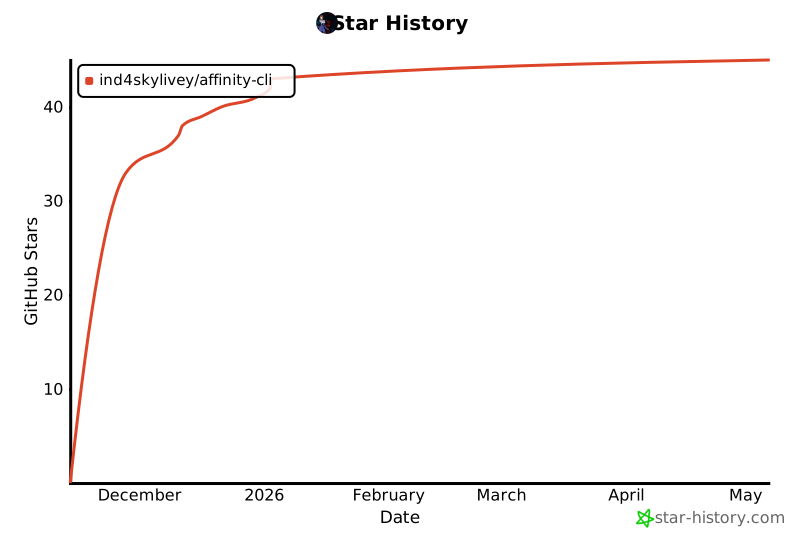
📊 Project Stats




📜 License
This project is licensed under the MIT License - see the LICENSE file for details.
Important: This project is not affiliated with Serif Labs (makers of Affinity). It's a community-driven effort to enable Affinity products on Linux.
🙏 Acknowledgments
Special Thanks To:
🍷 Wine Project - For making Windows apps run on Linux
🎨 Serif Labs - For creating amazing Affinity products
🐧 Linux Community - For continuous support and testing
⚡ ElementalWarrior - For Affinity-optimized Wine builds
💬 Community & Support



📬 Get Help
- 💬 GitHub Discussions - Ask questions, share ideas
- 🐛 GitHub Issues - Report bugs, request features
- 📧 Email - For private inquiries
- 🌐 Reddit - r/linux, r/linuxgaming, r/AffinityPhoto
🎨 Vision & Mission
🎯 Our Goals
- 🚀 Make Affinity installation effortless for Linux users
- 📊 Demonstrate demand for official Linux support from Serif
- 🤝 Build a community around professional Linux creative tools
- 🌟 Inspire official Affinity Linux support
🗺️ Roadmap
🔮 Future Plans
✅ Completed (v1.0.0-beta)
- Core installation system
- Multi-distro support
- Desktop integration
- CLI interface
- Unit tests & CI/CD
🚧 In Progress (v1.1.0)
- PyPI publication
- Extended distro testing
- Performance optimizations
- Enhanced error messages
🔮 Planned (v2.0.0)
- GUI installer option
- Flatpak/Snap packages
- AUR package (Arch)
- GPU-specific optimizations
- Proton support (experimental)
- Multi-language support
🌟 Dream Features
- Official Serif collaboration
- Native Linux Affinity (one day!)
🌈 Show Your Support
⭐ Star this repo if Affinity CLI helped you!
🔄 Share with other Linux creative professionals
💬 Tell Serif that Linux users exist and we want official support!
Together, we can make Linux a first-class platform for creative professionals. 🐧🎨
🚀 Ready to revolutionize Linux creative workflows?
Get Started Now ⬆️ | View Releases 📦 | Report Issues 🐛
Made with ❤️ by ind4skylivey and the Linux community
Make Serif notice. Make Windows jealous. Make Linux creators powerful. 🔥
1 maintainer

Metadata
1 maintainer
Release files for affinity-cli 1.1.1
For a detailed explanation of source distributions (sdists) and built distributions (wheels), please see the package formats documentation.
Source distribution (sdist)
| File | Size | Uploaded | |
|---|---|---|---|
| affinity_cli-1.1.1.tar.gz | 5.3 MB | Details |
Built distribution (wheel)
| File | Interpreter | ABI | Platform | Reset |
|---|---|---|---|---|
| affinity_cli-1.1.1-py3-none-any.whl | Python 3 | none | any | Details |
Total release size: 5.3 MB
Release files / affinity_cli-1.1.1.tar.gz
| Download URL | affinity_cli-1.1.1.tar.gz |
|---|---|
| Size | 5.3 MB |
| Tags | Source |
|
SHA-256 checksum How to use checksums |
9c868c60f648b794953e88e11cc69cc656706f58a7e4a7384fdbbd9e4c8427c4
|
|
BLAKE2b-256 checksum How to use checksums |
09d7e2eec4c913c23b9b4922c3ad4f1f64fcd4b1f389edda0f8d2d84ed727e91
|
| Upload date | |
|
Uploaded using Trusted Publishing? What is trusted publishing? |
No |
| Uploaded via |
twine/6.2.0 CPython/3.13.7
|
Release files / affinity_cli-1.1.1-py3-none-any.whl
| Download URL | affinity_cli-1.1.1-py3-none-any.whl |
|---|---|
| Size | 36.4 kB |
| Tags | Python 3 |
|
SHA-256 checksum How to use checksums |
ee9ca8929aceb3661063c01f498ced7176c9a535468739b1d44ffafe7a9f2924
|
|
BLAKE2b-256 checksum How to use checksums |
c965d42f97830201f28d91cd78cfd424690cad9d14dde0008ec39fe5dea25d4a
|
| Upload date | |
|
Uploaded using Trusted Publishing? What is trusted publishing? |
No |
| Uploaded via |
twine/6.2.0 CPython/3.13.7
|













