
Universal CLI installer for Affinity products on Linux

Project description

🎨 Affinity CLI
Universal Linux Installer for Affinity Products
Professional, One-Command Installation for Creative Professionals





Features • Quick Start • Installation • Documentation • Contributing
🐧 Linux users deserve professional creative tools.
🌟 What is Affinity CLI?
Affinity CLI is a powerful, open-source command-line tool that automates the complete installation of Affinity Photo, Designer, and Publisher on Linux distributions. Version v1.0.0 is the first polished milestone—distilled from months of late-night Wine experiments, community streams, and field engagements.
📌 Everything visible here is served straight from
release/v1.0.0-clean. To keep the release snapshot pristine, add future commits to that branch instead ofmasterso the landing view stays tidy for everyone.
# One command to rule them all
affinity-cli install
No more manual Wine configuration. No more dependency hunting. Just professional creative tools on Linux. 🚀
🔥 Why creators are hyped about v1.0.0
- Battle-tested automation – the same playbook we ran internally is now a single
affinity-cli installcommand. - Cross-distro parity – Ubuntu, Fedora, Arch, SUSE, and more all follow the exact same installer story.
- Confidence-first UX – installer discovery, verbose status, and
--dry-runshow every step before touching a Wine prefix.
✨ Transform your Linux system into a creative powerhouse
New hero artwork highlights the v1.0.0 release energy—swap the file at .github/assets/affinity-cli-hero.png whenever you refresh the brand.
🎯 Features
🐧 Universal SupportAuto-detects 15+ distros |
⚡ Full AutomationOne command installs |
🍷 Smart Wine SetupOptimized configuration |
🎨 Desktop IntegrationMenu entries, aliases, |
💻 Beautiful CLIRich progress bars |
✅ Well-Tested27 unit tests |
🖼️ Supported Products
| Product | Versions | Status |
|---|---|---|
| 📸 Affinity Photo | v1 • v2 • v3 | ✅ Supported |
| 🎨 Affinity Designer | v1 • v2 • v3 | ✅ Supported |
| 📄 Affinity Publisher | v1 • v2 • v3 | ✅ Supported |
🚀 Quick Start
⚡ Installation (3 simple steps)
# 1️⃣ Clone the repository
git clone https://github.com/ind4skylivey/affinity-cli.git
cd affinity-cli

# 2️⃣ Install the CLI tool
pip install -e .

# 3️⃣ Check your system status
affinity-cli status
🎬 Launch Affinity Products
# Install Affinity products (interactive mode)
affinity-cli install

# Or specify installer location
affinity-cli install --installer-path ~/Downloads
🎉 That's it! Launch from:
# Terminal
affinity-photo          # Launch Affinity Photo
affinity-designer       # Launch Affinity Designer
affinity-publisher      # Launch Affinity Publisher

# Or from your application menu! 🎨
In under five minutes you can go from a clean Linux install to launching Affinity as if it shipped with your distro. That same moment of disbelief people share on streams and meetups? This workflow makes it repeatable.
🐧 Supported Distributions

Ubuntu 20.04 • 22.04 • 24.04 |

Debian 11 • 12 (Bookworm) |

Fedora 38 • 39 • 40+ |

Arch Linux Rolling Release |

Linux Mint 20.x • 21.x |
Manjaro All versions |

openSUSE Leap • Tumbleweed |
More! Pop!_OS • Elementary |
💎 Why Choose Affinity CLI?
🆚 Comparison with Alternatives
| Feature | 🎨 Affinity CLI | Lutris | Bottles | Manual Wine |
|---|---|---|---|---|
| One-command install | ✅ | ❌ | ❌ | ❌ |
| Auto distro detection | ✅ | ❌ | ❌ | ❌ |
| Auto dependency install | ✅ | ❌ | ❌ | ❌ |
| Desktop integration | ✅ | ✅ | ✅ | ❌ |
| No external managers | ✅ | ❌ | ❌ | ✅ |
| Lightweight | ✅ | ❌ | ❌ | ✅ |
| Built for Affinity | ✅ | ❌ | ❌ | ❌ |
| CLI + GUI launcher | ✅ | ✅ | ✅ | ❌ |
| Open source | ✅ | ✅ | ✅ | ✅ |
🏆 Affinity CLI = Best of all worlds
📚 Documentation
📖 Installation Methods
From Source (Development)
git clone https://github.com/ind4skylivey/affinity-cli.git
cd affinity-cli
pip install -e .
From PyPI (Coming Soon)
pip install affinity-cli
From AUR (Arch Users - Coming Soon)
yay -S affinity-cli
⚙️ Command Reference
Installation Commands
# Interactive installation
affinity-cli install

# Specify installer path
affinity-cli install --installer-path ~/Downloads

# Install specific products
affinity-cli install --products photo,designer

# Custom Wine prefix
affinity-cli install --prefix ~/.my-affinity

# Skip dependency check (advanced)
affinity-cli install --skip-dependencies
Management Commands
# Check system status
affinity-cli status
affinity-cli status --verbose

# Repair broken installation
affinity-cli repair
affinity-cli repair --product photo

# Uninstall products
affinity-cli uninstall
affinity-cli uninstall --purge  # Complete removal

# Generate system report
affinity-cli report
affinity-cli report --output report.json
Information Commands
# Show version
affinity-cli --version

# Show help
affinity-cli --help
affinity-cli install --help

# Welcome message
affinity-cli welcome
🔧 Advanced Configuration
Custom Configuration File
Location: ~/.config/affinity-cli/config.yml
wine:
  version: "latest"
  prefix_path: "~/.wine-affinity"
  graphics_api: "vulkan"

affinity:
  products:
    - photo
    - designer
  auto_detect_installers: true

system:
  enable_multiarch: true
  install_dependencies: true
🐛 Troubleshooting
Common Issues
Issue: Installation fails on dependency step
# Update package lists first
sudo apt update      # Ubuntu/Debian
sudo dnf update      # Fedora
sudo pacman -Sy      # Arch
Issue: Products don't appear in menu
# Rebuild desktop database
affinity-cli repair
Issue: Wine prefix creation hangs
# Kill wine processes and retry
pkill wine
affinity-cli repair
Performance issues?
- Check GPU drivers:
vulkaninfo - Monitor resources:
htop - See logs:
~/.config/affinity-cli/logs/
🛠️ How It Works
graph LR
    A[🚀 Start] --> B[🐧 Detect Distro]
    B --> C[📦 Install Dependencies]
    C --> D[🍷 Setup Wine]
    D --> E[⚙️ Create Prefix]
    E --> F[🎨 Install Affinity]
    F --> G[🖥️ Desktop Integration]
    G --> H[✅ Done!]

    style A fill:#4CAF50,stroke:#2E7D32,color:#fff
    style H fill:#4CAF50,stroke:#2E7D32,color:#fff
    style B fill:#2196F3,stroke:#1565C0,color:#fff
    style C fill:#FF9800,stroke:#E65100,color:#fff
    style D fill:#9C27B0,stroke:#6A1B9A,color:#fff
    style E fill:#F44336,stroke:#C62828,color:#fff
    style F fill:#E91E63,stroke:#AD1457,color:#fff
    style G fill:#00BCD4,stroke:#00838F,color:#fff
🔄 Installation Pipeline
- 🐧 Detection Phase - Identifies your Linux distro and package manager
- 📦 Preparation Phase - Installs system dependencies (wine, libraries, fonts)
- 🍷 Wine Setup Phase - Downloads and configures optimized Wine build
- ⚙️ Configuration Phase - Creates isolated Wine prefix with .NET Framework
- 🎨 Installation Phase - Silently installs Affinity products
- 🖥️ Integration Phase - Creates menu entries and bash aliases
- ✅ Verification Phase - Tests installation and generates report
🎯 Requirements
💻 System Requirements
|
📥 What You Need
|
🏗️ Project Architecture
📂 Click to view project structure
affinity-cli/
├── 📦 affinity_cli/          # Main package
│   ├── 🧠 core/               # Core functionality
│   │   ├── distro_detector.py     # OS detection
│   │   ├── dependency_manager.py  # Package management
│   │   ├── wine_manager.py        # Wine setup
│   │   ├── prefix_manager.py      # Wine prefix config
│   │   ├── affinity_installer.py  # Product installation
│   │   └── desktop_integration.py # Desktop entries
│   │
│   ├── 🎮 commands/           # CLI commands
│   │   ├── install.py         # Install command
│   │   ├── status.py          # Status command
│   │   ├── uninstall.py       # Uninstall command
│   │   ├── repair.py          # Repair command
│   │   └── report.py          # Report command
│   │
│   └── 🛠️ utils/              # Utilities
│       └── logger.py          # Logging
│
├── 🧪 tests/                  # Unit tests (27 passing)
├── 🤖 .github/workflows/      # CI/CD automation
├── 📖 README.md               # This file
├── 📜 LICENSE                 # MIT License
└── 🤝 CONTRIBUTING.md         # Contribution guide
Code Statistics:
- 📊 ~2,800 lines of Python code
- ✅ 27 unit tests (all passing)
- 📦 6 core modules
- 🎮 5 CLI commands
- 📚 4 documentation files
🤝 Contributing
We ❤️ contributions! This project thrives on community support.
🌟 How You Can Help
🐛 Report BugsFound an issue? |
💻 Write CodeSubmit pull requests |
🧪 Test & FeedbackTry on different distros |
📖 Improve DocsHelp others learn |
⭐ Star the RepoShow your support |
📣 Spread the WordTell other Linux users |
🚀 Quick Contribution Setup
# Fork and clone
git clone https://github.com/yourusername/affinity-cli.git
cd affinity-cli

# Create virtual environment
python3 -m venv venv
source venv/bin/activate

# Install in dev mode
pip install -e ".[dev]"

# Run tests
pytest tests/ -v

# Make changes and submit PR! 🎉
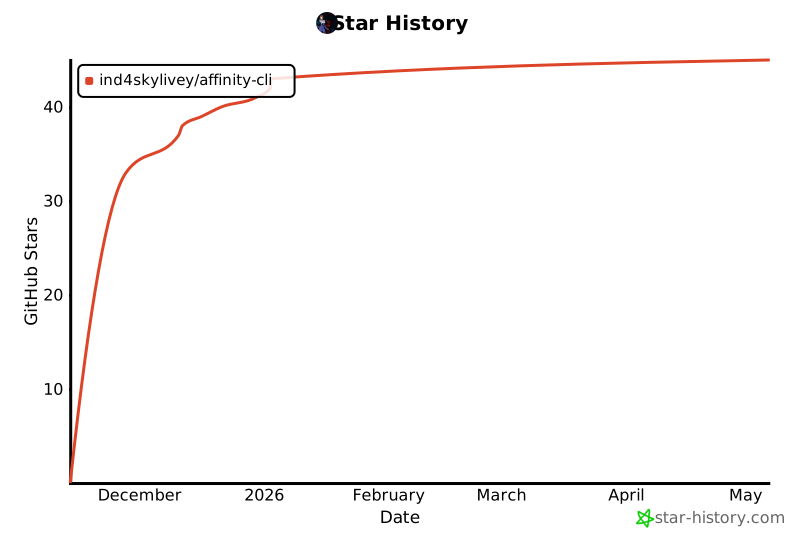
📊 Project Stats




📜 License
This project is licensed under the MIT License - see the LICENSE file for details.
Important: This project is not affiliated with Serif Labs (makers of Affinity). It's a community-driven effort to enable Affinity products on Linux.
🙏 Acknowledgments
Special Thanks To:
🍷 Wine Project - For making Windows apps run on Linux
🎨 Serif Labs - For creating amazing Affinity products
🐧 Linux Community - For continuous support and testing
⚡ ElementalWarrior - For Affinity-optimized Wine builds
💬 Community & Support
🔗 Connect With Us



📬 Get Help
- 💬 GitHub Discussions - Ask questions, share ideas
- 🐛 GitHub Issues - Report bugs, request features
- 📧 Email - For private inquiries
- 🌐 Reddit - r/linux, r/linuxgaming, r/AffinityPhoto
🎨 Vision & Mission
"Linux users deserve professional creative tools. This project proves it's possible."
🎯 Our Goals
- 🚀 Make Affinity installation effortless for Linux users
- 📊 Demonstrate demand for official Linux support from Serif
- 🤝 Build a community around professional Linux creative tools
- 🌟 Inspire official Affinity Linux support
🗺️ Roadmap
🔮 Future Plans
✅ Completed (v1.0.0-beta)
- Core installation system
- Multi-distro support
- Desktop integration
- CLI interface
- Unit tests & CI/CD
🚧 In Progress (v1.1.0)
- PyPI publication
- Extended distro testing
- Performance optimizations
- Enhanced error messages
🔮 Planned (v2.0.0)
- GUI installer option
- Flatpak/Snap packages
- AUR package (Arch)
- GPU-specific optimizations
- Proton support (experimental)
- Multi-language support
🌟 Dream Features
- Official Serif collaboration
- Native Linux Affinity (one day!)
🌈 Show Your Support
⭐ Star this repo if Affinity CLI helped you!
🔄 Share with other Linux creative professionals
💬 Tell Serif that Linux users exist and we want official support!
Together, we can make Linux a first-class platform for creative professionals. 🐧🎨
🚀 Ready to revolutionize Linux creative workflows?
Get Started Now ⬆️ | View Releases 📦 | Report Issues 🐛
Made with ❤️ by ind4skylivey and the Linux community
Make Serif notice. Make Windows jealous. Make Linux creators powerful. 🔥
Release history Release notifications | RSS feed

Download files
Download the file for your platform. If you're not sure which to choose, learn more about installing packages.
Source Distribution
Built Distribution
Filter files by name, interpreter, ABI, and platform.
If you're not sure about the file name format, learn more about wheel file names.
Copy a direct link to the current filters
File details
Details for the file affinity_cli-1.1.1.tar.gz.
File metadata
- Download URL: affinity_cli-1.1.1.tar.gz
- Upload date:
- Size: 5.3 MB
- Tags: Source
- Uploaded using Trusted Publishing? No
- Uploaded via: twine/6.2.0 CPython/3.13.7
File hashes
| Algorithm | Hash digest | |
|---|---|---|
| SHA256 |
9c868c60f648b794953e88e11cc69cc656706f58a7e4a7384fdbbd9e4c8427c4
|
|
| MD5 |
c0f2fa731d9c21887c410f61d89aa429
|
|
| BLAKE2b-256 |
09d7e2eec4c913c23b9b4922c3ad4f1f64fcd4b1f389edda0f8d2d84ed727e91
|
File details
Details for the file affinity_cli-1.1.1-py3-none-any.whl.
File metadata
- Download URL: affinity_cli-1.1.1-py3-none-any.whl
- Upload date:
- Size: 36.4 kB
- Tags: Python 3
- Uploaded using Trusted Publishing? No
- Uploaded via: twine/6.2.0 CPython/3.13.7
File hashes
| Algorithm | Hash digest | |
|---|---|---|
| SHA256 |
ee9ca8929aceb3661063c01f498ced7176c9a535468739b1d44ffafe7a9f2924
|
|
| MD5 |
30711c9c8440e4e9ea749a58cbe9aafd
|
|
| BLAKE2b-256 |
c965d42f97830201f28d91cd78cfd424690cad9d14dde0008ec39fe5dea25d4a
|






