
afragment



Async Python library for the Fragment.com API. Purchase Telegram Stars, Premium subscriptions, and TON balance topups programmatically.
Installation
pip install afragment
Authentication
You need two credentials from Fragment.com:
FRAGMENT_HASH- Session hash (from URL parameter)FRAGMENT_COOKIE- Session cookie (from browser)
How to get credentials
- Go to Fragment.com and log in
- Complete KYC verification if you haven't already
- Open Developer Tools (F12 or Right-click → Inspect)
- Go to the Network tab
- Select Fetch/XHR filter
- Perform any action on the site (e.g., search for a username)
- Click on any API request and find the credentials as shown below:
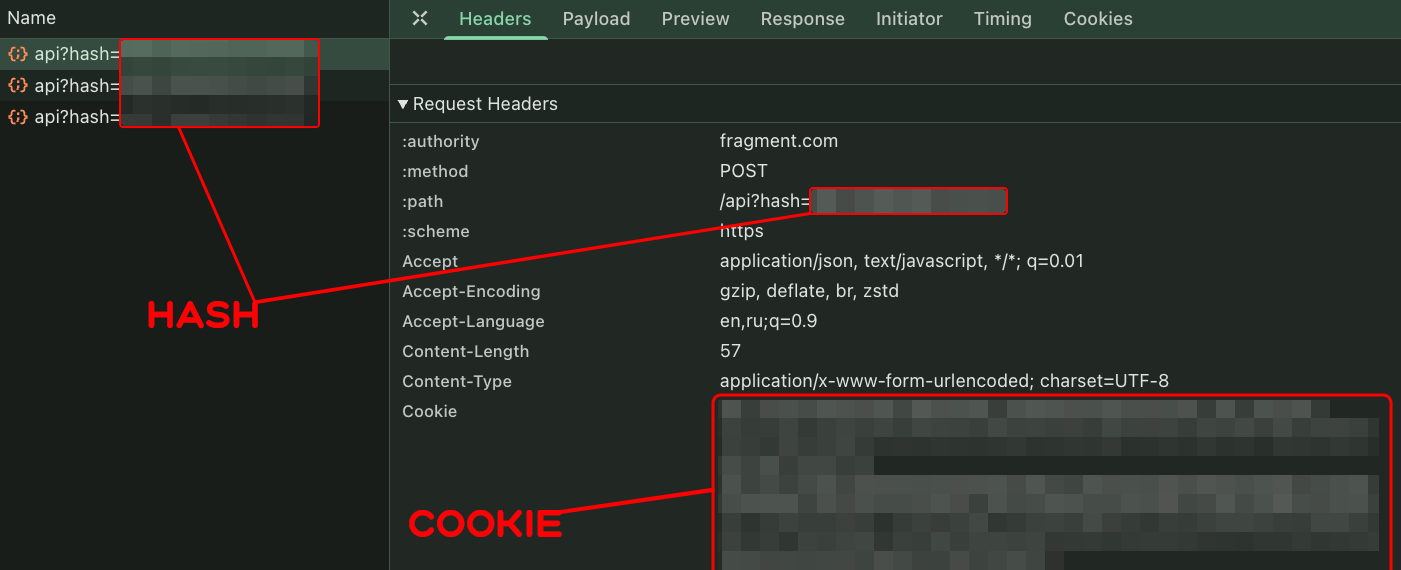
- FRAGMENT_HASH: Found in the request URL as
?hash=...parameter - FRAGMENT_COOKIE: Found in the Request Headers under
Cookie
Quick Start
One call = ready transaction! Just pass username, value, and wallet address.
🌟 Buy Telegram Stars
import asyncio
from afragment import AsyncFragmentClient, nano_to_ton

async def main():
    async with AsyncFragmentClient(
        fragment_hash="your_hash",
        fragment_cookie="your_cookie"
    ) as client:
        # Pay with TON (default)
        result = await client.buy_stars("username", 100, "your_wallet_address")

        # Or pay with USDT
        result = await client.buy_stars("username", 100, "your_wallet_address", payment_method="usdt")

        # Get transaction details
        tx = result["transaction"]["messages"][0]
        print(f"Recipient: {result['recipient']['name']}")
        print(f"Price: {result['amount']} TON")
        print(f"Send to: {tx['address']}")
        print(f"Amount: {nano_to_ton(int(tx['amount']))} TON")

asyncio.run(main())
⭐ Gift Telegram Premium
async def gift_premium():
    async with AsyncFragmentClient(
        fragment_hash="your_hash",
        fragment_cookie="your_cookie"
    ) as client:
        # Gift 12 months of Premium
        result = await client.buy_premium("username", 12, "your_wallet_address")

        tx = result["transaction"]["messages"][0]
        print(f"Send to: {tx['address']}")
        print(f"Amount: {tx['amount']} nanoTON")
💎 TON Balance Topup
async def topup_ton():
    async with AsyncFragmentClient(
        fragment_hash="your_hash",
        fragment_cookie="your_cookie"
    ) as client:
        # Topup 10 TON
        result = await client.buy_ton_topup("username", 10, "your_wallet_address")

        tx = result["transaction"]["messages"][0]
        print(f"Send to: {tx['address']}")
        print(f"Amount: {tx['amount']} nanoTON")
API Reference
Main Methods
| Method | Parameters | Description |
|---|---|---|
buy_stars(username, quantity, wallet_address, payment_method="ton") |
quantity >= 50 | Purchase Telegram Stars |
buy_premium(username, months, wallet_address, payment_method="ton") |
months: 3, 6, or 12 | Gift Telegram Premium |
buy_ton_topup(username, amount, wallet_address, payment_method="ton") |
amount >= 1 (whole number) | TON balance topup |
Payment Methods
All purchase methods accept payment_method parameter:
"ton"— pay with TON (default)"usdt"— pay with USDT
Return Value
All methods return a dictionary:
{
    "recipient": {
        "name": "User Name",
        "photo": "photo_url"
    },
    "amount": "2.5",  # Price in TON
    "transaction": {
        "messages": [{
            "address": "EQ...",      # Where to send TON
            "amount": "2500000000",  # Amount in nanoTON
            "payload": "base64..."   # Transaction payload
        }]
    }
}
Utility Functions
Payload Decoding
from afragment import decode_payload, extract_ref_id, extract_transaction_text

payload = result["transaction"]["messages"][0]["payload"]

# Extract reference ID
ref_id = extract_ref_id(payload)

# Extract human-readable comment
comment = extract_transaction_text(payload, "stars", quantity=100)
# Output: "100 Telegram Stars\n\nRef#abc123"
Amount Conversion
from afragment import nano_to_ton, ton_to_nano

ton = nano_to_ton(1500000000)  # 1.5 TON
nano = ton_to_nano(1.5)        # 1500000000 nanoTON
Error Handling
from afragment import (
    AsyncFragmentClient,
    FragmentAPIError,
    AuthenticationError,
    PriceChangedError,
    InvalidRecipientError,
)

async def safe_purchase():
    async with AsyncFragmentClient(
        fragment_hash="your_hash",
        fragment_cookie="your_cookie"
    ) as client:
        try:
            result = await client.buy_stars("username", 100, "wallet_address")
        except InvalidRecipientError:
            print("User not found!")
        except PriceChangedError:
            print("Price changed, try again")
        except AuthenticationError:
            print("Session expired, refresh credentials")
        except ValueError as e:
            print(f"Validation error: {e}")
Exceptions
| Exception | Description |
|---|---|
FragmentAPIError |
Base exception for all API errors |
AuthenticationError |
Invalid or expired credentials |
PriceChangedError |
Price changed during request (retry recommended) |
InvalidRecipientError |
User not found or not eligible |
ValueError |
Invalid input (validation failed) |
Validation Rules
| Method | Parameter | Validation |
|---|---|---|
buy_stars |
quantity |
Minimum 50 |
buy_premium |
months |
Must be 3, 6, or 12 |
buy_ton_topup |
amount |
Minimum 1, whole numbers only |
Contact
- Telegram: @thebraina1r
Donate
If you find this library useful, you can support the development:
- TON Wallet:
thebrainair.ton
1 maintainer

Metadata
1 maintainer
Release files for afragment 0.4.0
For a detailed explanation of source distributions (sdists) and built distributions (wheels), please see the package formats documentation.
Source distribution (sdist)
| File | Size | Uploaded | Provenance | Actions |
|---|---|---|---|---|
| afragment-0.4.0.tar.gz | 16.3 kB | Without provenance | Details for afragment-0.4.0.tar.gz |
Built distribution (wheel)
| File | Interpreter | ABI | Platform | Actions Reset |
|---|---|---|---|---|
| afragment-0.4.0-py3-none-any.whl | Python 3 | none | any | Details for afragment-0.4.0-py3-none-any.whl |
Total release size: 33.4 kB
Release files / afragment-0.4.0.tar.gz
| Download URL | afragment-0.4.0.tar.gz |
|---|---|
| Size | 16.3 kB |
| Tags | Source |
|
SHA-256 checksum How to use checksums |
5b06e007190bad1fa52dee4a697101b4028f55d7c62c9821d5ebf20b20ed5e38
|
|
BLAKE2b-256 checksum How to use checksums |
c23dd468e52896996cf5cc1a2d02e87b518023920ffa779cea20f0ded5f809cf
|
| Upload date | |
|
Uploaded using Trusted Publishing? What is trusted publishing? |
No |
| Uploaded via |
twine/6.2.0 CPython/3.13.1
|
Release files / afragment-0.4.0-py3-none-any.whl
| Download URL | afragment-0.4.0-py3-none-any.whl |
|---|---|
| Size | 17.1 kB |
| Tags | Python 3 |
|
SHA-256 checksum How to use checksums |
aa275af2eb67d70acd033e72506102e2fde2a584de34bfff96f835aba5f1648d
|
|
BLAKE2b-256 checksum How to use checksums |
cc2488c4dbd4e1f629548fd68672eeaf20a7a48924d6ca7ab0e93c986a670f74
|
| Upload date | |
|
Uploaded using Trusted Publishing? What is trusted publishing? |
No |
| Uploaded via |
twine/6.2.0 CPython/3.13.1
|
Security for afragment 0.4.0
Provenance
Provenance describes where a file came from. On PyPI, provenance is shared via attestations, which provide a verifiable record of the build or publishing details. View details, limitations and caveats.
No provenance found
None of the files in this release were uploaded with provenance metadata.
A note on package security
PyPI is a repository for distributing packages, not a service for auditing them. While third-party security researchers and our staff do their best to detect and remove malicious packages, PyPI cannot guarantee the quality, security or suitability of any given package.
To learn more about protecting yourself from malicious actors, visit our package security documentation.














