
Async Python library for Fragment.com API - Purchase Telegram Stars, Premium, and TON topups

Project description
afragment



Async Python library for the Fragment.com API. Purchase Telegram Stars, Premium subscriptions, and TON balance topups programmatically.
Installation
pip install afragment
Authentication
You need two credentials from Fragment.com:
FRAGMENT_HASH- Session hash (from URL parameter)FRAGMENT_COOKIE- Session cookie (from browser)
How to get credentials
- Go to Fragment.com and log in
- Complete KYC verification if you haven't already
- Open Developer Tools (F12 or Right-click → Inspect)
- Go to the Network tab
- Select Fetch/XHR filter
- Perform any action on the site (e.g., search for a username)
- Click on any API request and find the credentials as shown below:
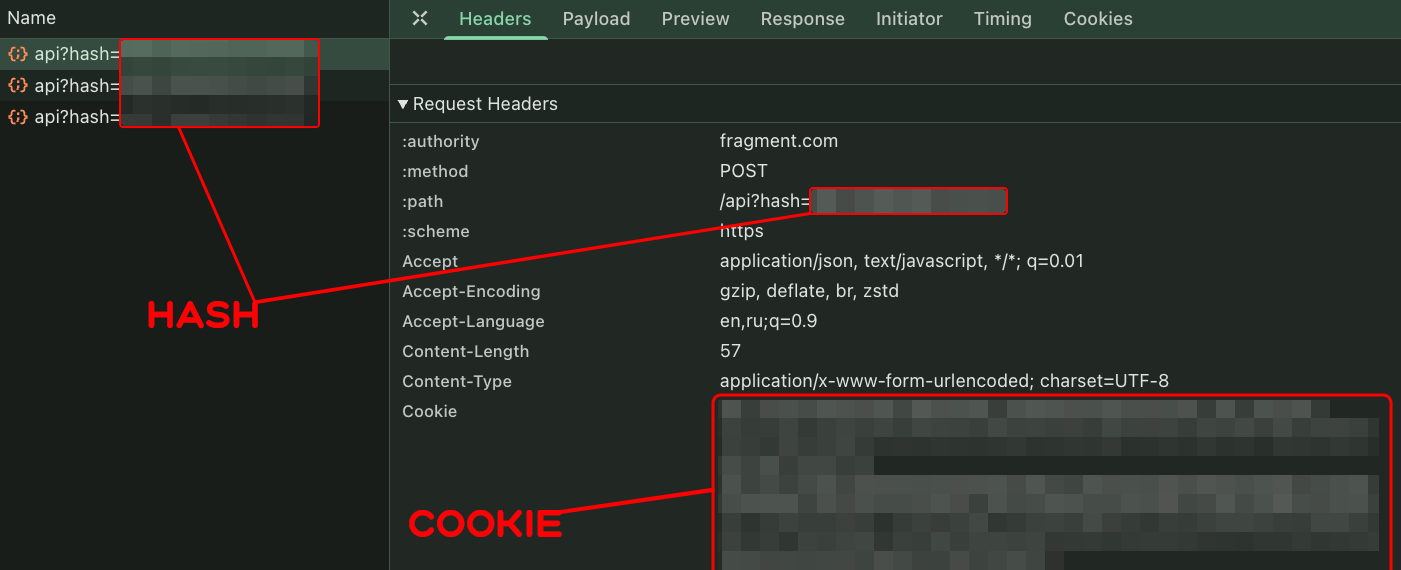
- FRAGMENT_HASH: Found in the request URL as
?hash=...parameter - FRAGMENT_COOKIE: Found in the Request Headers under
Cookie
Quick Start
One call = ready transaction! Just pass username, value, and wallet address.
🌟 Buy Telegram Stars
import asyncio
from afragment import AsyncFragmentClient, nano_to_ton

async def main():
    async with AsyncFragmentClient(
        fragment_hash="your_hash",
        fragment_cookie="your_cookie"
    ) as client:
        # Pay with TON (default)
        result = await client.buy_stars("username", 100, "your_wallet_address")

        # Or pay with USDT
        result = await client.buy_stars("username", 100, "your_wallet_address", payment_method="usdt")

        # Get transaction details
        tx = result["transaction"]["messages"][0]
        print(f"Recipient: {result['recipient']['name']}")
        print(f"Price: {result['amount']} TON")
        print(f"Send to: {tx['address']}")
        print(f"Amount: {nano_to_ton(int(tx['amount']))} TON")

asyncio.run(main())
⭐ Gift Telegram Premium
async def gift_premium():
    async with AsyncFragmentClient(
        fragment_hash="your_hash",
        fragment_cookie="your_cookie"
    ) as client:
        # Gift 12 months of Premium
        result = await client.buy_premium("username", 12, "your_wallet_address")

        tx = result["transaction"]["messages"][0]
        print(f"Send to: {tx['address']}")
        print(f"Amount: {tx['amount']} nanoTON")
💎 TON Balance Topup
async def topup_ton():
    async with AsyncFragmentClient(
        fragment_hash="your_hash",
        fragment_cookie="your_cookie"
    ) as client:
        # Topup 10 TON
        result = await client.buy_ton_topup("username", 10, "your_wallet_address")

        tx = result["transaction"]["messages"][0]
        print(f"Send to: {tx['address']}")
        print(f"Amount: {tx['amount']} nanoTON")
API Reference
Main Methods
| Method | Parameters | Description |
|---|---|---|
buy_stars(username, quantity, wallet_address, payment_method="ton") |
quantity >= 50 | Purchase Telegram Stars |
buy_premium(username, months, wallet_address, payment_method="ton") |
months: 3, 6, or 12 | Gift Telegram Premium |
buy_ton_topup(username, amount, wallet_address, payment_method="ton") |
amount >= 1 (whole number) | TON balance topup |
Payment Methods
All purchase methods accept payment_method parameter:
"ton"— pay with TON (default)"usdt"— pay with USDT
Return Value
All methods return a dictionary:
{
    "recipient": {
        "name": "User Name",
        "photo": "photo_url"
    },
    "amount": "2.5",  # Price in TON
    "transaction": {
        "messages": [{
            "address": "EQ...",      # Where to send TON
            "amount": "2500000000",  # Amount in nanoTON
            "payload": "base64..."   # Transaction payload
        }]
    }
}
Utility Functions
Payload Decoding
from afragment import decode_payload, extract_ref_id, extract_transaction_text

payload = result["transaction"]["messages"][0]["payload"]

# Extract reference ID
ref_id = extract_ref_id(payload)

# Extract human-readable comment
comment = extract_transaction_text(payload, "stars", quantity=100)
# Output: "100 Telegram Stars\n\nRef#abc123"
Amount Conversion
from afragment import nano_to_ton, ton_to_nano

ton = nano_to_ton(1500000000)  # 1.5 TON
nano = ton_to_nano(1.5)        # 1500000000 nanoTON
Error Handling
from afragment import (
    AsyncFragmentClient,
    FragmentAPIError,
    AuthenticationError,
    PriceChangedError,
    InvalidRecipientError,
)

async def safe_purchase():
    async with AsyncFragmentClient(
        fragment_hash="your_hash",
        fragment_cookie="your_cookie"
    ) as client:
        try:
            result = await client.buy_stars("username", 100, "wallet_address")
        except InvalidRecipientError:
            print("User not found!")
        except PriceChangedError:
            print("Price changed, try again")
        except AuthenticationError:
            print("Session expired, refresh credentials")
        except ValueError as e:
            print(f"Validation error: {e}")
Exceptions
| Exception | Description |
|---|---|
FragmentAPIError |
Base exception for all API errors |
AuthenticationError |
Invalid or expired credentials |
PriceChangedError |
Price changed during request (retry recommended) |
InvalidRecipientError |
User not found or not eligible |
ValueError |
Invalid input (validation failed) |
Validation Rules
| Method | Parameter | Validation |
|---|---|---|
buy_stars |
quantity |
Minimum 50 |
buy_premium |
months |
Must be 3, 6, or 12 |
buy_ton_topup |
amount |
Minimum 1, whole numbers only |
Contact
- Telegram: @thebraina1r
Donate
If you find this library useful, you can support the development:
- TON Wallet:
thebrainair.ton


Download files
Download the file for your platform. If you're not sure which to choose, learn more about installing packages.
Source Distribution
Built Distribution
Filter files by name, interpreter, ABI, and platform.
If you're not sure about the file name format, learn more about wheel file names.
Copy a direct link to the current filters
File details
Details for the file afragment-0.4.0.tar.gz.
File metadata
- Download URL: afragment-0.4.0.tar.gz
- Upload date:
- Size: 16.3 kB
- Tags: Source
- Uploaded using Trusted Publishing? No
- Uploaded via: twine/6.2.0 CPython/3.13.1
File hashes
| Algorithm | Hash digest | |
|---|---|---|
| SHA256 |
5b06e007190bad1fa52dee4a697101b4028f55d7c62c9821d5ebf20b20ed5e38
|
|
| MD5 |
d7257adfd9bb95fe36094beeeee43057
|
|
| BLAKE2b-256 |
c23dd468e52896996cf5cc1a2d02e87b518023920ffa779cea20f0ded5f809cf
|
File details
Details for the file afragment-0.4.0-py3-none-any.whl.
File metadata
- Download URL: afragment-0.4.0-py3-none-any.whl
- Upload date:
- Size: 17.1 kB
- Tags: Python 3
- Uploaded using Trusted Publishing? No
- Uploaded via: twine/6.2.0 CPython/3.13.1
File hashes
| Algorithm | Hash digest | |
|---|---|---|
| SHA256 |
aa275af2eb67d70acd033e72506102e2fde2a584de34bfff96f835aba5f1648d
|
|
| MD5 |
aa58de08609636047abfea8dd6692893
|
|
| BLAKE2b-256 |
cc2488c4dbd4e1f629548fd68672eeaf20a7a48924d6ca7ab0e93c986a670f74
|






