
Allows you to do full-text search on your own dataset, and use the result to open url, open file, run script, or basically do anything.

Project description













Full-Text Search Anything — Alfred Workflow + Python Library

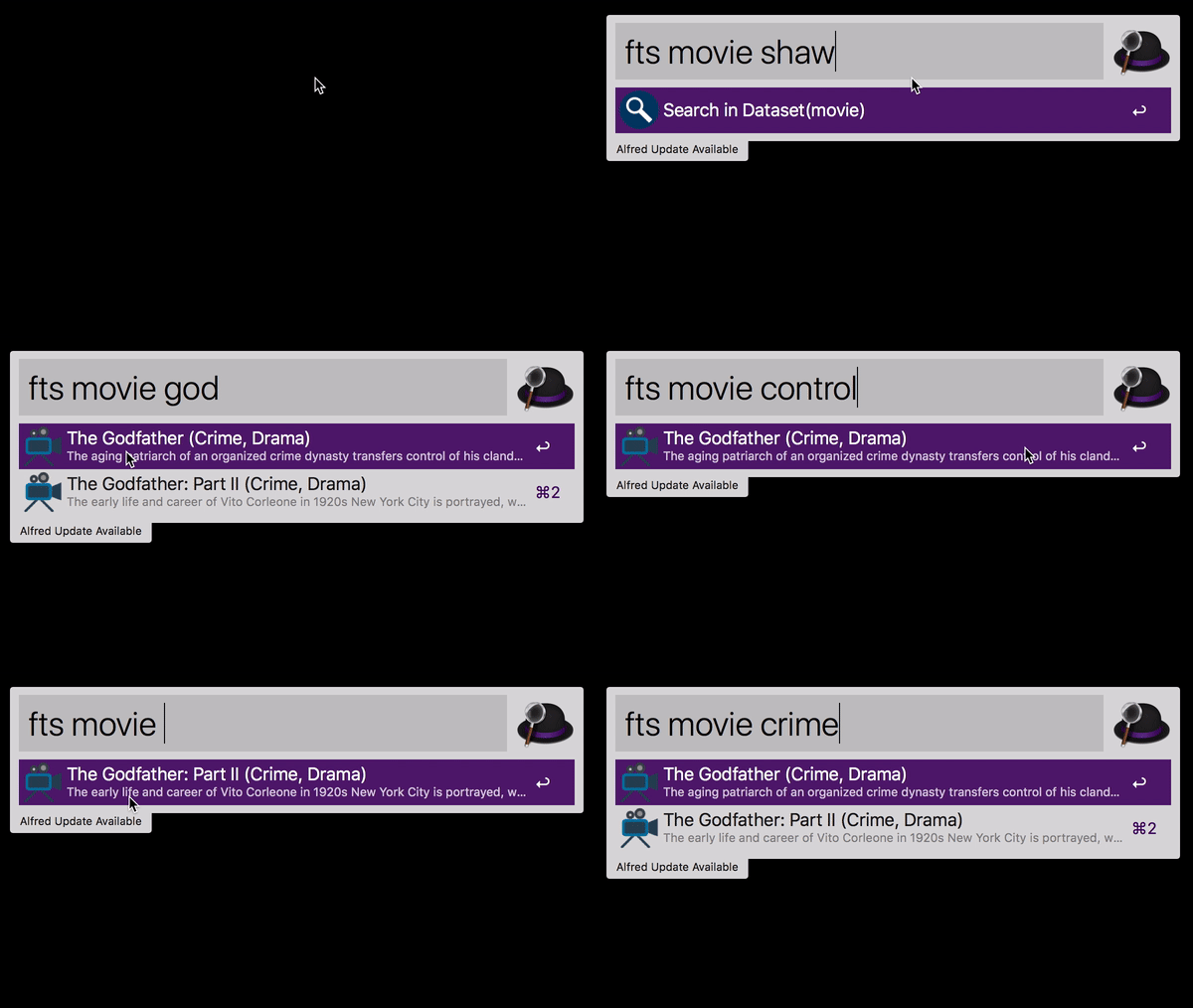
You Decide What Happens
Every search result is an action waiting to trigger. When you press Enter on a result, afwf_fts_anything can:
Open a URL — jump straight to a web page (IMDB movie page, AWS docs, GitHub issue, anything with a link).
Open a file — open a local file in its default application, or reveal it in Finder.
You configure the action once in the Alfred Script Filter:
# open a URL on Enter
~/.local/bin/uvx --from "afwf-fts-anything==2.0.1" afwf-fts-anything fts \
    --dataset-name 'movie' --query '{query}' --action open_url

# open a local file on Enter
~/.local/bin/uvx --from "afwf-fts-anything==2.0.1" afwf-fts-anything fts \
    --dataset-name 'movie' --query '{query}' --action open_file
No installation, no virtual environment. uvx handles everything.
Your Data, Your Schema
The dataset is a plain JSON file — a list of objects, any fields you want:
[
    {
        "movie_id": 1,
        "title": "The Shawshank Redemption",
        "description": "Two imprisoned men bond over a number of years, finding solace and eventual redemption through acts of common decency.",
        "genres": "Drama",
        "rating": 9.2,
        "url": "https://www.imdb.com/title/tt0111161"
    },
    {
        "movie_id": 2,
        "title": "The Godfather",
        "description": "The aging patriarch of an organized crime dynasty transfers control of his clandestine empire to his reluctant son.",
        "genres": "Crime, Drama",
        "rating": 9.2,
        "url": "https://www.imdb.com/title/tt0068646"
    },
    ...
]
It could be movies, bookmarks, API references, Terraform resources, local files — anything you can put in a JSON array.
Your Config, Your Search Behavior
A single JSON setting file controls how fields are indexed, how results are sorted, and what Alfred displays:
{
    "fields": [
        // store only — not searchable, but available in display templates
        {"type": "stored",  "name": "movie_id"},
        // n-gram: typing "god" already matches "godfather"
        {"type": "ngram",   "name": "title",       "min_gram": 2, "max_gram": 10, "boost": 2.0},
        // full-word phrase search on description
        {"type": "text",    "name": "description"},
        // full-word text search on genres with a relevance boost
        {"type": "text",    "name": "genres",       "boost": 1.5},
        // numeric field, sortable by rating descending
        {"type": "numeric", "name": "rating",       "kind": "f64", "indexed": true, "fast": true},
        // stored for use as the action argument (URL or file path)
        {"type": "stored",  "name": "url"}
    ],
    // default sort order: highest rated first
    "sort": [{"name": "rating", "descending": true}],
    // optional: auto-download data on first run / rebuild
    "data_url": "https://github.com/MacHu-GWU/afwf_fts_anything-project/releases/download/1.1.1/movie-data.json.zip",
    // Alfred display templates — {field_name} is replaced per result
    "title_field":        "{title} ({genres}) rate {rating}",
    "subtitle_field":     "{description}",
    "arg_field":          "{url}",
    "autocomplete_field": "{title}",
    "icon_field":         "movie-icon.png"
}
Comments (//) are supported and stripped automatically.
Alfred Owns the UI
There is no custom UI code to write. Everything visible in Alfred — the dropdown list, keyboard navigation, icons, subtitles, clipboard copy (CMD+C), tab-autocomplete — is standard Alfred behavior. You wire it together with one uvx command in a Script Filter:

The only thing you touch is the Script field. Everything else is Alfred.
Also a Python Library
afwf_fts_anything is built on sayt2 (powered by Tantivy, written in Rust) and works as a standalone Python full-text search library with no Alfred dependency. Build an index from any JSON dataset and query it directly:
from pathlib import Path
from afwf_fts_anything.api import DataCatalog

# point to the directory that holds your dataset folders
catalog = DataCatalog(
    dir_root=Path("~/.alfred-afwf/afwf_fts_anything").expanduser()
)

# get a dataset by name — reads movie-setting.json automatically
dataset = catalog.get_dataset("movie")

# build the index on first use (skipped if already built)
dataset.build_index()

# search and get plain dicts back
results = dataset.search("godfather", limit=10)
for doc in results:
    print(doc["title"], doc["rating"])
Documentation
Full documentation — Quick Start, Setting File Reference, Alfred Workflow Setup, and a step-by-step guide to building your own dataset:
Projects Built on afwf_fts_anything
AWS CloudFormation Resource & Property Reference — jump to official CloudFormation docs
Terraform AWS Resource Reference — jump to official Terraform docs
AWS Python Boto3 API Reference — jump to Boto3 service/method docs
Release history Release notifications | RSS feed


Download files
Download the file for your platform. If you're not sure which to choose, learn more about installing packages.
Source Distribution
Built Distribution
Filter files by name, interpreter, ABI, and platform.
If you're not sure about the file name format, learn more about wheel file names.
Copy a direct link to the current filters
File details
Details for the file afwf_fts_anything-2.0.1.tar.gz.
File metadata
- Download URL: afwf_fts_anything-2.0.1.tar.gz
- Upload date:
- Size: 28.5 kB
- Tags: Source
- Uploaded using Trusted Publishing? No
- Uploaded via: uv/0.11.3 {"installer":{"name":"uv","version":"0.11.3","subcommand":["publish"]},"python":null,"implementation":{"name":null,"version":null},"distro":{"name":"macOS","version":null,"id":null,"libc":null},"system":{"name":null,"release":null},"cpu":null,"openssl_version":null,"setuptools_version":null,"rustc_version":null,"ci":null}
File hashes
| Algorithm | Hash digest | |
|---|---|---|
| SHA256 |
f6b1fbebb8d5e1750a2d7ea1407fafc6365536aa0c739dec3db935d2ac6b437f
|
|
| MD5 |
c019be05af6bd7d025f24164af1615b9
|
|
| BLAKE2b-256 |
7361a2b76a7d7895e1ac50387c817f2cdefa76afc3f5173d8a1bbd4c53bf01ef
|
File details
Details for the file afwf_fts_anything-2.0.1-py3-none-any.whl.
File metadata
- Download URL: afwf_fts_anything-2.0.1-py3-none-any.whl
- Upload date:
- Size: 24.6 kB
- Tags: Python 3
- Uploaded using Trusted Publishing? No
- Uploaded via: uv/0.11.3 {"installer":{"name":"uv","version":"0.11.3","subcommand":["publish"]},"python":null,"implementation":{"name":null,"version":null},"distro":{"name":"macOS","version":null,"id":null,"libc":null},"system":{"name":null,"release":null},"cpu":null,"openssl_version":null,"setuptools_version":null,"rustc_version":null,"ci":null}
File hashes
| Algorithm | Hash digest | |
|---|---|---|
| SHA256 |
a9a31e48fd8af3d34c8d101060e4ab3bafd0135d684e771d7473746dacdca116
|
|
| MD5 |
5ec79895be373ed22f2bb7f5ffdef94f
|
|
| BLAKE2b-256 |
205e7bd481b5ded77d14ede6415f4412d8797e0bd17eb6b5a236aba0e9d35182
|






