













Full-Text Search Anything — Alfred Workflow + Python Library

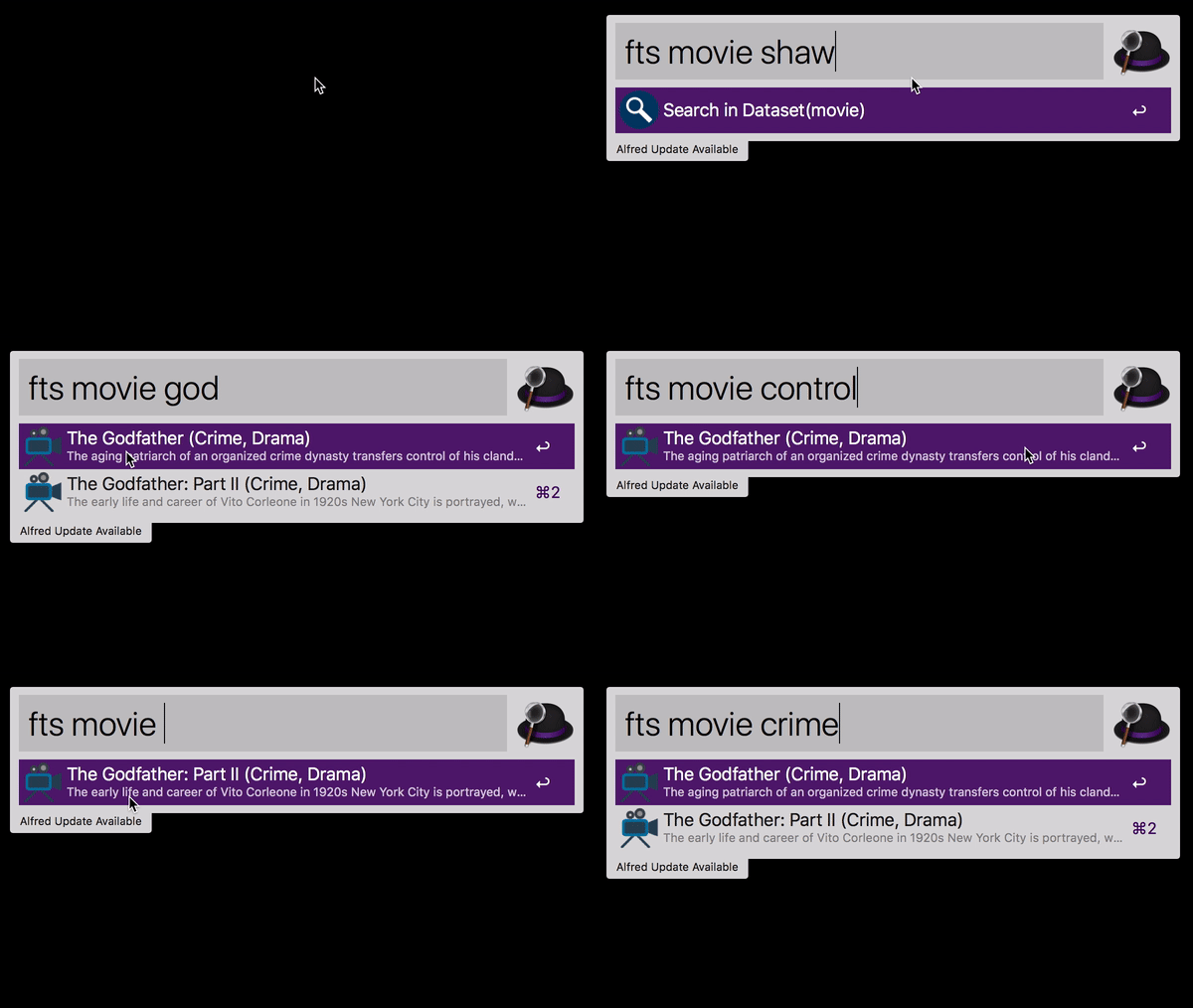
You Decide What Happens
Every search result is an action waiting to trigger. When you press Enter on a result, afwf_fts_anything can:
Open a URL — jump straight to a web page (IMDB movie page, AWS docs, GitHub issue, anything with a link).
Open a file — open a local file in its default application, or reveal it in Finder.
You configure the action once in the Alfred Script Filter:
# open a URL on Enter
~/.local/bin/uvx --from "afwf-fts-anything==2.0.2" afwf-fts-anything fts \
    --dataset-name 'movie' --query '{query}' --action open_url

# open a local file on Enter
~/.local/bin/uvx --from "afwf-fts-anything==2.0.2" afwf-fts-anything fts \
    --dataset-name 'movie' --query '{query}' --action open_file
No installation, no virtual environment. uvx handles everything.
Your Data, Your Schema
The dataset is a plain JSON file — a list of objects, any fields you want:
[
    {
        "movie_id": 1,
        "title": "The Shawshank Redemption",
        "description": "Two imprisoned men bond over a number of years, finding solace and eventual redemption through acts of common decency.",
        "genres": "Drama",
        "rating": 9.2,
        "url": "https://www.imdb.com/title/tt0111161"
    },
    {
        "movie_id": 2,
        "title": "The Godfather",
        "description": "The aging patriarch of an organized crime dynasty transfers control of his clandestine empire to his reluctant son.",
        "genres": "Crime, Drama",
        "rating": 9.2,
        "url": "https://www.imdb.com/title/tt0068646"
    },
    ...
]
It could be movies, bookmarks, API references, Terraform resources, local files — anything you can put in a JSON array.
Your Config, Your Search Behavior
A single JSON setting file controls how fields are indexed, how results are sorted, and what Alfred displays:
{
    "fields": [
        // store only — not searchable, but available in display templates
        {"type": "stored",  "name": "movie_id"},
        // n-gram: typing "god" already matches "godfather"
        {"type": "ngram",   "name": "title",       "min_gram": 2, "max_gram": 10, "boost": 2.0},
        // full-word phrase search on description
        {"type": "text",    "name": "description"},
        // full-word text search on genres with a relevance boost
        {"type": "text",    "name": "genres",       "boost": 1.5},
        // numeric field, sortable by rating descending
        {"type": "numeric", "name": "rating",       "kind": "f64", "indexed": true, "fast": true},
        // stored for use as the action argument (URL or file path)
        {"type": "stored",  "name": "url"}
    ],
    // default sort order: highest rated first
    "sort": [{"name": "rating", "descending": true}],
    // optional: auto-download data on first run / rebuild
    "data_url": "https://github.com/MacHu-GWU/afwf_fts_anything-project/releases/download/1.1.1/movie-data.json.zip",
    // Alfred display templates — {field_name} is replaced per result
    "title_field":        "{title} ({genres}) rate {rating}",
    "subtitle_field":     "{description}",
    "arg_field":          "{url}",
    "autocomplete_field": "{title}",
    "icon_field":         "movie-icon.png"
}
Comments (//) are supported and stripped automatically.
Alfred Owns the UI
There is no custom UI code to write. Everything visible in Alfred — the dropdown list, keyboard navigation, icons, subtitles, clipboard copy (CMD+C), tab-autocomplete — is standard Alfred behavior. You wire it together with one uvx command in a Script Filter:
~/.local/bin/uvx --from "afwf-fts-anything==2.0.2" afwf-fts-anything fts --dataset-name 'movie' --action 'open_url' --query {query}
The only thing you touch is the Script field. Everything else is Alfred.
Also a Python Library
afwf_fts_anything is built on sayt2 (powered by Tantivy, written in Rust) and works as a standalone Python full-text search library with no Alfred dependency. Build an index from any JSON dataset and query it directly:
from pathlib import Path
from afwf_fts_anything.api import DataCatalog

# point to the directory that holds your dataset folders
catalog = DataCatalog(
    dir_root=Path("~/.alfred-afwf/afwf_fts_anything").expanduser()
)

# get a dataset by name — reads movie-setting.json automatically
dataset = catalog.get_dataset("movie")

# build the index on first use (skipped if already built)
dataset.build_index()

# search and get plain dicts back
results = dataset.search("godfather", limit=10)
for doc in results:
    print(doc["title"], doc["rating"])
Documentation
Full documentation — Quick Start, Setting File Reference, Alfred Workflow Setup, and a step-by-step guide to building your own dataset.
Projects Built on afwf_fts_anything
AWS CloudFormation Resource & Property Reference — jump to official CloudFormation docs
Terraform AWS Resource Reference — jump to official Terraform docs
AWS Python Boto3 API Reference — jump to Boto3 service/method docs
1 maintainer

Metadata
1 maintainer
Release files for afwf_fts_anything 2.0.2
For a detailed explanation of source distributions (sdists) and built distributions (wheels), please see the package formats documentation.
Source distribution (sdist)
| File | Size | Uploaded | |
|---|---|---|---|
| afwf_fts_anything-2.0.2.tar.gz | 28.4 kB | Details |
Built distribution (wheel)
| File | Interpreter | ABI | Platform | Reset |
|---|---|---|---|---|
| afwf_fts_anything-2.0.2-py3-none-any.whl | Python 3 | none | any | Details |
Total release size: 52.6 kB
Release files / afwf_fts_anything-2.0.2.tar.gz
| Download URL | afwf_fts_anything-2.0.2.tar.gz |
|---|---|
| Size | 28.4 kB |
| Tags | Source |
|
SHA-256 checksum How to use checksums |
cb33b0e49c50efa18068ceeabd5895572e13ebfb02d602d701d29521594446fd
|
|
BLAKE2b-256 checksum How to use checksums |
92ecd4d4a513e2aa498dbe1127dc4df3eafceee74428e1df3f39cbf8bd83fbb8
|
| Upload date | |
|
Uploaded using Trusted Publishing? What is trusted publishing? |
No |
| Uploaded via |
uv/0.11.3 {"installer":{"name":"uv","version":"0.11.3","subcommand":["publish"]},"python":null,"implementation":{"name":null,"version":null},"distro":{"name":"macOS","version":null,"id":null,"libc":null},"system":{"name":null,"release":null},"cpu":null,"openssl_version":null,"setuptools_version":null,"rustc_version":null,"ci":null}
|
Release files / afwf_fts_anything-2.0.2-py3-none-any.whl
| Download URL | afwf_fts_anything-2.0.2-py3-none-any.whl |
|---|---|
| Size | 24.2 kB |
| Tags | Python 3 |
|
SHA-256 checksum How to use checksums |
7e37174928896477afc39d885e0ddd7a4d0b10473da83266080f334b56beace5
|
|
BLAKE2b-256 checksum How to use checksums |
a2d700dd80b4cbd90f0bce28ae8ae2257c707f149d4dbc42614d36b54255cc9d
|
| Upload date | |
|
Uploaded using Trusted Publishing? What is trusted publishing? |
No |
| Uploaded via |
uv/0.11.3 {"installer":{"name":"uv","version":"0.11.3","subcommand":["publish"]},"python":null,"implementation":{"name":null,"version":null},"distro":{"name":"macOS","version":null,"id":null,"libc":null},"system":{"name":null,"release":null},"cpu":null,"openssl_version":null,"setuptools_version":null,"rustc_version":null,"ci":null}
|














