

agent-memory
One memory for Claude Code and Codex.
What your agents learn, kept as plain Markdown in a git repository you own.


Why agent-memory
- Tell one agent, both remember. A preference you give Codex is there the next time Claude Code starts, and the other way round, on every machine that pulls.
- The right memories in each session. Everything global, plus what was learned in this folder or repository, and nothing from your other projects.
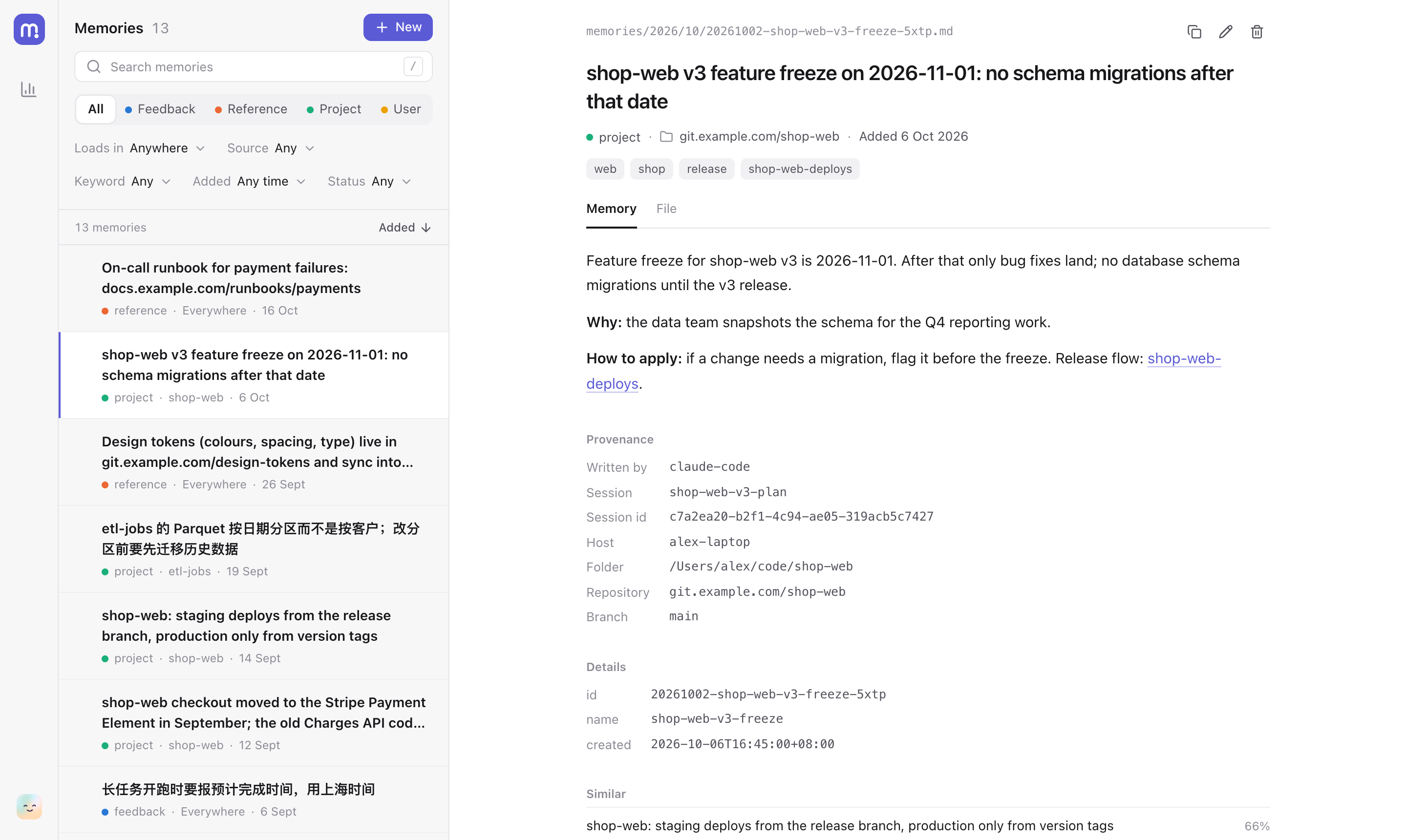
- Memory in git. One Markdown file per memory in a git repository you own, with where it came from recorded by the hooks. Every change is a commit you can review or revert; add a private remote to sync machines, or keep it all on one. Here is an example. Profiles keep separate sets of memories in repositories of their own, and a switch reaches running sessions too.
- Nothing to run. Two hooks and git. No service, no account; search by meaning runs on your CPU.
- A page to keep it tidy.
mem uisearches by words and by meaning, edits with undo, and shows what changed week by week.
Quick start
See it first, with nothing installed:
uvx --from "agent-memory-git[ui]" mem ui --demo
Then set it up (Python 3.11+, git and uv):
uv tool install "agent-memory-git[ui]"
mem init ~/repos/agent-memory-data   # your data repository
mem install --dry-run                # every change, as a diff
mem install
Codex asks you to trust new hooks once: open /hooks in Codex and enable the three agent-memory
hooks. The docs cover importing existing
memories, every file mem install changes, upgrading and uninstalling.
How it works
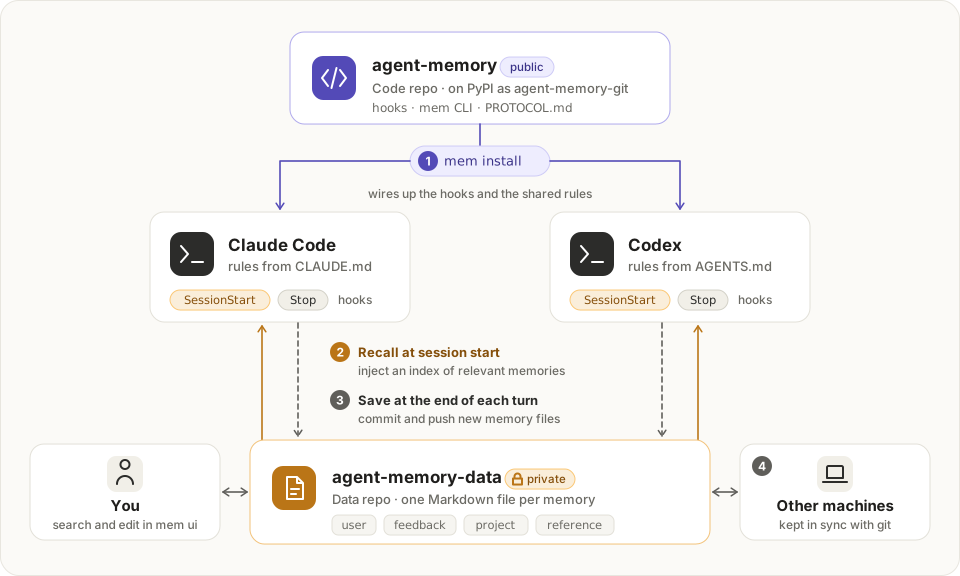
At session start a hook gives the agent an index of the memories that apply where it runs. The agent saves what is worth keeping as Markdown files, following PROTOCOL.md, and at the end of each turn a hook records where each came from, commits and pushes. The docs explain the file format, where memories load, the commands and the configuration.
Contributing
uv sync --all-extras && uv run pytest
The mem ui page is plain HTML, CSS and JavaScript with no build step, and
uv run scripts/site.py serve runs the website and its live demo locally. More in the
docs.
License
1 maintainer

Metadata
1 maintainer
Release files for agent-memory-git 0.1.11
For a detailed explanation of source distributions (sdists) and built distributions (wheels), please see the package formats documentation.
Source distribution (sdist)
| File | Size | Uploaded | |
|---|---|---|---|
| agent_memory_git-0.1.11.tar.gz | 116.2 kB | Details |
Built distribution (wheel)
| File | Interpreter | ABI | Platform | Reset |
|---|---|---|---|---|
| agent_memory_git-0.1.11-py3-none-any.whl | Python 3 | none | any | Details |
Total release size: 260.9 kB
Release files / agent_memory_git-0.1.11.tar.gz
| Download URL | agent_memory_git-0.1.11.tar.gz |
|---|---|
| Size | 116.2 kB |
| Tags | Source |
|
SHA-256 checksum How to use checksums |
d684c95f5f6d2a3f8679925d94de6f90ae7142040719960123f4a48226fc9eec
|
|
BLAKE2b-256 checksum How to use checksums |
67f1f55de87d9c9efdc4153cf3eef52395c6b60f03da161ffa762ed3a3173598
|
| Upload date | |
|
Uploaded using Trusted Publishing? What is trusted publishing? |
Yes |
| Uploaded via |
uv/0.12.13 {"installer":{"name":"uv","version":"0.12.13","subcommand":["publish"]},"python":null,"implementation":{"name":null,"version":null},"distro":{"name":"Ubuntu","version":"24.04","id":"noble","libc":null},"system":{"name":null,"release":null},"cpu":null,"openssl_version":null,"setuptools_version":null,"rustc_version":null,"ci":true}
|
Release files / agent_memory_git-0.1.11-py3-none-any.whl
| Download URL | agent_memory_git-0.1.11-py3-none-any.whl |
|---|---|
| Size | 144.8 kB |
| Tags | Python 3 |
|
SHA-256 checksum How to use checksums |
4ae8c2cdb5518a103b29e4a1f8a48eeb1a2c05f6ff787fb23389271db3524bbf
|
|
BLAKE2b-256 checksum How to use checksums |
ae9ae893e61f33c702c1d8efe79555b3e42a716f7aaae04440b559758b88a105
|
| Upload date | |
|
Uploaded using Trusted Publishing? What is trusted publishing? |
Yes |
| Uploaded via |
uv/0.12.13 {"installer":{"name":"uv","version":"0.12.13","subcommand":["publish"]},"python":null,"implementation":{"name":null,"version":null},"distro":{"name":"Ubuntu","version":"24.04","id":"noble","libc":null},"system":{"name":null,"release":null},"cpu":null,"openssl_version":null,"setuptools_version":null,"rustc_version":null,"ci":true}
|














