
agent-memory
One memory for Claude Code and Codex, kept as plain Markdown files in a git repository you own.
When a session starts, a hook gives the agent an index of the memories that matter where it is running: everything marked global, plus what was learned in the same folder or repository. When a turn ends, a hook commits what the agent wrote, with full provenance (tool, session, host, folder, git remote), and pushes it. Both tools read and write the same files, so a preference you gave Codex is there the next time Claude Code starts, on any machine that pulls the data repository. This repository holds only the code; the memories live in a separate data repository.

mem ui on the demo data repository.
Try it without installing
git clone https://github.com/Ki-Seki/agent-memory-data-demo
AGENT_MEMORY_DATA=agent-memory-data-demo uvx --from "agent-memory-git[ui]" mem ui --keywords-only
uvx runs mem from a throwaway environment and AGENT_MEMORY_DATA points it at the demo
repository, so nothing is installed and no hooks change. --keywords-only skips the optional
embedding model; leave it out after mem ui --fetch-model to also search by meaning.
How it works
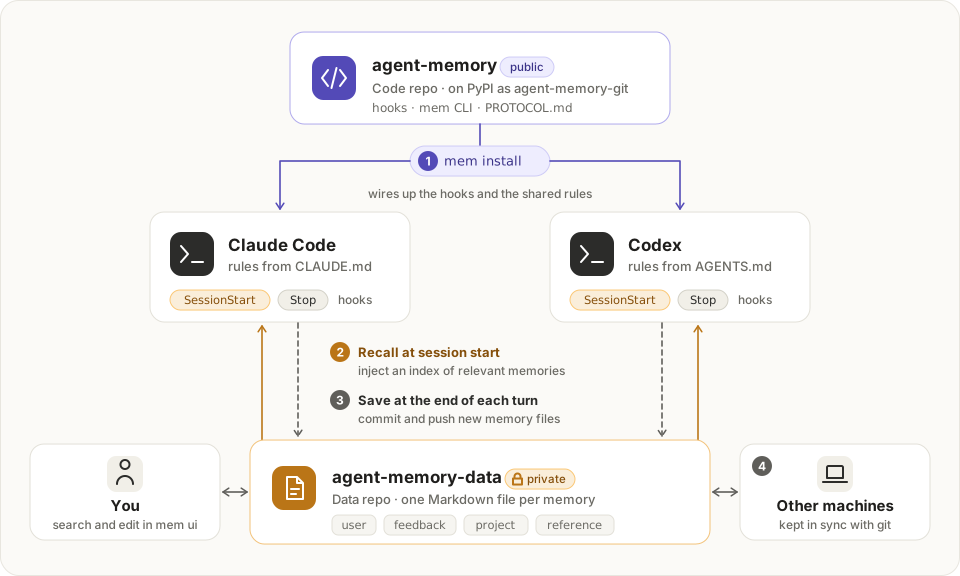
- One file per memory. Frontmatter carries
type(user / feedback / project / reference),scope(global / here), a one-linedescription, and provenance undersource: tool, session id and name, model, host, folder, git root, remote, branch and commit. Files live inmemories/YYYY/MM/<id>.md; the folders exist only to keep listings short. - Session start. A SessionStart hook works out where the session runs (folder, host, git
identity), picks every
globalmemory plus theherememories recorded at the same place, and injects a compact index (under 10,000 characters, the Claude Code hook limit). - Writing. The agent writes new memories into a per-session staging folder and edits existing
files in place. At the end of each turn a Stop hook stamps ids and provenance, moves staged
files into
memories/, commits, and pushes in the background. The agent never writes provenance itself. - Rules.
PROTOCOL.mdtells the agent what to save and how.mem installcopies it to~/.config/agent-memory/PROTOCOL.md, which~/.claude/CLAUDE.mdimports, and into~/.codex/AGENTS.mdfor Codex.
Sessions in throwaway folders (Claude Code scratch workspaces, Codex per-thread folders under
~/Documents/Codex/<date>/) get their here memories filed under the project folder the
transcript shows them working in most, with the original folder kept as source.original_cwd.
mem relocate applies the same inference to existing memories. Patterns can be overridden with
throwaway_patterns in ~/.config/agent-memory/config.json.
A here memory matches a session when they share the folder (100), the git checkout (90), the
remote (80, other clones and worktrees), or when one folder contains the other (70 / 60). Home
and its direct children such as ~/repos are too broad to match through containment.
Setup
Requires Python 3.11+, git and uv.
uv tool install "agent-memory-git[ui]"     # the mem command; [ui] adds numpy for mem ui
mem init ~/repos/agent-memory-data     # create the data repository and ~/.config/agent-memory
mem import claude --dry-run            # preview, then run without --dry-run
mem import codex --dry-run
mem install --dry-run                  # shows every change as a diff
mem install
To upgrade, run uv tool upgrade agent-memory-git and then mem install, which refreshes the
protocol copies; mem doctor says when they are out of date. mem ui does both from Settings, with
one click, when a newer release is out.
install edits, and records in ~/.config/agent-memory/install-state.json:
| File | Change |
|---|---|
~/.claude/settings.json |
SessionStart / Stop / SessionEnd hooks, autoMemoryEnabled: false, read/edit permission on the data repository, mem search/list/show allowed |
~/.claude/CLAUDE.md |
a marked block importing ~/.config/agent-memory/PROTOCOL.md, a copy of the protocol |
~/.codex/hooks.json |
the same three hooks |
~/.codex/config.toml |
memories.generate_memories = false, memories.use_memories = false, data repository added to sandbox_workspace_write.writable_roots |
~/.codex/AGENTS.md |
a marked block with the protocol |
~/.zshrc or ~/.bashrc |
a marked block putting ~/.local/bin, where uv installs mem, on PATH, only if a new login shell lacks it |
Codex asks you to trust new hooks once: open /hooks in Codex and enable the three
agent-memory hooks.
mem uninstall reverts exactly those edits (other changes the tools made in the meantime are
kept) and turns native memory back on. The data repository is never touched by uninstall.
Commands
mem index [--cwd DIR]           what a session started here would see
mem list [--global|--here|--all] [--type T]
mem search WORDS... [--all]     full-text search; --all includes other locations
mem show ID|NAME|PATH
mem add --name N --type T --scope S --description D BODY|-
mem flush                       commit anything left in staging
mem relocate [PATH...] [--dry-run]  re-file memories recorded in throwaway folders
mem sync [--pull-only]          pull --rebase and push the data repository
mem lint [ID...] [--summary]    list memories that do not follow the body format
mem ui [--port N] [--no-open]   search, filter, read and edit memories in a local page
mem doctor                      check the installation
Managing memories in a page
mem ui starts a small server on 127.0.0.1 and opens a page with three parts: Memories, Insights
and Settings (the logo always leads back to Memories). Keep the terminal open while you use it. It
needs numpy; the hooks do not.
- Find. One search box (press
/). Word matches appear as you type, with the matching words marked; a moment later the local model adds memories close in meaning, across Chinese and English. Filters narrow the list by type, where a memory loads (everywhere, or one project or folder), which tool wrote it, keyword, when it was added (a recent period or a date range), and status (needs tidying, asmem lintreports and the open memory lists, or unchanged for 60 days). Tick several values in one filter to see memories that match any of them. The list's header sets the order: newest, oldest, recently changed or A to Z. - Read. Click a memory, or move with
j/k. It opens beside the list (drag the line between them to resize) with the body rendered as Markdown,[[links]]that open other memories, where it came from, every other frontmatter field, the most similar memories, and the file exactly as stored. On a narrow window the list and the memory take turns. - Change. Edit (
e) or delete from the open memory, add one with New (n), or tick several memories (x) and delete them together. Every change is one git commit, pushed in the background, with Undo. If an agent edits the same file meanwhile, saving is refused rather than overwriting. - Insights. How many memories there are and how they change week by week, where they load and which tool wrote them, pairs that read alike (compare them side by side and keep one), and the index a session would get at a chosen place, against the 10,000-character hook limit.
- Settings. Light or dark, updates, the data repository and a sync on demand, words never to
use as keywords, the embedding model, and the same checks as
mem doctor. Once a day the page asks PyPI whether a newer release is out (only the package name is sent; turn it off there); whenuv toolinstalled agent-memory, Update runs the upgrade andmem installand restarts the page on the new version.
Similar memories and search by meaning use Qwen3-Embedding-0.6B, int8 ONNX, on the CPU, in a
separate uv run --with onnxruntime --with tokenizers environment; vectors are cached by content
in <data>/.cache/embeddings/. Get the model once with mem ui --fetch-model (about 625 MB,
pinned revision, checked by SHA-256). Without it, or with --keywords-only, similar memories
come from keyword vectors and search matches words only.
Keywords are the words that most set a memory apart from the others (TF-IDF). Words that should
never be keywords, such as your own name, go in Settings, which keeps them as keyword_stopwords in
~/.config/agent-memory/config.json.
The server only listens on loopback, and every request needs the one-time token from the link it prints, so other web pages cannot read or change memories.
Development
uv sync --all-extras          # dev tools and numpy
uv run pytest
uv run ruff check .
uv run ruff format .
The page mem ui serves lives in web/ (Svelte 5, TypeScript, Vite, Tailwind and bits-ui) and
needs Node 20 or newer. npm run build there writes it into src/agent_memory/webui/, which the
package ships; CI builds it before packaging, so the built files are not committed. While working on it, npm run dev serves the page with hot reload and passes API
calls to a running mem ui (set MEM_UI if it is not on port 8790); open it with the #t=… part of
the link mem ui printed.
cd web && npm ci && npm run build   # the page, into the package
npm run check                       # svelte-check, warnings fail it
uv run mem ... runs the working copy without touching the installed one. To have every
session use the working copy, install it in place of the release and rewire the hooks; go back
the same way:
uv tool install --force --editable ".[ui]" && mem install    # the checkout, live
uv tool install --force "agent-memory-git[ui]" && mem install  # the release again
To release, run uv run scripts/release.py prepare patch (or minor, major) to open a
version PR. After it is merged, uv run scripts/release.py publish <PR_NUMBER> creates the GitHub
Release, and GitHub Actions publishes it to PyPI.
Notes
- Hooks never fail the host session; errors go to
<data>/.cache/agent-memory.log. - Git operations are serialized with a lock file, so parallel sessions are safe on one machine. Across machines, unique file names keep merge conflicts rare; a failed rebase is aborted and logged for you to resolve.
- Session names come from Claude Code's
custom-titletranscript entries and Codex's thread database, when available.
License
1 maintainer

Metadata
1 maintainer
Release files for agent-memory-git 0.1.4
For a detailed explanation of source distributions (sdists) and built distributions (wheels), please see the package formats documentation.
Source distribution (sdist)
| File | Size | Uploaded | |
|---|---|---|---|
| agent_memory_git-0.1.4.tar.gz | 181.3 kB | Details |
Built distribution (wheel)
| File | Interpreter | ABI | Platform | Reset |
|---|---|---|---|---|
| agent_memory_git-0.1.4-py3-none-any.whl | Python 3 | none | any | Details |
Total release size: 373.2 kB
Release files / agent_memory_git-0.1.4.tar.gz
| Download URL | agent_memory_git-0.1.4.tar.gz |
|---|---|
| Size | 181.3 kB |
| Tags | Source |
|
SHA-256 checksum How to use checksums |
b6054afa984fdc88831fce0cea497af6e27887b35c7e9f7da3c8a3aabf74c496
|
|
BLAKE2b-256 checksum How to use checksums |
421c0c1e7d7668bf2b80cc04681238bc7ea180f3ac016a3b9c6624ae363d44db
|
| Upload date | |
|
Uploaded using Trusted Publishing? What is trusted publishing? |
Yes |
| Uploaded via |
uv/0.12.13 {"installer":{"name":"uv","version":"0.12.13","subcommand":["publish"]},"python":null,"implementation":{"name":null,"version":null},"distro":{"name":"Ubuntu","version":"24.04","id":"noble","libc":null},"system":{"name":null,"release":null},"cpu":null,"openssl_version":null,"setuptools_version":null,"rustc_version":null,"ci":true}
|
Release files / agent_memory_git-0.1.4-py3-none-any.whl
| Download URL | agent_memory_git-0.1.4-py3-none-any.whl |
|---|---|
| Size | 191.9 kB |
| Tags | Python 3 |
|
SHA-256 checksum How to use checksums |
d6ff65c3fb05e90b7c257598184008cbacfce2f9e93b7745c18705c71e4d9d93
|
|
BLAKE2b-256 checksum How to use checksums |
6fde55f8e3871b796c4e67bffa15b9b0fbacb47099cd8882bbf588b59af0e552
|
| Upload date | |
|
Uploaded using Trusted Publishing? What is trusted publishing? |
Yes |
| Uploaded via |
uv/0.12.13 {"installer":{"name":"uv","version":"0.12.13","subcommand":["publish"]},"python":null,"implementation":{"name":null,"version":null},"distro":{"name":"Ubuntu","version":"24.04","id":"noble","libc":null},"system":{"name":null,"release":null},"cpu":null,"openssl_version":null,"setuptools_version":null,"rustc_version":null,"ci":true}
|














