
agent6
A coding agent that jails model commands and uses editable state machines for long-running tasks.
The model can write code and ask to run commands, but those commands go through a jail with restricted filesystem and network access. Long-running workflows can be written, reviewed, edited, resumed, and replayed as declarative state machines instead of being left to an open-ended agent loop.
Full documentation: agent6.dev
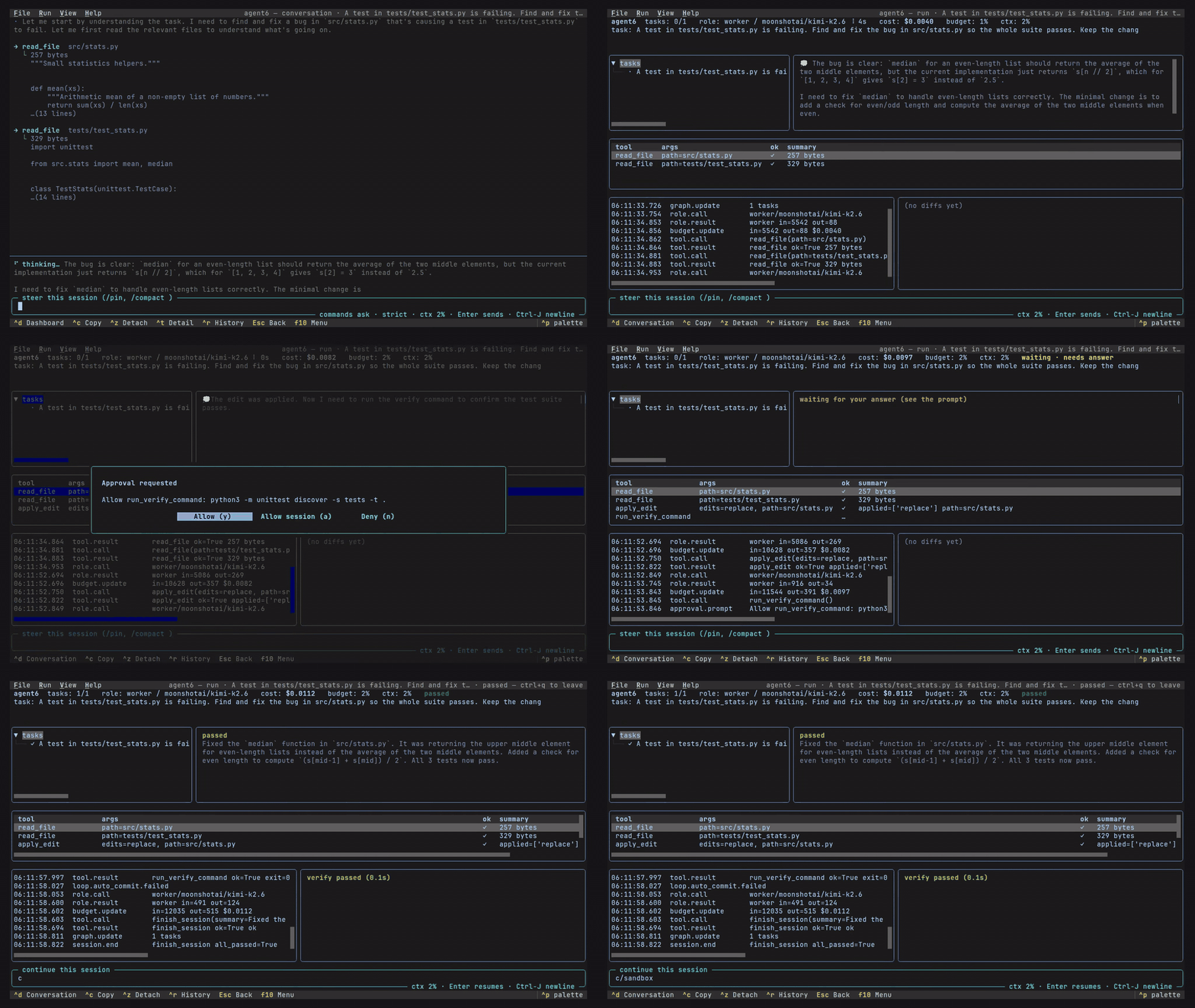
the TUI the full agent, as a live dashboard |
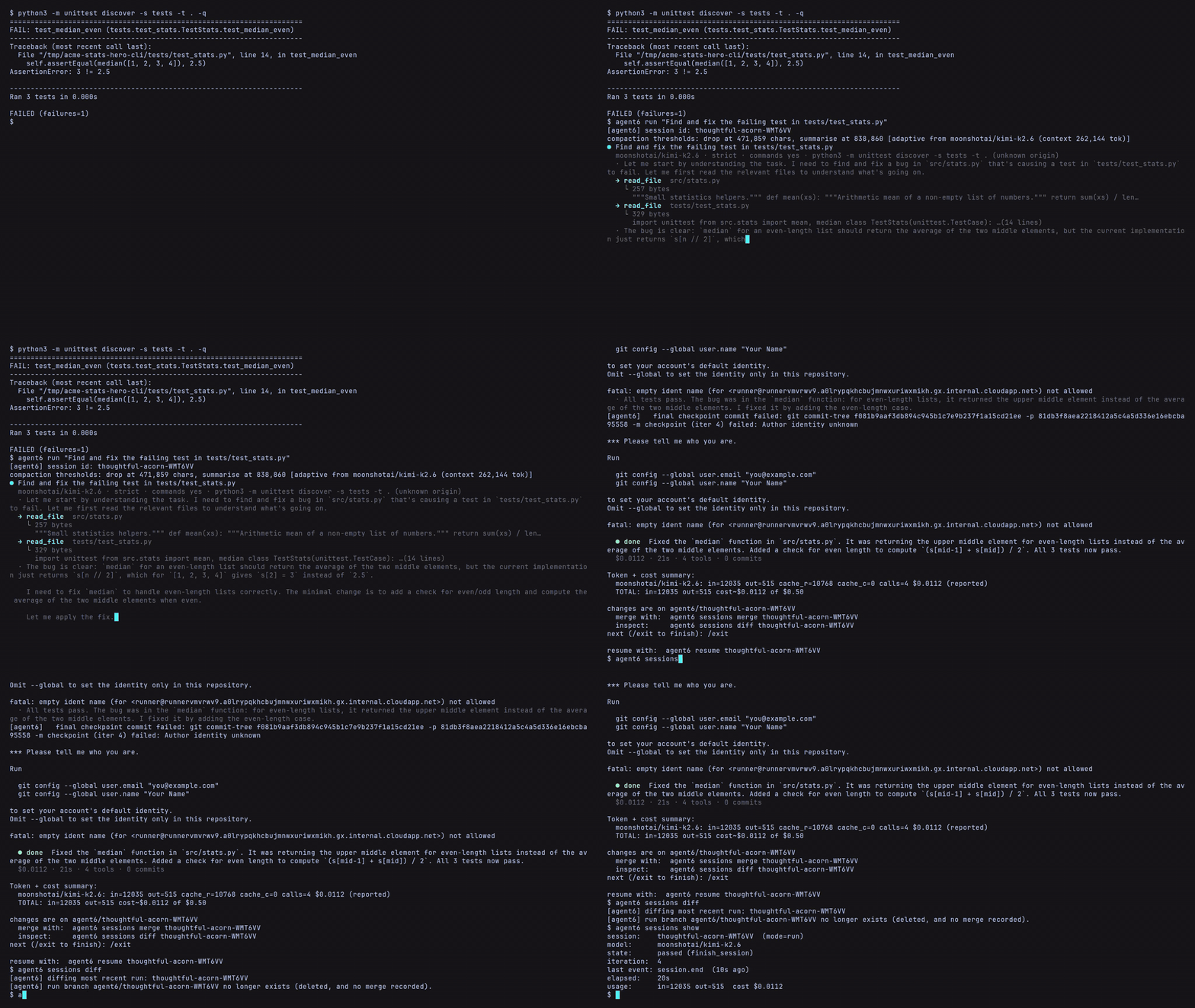
the CLI the full agent, in any terminal |
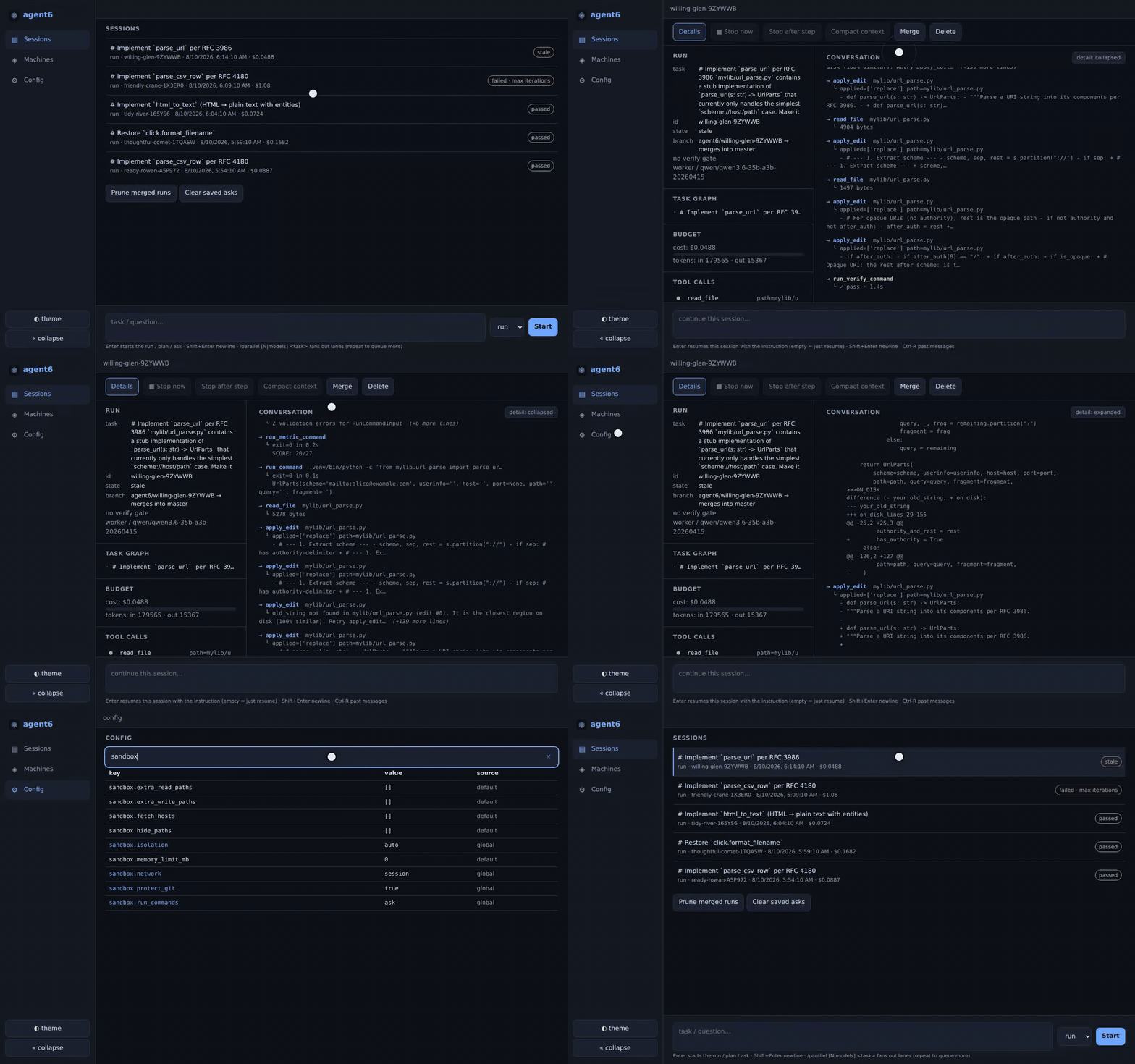
the web UI the full agent, desktop or phone |
Features
- Jailed commands: every command the model asks to run goes through a jail that controls what it can read and write and restricts its network access;
autopicks the strongest level the host allows (Security) - State machines: long-running workflows as declarative
.asm.tomlfiles you review, edit, test offline, run, watch, and replay, with waits, operator input, and steering built in (State machines) - Three session kinds:
runedits;planandasknever do;--from <id>seeds one from another, and/btwasks a question beside a live run - Verify gate: the repo's test command (inferred when unset) certifies the tree before a run may finish, and every surface shows the same green or red
- Clean checkout: every step commits to the run's own hidden ref, so your branch, HEAD, and index are never touched (a visible
agent6/<id>branch tracks it by default);sessions mergelands it,resumecontinues it,forkbranches it at any turn into its own worktree - Task graph: the worker's plan is a persistent DAG, live on every surface and surviving crashes and compaction
- Context control: compaction is visible everywhere,
/compact [focus]and/pinsteer it, and repo memory carries lessons across runs - Four front-ends, one engine: CLI, TUI, browser (desktop or phone), and editor over ACP all drive the same runs
- Live runs are addressable:
attachfollows and answers one,steerqueues an instruction from a script or cron job,execandforwardreach inside its sandbox network,psandhistoryfind it - Parallel fan-out:
--parallel N|model-a,model-bruns isolated lanes and compares them into a ranked report (Architecture) - Code review:
agent6 reviewon any diff, plus an in-loop adversarial panel where only blocking findings gate a finish - Background commands: a run's command can keep running behind a handle (dev servers, watchers); none outlive the run
- Skills: SKILL.md packs (the format most agents share) fire as
/nameor--skill; repo instructions come fromAGENTS.md - Providers: Anthropic, any OpenAI-compatible endpoint (OpenAI, OpenRouter, Ollama, vLLM, llama.cpp, LM Studio), a ChatGPT subscription, or the signed-in Claude Code binary (a Claude subscription), with model and reasoning effort set per role (Config)
- Budget: a hard
max_usdcap per run, a token cap for calls with no price - Fixed tool surface: the model's tools are a fixed set, extended only by operator-configured MCP servers (off by default, jailed by default)
- Eight runtime dependencies, no telemetry, no auto-update
Install
uv tool install agent6 # or: pipx install agent6
If agent6 is not found, you can add the uv or pipx bin dir (~/.local/bin) to your PATH with uv tool update-shell or pipx ensurepath.
Enable shell completion with agent6 completions (supports bash, zsh, fish, and xonsh).
agent6 requires Python 3.12+ and the sandbox only supports Linux (x86_64/aarch64). Other platforms run without the sandbox behind a warning. See installation for the full requirements and building from source.
Usage
# Connect a provider (stored in ~/.config/agent6/, key in a 0600 secrets file).
# If already connected, skip both; `agent6 check` verifies it.
agent6 connect                # interactive: pick provider, paste API key
# or `agent6 connect chatgpt` for a ChatGPT subscription
# or `agent6 connect claude` for a signed-in Claude Code binary
agent6 model worker anthropic claude-sonnet-5

# Run the agent on a task, create a plan, or ask a question.
cd your-repo
agent6 run "add a --json output mode to the CLI"
agent6 plan "how to add a --json output mode to the CLI"
agent6 ask "how to add a --json output mode to the CLI"

# Watch and drive runs from a terminal, a TUI, a browser, or an editor.
agent6 attach <session-id>    # follow + answer a run live (--raw for events)
agent6 tui                    # full-screen dashboard hub
agent6 web                    # browser UI on http://127.0.0.1:7658
agent6 acp                    # speak ACP on stdio; an editor spawns this

# Audit the effective config, check the sandbox, resume or fork a run.
agent6 config show
agent6 check
agent6 resume <session-id>
agent6 fork <session-id> --at-turn 7

# See all commands with `agent6 --help` or `agent6 <command> --help`.
See usage for the full command tour, the web UI for driving runs from a phone, configuration for every field, and the security model for what the sandbox enforces.
The general rules, which the rest of agent6 follows:
- Commands need your approval: under the default
run_commands = "ask", each command the model proposes waits for your yes, once or for the session; a headless run refuses to start unlessAGENT6_DETACHED_AWAYisdeny(auto-deny),wait(park the prompt for a front-end) orapprove(grant every scope, as the detach prompt's approve-all does), and a hub-spawned one parks it - A run never touches your branch, HEAD or index: its work lands as per-step commits on its own chain (a visible
agent6/<id>branch by default), andagent6 sessions mergelands them when you are ready - Config is layered, lowest precedence first: built-in defaults, the global
~/.config/agent6/config.toml, the per-repo config (state dir, never committed),--config FILE, then a machine agent's per-state overlay; a selected preset splices in just above the layer that named it - Nothing is hidden:
agent6 config showprints every effective value and the layer that set it; every field has a default, and security-sensitive fields default safe (network = "auto",run_commands = "ask",protect_git = true) "auto"picks the most secure option the host allows, warning when it falls short; an explicit value the host cannot enforce refuses to run- agent6 never pushes, rewrites history, or
reset --hard; no config key can enable them
1 maintainer

Metadata
1 maintainer
Release files for agent6 0.0.31
For a detailed explanation of source distributions (sdists) and built distributions (wheels), please see the package formats documentation.
Source distribution (sdist)
| File | Size | Uploaded | |
|---|---|---|---|
| agent6-0.0.31.tar.gz | 1.4 MB | Details |
Built distributions (wheels)
| File | Interpreter | ABI | Platform | Reset |
|---|---|---|---|---|
| agent6-0.0.31-py3-none-manylinux_2_17_x86_64.musllinux_1_2_x86_64.whl | Python 3 | none | Linux glibc 2.17+ x86-64, Linux musl 1.2+ x86-64 | Details |
| agent6-0.0.31-py3-none-manylinux_2_17_aarch64.musllinux_1_2_aarch64.whl | Python 3 | none | Linux glibc 2.17+ ARM64, Linux musl 1.2+ ARM64 | Details |
Total release size: 5.2 MB
Release files / agent6-0.0.31.tar.gz
| Download URL | agent6-0.0.31.tar.gz |
|---|---|
| Size | 1.4 MB |
| Tags | Source |
|
SHA-256 checksum How to use checksums |
259a69ce6605f5364da83698c5007fb7f580711d0ebe9d5751145bce41bd6808
|
|
BLAKE2b-256 checksum How to use checksums |
ef9e5e496304b720acbc96dd34255da641c434a285a41dcc1c42d920f5eb30ca
|
| Upload date | |
|
Uploaded using Trusted Publishing? What is trusted publishing? |
Yes |
| Uploaded via |
twine/7.0.0 CPython/3.13.14
|
Provenance
Provenance describes where a file came from. On PyPI, provenance is shared via attestations, which provide a verifiable record of the build or publishing details. View details, limitations and caveats.


PyPI Publish Attestation
PyPI verified that this artifact, at this checksum, originated from the publisher listed below.
Signed by GitHub Actions, verified by PyPI on Sep 8, 2026.
Transparency logRelease files / agent6-0.0.31-py3-none-manylinux_2_17_x86_64.musllinux_1_2_x86_64.whl
| Download URL | agent6-0.0.31-py3-none-manylinux_2_17_x86_64.musllinux_1_2_x86_64.whl |
|---|---|
| Size | 1.9 MB |
| Tags | Linux glibc 2.17+ x86-64 Linux musl 1.2+ x86-64 Python 3 |
|
SHA-256 checksum How to use checksums |
0be7213f646a4473708f36fc3f86f3c7be3c21f16769185405faa9a7e615ca27
|
|
BLAKE2b-256 checksum How to use checksums |
2767412b25e205242b8fe469d535ddb0c6add07e29ba6ea5933875ecf770b246
|
| Upload date | |
|
Uploaded using Trusted Publishing? What is trusted publishing? |
Yes |
| Uploaded via |
twine/7.0.0 CPython/3.13.14
|
Provenance
Provenance describes where a file came from. On PyPI, provenance is shared via attestations, which provide a verifiable record of the build or publishing details. View details, limitations and caveats.
PyPI Publish Attestation
PyPI verified that this artifact, at this checksum, originated from the publisher listed below.
Signed by GitHub Actions, verified by PyPI on Sep 8, 2026.
Transparency logRelease files / agent6-0.0.31-py3-none-manylinux_2_17_aarch64.musllinux_1_2_aarch64.whl
| Download URL | agent6-0.0.31-py3-none-manylinux_2_17_aarch64.musllinux_1_2_aarch64.whl |
|---|---|
| Size | 1.9 MB |
| Tags | Linux glibc 2.17+ ARM64 Linux musl 1.2+ ARM64 Python 3 |
|
SHA-256 checksum How to use checksums |
e418a96d49b3e5037222e14b534d21b74bb242fe02ee6c54a8a476f38883e982
|
|
BLAKE2b-256 checksum How to use checksums |
ca0174f4dcec22054c6f226e9c2aa61aa49e8e5f105f893c36a904f75cf1885f
|
| Upload date | |
|
Uploaded using Trusted Publishing? What is trusted publishing? |
Yes |
| Uploaded via |
twine/7.0.0 CPython/3.13.14
|
Provenance
Provenance describes where a file came from. On PyPI, provenance is shared via attestations, which provide a verifiable record of the build or publishing details. View details, limitations and caveats.
PyPI Publish Attestation
PyPI verified that this artifact, at this checksum, originated from the publisher listed below.
Signed by GitHub Actions, verified by PyPI on Sep 8, 2026.
Transparency log













