agent6
A coding agent with sandboxed commands, resumable sessions, and editable workflows.
Give agent6 a task in a Git repository: fix a bug, add a feature, review a change, or explain the code. It uses a model you choose and saves the conversation, tool activity, and Git checkpoints so you can inspect the result or continue the work. For longer workflows, define the steps in a TOML state machine you can review, test, and replay.
Documentation · Quick start · Security model
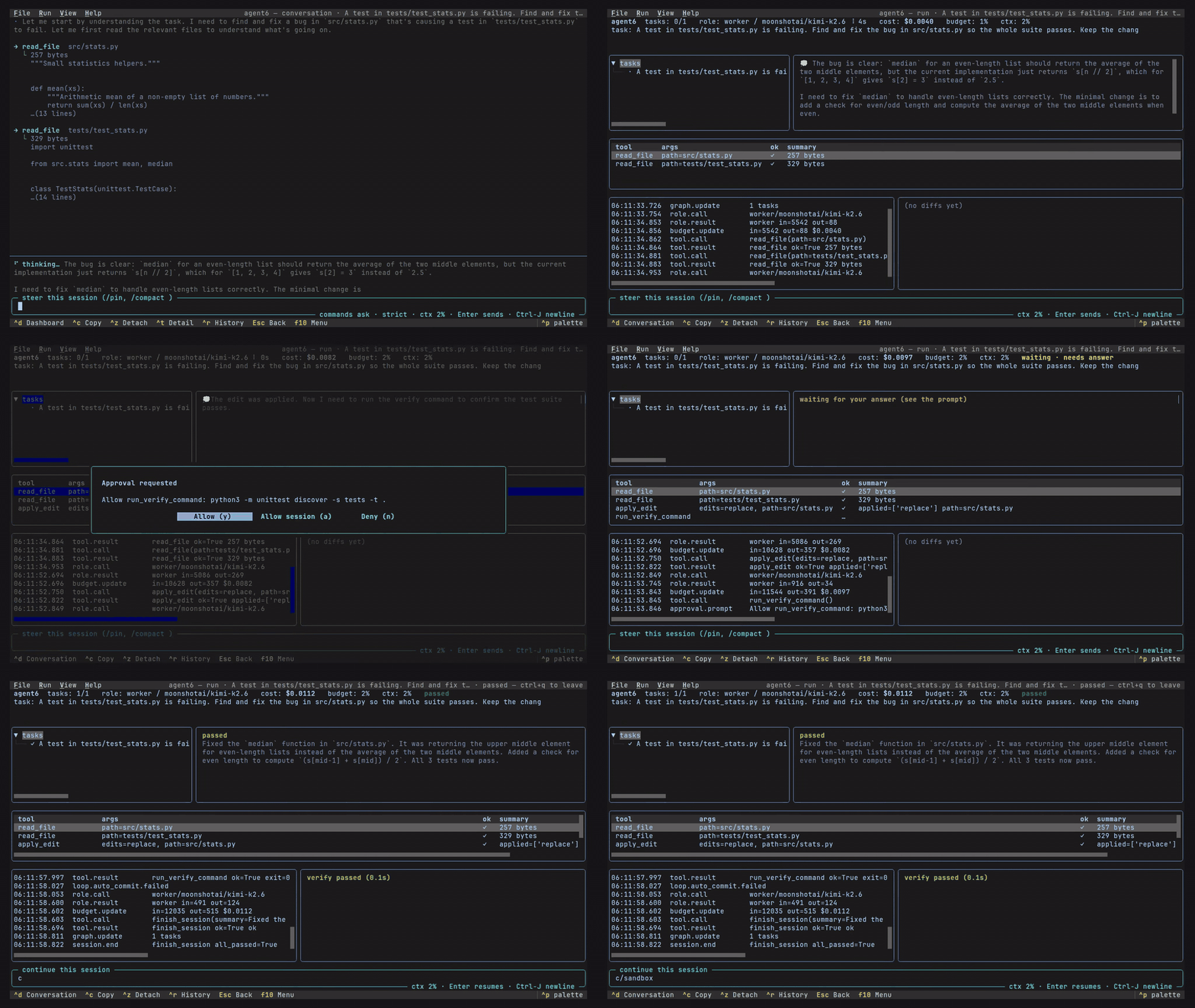
the terminal UI |
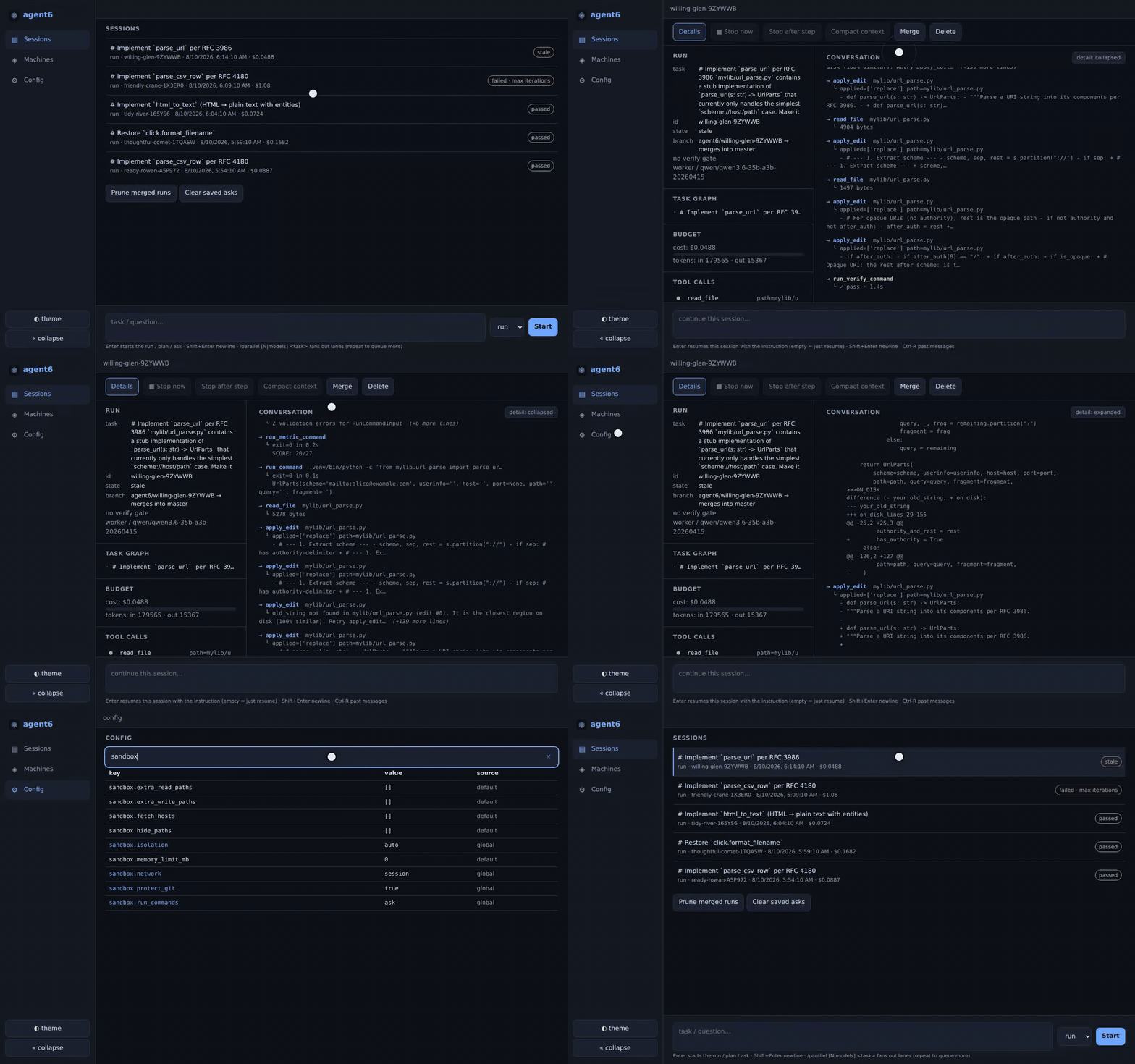
the web UI |
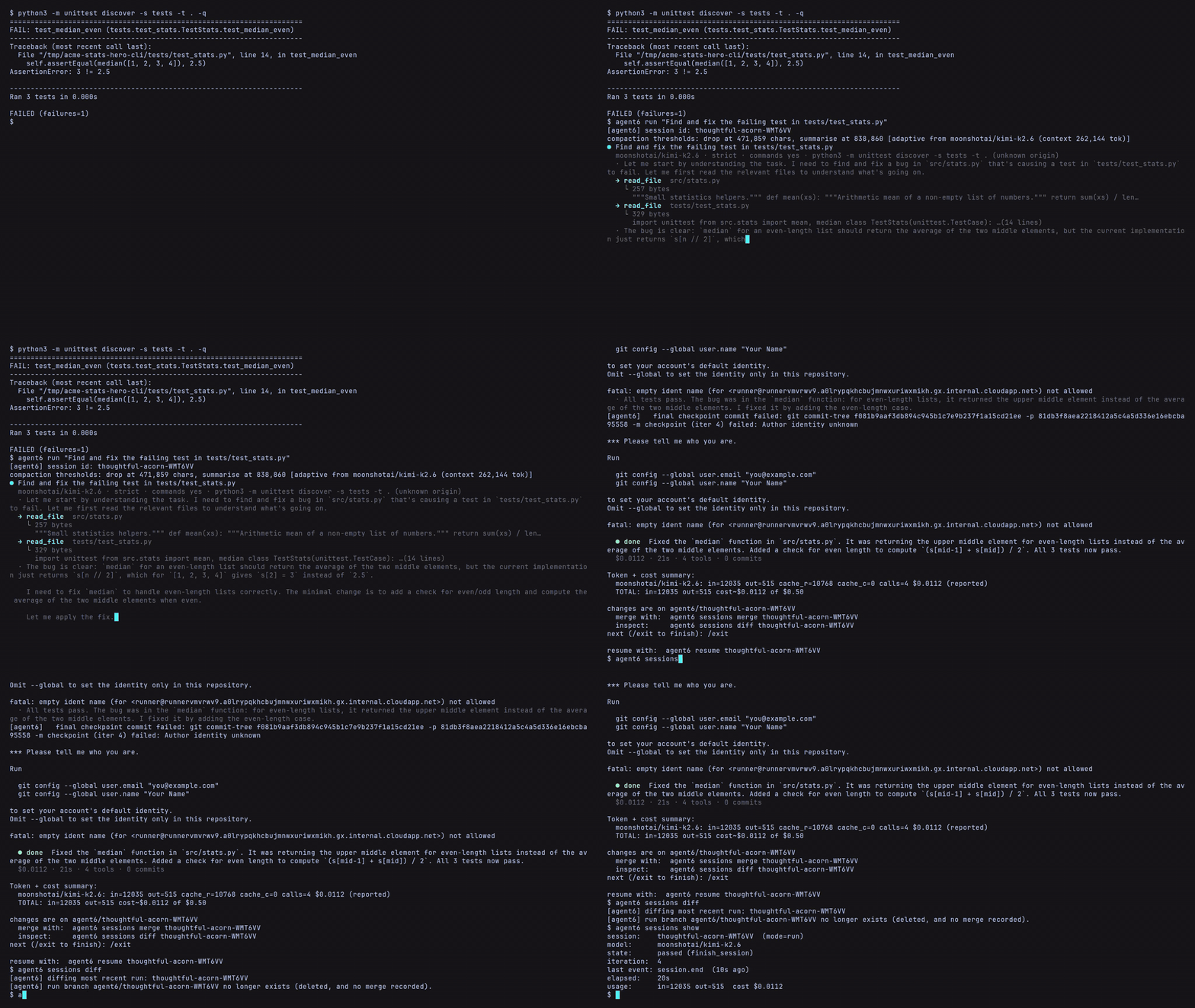
The CLI streams the same run in any terminal.
Quick start
Requires Python 3.12+, Git 2.40+, and access to a model through an API, local server, or supported subscription. The sandbox supports Linux on x86_64 and aarch64. On macOS, commands run without the Linux sandbox; on Windows, use WSL.
uv tool install agent6        # or: pipx install agent6
agent6 completions            # tab completion for your shell
agent6 connect                # connect a provider
agent6 model worker           # choose its model interactively
cd your-repo
agent6 check                  # check provider config and sandbox support
agent6 run "your task here"
For a subscription, use agent6 connect chatgpt or agent6 connect claude in place of agent6 connect.
The Claude route uses your installed, signed-in Claude Code binary.
Then select the worker model as above.
The run streams in your terminal and asks before running commands by default.
It edits your current working tree and saves checkpoint commits on a separate agent6/<id> branch by default.
Checkpointing leaves your current branch's history and index in place; sessions merge brings the recorded work onto that branch.
At the end, read the verification result and diff; type /exit to leave the interactive session.
agent6 sessions show          # status and verification result of the latest run
agent6 sessions diff          # inspect its changes
agent6 sessions merge         # merge them into the run's starting branch
To keep your current checkout unchanged, use agent6 run --worktree "your task".
This starts from the committed files at HEAD; uncommitted changes and untracked dependencies are not copied.
See isolated workspaces for setup commands, and installation for PATH and platform setup.
Features
- Command sandboxing: control what model commands can read, write, and reach on the network, with approvals enabled by default and diagnostics that show the effective boundaries (security).
- Resume and fork: saved session state, transcripts, and Git checkpoints let you continue interrupted work or branch from an earlier turn into a separate worktree (recovery).
- Project checks: configure a verification command or let agent6 infer one, then see whether the final work passed, failed, or remains unverified (verification).
- Terminal, browser, and editor: the CLI, terminal UI, browser UI on desktop or phone, and editor integration through the Agent Client Protocol (ACP) share the same engine and session records; the browser also shows the repository's commit graph, any two revisions compared, and each file's diff.
- Visible context and progress: inspect the task graph, tool calls, usage, and compaction events;
/pinpreserves an instruction through compaction,/compact [focus]requests a summary, and repository memory carries facts across runs (architecture). - Parallel attempts: run the same task in isolated clones with
--parallel Nor a list of models, compare the results in a ranked report, and choose which result to merge (parallel runs). - Editable state machines: compose agent runs, tool calls, waits, and branches in
.asm.tomlfiles, with validation, offline tests, journaled transitions, and replay from recorded results (state machines).
Inspect and direct a run
Run agent6 tui for the terminal dashboard or agent6 web for the browser UI.
Both show sessions, conversations, tool activity, verification results, and usage, and let you answer prompts and steer work.
Run headers show the model, resolved isolation level, command approval setting, and verification command.
The web UI also supports access from another device; the web guide covers authentication and remote access.
From another terminal, use the session ID printed by the run:
agent6 attach <session-id>
agent6 steer <session-id> "keep the public API unchanged"
agent6 stop <session-id> --after-step
agent6 resume <session-id>
To continue an already finished run, use agent6 resume <session-id> --steer "your next task".
To explore a different approach, use agent6 fork <session-id> --at-turn 7 --steer "try a different approach".
The usage guide covers transcripts, history search, side questions with /btw, and commands inside a run's sandbox.
Models and integrations
Use Anthropic, OpenAI, OpenRouter, or another OpenAI-compatible endpoint, including local servers such as Ollama, vLLM, llama.cpp, and LM Studio. ChatGPT and Claude Code subscription routes are also supported. Choose the model and reasoning effort for the worker, planner, and reviewer separately; unset roles fall back to the worker (configuration).
- Plan and ask:
agent6 planandagent6 askexplore a repository without editing its files;agent6 run --from <plan-id>uses a saved plan. - Code review:
agent6 reviewreviews a diff; an optional review panel can also check work during a run. - Skills and instructions: use
AGENTS.mdfor repository instructions andSKILL.mdpacks through/nameor--skill. - Model Context Protocol (MCP): connect servers you configure; MCP is off by default, and locally spawned servers are sandboxed by default.
- Background commands: keep a development server or watcher running while the agent continues, with controls to read its output or stop it.
- Usage limits: track cost and tokens, and set spending limits, token limits for unpriced calls, and usage limits for supported subscriptions (budgets).
Security and verification
agent6 treats model output as untrusted.
The model's tools are a fixed built-in set plus the MCP servers you enable.
Its Linux sandbox restricts command execution; the main agent process remains trusted and connects to your configured model providers.
Provider keys stay with the agent process: a command's environment and jail hold neither the keys nor secrets.toml, except under sandbox.isolation = "none", where nothing is hidden.
A sandbox around the whole agent would hold them inside it.
agent6's own git never pushes, rewrites history or resets a tree, and no config key turns that on; a command the model runs is bounded by the jail.
sandbox.isolation sets the level: full is a namespace-based Linux jail, partial is Landlock and seccomp without namespaces, none leaves commands unconfined.
The default, auto, selects the strongest available level and warns when it falls back.
sandbox.network is set separately: under full it defaults to the run's private network and can use the host network; partial and none use the host network.
Run agent6 check sandbox to inspect file and command access by path, network and approval settings, and live probe results.
Read the security model for the boundaries and host requirements at each level.
A fresh run runs the verification command before it edits anything, when one is set or inferred. A run ends passed, failed or unverified, and a scoped gate says so in the result. Read the result and the diff before you merge.
The defaults are sandbox.network = "auto", sandbox.run_commands = "ask" and sandbox.protect_git = "auto".
agent6 has eight runtime dependencies, no telemetry and no automatic updates.
How it compares
If you have used Claude Code, Codex, OpenCode or Pi, the shape is familiar: sessions you resume, skills in the shared SKILL.md format, MCP servers, an editor over ACP, several front-ends on one run.
Compared with an agent in a container or a VM, the jail is per command and in place.
There is no image to build or keep current, the jail sees your installed toolchains read-only, the repository is at its real path, and agent6 check sandbox prints the boundary one row per path.
A jailed command cannot install system packages; it can only install into the repository, a venv or a node_modules there, its private /tmp and HOME, or a path you grant.
Inside a container, sandbox.isolation = "auto" resolves to the level that kernel allows, and agent6 check says which.
Compared with the command sandboxes other agents offer, agent6's is on by default at the strongest level the host allows, keeps your home directory and credentials out of the jail, gives the run's commands a network of their own under full, and jails MCP servers the same way.
Development and feedback
agent6 is Apache-2.0 licensed and is under active development before 1.0; configuration, commands, and stored formats can change. See development conventions and the repository's benchmark and evaluation suites, which compare models and harness settings with task graders, repeated runs, and usage measurements.
If you try it, open an issue with the task you attempted, what you expected, and where setup or the run became confusing or failed. For vulnerabilities, use private security reporting.
1 maintainer

Metadata
1 maintainer
Release files for agent6 0.0.38
For a detailed explanation of source distributions (sdists) and built distributions (wheels), please see the package formats documentation.
Source distribution (sdist)
| File | Size | Uploaded | Provenance | |
|---|---|---|---|---|
| agent6-0.0.38.tar.gz | 1.5 MB | With provenance | Details |
Built distributions (wheels)
| File | Interpreter | ABI | Platform | Reset |
|---|---|---|---|---|
| agent6-0.0.38-py3-none-manylinux_2_17_x86_64.musllinux_1_2_x86_64.whl | Python 3 | none | Linux musl 1.2+ x86-64, Linux glibc 2.17+ x86-64 | Details |
| agent6-0.0.38-py3-none-manylinux_2_17_aarch64.musllinux_1_2_aarch64.whl | Python 3 | none | Linux musl 1.2+ ARM64, Linux glibc 2.17+ ARM64 | Details |
Total release size: 5.5 MB
Release files / agent6-0.0.38.tar.gz
| Download URL | agent6-0.0.38.tar.gz |
|---|---|
| Size | 1.5 MB |
| Tags | Source |
|
SHA-256 checksum How to use checksums |
6b46fca4ba3e28290e7407e8b206d15c1abc9fe0c5cc3a24358a783aa3802dcb
|
|
BLAKE2b-256 checksum How to use checksums |
242708a5d73dacf5dece6efdcb40d3c92ad396e95ce16fd55d47d0b9c74cec0c
|
| Upload date | |
|
Uploaded using Trusted Publishing? What is trusted publishing? |
Yes |
| Uploaded via |
twine/7.0.0 CPython/3.13.16
|
Provenance
Provenance describes where a file came from. On PyPI, provenance is shared via attestations, which provide a verifiable record of the build or publishing details. View details, limitations and caveats.


PyPI Publish Attestation
PyPI verified that this artifact, at this checksum, originated from the publisher listed below.
Signed by GitHub Actions, verified by PyPI on Oct 22, 2026.
Transparency logRelease files / agent6-0.0.38-py3-none-manylinux_2_17_x86_64.musllinux_1_2_x86_64.whl
| Download URL | agent6-0.0.38-py3-none-manylinux_2_17_x86_64.musllinux_1_2_x86_64.whl |
|---|---|
| Size | 2.0 MB |
| Tags | Linux glibc 2.17+ x86-64 Linux musl 1.2+ x86-64 Python 3 |
|
SHA-256 checksum How to use checksums |
3198f01e9299a04ac09a7b7ffe15a877d12326d1e6966823b25f9b65ac2db89b
|
|
BLAKE2b-256 checksum How to use checksums |
4d7cad11b80cfa5c52e2576cd7dd0102e50a061d4e7c744f1a8fc7fafeeb19f1
|
| Upload date | |
|
Uploaded using Trusted Publishing? What is trusted publishing? |
Yes |
| Uploaded via |
twine/7.0.0 CPython/3.13.16
|
Provenance
Provenance describes where a file came from. On PyPI, provenance is shared via attestations, which provide a verifiable record of the build or publishing details. View details, limitations and caveats.
PyPI Publish Attestation
PyPI verified that this artifact, at this checksum, originated from the publisher listed below.
Signed by GitHub Actions, verified by PyPI on Oct 22, 2026.
Transparency logRelease files / agent6-0.0.38-py3-none-manylinux_2_17_aarch64.musllinux_1_2_aarch64.whl
| Download URL | agent6-0.0.38-py3-none-manylinux_2_17_aarch64.musllinux_1_2_aarch64.whl |
|---|---|
| Size | 2.0 MB |
| Tags | Linux glibc 2.17+ ARM64 Linux musl 1.2+ ARM64 Python 3 |
|
SHA-256 checksum How to use checksums |
655862f6d33ddcff9034c8a0f41e5d87c0d9ac9247d75955511cb9158803759d
|
|
BLAKE2b-256 checksum How to use checksums |
c86bdfbc29bd9e5120a7220b2b7e2968239ee9e1dcbe3e658fb79d7eccb9045e
|
| Upload date | |
|
Uploaded using Trusted Publishing? What is trusted publishing? |
Yes |
| Uploaded via |
twine/7.0.0 CPython/3.13.16
|
Provenance
Provenance describes where a file came from. On PyPI, provenance is shared via attestations, which provide a verifiable record of the build or publishing details. View details, limitations and caveats.
PyPI Publish Attestation
PyPI verified that this artifact, at this checksum, originated from the publisher listed below.
Signed by GitHub Actions, verified by PyPI on Oct 22, 2026.
Transparency logSecurity for agent6 0.0.38
Provenance
Provenance describes where a file came from. On PyPI, provenance is shared via attestations, which provide a verifiable record of the build or publishing details. View details, limitations and caveats.
Full provenance
All 3 files in this release have been uploaded with provenance metadata.
Attestation for agent6-0.0.38.tar.gz
PyPI Publish Attestation
PyPI verified that this artifact, at this checksum, originated from the publisher listed below.
Signed by GitHub Actions, verified by PyPI on Oct 22, 2026.
Transparency logA note on package security
PyPI is a repository for distributing packages, not a service for auditing them. While third-party security researchers and our staff do their best to detect and remove malicious packages, PyPI cannot guarantee the quality, security or suitability of any given package.