
AgentAbacus
Understand how you use AI coding agents.


AgentAbacus turns your local AI coding-agent session logs into analytics.
See which models are doing the work, which projects and sessions consume the most usage, how much work comes from subagents, where your tokens are going, and what that usage would cost at API rates.
No server. No account. No telemetry. Your data stays on your machine.
Why AgentAbacus?
I spent $4,500 on AI coding agents in six months.
Except...
I didn't actually spend $4,500.
I paid for a subscription.
That's the interesting part.
AI coding agents can generate enormous amounts of usage behind a flat-rate subscription. The number on the bill doesn't necessarily tell you what is happening inside your development workflow.
So AgentAbacus looks at the usage, not just the bill.
It helps answer questions like:
- Which models are doing most of the work?
- Which projects are consuming the most usage?
- Which sessions are the most intensive?
- How much work is being delegated to subagents?
- How many tokens am I actually using?
- How much of that usage comes from cached context?
- Which tools are being called most often, and which ones fail?
- What would this usage cost at API pricing?
API-equivalent cost is a measurement, not your bill.
If you're using a subscription, the cost shown by AgentAbacus does not mean you owe that amount.
It is an estimated cost based on published API pricing, giving you a common way to compare AI usage across models, projects and sessions. A token is not a good unit for comparison, because a token of Opus output and a token of cached Haiku input are worth very different things. Money is the unit that makes them comparable.
Install
Try it without installing anything:
uvx agentabacus report
Or keep it:
pipx install agentabacus
Running it with no arguments shows the whole surface:
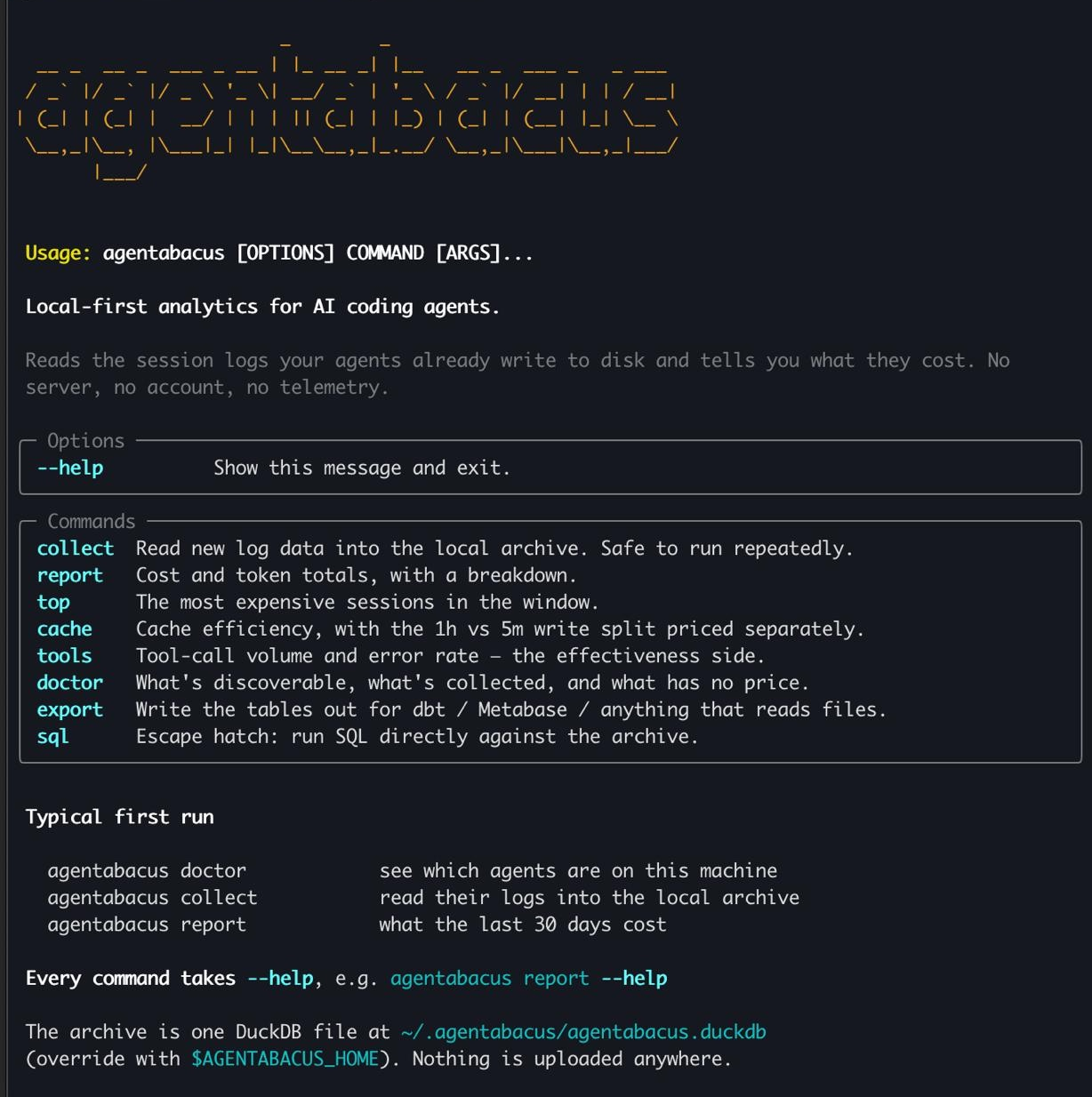
See what it can find on your machine, then read it in:
agentabacus doctor
agentabacus collect
Collection is incremental, so you can safely run it again as new sessions are created. A repeat run over a 400 MB corpus costs one stat() per unchanged file.
To collect from one agent only, name it:
agentabacus collect --claude
What you can see
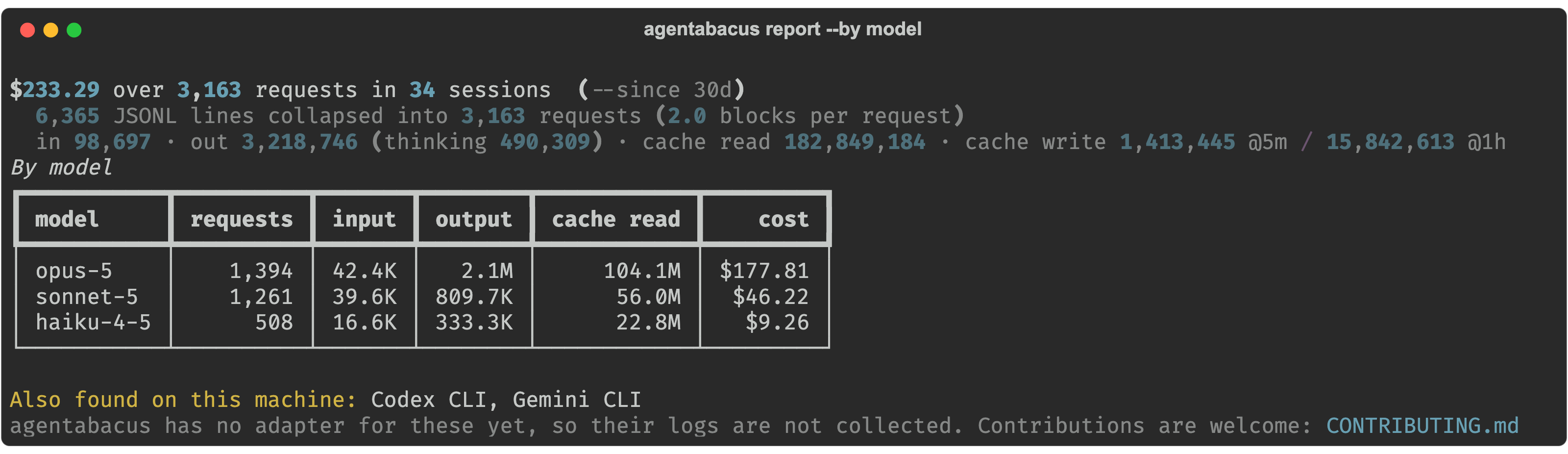
Model usage
Which models are doing the work.
agentabacus report --by model
Under a subscription this is an allowance question, not a cost question. Opus on a one-line edit consumes the same allowance as Opus on an architecture problem.
Where the usage goes
agentabacus report --by project      # working directory
agentabacus report --by branch       # cost a feature
agentabacus report --by day          # daily series, for charting
agentabacus report --since all       # everything you have collected
--since takes 24h, 7d, 4w, 6m, or all. There is no upper limit.
Context and cache
agentabacus cache
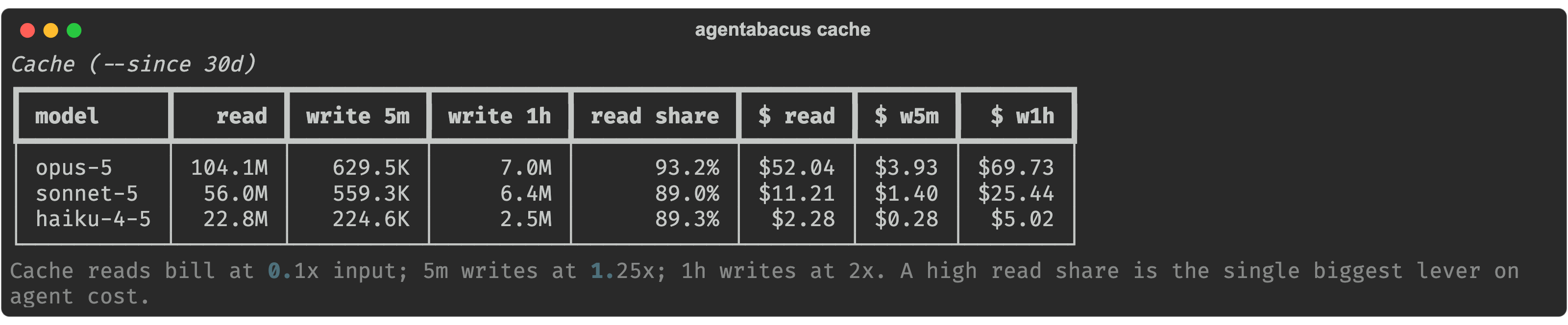
This is usually the most surprising view. On real sessions, 90–96% of every request is re-read cached context rather than new instruction, and heavy sessions can average hundreds of thousands of tokens of context per request.
That matters beyond cost. It is the mechanical reason long sessions slow down, start compacting, and run into limits.
The two cache-write TTLs are also priced separately, because they are not the same price: a 1-hour write bills at 2× base input, a 5-minute write at 1.25×, and a read at 0.1×. Tools that collapse them into one number cannot show you which one you are paying for.
Subagents
agentabacus report --by thread
Splits your main conversation from subagent work. Subagent transcripts are stored in separate files, at two different nesting depths, so most tooling misses them entirely.
Tool calls
agentabacus tools
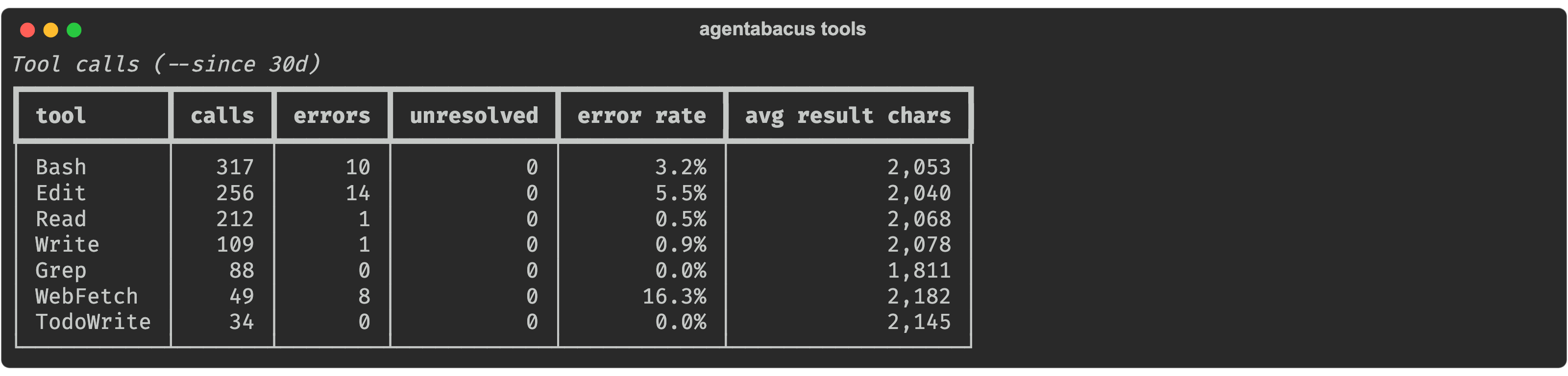
Volume and error rate per tool. This is the effectiveness side rather than the usage side: it tells you what your agent is actually bad at in your repo, which changes how you prompt tomorrow.
The most intensive sessions
agentabacus top --limit 10
Collect automatically
Agent transcripts get garbage-collected by the tools that write them, so collection has to happen without you remembering.
Claude Code plugin — archives each session the moment it closes:
/plugin marketplace add tripleaceme/agentabacus
/plugin install agentabacus@agentabacus
Or on a schedule, using your operating system's own scheduler:
agentabacus schedule --every 6h
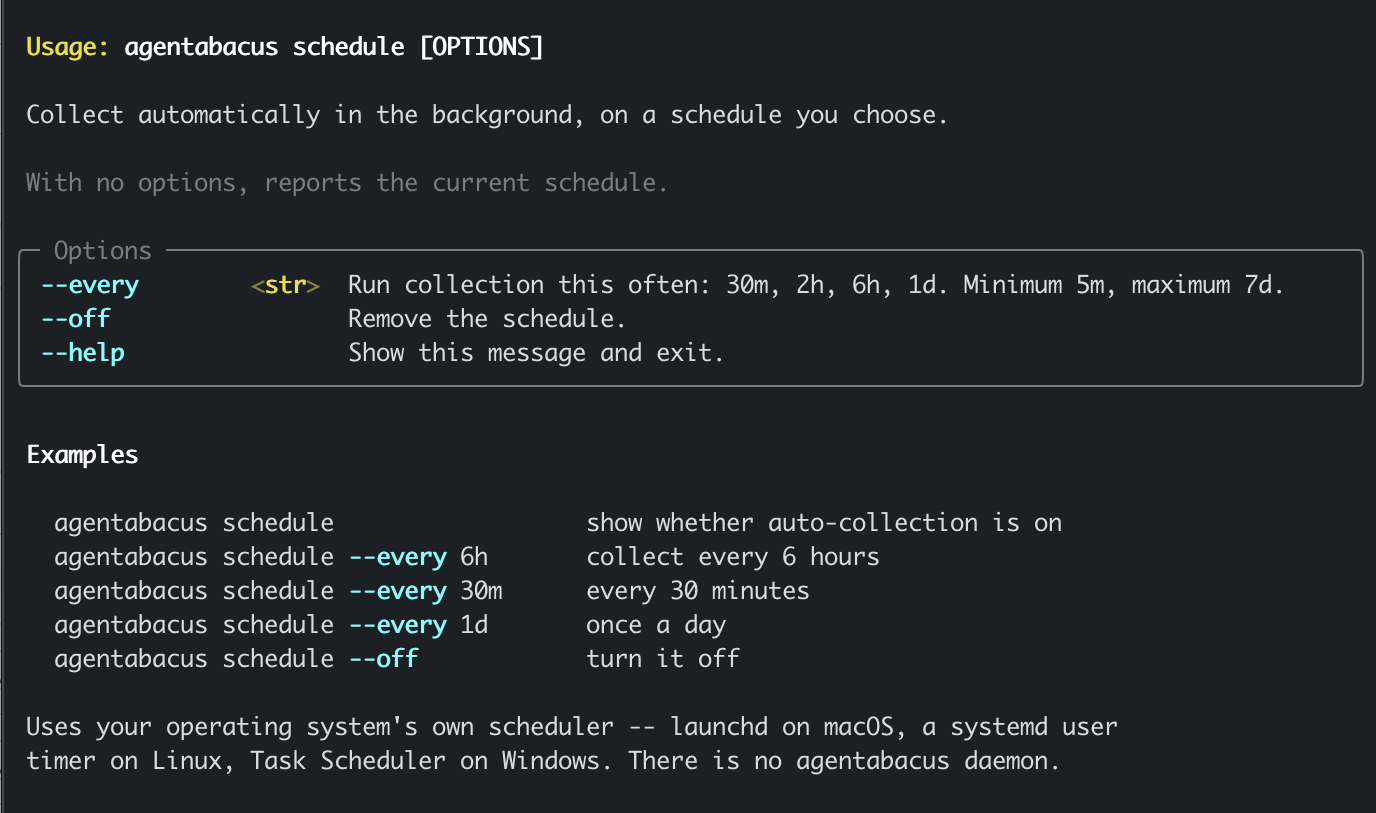
There is no AgentAbacus daemon. On macOS it registers a launchd agent, on Linux a systemd user timer, on Windows a Task Scheduler task — all of them already installed, already supervised, and visible to you in tools you know.
Accuracy
Three things make the obvious implementation of this wrong. All three are handled, and each is pinned by a test.
1. Usage is repeated across log lines. Claude Code writes one line per content block — thinking, text, each tool call — and every one of those lines carries the full usage of the parent API response. Summing per line overcounts by 2–3×, by a multiplier that changes with every response, so it cannot be corrected afterwards. AgentAbacus keys on the request id and merges with max().
| naive per-line sum | deduped by request | overcount | |
|---|---|---|---|
| input | 5,273 | 1,759 | 3.0× |
| output | 18,555 | 7,861 | 2.4× |
| cache read | 712,283 | 264,865 | 2.7× |
| cache write | 61,219 | 25,647 | 2.4× |
2. Cache writes are not one number. See above — 2×, 1.25× and 0.1× are three different rates.
3. Subagent transcripts live in separate files, at two depths.
~/.claude/projects/<slug>/<uuid>.jsonl                             # main
~/.claude/projects/<slug>/<uuid>/subagents/agent-*.jsonl           # subagent
~/.claude/projects/<slug>/<uuid>/subagents/workflows/wf_*/*.jsonl  # workflow subagent
A projects/*/*.jsonl glob misses every subagent file. A */subagents/*.jsonl glob still misses the workflow ones a level deeper, which on a machine that runs workflows are the majority.
Pricing is effective-dated. Cost is computed as tokens × the price in force when the request ran, so correcting a rate reprices history rather than only new rows.
Command reference
Every command also takes --help, e.g. agentabacus report --help.
Shared options
| Option | What it does |
|---|---|
--since <window> |
Time window counting back from now: 24h, 7d, 4w, 6m, or all. Default 30d. |
--source <agent> |
Restrict to one agent, e.g. claude_code. |
--main-only |
Exclude subagent threads, counting only your main conversation. |
--limit <n> |
How many rows to show. |
agentabacus collect
| Option | What it does |
|---|---|
| (no flag) | Collect every supported agent found on this machine. |
--claude |
Collect Claude Code only. |
--codex, --gemini, --opencode, --cursor, --cline, --aider |
Collect that agent only. Unsupported ones exit with a link to the contributing guide. |
--full |
Ignore saved read positions and re-read every log from the start. |
--session-id <id> |
Collect a single session. Used by the Claude Code SessionEnd hook. |
--quiet, -q |
Print nothing unless something failed. |
agentabacus report
| Option | What it does |
|---|---|
--by <dimension> |
model, source, project, branch, day, effort, speed, thread. Default model. |
--since, --source, --main-only, --limit |
See shared options. |
agentabacus top · cache · tools
| Option | What it does |
|---|---|
--since, --source, --main-only |
See shared options. |
--limit <n> |
top defaults to 10, tools to 20. |
agentabacus schedule
| Option | What it does |
|---|---|
| (no option) | Show whether auto-collection is on, and how often it runs. |
--every <interval> |
Turn it on: 30m, 2h, 6h, 1d. Minimum 5m, maximum 7d. |
--off |
Remove the schedule. |
agentabacus doctor
Which agents are on this machine, what has been collected, and any model in your data with no pricing row. Takes no options.
agentabacus export
| Option | What it does |
|---|---|
--out <dir> |
Directory to write into. Default ./agentabacus_export. |
--format <fmt> |
parquet or csv. Default parquet. |
agentabacus sql
Run SQL directly against the archive. Run it with no query to print the schema — every table, view, column and row count, so you never have to guess a table name.
agentabacus sql                                                  # what can I query?
agentabacus sql "SELECT model_id, count(*) FROM turns GROUP BY 1"
Main tables: turns, turns_costed, sessions, tool_calls, prompts, pricing.
Supported agents
| Agent | Status |
|---|---|
| Claude Code | ✅ Supported |
| Codex CLI | Open for contribution |
| Gemini CLI | Open for contribution |
| OpenCode | Open for contribution |
| Cursor | Open for contribution |
| Cline | Open for contribution |
| Aider | Open for contribution |
agentabacus doctor detects every agent on this list that is installed on your machine, whether or not it is supported yet:
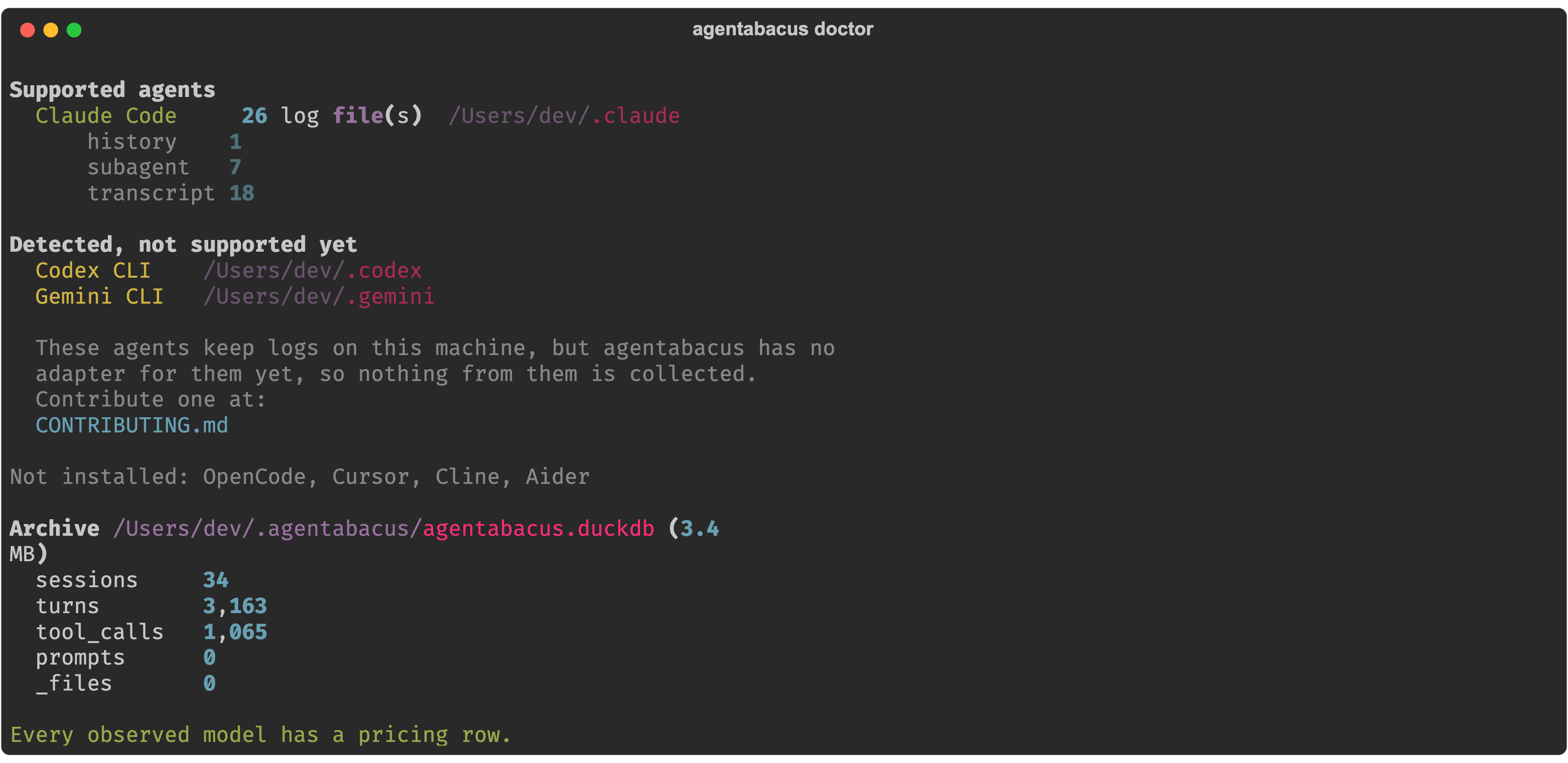
Nothing from an unsupported agent is ever parsed, stored, or counted. You can contribute by adding it.
How it works
AgentAbacus discovers session logs on your machine, parses them into a common schema, and stores the results in DuckDB.
Agent logs
    ↓
Discovery
    ↓
Adapters
    ↓
Normalized schema
    ↓
DuckDB
    ↓
Reports / SQL / Parquet
Data and privacy
Everything stays local. By default the archive is one file:
~/.agentabacus/agentabacus.duckdb
Change it with AGENTABACUS_HOME.
AgentAbacus does not upload your prompts, responses, code, or usage data anywhere.
Prompt and response text is never stored. The prompts table keeps a hash and a character count. There is no column for the body — that is a property of the schema, not a filter you have to trust.
One limitation worth knowing: the archive covers the machine it runs on. If you use the same agent on two laptops, each has its own archive. Export both to Parquet and union them if you need the whole picture.
For contributors
Agent logs are not stable APIs, so adapters are designed to tolerate format changes.
A new adapter needs a parser, discovery support, and registration — see CONTRIBUTING.md. Opening a PR runs the full test suite, an adapter contract against your fixtures, pricing validation, and a review guide that flags whether the change touches shared code.
pip install -e ".[dev]"
python -m pytest
Roadmap
- More agent adapters
- Usage against your plan's actual limits, not just totals
- Local dashboard
- Edit-survival metrics
- Warehouse exports and a dbt package
License
MIT
1 maintainer

Metadata
1 maintainer
Release files for agentabacus 1.0.4
For a detailed explanation of source distributions (sdists) and built distributions (wheels), please see the package formats documentation.
Source distribution (sdist)
| File | Size | Uploaded | |
|---|---|---|---|
| agentabacus-1.0.4.tar.gz | 48.0 kB | Details |
Built distribution (wheel)
| File | Interpreter | ABI | Platform | Reset |
|---|---|---|---|---|
| agentabacus-1.0.4-py3-none-any.whl | Python 3 | none | any | Details |
Total release size: 92.4 kB
Release files / agentabacus-1.0.4.tar.gz
| Download URL | agentabacus-1.0.4.tar.gz |
|---|---|
| Size | 48.0 kB |
| Tags | Source |
|
SHA-256 checksum How to use checksums |
f4ac59908d3714cfe62dd8bbfdba068b7175f9f00f8662fca23c0dafe6676ce7
|
|
BLAKE2b-256 checksum How to use checksums |
777c82200e61dbb3ecd48be7f23be6701d2b2f4ae977fd112f9051c2d45d090e
|
| Upload date | |
|
Uploaded using Trusted Publishing? What is trusted publishing? |
Yes |
| Uploaded via |
twine/7.0.0 CPython/3.13.14
|
Provenance
Provenance describes where a file came from. On PyPI, provenance is shared via attestations, which provide a verifiable record of the build or publishing details. View details, limitations and caveats.


PyPI Publish Attestation
PyPI verified that this artifact, at this checksum, originated from the publisher listed below.
Signed by GitHub Actions, verified by PyPI on Aug 30, 2026.
Transparency logRelease files / agentabacus-1.0.4-py3-none-any.whl
| Download URL | agentabacus-1.0.4-py3-none-any.whl |
|---|---|
| Size | 44.4 kB |
| Tags | Python 3 |
|
SHA-256 checksum How to use checksums |
071f2e852ff01fd35138a4fbc72d5932fa68e568b82a3ee2682b7a3662130659
|
|
BLAKE2b-256 checksum How to use checksums |
738a0c8b00f42c584ab8e3d9e6fc35cb79ad68e4e32ae3e397fe1a8385ef16b9
|
| Upload date | |
|
Uploaded using Trusted Publishing? What is trusted publishing? |
Yes |
| Uploaded via |
twine/7.0.0 CPython/3.13.14
|
Provenance
Provenance describes where a file came from. On PyPI, provenance is shared via attestations, which provide a verifiable record of the build or publishing details. View details, limitations and caveats.
PyPI Publish Attestation
PyPI verified that this artifact, at this checksum, originated from the publisher listed below.
Signed by GitHub Actions, verified by PyPI on Aug 30, 2026.
Transparency log













