
agentabacus
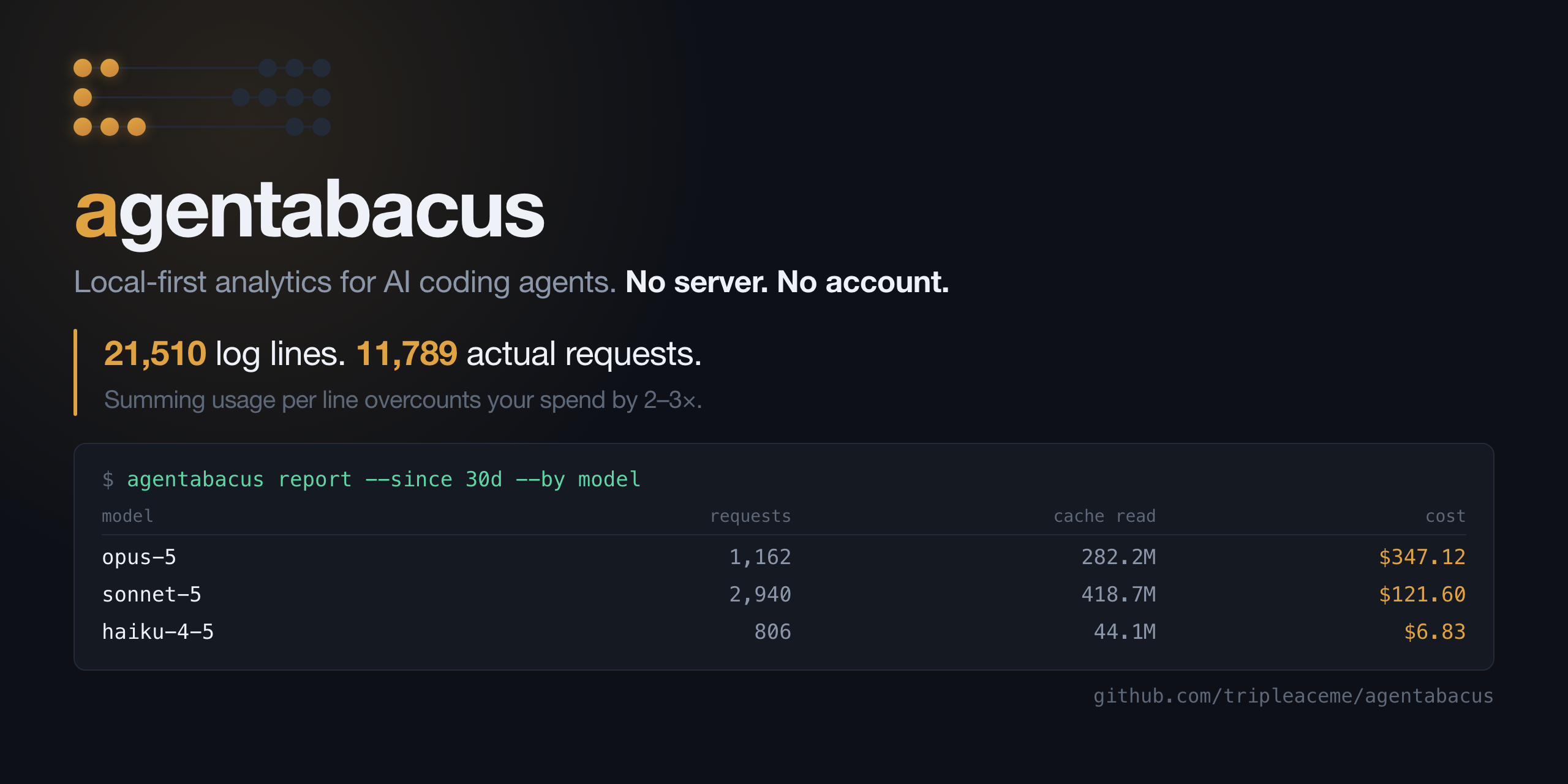


Local-first analytics for AI coding agents.
AI coding agents generate session logs, but each agent stores them differently. agentabacus brings those logs into one local database so you can see:
- What did I spend?
- Which models are doing the work?
- Which projects or sessions cost the most?
- How much of the usage comes from subagents?
- Where are tokens being spent?
No server. No account. No telemetry. Your data stays on your machine.
Install
Try it without installing:
uvx agentabacus report
Or install it permanently:
pipx install agentabacus
Then check what agentabacus can find:
agentabacus doctor
Collect your agent logs:
agentabacus collect
Collection is incremental, so you can safely run it again as new sessions are created.
To collect from one agent only, use:
agentabacus collect --claude
With no agent flag, collect reads every supported agent found on your machine.
Reports
Get a cost and usage report:
agentabacus report
Filter by time:
agentabacus report --since 30d
Group the results:
agentabacus report --by model
For example, --by thread separates your main agent from its subagents.
Every grouping is listed in the command reference below.
Command reference
Every command also takes --help, e.g. agentabacus report --help.
Shared options
These mean the same thing wherever they appear.
| Option | What it does |
|---|---|
--since <window> |
Time window counting back from now: 24h, 7d, 4w, 6m, or all. Default 30d. There is no upper limit — all covers everything you have collected. |
--source <agent> |
Restrict to one agent, e.g. claude_code. Default is every agent in the archive. |
--main-only |
Exclude subagent threads, counting only your main conversation. |
--limit <n> |
How many rows to show. |
agentabacus collect
Reads new log data into the archive. Incremental and safe to re-run — unchanged files cost one stat().
| Option | What it does |
|---|---|
| (no flag) | Collect every supported agent found on this machine. |
--claude |
Collect Claude Code only. |
--codex, --gemini, --opencode, --cursor, --cline, --aider |
Collect that agent only. Unsupported ones exit with a link to the contributing guide. |
--full |
Ignore saved read positions and re-read every log from the start. Use only after upgrading, or if numbers look wrong. |
--session-id <id> |
Collect a single session. Used by the Claude Code SessionEnd hook. |
--quiet, -q |
Print nothing unless something failed. Also disables the progress bar. |
agentabacus report
Cost and token totals, with a breakdown.
| Option | What it does |
|---|---|
--since <window> |
Time window. Default 30d. |
--by <dimension> |
Group the breakdown. Default model. |
--source, --main-only, --limit |
See shared options. |
--by accepts:
| Value | Groups by |
|---|---|
model |
Which model did the work — where the money goes. |
source |
Which agent (Claude Code, etc.). |
project |
Working directory the session ran in. |
branch |
Git branch, so you can cost a feature. |
day |
Daily series, for charting a trend. |
effort |
Reasoning-effort setting. |
speed |
Standard vs fast, which are priced differently. |
thread |
Main conversation vs subagents — a split no other tool shows. |
agentabacus report                              # last 30 days, by model
agentabacus report --since all                  # everything collected
agentabacus report --since 7d --by project      # last week, by project
agentabacus report --since all --by day         # daily series, for charting
agentabacus report --by thread                  # main loop vs subagents
agentabacus report --since 6m --main-only       # 6 months, no subagents
agentabacus top
The most expensive sessions in the window.
| Option | What it does |
|---|---|
--since, --source, --main-only |
See shared options. |
--limit <n> |
How many sessions to list. Default 10. |
agentabacus cache
Cache efficiency, with the 1-hour and 5-minute write split priced separately. Cache reads bill at 0.1× input, 5-minute writes at 1.25×, 1-hour writes at 2× — on a long session this is usually where the spend is.
| Option | What it does |
|---|---|
--since, --source, --main-only |
See shared options. |
agentabacus tools
Tool-call volume and error rate — the effectiveness side rather than the cost side.
| Option | What it does |
|---|---|
--since, --source, --main-only |
See shared options. |
--limit <n> |
How many tools to list. Default 20. |
agentabacus schedule
Collect automatically in the background, on an interval you choose. Uses your operating system's own scheduler — there is no agentabacus daemon.
| Option | What it does |
|---|---|
| (no option) | Show whether auto-collection is on, and how often it runs. |
--every <interval> |
Turn it on and run this often: 30m, 2h, 6h, 1d. Minimum 5m, maximum 7d. |
--off |
Remove the schedule. |
agentabacus schedule --every 6h    # collect every 6 hours
agentabacus schedule               # is it on?
agentabacus schedule --off         # stop
| Platform | What gets created |
|---|---|
| macOS | ~/Library/LaunchAgents/tech.agentabacus.collect.plist |
| Linux | ~/.config/systemd/user/agentabacus-collect.timer |
| Windows | A Task Scheduler task named agentabacus collect |
Output goes to ~/.agentabacus/collect.log. Collection is incremental, so a long interval costs nothing and loses nothing — 6h is a good default.
This complements the Claude Code plugin rather than replacing it. The SessionEnd hook archives a session the moment it closes; the schedule also catches sessions that never exited cleanly, and every agent that has no hook at all.
agentabacus doctor
Which agents are on this machine, what has been collected, and any model in your data with no pricing row. Takes no options.
agentabacus export
Writes one file per table, plus the costed view, for dbt / Metabase / anything that reads files.
| Option | What it does |
|---|---|
--out <dir> |
Directory to write into, created if missing. Default ./agentabacus_export. |
--format <fmt> |
parquet (typed, smaller) or csv (portable). Default parquet. |
agentabacus sql
Run SQL directly against the archive. Run it with no query to print the schema — every table, view, column and row count, so you never have to guess a table name.
| Argument | What it does |
|---|---|
| (no argument) | Print the schema and example queries, then exit. |
"<SQL>" |
Run it. DuckDB dialect. |
--schema |
Same as passing no query. |
agentabacus sql                                                  # what can I query?
agentabacus sql "SELECT model_id, count(*) FROM turns GROUP BY 1"
Main tables: turns (one row per request), turns_costed (the same plus cost_usd — use this one when you want money), sessions, tool_calls, prompts, pricing.
Supported agents
| Agent | Status |
|---|---|
| Claude Code | ✅ Supported |
| Codex CLI | Open for contribution |
| Gemini CLI | Open for contribution |
| OpenCode | Open for contribution |
| Cursor | Open for contribution |
| Cline | Open for contribution |
| Aider | Open for contribution |
agentabacus doctor detects every agent on this list that is installed on your
machine, whether or not it is supported yet:
Supported agents
  Claude Code    163 log file(s)  /Users/you/.claude

Detected, not supported yet
  Codex CLI      /Users/you/.codex
  Gemini CLI     /Users/you/.gemini

  These agents keep logs on this machine, but agentabacus has no
  adapter for them yet, so nothing from them is collected.
  You can contribute by [adding it](CONTRIBUTING.md#contributing-an-adapter)
How it works
agentabacus discovers session logs on your machine, parses them into a common schema, and stores the results in DuckDB.
Agent logs
    ↓
Discovery
    ↓
Adapters
    ↓
Normalized schema
    ↓
DuckDB
    ↓
Reports / SQL / Parquet
It also handles a few problems that can make agent usage data misleading:
- Duplicate usage records in agent transcripts
- Different cache pricing tiers
- Subagent transcripts stored separately from the main session
- Model pricing that changes over time
Data & privacy
Everything stays local.
By default, the database is stored at:
~/.agentabacus/agentabacus.duckdb
You can change the location with:
export AGENTABACUS_HOME=/path/to/data
agentabacus does not upload your prompts, responses, code, or usage data.
Prompt and response text is not stored. The database only keeps metadata such as hashes, counts, tokens, costs, and session information.
Claude Code auto-collection
Claude Code transcripts can be archived automatically when a session ends.
Install the plugin:
/plugin marketplace add tripleaceme/agentabacus
/plugin install agentabacus@agentabacus
Make sure agentabacus is available on your PATH:
pipx install agentabacus
No daemon or cron job is required.
For agents with no hook, or to catch sessions that never closed cleanly, add a schedule as well:
agentabacus schedule --every 6h
For contributors
Agent logs are not stable APIs, so adapters are designed to tolerate format changes.
A new adapter generally needs:
- A parser
- Discovery support
- Registration in the adapter package
See the existing adapters for examples.
Install the development dependencies and run the tests with:
pip install -e ".[dev]"
python -m pytest
Roadmap
- More agent adapters
- Local dashboard
- Edit-survival metrics
- Warehouse exports
- dbt integration
- GitHub Actions for usage rollups
License
MIT
1 maintainer

Download files
Download the file for your platform. If you're not sure which to choose, learn more about installing packages.
Source Distribution
Built Distribution
Filter files by name, interpreter, ABI, and platform.
If you're not sure about the file name format, learn more about wheel file names.
Copy a direct link to the current filters
File details
Details for the file agentabacus-1.0.0.tar.gz.
File metadata
- Download URL: agentabacus-1.0.0.tar.gz
- Upload date:
- Size: 48.3 kB
- Tags: Source
- Uploaded using Trusted Publishing? Yes
- Uploaded via:
twine/7.0.0 CPython/3.13.14
File hashes
| Algorithm | Hash digest | |
|---|---|---|
| SHA256 |
871b4d207d1d85d060e14f3a4b9edbd9debb541abbf1dd416aac44a278e04f9e
|
|
| MD5 |
5d4a68e224b3b1daa510e03de1adaa40
|
|
| BLAKE2b-256 |
44f49c5bca1927eba1fa5c8786cefd187f4f28f7d3716dcf37a8f8bb40821eda
|
Provenance
The following attestation bundles were made for agentabacus-1.0.0.tar.gz:
Publisher:
release.yml on tripleaceme/agentabacus
-
Statement:
-
Statement type:
https://in-toto.io/Statement/v1 -
Predicate type:
https://docs.pypi.org/attestations/publish/v1 -
Subject name:
agentabacus-1.0.0.tar.gz -
Subject digest:
871b4d207d1d85d060e14f3a4b9edbd9debb541abbf1dd416aac44a278e04f9e - Sigstore transparency entry: 2576771130
- Sigstore integration time:
-
Permalink:
tripleaceme/agentabacus@7b3dd8d52e85388701e3265ec1e91d720a034583 -
Branch / Tag:
refs/heads/main - Owner: https://github.com/tripleaceme
-
Access:
public
-
Token Issuer:
https://token.actions.githubusercontent.com -
Runner Environment:
github-hosted -
Publication workflow:
release.yml@7b3dd8d52e85388701e3265ec1e91d720a034583 -
Trigger Event:
workflow_dispatch
-
Statement type:
File details
Details for the file agentabacus-1.0.0-py3-none-any.whl.
File metadata
- Download URL: agentabacus-1.0.0-py3-none-any.whl
- Upload date:
- Size: 43.6 kB
- Tags: Python 3
- Uploaded using Trusted Publishing? Yes
- Uploaded via:
twine/7.0.0 CPython/3.13.14
File hashes
| Algorithm | Hash digest | |
|---|---|---|
| SHA256 |
7690c2fee3b0dffb911b0ddc1e8fd04c4d8074a39ce5db1203f54a0395e64477
|
|
| MD5 |
9e34c24467230e7a41c4e96f6eac5984
|
|
| BLAKE2b-256 |
0badbdab03871fa311c3c916af69660eb0cad82ab6b6a65245eb85a53d55c063
|
Provenance
The following attestation bundles were made for agentabacus-1.0.0-py3-none-any.whl:
Publisher:
release.yml on tripleaceme/agentabacus
-
Statement:
-
Statement type:
https://in-toto.io/Statement/v1 -
Predicate type:
https://docs.pypi.org/attestations/publish/v1 -
Subject name:
agentabacus-1.0.0-py3-none-any.whl -
Subject digest:
7690c2fee3b0dffb911b0ddc1e8fd04c4d8074a39ce5db1203f54a0395e64477 - Sigstore transparency entry: 2576771148
- Sigstore integration time:
-
Permalink:
tripleaceme/agentabacus@7b3dd8d52e85388701e3265ec1e91d720a034583 -
Branch / Tag:
refs/heads/main - Owner: https://github.com/tripleaceme
-
Access:
public
-
Token Issuer:
https://token.actions.githubusercontent.com -
Runner Environment:
github-hosted -
Publication workflow:
release.yml@7b3dd8d52e85388701e3265ec1e91d720a034583 -
Trigger Event:
workflow_dispatch
-
Statement type:







