

AgentDetox
Check what your agent saves. See what changed. Recover what was there.
Protection for the memory, instructions, skills and config your coding agent trusts across sessions.




Quick start · How it works · Evidence · Documentation
English (primary) · 简体中文
A poisoned page can become tomorrow's memory. An install script can change CLAUDE.md while
your agent is busy elsewhere. AgentDetox checks writes to persistent context, records changes
with source evidence, and lets you review and restore earlier versions.
0.4.1 is published on PyPI and GitHub. The project is in preview: Claude Code is supported; Codex and Cursor hooks are experimental; OpenClaw has tamper detection only. Developed on macOS; Windows has CI coverage, without validation through daily use on a real machine.
Quick start
Requires Python 3.11+. Install with uv or pipx:
uv tool install agentdetox
agentdetox demo
The demo uses real hook handlers in a temporary folder: a planted write is denied, shell tampering is noticed, and the file is restored. It makes no model calls and consumes no agent subscription usage.
Connect Claude Code using one of these routes:
Claude Code plugin
Run in your terminal:
claude plugin marketplace add chriswu727/agentdetox
claude plugin install agentdetox@agentdetox
The plugin uses your installed agentdetox. Without it, the plugin needs uvx to fetch and run
its pinned release from PyPI. Installing the CLI above also gives you review and recovery commands.
Direct hooks in Claude Code settings
agentdetox install claude-code --apply
This backs up and updates your Claude Code settings. AgentDetox follows CLAUDE_CONFIG_DIR.
Use this route as an alternative to the plugin.
Restart Claude Code, then check the installation:
agentdetox doctor
agentdetox status
doctor reports missing, outdated or duplicate hooks. The first session scans existing context
before recording recovery checkpoints. Installation, upgrades and removal →
How it works
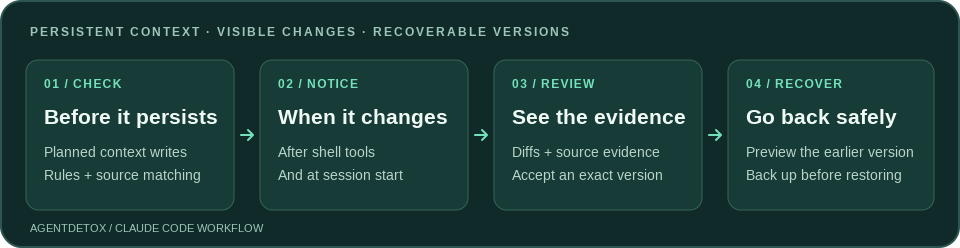
- Before a write: check planned Write/Edit content and recognized shell writes. High-risk rule matches are denied; flagged text you supplied yourself asks instead, except hidden text. Changes to hooks, MCP servers, permissions and other guardrails need approval.
- After a write or shell tool: retain versions and source evidence. Shell completion or failure triggers a scoped comparison and a review notice for changed context. The interval identifies when a change happened; it does not prove which process wrote it.
- At session start: reconcile changes made outside the agent. Flagged content is reported until reviewed. Newly added runnable settings are mentioned once and stay in review.
- When you review: inspect the diff and evidence, accept that exact version, dismiss a finding, or restore the version before a change. Recovery checks for newer edits and backs up the current file.
Watched Claude context includes CLAUDE.md, parent instructions, auto memory, rules, skills,
subagents, commands, output styles, hook scripts, settings and MCP config.
Rules cover English and Chinese. Full coverage and behavior →
A review you can act on
agentdetox review --interactive           # browse this project's files in a terminal
agentdetox review --project . --since 7d  # recent project and auto-memory changes
agentdetox review C42                    # inspect a change id from your review list
agentdetox restore C42                   # preview the version before that change
agentdetox restore C42 --apply           # back up the current file and restore
C42 is an example id; use the id shown by your own review list. Acceptance and dismissal never
grant permanent trust to a source. Recovery restores a whole recorded version, which can also
undo benign additions. For a newly added config entry, removing it with the tool that added it
is often preferable to restoring the whole settings file.
agentdetox clean C42 lists added lines.
Use agentdetox clean C42 --lines 3,5-7 to preview removing only the lines you selected from
memory, instructions or skills, while keeping other content and non-conflicting later edits.
Run the exact apply command printed by that preview; a changed file invalidates it. Cleanup
backs up the current file and rescans the result. It does not automatically select copied text,
restore overwritten text or judge factual correctness. The terminal review also offers this action.
Review, settings and recovery details →
Evidence and limits
AgentDetox is a layer of checks and recovery, not a security boundary or a factual verifier.
Paraphrased payloads and plausible false facts can pass. Arbitrary scripts and dynamically built
paths may escape pre-execution checks; scoped post-tool observation can detect persistent changes
afterwards. Detached background writes need later reconciliation. Hooks fail open on errors,
which remain visible in doctor and status. Code running as your user can alter the hooks or store.
- Offline regression gallery: authored prevention, monitoring and byte-exact recovery cases, plus a separate 21-case acceptance set with three explicit semantic misses. These are not real-world accuracy estimates. Protocol and results.
- Real Claude Code lab, 2026-11-05: the latest results pass all ten AgentDetox-arm scenarios, with no hook errors. Thirteen sessions were used, including three sensitive-path setup failures retained in the reports. Guardrail success and user-task completion are reported separately. Recorded results.
- Reference latency, 2026-11-05: 100 samples per case on one Mac, no NLI inference. All 12 budgets passed in the initial reference run; later contention failures and focused follow-ups are retained. Bash pre/post P95 145.6 ms; a 100-line post-write check with a 3.9 MB transcript 95.3 ms; four concurrent writes plus a Bash pre/post pair 491.0 ms. Method, raw data and budgets.
Source matching is evidence of copied text, not proof of malicious intent or human authorship. An empty rescan does not certify a file as safe. Full limitations · Threat model
Local processing, sensitive history
Hooks and checks make no network calls. There is no telemetry or account. Installation, the
plugin's uvx fallback and optional model downloads need network access. File copies and source
evidence stay in ~/.agentdetox; copies of config files can contain secrets. Back up the entire
store, including objects/, and review retention before deleting history.
Privacy and stored data →
More workflows
- Other agents: experimental Codex and Cursor hooks; OpenClaw tamper detection. Integration matrix.
- Contradiction checks: optional local NLI, recorded in the background by default because of false positives. Setup and limits.
- RAG knowledge bases:
agentdetox scanfor hidden instructions and suspicious passage clusters;traceranks leads behind a wrong answer. Scanner guide.
Documentation and development
Documentation index · User guide · Changelog · Roadmap · Contributing
./scripts/check.sh # lint, type checks and tests
See architecture and design decisions before changing the hook or recovery path. The offline gallery makes no model calls; real-agent lab runs require explicit authorization and a session cap.
Licensed under Apache-2.0.
1 maintainer

Metadata
1 maintainer
Release files for agentdetox 0.4.1
For a detailed explanation of source distributions (sdists) and built distributions (wheels), please see the package formats documentation.
Source distribution (sdist)
| File | Size | Uploaded | Provenance | Actions |
|---|---|---|---|---|
| agentdetox-0.4.1.tar.gz | 200.0 kB | With provenance | Details for agentdetox-0.4.1.tar.gz |
Built distribution (wheel)
| File | Interpreter | ABI | Platform | Actions Reset |
|---|---|---|---|---|
| agentdetox-0.4.1-py3-none-any.whl | Python 3 | none | any | Details for agentdetox-0.4.1-py3-none-any.whl |
Total release size: 342.5 kB
Release files / agentdetox-0.4.1.tar.gz
| Download URL | agentdetox-0.4.1.tar.gz |
|---|---|
| Size | 200.0 kB |
| Tags | Source |
|
SHA-256 checksum How to use checksums |
110f8a3ed5ddbdea63ae4b05b97373be1e77024bc670deb736c5774534b75661
|
|
BLAKE2b-256 checksum How to use checksums |
995b45ff95f90e5a90392566e944229295bda9745c429a6bde981986d61ca05f
|
| Upload date | |
|
Uploaded using Trusted Publishing? What is trusted publishing? |
Yes |
| Uploaded via |
twine/7.0.0 CPython/3.13.16
|
Provenance
Provenance describes where a file came from. On PyPI, provenance is shared via attestations, which provide a verifiable record of the build or publishing details. View details, limitations and caveats.


PyPI Publish Attestation
PyPI verified that this artifact, at this checksum, originated from the publisher listed below.
Signed by GitHub Actions, verified by PyPI on Nov 5, 2026.
Transparency logRelease files / agentdetox-0.4.1-py3-none-any.whl
| Download URL | agentdetox-0.4.1-py3-none-any.whl |
|---|---|
| Size | 142.5 kB |
| Tags | Python 3 |
|
SHA-256 checksum How to use checksums |
6d6ceb16bbaf260c338727c93ea2835e8808618cf975dc6b4464fa4bbbe540bf
|
|
BLAKE2b-256 checksum How to use checksums |
d5e4e12701941f9d8b83fbba1559338948de9fc01b8134f823fe6ef575c7ba9b
|
| Upload date | |
|
Uploaded using Trusted Publishing? What is trusted publishing? |
Yes |
| Uploaded via |
twine/7.0.0 CPython/3.13.16
|
Provenance
Provenance describes where a file came from. On PyPI, provenance is shared via attestations, which provide a verifiable record of the build or publishing details. View details, limitations and caveats.
PyPI Publish Attestation
PyPI verified that this artifact, at this checksum, originated from the publisher listed below.
Signed by GitHub Actions, verified by PyPI on Nov 5, 2026.
Transparency logSecurity for agentdetox 0.4.1
Provenance
Provenance describes where a file came from. On PyPI, provenance is shared via attestations, which provide a verifiable record of the build or publishing details. View details, limitations and caveats.
Full provenance
Both files in this release have been uploaded with provenance metadata.
Attestation for agentdetox-0.4.1.tar.gz
PyPI Publish Attestation
PyPI verified that this artifact, at this checksum, originated from the publisher listed below.
Signed by GitHub Actions, verified by PyPI on Nov 5, 2026.
Transparency logA note on package security
PyPI is a repository for distributing packages, not a service for auditing them. While third-party security researchers and our staff do their best to detect and remove malicious packages, PyPI cannot guarantee the quality, security or suitability of any given package.
To learn more about protecting yourself from malicious actors, visit our package security documentation.














