
Agent Eye dashboard for monitoring GitHub Copilot CLI sessions in real-time
Verified details
These details have been verified by PyPIProject links
GitHub Statistics
Maintainers

Project description
 Agent Eye







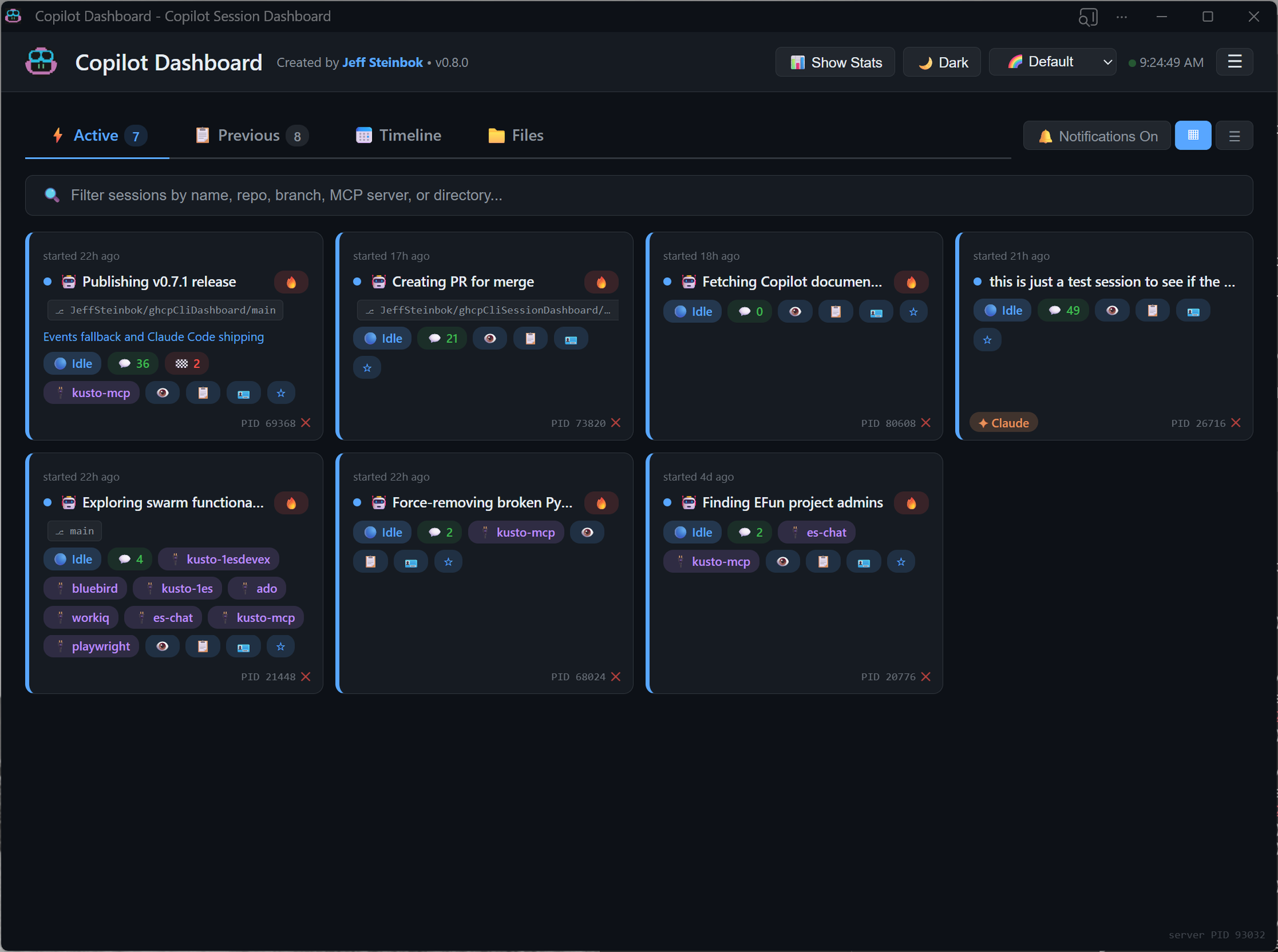
A local web dashboard that monitors all your GitHub Copilot CLI and Claude Code sessions in real-time. Designed for power users running multiple AI coding sessions simultaneously.
[!TIP] The dashboard works out of the box by reading
events.jsonlfiles from your Copilot session directories. For richer session history (summaries, checkpoints), enable the SESSION_STORE experimental feature: add"experimental": trueto~/.copilot/config.jsonand start a new Copilot session.
Installation
Option 1: From PyPI
pip install agenteye-app
Option 2: From Source
# Clone the repo
git clone https://github.com/JeffSteinbok/agenteye.git
cd agenteye

# Install in editable mode
pip install -e .
Usage
Native App (Recommended)
Run as a native desktop app with system tray integration:
# Start the tray app (window + tray icon)
agenteye app

# Start minimized to tray
agenteye app --hidden

# Custom port
agenteye app --port 8080
The tray app provides:
- Native window with dark/light title bar matching app theme
- System tray icon with quick access menu
- Close (X) minimizes to tray, quit from tray menu exits
- Native Windows notifications (no browser permission needed)
Browser Mode
Run as a background server and open in your browser:
# Start the dashboard
agenteye start

# Start in background
agenteye start --background

# Check status
agenteye status

# Stop
agenteye stop

# Upgrade to the latest version (restarts automatically if running)
agenteye upgrade
Open http://localhost:5111 in your browser.
Autostart at Login (Windows)
# Start tray app on login (recommended)
agenteye autostart --mode app

# Start background server on login
agenteye autostart --mode server

# Custom port
agenteye autostart --mode app --port 8080

# Remove login startup
agenteye autostart-remove
Features
Session States
- Working / Thinking (green) — session is actively running tools or reasoning
- Waiting (yellow) — session needs your input (
ask_userorask_permissionpending) - Idle (blue) — session is done and ready for your next task
Key Features
- Native tray app —
agenteye appruns as a native desktop application with system tray integration, eliminating the need for a separate browser tab - Dark/light title bar — window title bar automatically matches your chosen theme
- Native notifications — Windows toast notifications with proper app name and icon (no browser permission prompts)
- Start hidden —
--hiddenflag starts the app minimized to tray (great for autostart) - Claude Code support — automatically discovers Claude Code sessions from
~/.claude/projects/. Active Claude sessions appear alongside Copilot sessions with a✦ Claudebadge. - Cross-machine sync — see active sessions from all your machines in one dashboard, powered by OneDrive or any cloud-synced folder. See Cross-Machine Sync for details.
- Settings menu — ☰ hamburger menu in the header with toggles for autostart-on-login and remote sync.
- Upgrade command —
agenteye upgradestops the server, upgrades via pip, and restarts automatically. - Desktop notifications — get alerts when sessions transition between states
- Focus window — bring an active session's terminal to the foreground with one click
- Restart commands — copy-pasteable
copilot --resume <id>commands for every session - Waiting context — shows what a waiting session is asking (e.g. the
ask_userquestion and choices) - Background tasks — shows count of running subagents per session
- Session details — click any session to see checkpoints, recent tool output, references, and conversation history
- Tile & List views — compact card grid or detailed expandable rows
- 9 color palettes and light/dark mode
Cross-Machine Sync
See active sessions from all your machines in one dashboard — powered by OneDrive, Google Drive, or any cloud-synced folder. No Git commits needed.
How it works:
- On each poll cycle, the dashboard exports your active sessions as JSON files to a shared cloud folder
- Other machines read those files and display them in a "Remote Sessions" section under Active
- Each machine only writes to its own subfolder — no sync conflicts
Auto-detection (priority order):
OneDriveCommercial(preferred — prevents data leakage to personal accounts)OneDriveConsumer- User Documents folder
Configuration (~/.copilot/dashboard-config.json):
{
  "sync": {
    "enabled": true,
    "folder": "D:\\MyCloudSync"
  }
}
- Set
"enabled": falseto disable sync entirely - Set
"folder"to override auto-detection with a specific path
What remote sessions show:
- Live state indicators (working, waiting, idle)
- Session summary, intent, branch, MCP servers, turn/checkpoint counts
- Machine name badge (e.g.
🖥️ LAPTOP-HOME)
What remote sessions don't show:
- No detail drill-down (checkpoints, turns, files)
- No focus or kill actions (those are local-only)
- No past/previous sessions from remote machines
Prerequisites
| Package | Purpose |
|---|---|
fastapi |
Web framework with auto-generated OpenAPI docs |
uvicorn |
ASGI server |
pywinauto |
Window focus and process detection (Windows-only) |
pywebview |
Native window for tray app |
pystray |
System tray icon |
plyer |
Native OS notifications |
All are installed automatically via pip install agenteye-app.
For more details on architecture, data sources, and API endpoints, see DEVELOPMENT.md.
Project details
Verified details
These details have been verified by PyPIProject links
GitHub Statistics
Maintainers


Download files
Download the file for your platform. If you're not sure which to choose, learn more about installing packages.
Source Distribution
Built Distribution
Filter files by name, interpreter, ABI, and platform.
If you're not sure about the file name format, learn more about wheel file names.
Copy a direct link to the current filters
File details
Details for the file agenteye_app-1.0.1.tar.gz.
File metadata
- Download URL: agenteye_app-1.0.1.tar.gz
- Upload date:
- Size: 1.4 MB
- Tags: Source
- Uploaded using Trusted Publishing? Yes
- Uploaded via: twine/6.1.0 CPython/3.13.12
File hashes
| Algorithm | Hash digest | |
|---|---|---|
| SHA256 |
729afd6b119bbe40ecdb48beda20b3a0a51da3d390f46d60f5175df9bd624e45
|
|
| MD5 |
c97c7354b26053de365f422f515386f0
|
|
| BLAKE2b-256 |
41adb2a279dd8bfe5c374840ab304fb8a06d244205ef61e99a48e666417a7831
|
Provenance
The following attestation bundles were made for agenteye_app-1.0.1.tar.gz:
Publisher:
publish-pypi.yml on JeffSteinbok/agenteye
-
Statement:
-
Statement type:
https://in-toto.io/Statement/v1 -
Predicate type:
https://docs.pypi.org/attestations/publish/v1 -
Subject name:
agenteye_app-1.0.1.tar.gz -
Subject digest:
729afd6b119bbe40ecdb48beda20b3a0a51da3d390f46d60f5175df9bd624e45 - Sigstore transparency entry: 1991466463
- Sigstore integration time:
-
Permalink:
JeffSteinbok/agenteye@767b3fc5c9c63743b53222b7a57fcfb848d2bf7b -
Branch / Tag:
refs/tags/v1.0.1 - Owner: https://github.com/JeffSteinbok
-
Access:
public
-
Token Issuer:
https://token.actions.githubusercontent.com -
Runner Environment:
github-hosted -
Publication workflow:
publish-pypi.yml@767b3fc5c9c63743b53222b7a57fcfb848d2bf7b -
Trigger Event:
release
-
Statement type:
File details
Details for the file agenteye_app-1.0.1-py3-none-any.whl.
File metadata
- Download URL: agenteye_app-1.0.1-py3-none-any.whl
- Upload date:
- Size: 1.4 MB
- Tags: Python 3
- Uploaded using Trusted Publishing? Yes
- Uploaded via: twine/6.1.0 CPython/3.13.12
File hashes
| Algorithm | Hash digest | |
|---|---|---|
| SHA256 |
277039c7a663f3d0c54c1588d1bc9f211aa0998c50ae0e99b887e175a258ba94
|
|
| MD5 |
026bdcd8af15602034041f1a1190bfc8
|
|
| BLAKE2b-256 |
e5dfc643710b9e8f62ad437ca4c455710d21348e545133cd435f049465de8248
|
Provenance
The following attestation bundles were made for agenteye_app-1.0.1-py3-none-any.whl:
Publisher:
publish-pypi.yml on JeffSteinbok/agenteye
-
Statement:
-
Statement type:
https://in-toto.io/Statement/v1 -
Predicate type:
https://docs.pypi.org/attestations/publish/v1 -
Subject name:
agenteye_app-1.0.1-py3-none-any.whl -
Subject digest:
277039c7a663f3d0c54c1588d1bc9f211aa0998c50ae0e99b887e175a258ba94 - Sigstore transparency entry: 1991466548
- Sigstore integration time:
-
Permalink:
JeffSteinbok/agenteye@767b3fc5c9c63743b53222b7a57fcfb848d2bf7b -
Branch / Tag:
refs/tags/v1.0.1 - Owner: https://github.com/JeffSteinbok
-
Access:
public
-
Token Issuer:
https://token.actions.githubusercontent.com -
Runner Environment:
github-hosted -
Publication workflow:
publish-pypi.yml@767b3fc5c9c63743b53222b7a57fcfb848d2bf7b -
Trigger Event:
release
-
Statement type:






