
This release has been yanked by its maintainers, and will be ignored by installers, except when explicitly specified.
Consider using release 1.0.0rc5 instead.
Reason given by maintainers: Broken Claude auth subcommand
agentic-dev-loop
Turn an LLM into a gated, sandboxed, resumable construction loop over your codebase.
Describe your pipeline in one YAML file - agent steps, mechanical test gates, and
trusted actions - and agentic-dev-loop runs it end to end: agent and command steps get
kernel-level sandboxing via Docker, verdicts route the graph, every boundary is
checkpointed, and nothing gets committed until every gate passes.
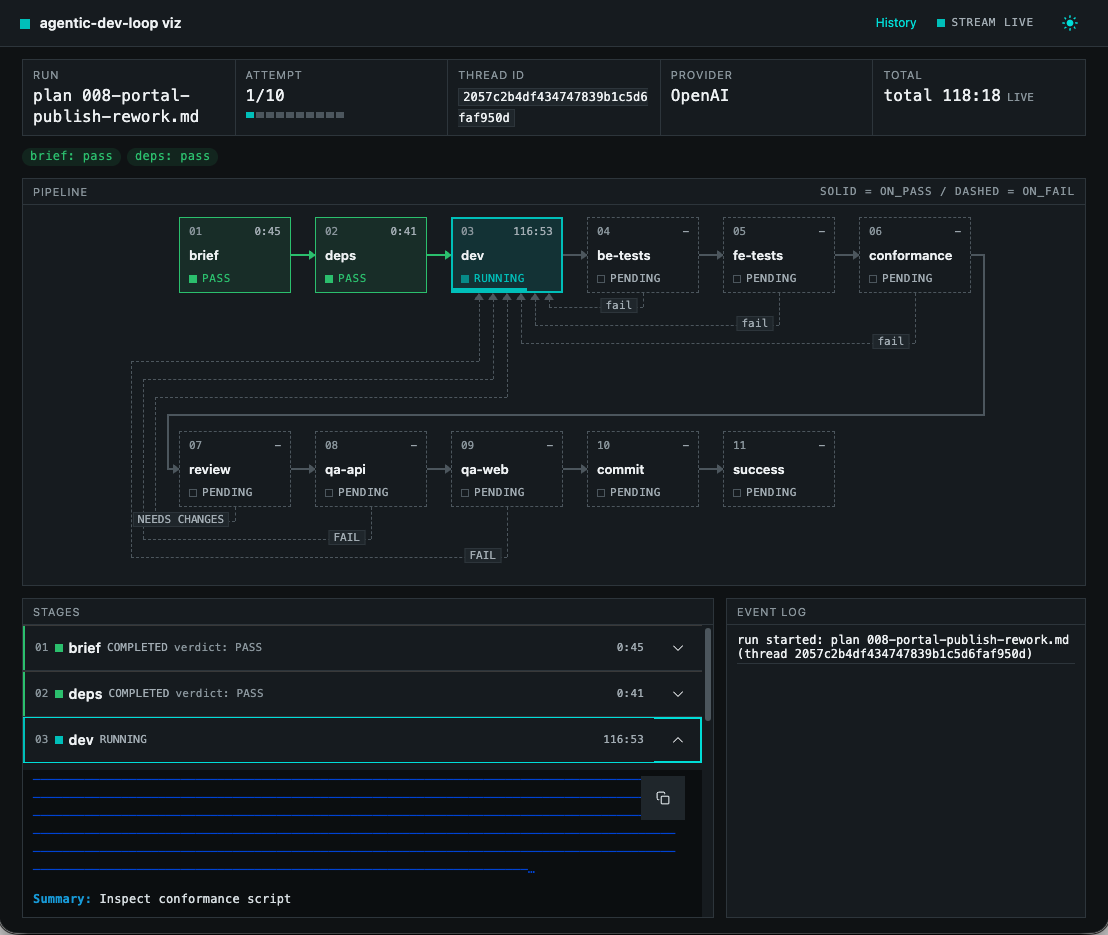
Key features
- A tool, not a wiring project. One CLI entry point, opinionated defaults, fixed safety policies. You write the pipeline and the agent definitions - nothing else.
- Deterministic. Same pipeline + same state means the same routing. Verdicts are parsed from files and validated tool calls, retries are bounded, nothing is best-effort.
- Sandboxed by default. The agent's shell and every command step run
inside an always-on Docker sandbox: network off by default, writes only to
declared
mounts:, no.git. If no sandbox is available, the run stops instead of degrading. - Crash-safe and resumable. Every boundary is checkpointed; interrupt a
run and resume it from the exact checkpoint with
--resume, notes intact. - Watchable. A live browser graph view with per-stage consoles and an event log, a browsable run history, and markdown reports.
- Gated commits. A single commit point that fires only when every gate passed and the worktree was clean at start.
- Supply-chain careful. A digest-pinned dev image, a locked-by-default dependency policy, and a CVE-audited restore step.
- Secret-safe. Secrets are refs in config, values in the host environment,
opted in per step, and scrubbed from every engine-written output; the
workspace may not contain
.env*files. - Onboarding that stays honest.
initscaffolds a working loop for your repo,doctorprobes the host before every run,upgradeconverges the install and the pinned version. - Extensible. Plugins add your own actions, tools, and document loaders, loaded from outside the workspace only.
Supported platforms
The engine is plain Linux under the hood and runs wherever a compliant Docker engine does:
| Platform | Support |
|---|---|
| Linux | Native. Docker Engine, OrbStack, Colima, or podman with docker compat. |
| macOS | Native. Docker Desktop, OrbStack, or Colima. |
| Windows | Via WSL2 (Ubuntu distro). Enable Docker Desktop's WSL integration (or run Docker Engine inside the distro) and keep the repo on the WSL filesystem (~/dev/...), not /mnt/c - bind-mounting a 9p path into containers breaks permissions and is slow. |
Quickstart
Prerequisites
| Requirement | Detail |
|---|---|
| Python | >= 3.12 |
| Docker engine | Engine API >= 1.43 (Engine 24). Any compliant engine works - Docker Desktop, OrbStack, Colima, Rancher Desktop, podman docker-compat. On Windows, run under WSL2: the repo must live on the WSL filesystem, not /mnt/c. |
| LLM API key | The env var named by your pipeline's api_key_env (e.g. OPENAI_API_KEY) must be set - a missing key fails fast, naming it. Alternatively, agentic-dev-loop copilot-login authenticates a Copilot subscription, and a Claude Pro or Max subscription runs on Anthropic's own endpoint after agentic-dev-loop claude-login (see LLM providers). |
Installation
pipx install --pip-args="--pre" agentic-dev-loop   # latest release is currently a pre-release
agentic-dev-loop --version
Install with pipx: the engine's venv lives outside the workspace, so it is unmounted from the sandbox and never agent-writable. On the first run the engine pulls the digest-pinned dev image and verifies its digest. Setup details and troubleshooting live in the setup guide.
Your first loop
cd <your-repo>
agentic-dev-loop init --profile python                     # writes the pipeline + agents
export OPENAI_API_KEY=...                                  # whatever api_key_env names
agentic-dev-loop agentic-dev-loop/pipeline.yaml --dry-run  # validate - no LLM, no Docker
agentic-dev-loop agentic-dev-loop/pipeline.yaml            # run it
init scaffolds agentic-dev-loop/pipeline.yaml plus the agent files it
names; --dry-run loads and validates with no LLM, no Docker, and no state
writes. A minimal pipeline looks like:
name: my-construction-loop

llm:
  model: openai/deepseek-v4-pro
  base_url: https://api.deepseek.com
  api_key_env: OPENAI_API_KEY

max_attempts: 10
agents_dir: sdk_agents

steps:
  - name: dev
    agent: dev
    produces: implementation-summary.md
    on_pass: test

  - name: test
    command: .venv-sandbox/bin/python -m pytest tests/ -q
    on_pass: review
    on_fail: { goto: dev, retry: true }

  - name: review
    agent: review
    artifact: review-findings.md
    verdicts: { pass: APPROVED, fail: NEEDS CHANGES }
    on_pass: commit
    on_fail: { goto: dev, retry: true }

  - name: commit
    action: commit
    params: { message: "feat: construct {subject}" }
Every field - per-step isolation, mounts and egress, secrets, dependency policy, named LLM profiles - is in the pipeline.yaml reference.
Documentation
| Page | What it covers |
|---|---|
| Architecture | The five layers, one full run end to end, and the host-boundary security model |
| CLI | Run flags, resuming, the live view, reports, container management, and onboarding commands |
| pipeline.yaml | The complete configuration reference: steps, isolation, secrets, networking, dependency policy |
| LLM providers | OpenAI-compatible endpoints (OpenAI, DeepSeek, and others), the GitHub Copilot subscription, and the Claude subscription |
| Authoring a loop | From init to a committed pipeline: agent files, stage lineup, adaptation checklist |
| Setup and troubleshooting | Docker engines, the dev image, caching, error codes |
| Browser sandbox | Running a browser inside the sandbox |
| Known issues | Container lifecycle edge cases |
Contributing
Read AGENTS.md first - it is the instruction set for both human and agent contributors - then see CONTRIBUTING.md for the development workflow and the OpenCode commands.
Built on OpenHands SDK and LangGraph.
1 maintainer

Metadata
1 maintainer
Release files for agentic-dev-loop 1.0.0rc3
For a detailed explanation of source distributions (sdists) and built distributions (wheels), please see the package formats documentation.
Source distribution (sdist)
| File | Size | Uploaded | Provenance | Actions |
|---|---|---|---|---|
| agentic_dev_loop-1.0.0rc3.tar.gz | 1.0 MB | With provenance | Details for agentic_dev_loop-1.0.0rc3.tar.gz |
Built distribution (wheel)
| File | Interpreter | ABI | Platform | Actions Reset |
|---|---|---|---|---|
| agentic_dev_loop-1.0.0rc3-py3-none-any.whl | Python 3 | none | any | Details for agentic_dev_loop-1.0.0rc3-py3-none-any.whl |
Total release size: 1.9 MB
Release files / agentic_dev_loop-1.0.0rc3.tar.gz
| Download URL | agentic_dev_loop-1.0.0rc3.tar.gz |
|---|---|
| Size | 1.0 MB |
| Tags | Source |
|
SHA-256 checksum How to use checksums |
e8863d22f72f79b653c683a249b5bea3776620e400883c5fc4ec11437f003048
|
|
BLAKE2b-256 checksum How to use checksums |
4d06dc92371a10ccc25153f90620391d80ead6038bebf21fff92c441427366ad
|
| Upload date | |
|
Uploaded using Trusted Publishing? What is trusted publishing? |
Yes |
| Uploaded via |
twine/7.0.0 CPython/3.13.16
|
Provenance
Provenance describes where a file came from. On PyPI, provenance is shared via attestations, which provide a verifiable record of the build or publishing details. View details, limitations and caveats.


PyPI Publish Attestation
PyPI verified that this artifact, at this checksum, originated from the publisher listed below.
Signed by GitHub Actions, verified by PyPI on Nov 13, 2026.
Transparency logRelease files / agentic_dev_loop-1.0.0rc3-py3-none-any.whl
| Download URL | agentic_dev_loop-1.0.0rc3-py3-none-any.whl |
|---|---|
| Size | 876.5 kB |
| Tags | Python 3 |
|
SHA-256 checksum How to use checksums |
a8b986736b41ac7e4316f0bcbb21174efb4c954191971b9ab61f67eeca6872fb
|
|
BLAKE2b-256 checksum How to use checksums |
0f3ec8f0f8778c2062056dabab781b4ab3f5c47eaf85e134291a5a38f60b5842
|
| Upload date | |
|
Uploaded using Trusted Publishing? What is trusted publishing? |
Yes |
| Uploaded via |
twine/7.0.0 CPython/3.13.16
|
Provenance
Provenance describes where a file came from. On PyPI, provenance is shared via attestations, which provide a verifiable record of the build or publishing details. View details, limitations and caveats.
PyPI Publish Attestation
PyPI verified that this artifact, at this checksum, originated from the publisher listed below.
Signed by GitHub Actions, verified by PyPI on Nov 13, 2026.
Transparency logSecurity for agentic-dev-loop 1.0.0rc3
Provenance
Provenance describes where a file came from. On PyPI, provenance is shared via attestations, which provide a verifiable record of the build or publishing details. View details, limitations and caveats.
Full provenance
Both files in this release have been uploaded with provenance metadata.
Attestation for agentic_dev_loop-1.0.0rc3.tar.gz
PyPI Publish Attestation
PyPI verified that this artifact, at this checksum, originated from the publisher listed below.
Signed by GitHub Actions, verified by PyPI on Nov 13, 2026.
Transparency logA note on package security
PyPI is a repository for distributing packages, not a service for auditing them. While third-party security researchers and our staff do their best to detect and remove malicious packages, PyPI cannot guarantee the quality, security or suitability of any given package.
To learn more about protecting yourself from malicious actors, visit our package security documentation.














