
A powerful multi-agent system for adaptive AI reasoning and automation
Verified details
These details have been verified by PyPIProject links
GitHub Statistics
Maintainers

Project description
AgenticFleet
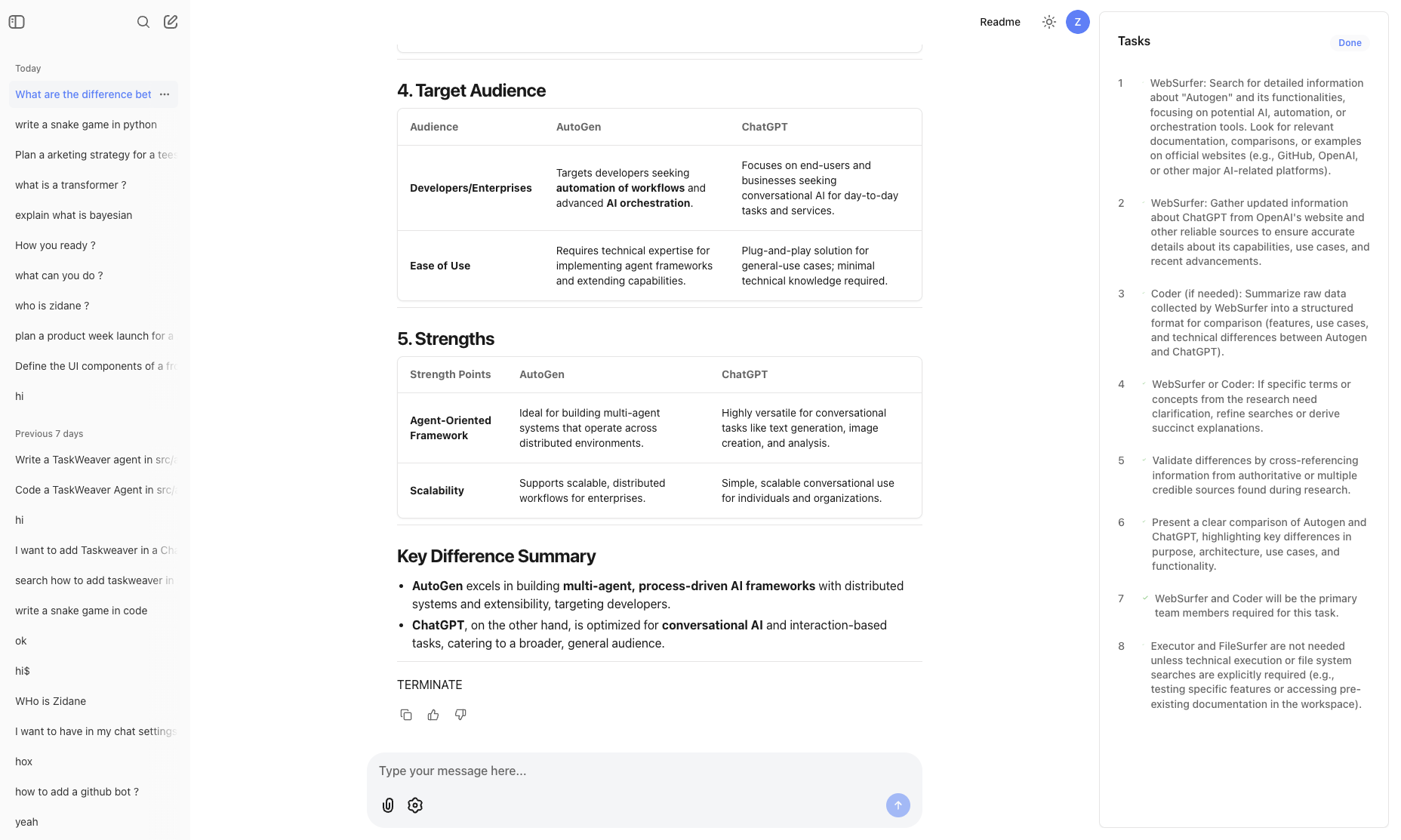
A powerful multi-agent system for adaptive AI reasoning and automation. AgenticFleet combines Chainlit's interactive interface with AutoGen's multi-agent capabilities to create a flexible, powerful AI assistant platform.




Core Components
AgenticFleet operates through a coordinated team of specialized agents:
-
WebSurfer: Expert web navigation agent
- Extracts information from web pages
- Captures and processes screenshots
- Provides structured summaries of findings
-
FileSurfer: File system specialist
- Searches and analyzes workspace files
- Manages file operations efficiently
- Extracts relevant information from documents
-
Coder: Development expert
- Generates and reviews code
- Implements solutions
- Maintains code quality
-
Executor: Code execution specialist
- Safely runs code in isolated workspace
- Monitors execution and handles timeouts
- Provides detailed execution feedback
Supported Model Providers
AgenticFleet supports multiple LLM providers through a unified interface:
-
OpenAI
- GPT-4 and other OpenAI models
- Function calling and vision capabilities
- JSON mode support
-
Azure OpenAI
- Azure-hosted OpenAI models
- Azure AD authentication support
- Enterprise-grade security
-
Google Gemini
- Gemini Pro and Ultra models
- OpenAI-compatible API
- Multimodal capabilities
-
DeepSeek
- DeepSeek's language models
- OpenAI-compatible API
- Specialized model capabilities
-
Ollama
- Local model deployment
- Various open-source models
- Offline capabilities
-
Azure AI Foundry
- Azure-hosted models (e.g., Phi-4)
- GitHub authentication
- Enterprise integration
-
CogCache
- OpenAI-compatible API with caching
- Improved response times
- Cost optimization
- Automatic retry handling
Model Provider Installation
Install providers using pip:
# Install base package
pip install agentic-fleet

# Install all model providers
pip install "agentic-fleet[models]"

# Or install individual providers
pip install "google-cloud-aiplatform>=1.38.0" "google-generativeai>=0.3.0"  # For Gemini
pip install "deepseek>=0.1.0"  # For DeepSeek
pip install "ollama>=0.1.5"  # For Ollama
Model Provider Usage
from agentic_fleet.models import ModelFactory, ModelProvider
from autogen_core.models import UserMessage

# Create Azure OpenAI client
azure_client = ModelFactory.create(
    ModelProvider.AZURE_OPENAI,
    deployment="your-deployment",
    model="gpt-4",
    endpoint="your-endpoint"
)

# Create Gemini client
gemini_client = ModelFactory.create(
    ModelProvider.GEMINI,
    api_key="your-api-key"
)

# Create CogCache client
cogcache_client = ModelFactory.create(
    ModelProvider.COGCACHE,
    api_key="your-cogcache-key",
    model="gpt-4"
)

# Create local Ollama client
ollama_client = ModelFactory.create(
    ModelProvider.OLLAMA,
    model="llama2:latest"
)

# Use any client
async def test_model(client):
    response = await client.create([
        UserMessage(content="What is the capital of France?", source="user")
    ])
    print(response)
Key Features
-
Multi-Agent System
- Coordinated team of specialized AI agents
- Real-time inter-agent communication
- Task planning and execution tracking
-
Interactive Interface
- Real-time streaming responses
- Code syntax highlighting
- Markdown rendering
- File upload/download support
- Progress visualization with task lists
-
Advanced Capabilities
- Multiple LLM provider support
- GitHub OAuth authentication
- Configurable agent behaviors
- Comprehensive error handling and recovery
- Multi-modal content processing (text, images)
- Execution workspace isolation
-
Developer-Friendly
- Easy-to-use CLI
- Extensive documentation
- Flexible configuration
- Active community support
Quick Start
- Install AgenticFleet using uv (recommended):
uv pip install agentic-fleet
playwright install --with-deps chromium # Optional: Install Playwright Chromium dependencies
- Copy and configure environment variables:
# Copy the example environment file
cp .env.example .env

# Open .env and update with your values
# Required: Add your Azure OpenAI credentials
# Optional: Configure OAuth settings
- Start the server:
agenticfleet start   # Enable GitHub authentication
agenticfleet start --no-oauth # Default local mode
The web interface will be available at http://localhost:8001.
System Architecture
graph TD
    User[Chainlit UI] -->|HTTP| App[app.py]
    App --> AgentTeam[MagenticOneGroupChat]
    AgentTeam --> WebSurfer
    AgentTeam --> FileSurfer
    AgentTeam --> Coder
    AgentTeam --> Executor
    WebSurfer -->|Selenium| Web[External Websites]
    FileSurfer -->|OS| FileSystem[Local Files]
    Executor -->|Subprocess| Code[Python/Runtime]
Configuration
The .env.example file contains all required and recommended settings:
# Required: Azure OpenAI Configuration
AZURE_OPENAI_API_KEY=your_api_key
AZURE_OPENAI_ENDPOINT=your_endpoint
AZURE_OPENAI_DEPLOYMENT=your_deployment
AZURE_OPENAI_MODEL=your_model

# Optional: OAuth Configuration
USE_OAUTH=false # Set to true to enable GitHub OAuth
OAUTH_GITHUB_CLIENT_ID=
OAUTH_GITHUB_CLIENT_SECRET=
OAUTH_REDIRECT_URI=http://localhost:8001/oauth/callback

# Optional: Other Model Provider Configurations
GEMINI_API_KEY=your_gemini_key
DEEPSEEK_API_KEY=your_deepseek_key
GITHUB_TOKEN=your_github_pat  # For Azure AI Foundry
COGCACHE_API_KEY=your_cogcache_key  # For CogCache proxy API
Error Handling
AgenticFleet implements comprehensive error handling:
- Graceful degradation on service failures
- Detailed error logging and reporting
- Automatic cleanup of resources
- Session state recovery
- Execution timeout management
Development
Prerequisites
- Python 3.10-3.12 (Python 3.13 is not yet supported)
- uv package manager (recommended)
- Azure OpenAI API access
Setup
- Clone and install:
git clone https://github.com/qredence/agenticfleet.git
cd agenticfleet
pip install uv
uv pip install -e .
uv pip install -e ".[dev]"
- Run tests:
pytest tests/
Documentation
- Installation Guide - Detailed setup instructions
- Usage Guide - How to use AgenticFleet
- API Reference - Complete API documentation
- Architecture Overview - System architecture and design
Contributing
We welcome contributions! Please see our Contributing Guide for details.
Security
For security concerns, please review our Security Policy.
License
This project is licensed under the Apache-2.0 License - see the LICENSE file for details.
Support
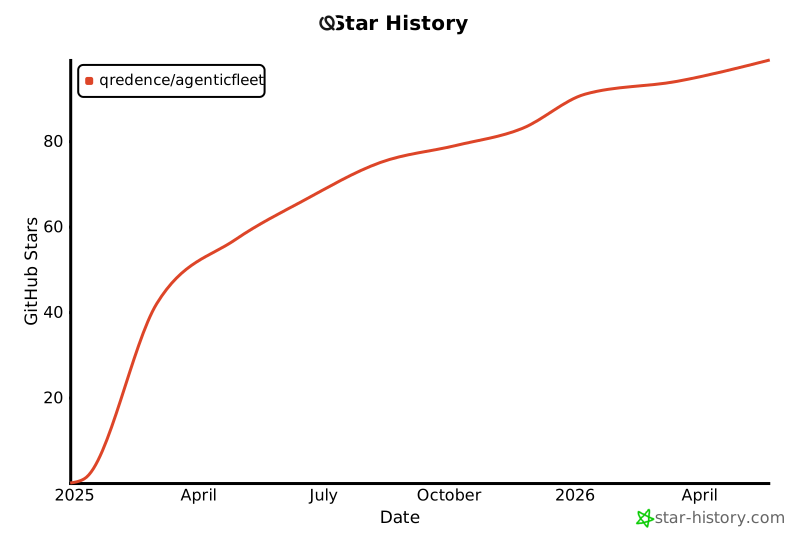
Star History
Project details
Verified details
These details have been verified by PyPIProject links
GitHub Statistics
Maintainers
Release history Release notifications | RSS feed


Download files
Download the file for your platform. If you're not sure which to choose, learn more about installing packages.
Source Distribution
Built Distribution
Filter files by name, interpreter, ABI, and platform.
If you're not sure about the file name format, learn more about wheel file names.
Copy a direct link to the current filters
File details
Details for the file agentic_fleet-0.4.65.tar.gz.
File metadata
- Download URL: agentic_fleet-0.4.65.tar.gz
- Upload date:
- Size: 60.5 kB
- Tags: Source
- Uploaded using Trusted Publishing? Yes
- Uploaded via: twine/6.1.0 CPython/3.12.8
File hashes
| Algorithm | Hash digest | |
|---|---|---|
| SHA256 |
b00df83f8d10478f84d23f0450daed160430eee8bf4869d9d063fd7582a7443a
|
|
| MD5 |
168ed55521e1a169e0ef96650f12707b
|
|
| BLAKE2b-256 |
860e10594d2767375e277313f462b0617138740b94256e4a779c0ed0b0829412
|
Provenance
The following attestation bundles were made for agentic_fleet-0.4.65.tar.gz:
Publisher:
python-publish.yml on Qredence/AgenticFleet
-
Statement:
-
Statement type:
https://in-toto.io/Statement/v1 -
Predicate type:
https://docs.pypi.org/attestations/publish/v1 -
Subject name:
agentic_fleet-0.4.65.tar.gz -
Subject digest:
b00df83f8d10478f84d23f0450daed160430eee8bf4869d9d063fd7582a7443a - Sigstore transparency entry: 167347525
- Sigstore integration time:
-
Permalink:
Qredence/AgenticFleet@1784cbfdae70339b56e4625640c5e1fa6ac2b181 -
Branch / Tag:
refs/tags/0.4.65-r - Owner: https://github.com/Qredence
-
Access:
public
-
Token Issuer:
https://token.actions.githubusercontent.com -
Runner Environment:
github-hosted -
Publication workflow:
python-publish.yml@1784cbfdae70339b56e4625640c5e1fa6ac2b181 -
Trigger Event:
release
-
Statement type:
File details
Details for the file agentic_fleet-0.4.65-py3-none-any.whl.
File metadata
- Download URL: agentic_fleet-0.4.65-py3-none-any.whl
- Upload date:
- Size: 9.8 kB
- Tags: Python 3
- Uploaded using Trusted Publishing? Yes
- Uploaded via: twine/6.1.0 CPython/3.12.8
File hashes
| Algorithm | Hash digest | |
|---|---|---|
| SHA256 |
95ef0a5e847304e1387faf2a9f921352302f96772d9476477c8b3cb4d07aa65f
|
|
| MD5 |
513b30a69f611cb15088e47603ac19fc
|
|
| BLAKE2b-256 |
6e2fc27f2ac12c9da261b0f3294e3c09c5b758a39188b77334fb5298421b5c10
|
Provenance
The following attestation bundles were made for agentic_fleet-0.4.65-py3-none-any.whl:
Publisher:
python-publish.yml on Qredence/AgenticFleet
-
Statement:
-
Statement type:
https://in-toto.io/Statement/v1 -
Predicate type:
https://docs.pypi.org/attestations/publish/v1 -
Subject name:
agentic_fleet-0.4.65-py3-none-any.whl -
Subject digest:
95ef0a5e847304e1387faf2a9f921352302f96772d9476477c8b3cb4d07aa65f - Sigstore transparency entry: 167347527
- Sigstore integration time:
-
Permalink:
Qredence/AgenticFleet@1784cbfdae70339b56e4625640c5e1fa6ac2b181 -
Branch / Tag:
refs/tags/0.4.65-r - Owner: https://github.com/Qredence
-
Access:
public
-
Token Issuer:
https://token.actions.githubusercontent.com -
Runner Environment:
github-hosted -
Publication workflow:
python-publish.yml@1784cbfdae70339b56e4625640c5e1fa6ac2b181 -
Trigger Event:
release
-
Statement type:






