
Agentic HIL
Your AI agent can develop firmware on its own — because Agentic HIL closes the loop with real hardware.
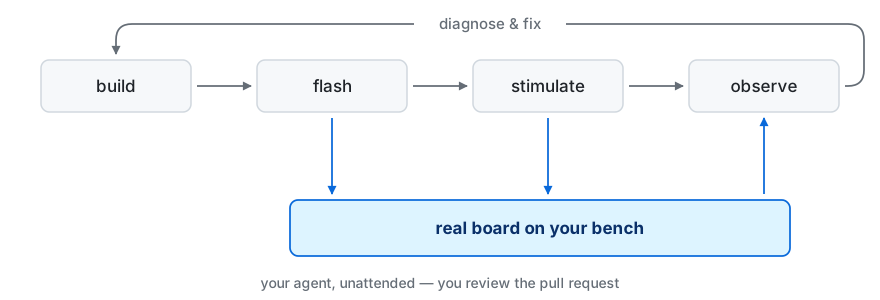
Agentic Hardware-in-the-Loop (Agentic HIL) is a Python package that exposes bounded MCP tools for probing, flashing, resetting, artifact validation, serial and CAN stimulus/feedback, reports, and logs — without giving an agent arbitrary host or debugger access. Each project has exactly one authoritative configuration stored outside the repository, out of reach of the agent's own file tools.
Why
A green build is not enough in embedded development: firmware has to behave correctly on the real board. Classic tools automate single steps — flash here, read a log there — but the moment real hardware has to respond, a human is back in the loop. Handing an agent a raw debugger shell or direct serial access instead is neither safe nor reproducible. Agentic HIL closes the gap with a small, auditable gate:
AI agent / CI  ──MCP (stdio)──▶  Agentic HIL  ──authoritative config──▶  OpenOCD / pyOCD / STM32CubeProgrammer
                                    │                        serial ports (pyserial)
                                    │                        CAN (PEAK / SocketCAN / bridge)
                                    ▼
                       structured results, reports, logs
Every hardware action is validated against the selected authoritative configuration, executed with timeouts, logged to .agentic-hil/logs/, and answered with a structured JSON result (ok, error_type, summary, likely_causes, report_path, log_path) that an agent can act on. What the agent may do at all is per device and per permission, and reaching for a debugger escape hatch is what takes flashing away: the safety model is the short version, docs/security-design.md the long one.
The supported first path
An ST Nucleo-F446RE with its on-board ST-LINK, driven through OpenOCD, on Python 3.10 or newer. That is the bench the worked example in examples/nucleo-f446re_demo/ is built and tested against, and the one to start from unless your project already says otherwise. Linux, macOS, and Windows are all CI-tested; pyOCD and the STM32CubeProgrammer CLI are the other two debugger backends, and CAN comes as an optional extra — installation has the rest.
Install
The easiest path: copy/paste this prompt to your AI agent:
Read and follow the complete guide at https://github.com/agentic-hil/agentic-hil/blob/master/AI_AGENT_QUICKSTART.md to install Agentic HIL and set it up for this project.
Agents follow AI_AGENT_QUICKSTART.md — everything installs user-local, no admin rights required, ever. The same is true doing it by hand, from the firmware project root:
pip install --user agentic-hil
agentic-hil setup                 # add --agent codex or --agent opencode for those
setup installs the agent skill, registers the MCP server with a verified absolute executable path, creates the policy file outside the repository, and runs doctor. It prints where that file landed: review it, and take back whatever this bench should not have. Your agent's host will ask you to approve the command once, because it writes the agent's own skill file and MCP registration.
If pip is missing, Python is externally managed, or agentic-hil does not end up on PATH, use uv tool install agentic-hil or pipx install agentic-hil instead and rerun setup. Installation has the two halves setup composes, the optional extras, and upgrading; TROUBLESHOOTING.md covers what to do when something does not start.
Quickstart: one real run
The worked example is a firmware project of its own. Plug the board in, build it, and point Agentic HIL at it from that directory:
cd examples/nucleo-f446re_demo
cmake --preset Debug && cmake --build --preset Debug   # → build/Debug/nucleo-f446re_demo.elf
agentic-hil setup --agent claude-code                  # or: codex / opencode
agentic-hil doctor
doctor checks the configuration against the attached bench and names what it finds — a missing toolchain, an unreachable probe, a target type this host cannot resolve — before anything is flashed. If the board arrived after setup ran, agentic-hil adopt-hardware fills in the probe serial, the backend executable and the COM device it left unset (--dry-run shows the plan first).
With the MCP host started from that directory, the agent drives four calls:
flash_firmware     {"image_path": "build/Debug/nucleo-f446re_demo.elf"}
com_session_start  {"port_id": "dut_uart"}
reset_target       {"mode": "run"}
com_read           {"port_id": "dut_uart", "wait_timeout_s": 5}
→ feedback contains "Hello World"
The same loop runs headless as a pytest regression — pytest tests/ in that directory flashes the ELF, resets the target and asserts the boot banner on the UART. examples/nucleo-f446re_demo/ walks through both, and docs/testing.md covers writing the run down as a reviewable YAML plan instead.
Where the depth lives
| If you want | Read |
|---|---|
| to install, upgrade, add CAN or pyOCD, or look up a command | docs/installation.md |
| what the authoritative configuration declares and who may change it | docs/configuration.md |
| the complete MCP tool surface and how a run is composed from it | docs/mcp-tools.md |
| to register the server in a specific MCP host | docs/mcp-hosts.md |
| to write hardware tests — YAML plans or pytest | docs/testing.md |
| why it is safe to leave an agent alone with the bench | docs/safety-model.md and docs/security-design.md |
| a failure diagnosed | TROUBLESHOOTING.md |
| to point your agent at this repository | AI_AGENT_QUICKSTART.md and AGENTS.md |
Names: the Python distribution/install target, CLI command, repository URL, and MCP server name use agentic-hil. Python imports, pytest plugin names, fixtures, and Python examples use agentic_hil.
Development
python -m pip install -e '.[dev]'
ruff check src tests evals tools
pytest
python -m build
twine check dist/*
The package is configured for PyPI publishing through GitHub trusted publishing in .github/workflows/workflow.yml. Contribution guidelines: CONTRIBUTING.md.
Security
Policy bypasses are treated as vulnerabilities — see SECURITY.md.
License
Apache-2.0 — see LICENSE.
1 maintainer

Download files
Download the file for your platform. If you're not sure which to choose, learn more about installing packages.
Source Distribution
Built Distribution
Filter files by name, interpreter, ABI, and platform.
If you're not sure about the file name format, learn more about wheel file names.
Copy a direct link to the current filters
File details
Details for the file agentic_hil-0.11.0.tar.gz.
File metadata
- Download URL: agentic_hil-0.11.0.tar.gz
- Upload date:
- Size: 919.0 kB
- Tags: Source
- Uploaded using Trusted Publishing? Yes
- Uploaded via: twine/7.0.0 CPython/3.13.14
File hashes
| Algorithm | Hash digest | |
|---|---|---|
| SHA256 |
578349d06792d1df822cfec8b1b7378f41c2a52c041c9ab012905bd35db2e8d4
|
|
| MD5 |
99d3444978768a918240af25f1b2b713
|
|
| BLAKE2b-256 |
06be6671f2d91e3d614c5f5221840e2bcbe7d2d41c47cec29d1af4760ca06129
|
Provenance
The following attestation bundles were made for agentic_hil-0.11.0.tar.gz:
Publisher:
workflow.yml on agentic-hil/agentic-hil
-
Statement:
-
Statement type:
https://in-toto.io/Statement/v1 -
Predicate type:
https://docs.pypi.org/attestations/publish/v1 -
Subject name:
agentic_hil-0.11.0.tar.gz -
Subject digest:
578349d06792d1df822cfec8b1b7378f41c2a52c041c9ab012905bd35db2e8d4 - Sigstore transparency entry: 2406100765
- Sigstore integration time:
-
Permalink:
agentic-hil/agentic-hil@23530bb0ef5fc0549a2a67e177c088bbd53141ec -
Branch / Tag:
refs/tags/v0.11.0 - Owner: https://github.com/agentic-hil
-
Access:
public
-
Token Issuer:
https://token.actions.githubusercontent.com -
Runner Environment:
github-hosted -
Publication workflow:
workflow.yml@23530bb0ef5fc0549a2a67e177c088bbd53141ec -
Trigger Event:
release
-
Statement type:
File details
Details for the file agentic_hil-0.11.0-py3-none-any.whl.
File metadata
- Download URL: agentic_hil-0.11.0-py3-none-any.whl
- Upload date:
- Size: 536.2 kB
- Tags: Python 3
- Uploaded using Trusted Publishing? Yes
- Uploaded via: twine/7.0.0 CPython/3.13.14
File hashes
| Algorithm | Hash digest | |
|---|---|---|
| SHA256 |
57955cd0eb88b2dfa566a59ddd15c02067e5d9c5a0faa9b3d2f0a709099678fb
|
|
| MD5 |
2325a1a04c21326fde8489d18020c420
|
|
| BLAKE2b-256 |
f68c76b596a9205162bbdbc86e811aa02954c937bd33834ec399b71ea40de4df
|
Provenance
The following attestation bundles were made for agentic_hil-0.11.0-py3-none-any.whl:
Publisher:
workflow.yml on agentic-hil/agentic-hil
-
Statement:
-
Statement type:
https://in-toto.io/Statement/v1 -
Predicate type:
https://docs.pypi.org/attestations/publish/v1 -
Subject name:
agentic_hil-0.11.0-py3-none-any.whl -
Subject digest:
57955cd0eb88b2dfa566a59ddd15c02067e5d9c5a0faa9b3d2f0a709099678fb - Sigstore transparency entry: 2406100831
- Sigstore integration time:
-
Permalink:
agentic-hil/agentic-hil@23530bb0ef5fc0549a2a67e177c088bbd53141ec -
Branch / Tag:
refs/tags/v0.11.0 - Owner: https://github.com/agentic-hil
-
Access:
public
-
Token Issuer:
https://token.actions.githubusercontent.com -
Runner Environment:
github-hosted -
Publication workflow:
workflow.yml@23530bb0ef5fc0549a2a67e177c088bbd53141ec -
Trigger Event:
release
-
Statement type:







