

agentkai





An open-source personal AI agent that runs on your own computer.
agentkai is model-agnostic by design: bring your own model — Claude, Gemini, GPT, a local Ollama model, GLM, or anything LiteLLM speaks — and the agent keeps the same tools, memory, scheduler, and dashboard. Everything runs locally first; your data stays on your machine.
60-second quickstart
pip install agentkai

export ANTHROPIC_API_KEY=...   # or GEMINI_API_KEY / OPENAI_API_KEY / ZHIPUAI_API_KEY
agentkai run "summarize what's in ~/Documents" --model claude
agentkai dashboard             # local UI at http://127.0.0.1:8931/
No key? Install Ollama, ollama pull qwen3:32b,
then agentkai run "hello" --model local — fully offline.
⭐ If agentkai helped you, a star means a lot — it helps other developers find the project.
Why agentkai
Cloud assistants rent you a brain. agentkai gives you the whole animal: one agent loop with real tools, a memory that persists in plain markdown, a scheduler that works while you sleep, and a local dashboard — all wired to whichever model you choose, on your own machine.
- Model-agnostic, BYOK. Aliases (
claude,gemini,gpt,glm,local) with fallbacks and capability probing. Keys are yours, never logged, never leave your machine except to the provider you chose. - Real tools, permission-gated. Shell/filesystem (root-scoped, blocklisted), a real Chromium browser, an MCP client (stdio + SSE), and 12 bundled skills: Gmail, Calendar, GitHub, Spotify, places, images, voice, media, payments, shopping, travel, health. Every tool call passes a risk-based allow/ask/deny gate, audited — unattended jobs can never run high-risk tools.
- Markdown memory.
SOUL.md/USER.md/MEMORY.md, daily logs, people & groups, keyword search. Plain files you can read, edit, and git — no black-box vector store. - Scheduler. Cron, one-shot, heartbeat check-ins, and nightly dreaming (memory consolidation), all in SQLite. Manage jobs from the CLI or the dashboard — create, delete, run now.
- Messaging gateway. Telegram, Discord, built-in WebChat, and an
experimental WhatsApp bridge. Per-session isolation; owner approvals
via
APPROVE/DENY. - Voice & media. Speech-to-text/TTS via faster-whisper or OpenAI; image generation via OpenAI or a local Stable Diffusion server. Honest errors when nothing is configured — nothing faked.
- Devices & goals. Pair your phone via the companion-app contract; durable goals and tracked items with a daily briefing prompt.
CLI reference
| Command | What it does |
|---|---|
agentkai run PROMPT |
run one agent task with live streaming output |
agentkai chat PROMPT |
send one prompt, print the final answer |
agentkai models |
show model aliases and what they resolve to |
agentkai doctor |
check the setup: config, provider keys, scheduler DB, memory, tools, media providers, dashboard assets (exits 1 on any [FAIL]) |
agentkai runs list/show RUN_ID |
inspect past runs from the event log: status, model, tools, full replay |
agentkai dashboard |
launch the local web dashboard (127.0.0.1 only, token-secured) |
agentkai gateway |
run the messaging gateway daemon (Telegram/Discord/WebChat/WhatsApp) |
agentkai scheduler add/list/remove/run-once/run-due |
manage scheduled agent jobs |
agentkai devices |
pair phones/laptops and reach them from the agent |
agentkai goals |
durable user goals: create, track, close |
agentkai track |
tracked items: reservations, deliveries, reminders |
agentkai skills list/show/install |
manage SKILL.md playbooks |
Run agentkai <command> --help for flags on any command.
Web dashboard
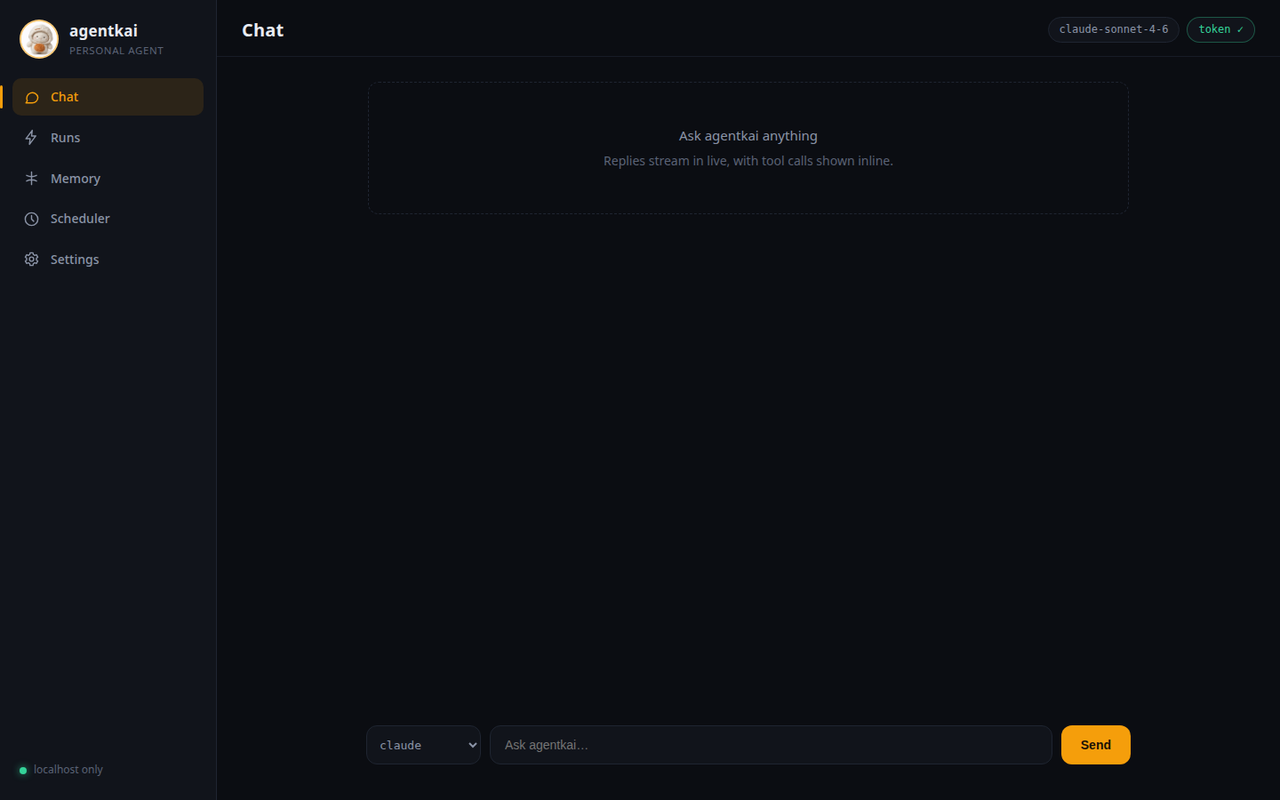
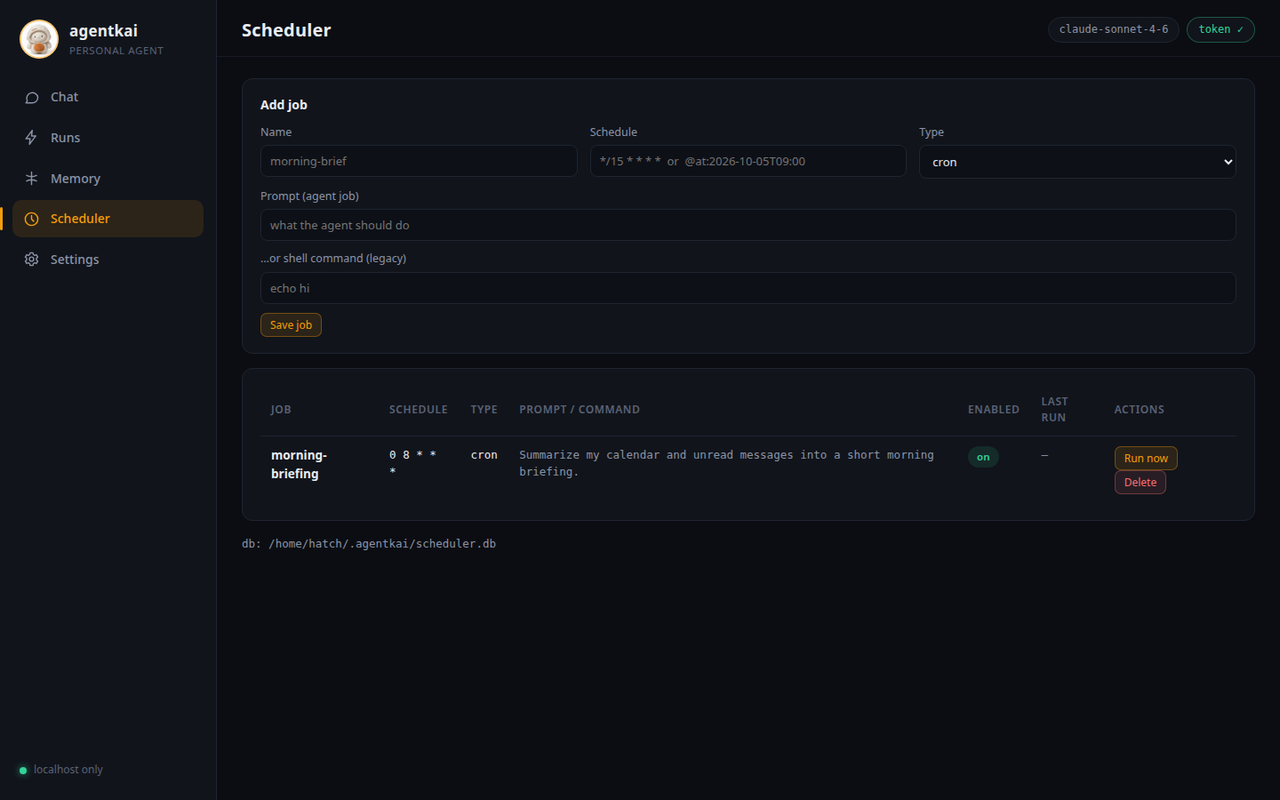
Prefer a UI? agentkai dashboard launches a local web app: chat with
the agent, watch runs stream in with tool calls inline, browse and edit
memory, inspect the tool registry,
and manage scheduled jobs — create, delete, or trigger a run now.
agentkai dashboard
# → http://127.0.0.1:8931/?token=<fresh-token-every-launch>
It binds only to 127.0.0.1 (never exposed to the network), generates
a fresh login token on every launch, and loads zero third-party
resources — the entire UI is packaged with agentkai and works fully
offline. Same agent, same tools underneath.
Docs
📚 Documentation: docs/
Quickstart · Models · Tools · Browser · Memory · Scheduler · Channels · Skills · Voice · Media · Devices · Goals · Dashboard · Privacy · Troubleshooting
Honest scope note: this is early-stage software (v0.3.0). Core flows — agent runs, tools, memory, scheduler, dashboard, channels — are implemented and tested. Areas marked experimental in the docs are real code with real limits; they are labeled, not hidden.
Development
git clone https://github.com/Bilal-Junaid-Jiwani/agentkai
cd agentkai
python -m venv .venv && .venv/bin/pip install -e ".[test,voice]"
.venv/bin/python -m pytest tests/   # full suite
License
Apache-2.0. See LICENSE.
1 maintainer

Metadata
1 maintainer
Release files for agentkai 0.6.5
For a detailed explanation of source distributions (sdists) and built distributions (wheels), please see the package formats documentation.
Source distribution (sdist)
| File | Size | Uploaded | Provenance | |
|---|---|---|---|---|
| agentkai-0.6.5.tar.gz | 5.5 MB | Without provenance | Details |
Built distribution (wheel)
| File | Interpreter | ABI | Platform | Reset |
|---|---|---|---|---|
| agentkai-0.6.5-py3-none-any.whl | Python 3 | none | any | Details |
Total release size: 10.9 MB
Release files / agentkai-0.6.5.tar.gz
| Download URL | agentkai-0.6.5.tar.gz |
|---|---|
| Size | 5.5 MB |
| Tags | Source |
|
SHA-256 checksum How to use checksums |
af32da08217893700a723f50f23a0bc0a5c07acb35aa984100536acec46eeff0
|
|
BLAKE2b-256 checksum How to use checksums |
ac62a68bb014371d2733890d5e310fe68101446e86315724d1241703a47764f1
|
| Upload date | |
|
Uploaded using Trusted Publishing? What is trusted publishing? |
No |
| Uploaded via |
okfsmith-pypi-skill/1.0
|
Release files / agentkai-0.6.5-py3-none-any.whl
| Download URL | agentkai-0.6.5-py3-none-any.whl |
|---|---|
| Size | 5.4 MB |
| Tags | Python 3 |
|
SHA-256 checksum How to use checksums |
52dbc778e19b733022aa6c5bb6a2a21acd29b2deb724148cbd86bba1676cc4c4
|
|
BLAKE2b-256 checksum How to use checksums |
9c16eb8a091cd68335498299abc7675c9f55cf0c328e84f27d89f7d08a57c8a7
|
| Upload date | |
|
Uploaded using Trusted Publishing? What is trusted publishing? |
No |
| Uploaded via |
okfsmith-pypi-skill/1.0
|
Security for agentkai 0.6.5
Provenance
Provenance describes where a file came from. On PyPI, provenance is shared via attestations, which provide a verifiable record of the build or publishing details. View details, limitations and caveats.
No provenance found
None of the files in this release were uploaded with provenance metadata.
A note on package security
PyPI is a repository for distributing packages, not a service for auditing them. While third-party security researchers and our staff do their best to detect and remove malicious packages, PyPI cannot guarantee the quality, security or suitability of any given package.
To learn more about protecting yourself from malicious actors, visit our package security documentation.














