
Interactive coding-agent CLI that commits AI changes to git with traceable metadata.

Project description
aGiTrack
aGiTrack stands for agent + git tracking. It's a command-line tool that runs an AI coding agent for you and turns each change the agent makes into a git commit automatically — with a record of what you asked, what the agent did, and how many tokens it used. You get a clean, reviewable git history of the AI's work without committing anything by hand.
You can use either OpenCode or Claude (Claude Code) as the AI agent — they're interchangeable, and every aGiTrack feature works the same way with either one. Support for more agents is planned.
Requirements
aGiTrack runs on macOS and Linux. It doesn't run directly on Windows; on Windows, run it inside WSL (Windows Subsystem for Linux), which gives you a Linux environment. It works in the common terminal apps (iTerm2, Apple Terminal, Alacritty, kitty, GNOME Terminal, Konsole, tmux, the VS Code terminal, and Windows Terminal running WSL); on a terminal that lacks some advanced features, it still works, just with fewer visual frills.
You need git and at least one AI agent — Claude Code or OpenCode — installed and on your PATH. The dashboard can also use the GitHub CLI (gh) to show each commit's author by their GitHub username: install it from cli.github.com and run gh auth login. gh is optional — without it, the dashboard still works and just groups authors by email instead.
Install
pip install agitrack
This installs the agitrack command and the terminal UI dependency used for status bars and contextual command hints. The PyPI distribution, the importable package, and the command are all named agitrack. Once installed, aGiTrack keeps itself up to date — see Self-update.
On systems where Python comes from a system package manager (many Linux distributions, or Homebrew on macOS), pip may refuse to install into the system environment with an "externally-managed-environment" error (PEP 668). In that case install with pipx instead, which puts agitrack in its own isolated environment and on your PATH:
pipx install agitrack
For local development, install from a checkout instead:
python3 -m pip install -e .
VS Code extension
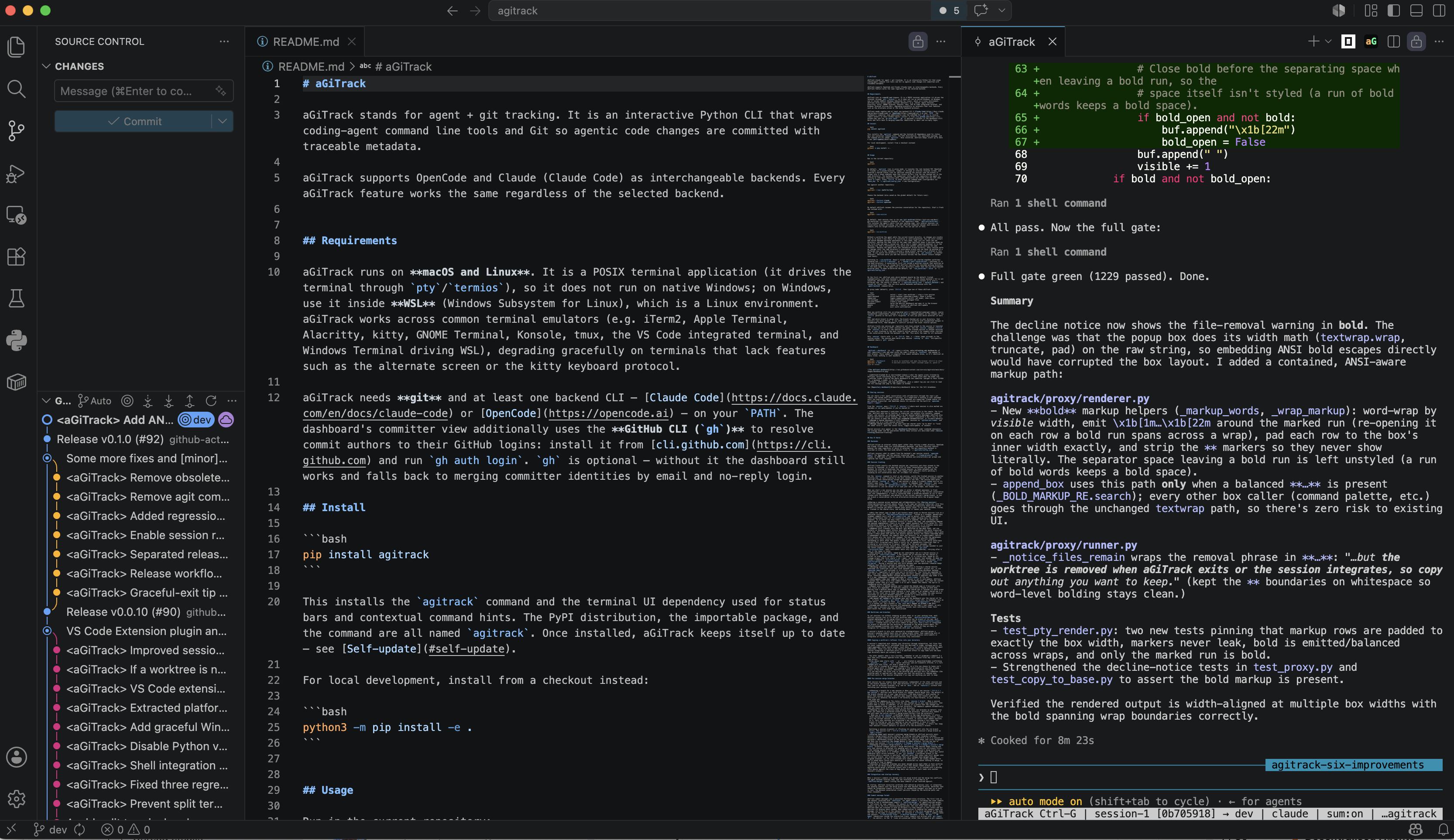
aGiTrack is also available as a VS Code extension. Install it from the Marketplace and launch aGiTrack inside VS Code with one click — the aG button in the editor toolbar (top-right), or the aGiTrack: commands in the Command Palette. It runs the real aGiTrack CLI in an integrated terminal (installing the CLI on first use if it's missing), so you get the complete experience — the agent's native interface, the Ctrl-G menu, sessions, sharing, worktrees, and per-turn auto-commits. See Editor integration for details.
Usage
Run in the current repository:
agitrack
By default, aGiTrack launches the AI agent's normal interface (OpenCode or Claude) and sits quietly between you and it — you use the agent exactly as you would on its own. At the bottom of the screen, aGiTrack adds a status line showing: the current session and the branch its work goes into (in bold when that branch isn't the one you have checked out), which agent is running, whether commit summaries are on, and which repository you're working in. Press Ctrl-G at any time to open aGiTrack's own menu (you can change this key with menu_key in ~/.agitrack/config.json — see Configuration).
Run against another repository:
agitrack --repo /path/to/repo
Choose the backend (also saved as the global default for future runs):
agitrack --backend claude
agitrack --backend opencode
By default aGiTrack resumes the previous conversation for the repository. Start a fresh one instead with:
agitrack --new-session
By default, each session runs in its own git worktree — a separate checkout of the repository under .agitrack/worktrees/. This isolates the agent's edits from your working copy, lets several sessions run concurrently without colliding, and lets aGiTrack integrate (merge) each session's commits into its target branch on its own. You can opt out of this:
agitrack --no-worktree
Without a worktree the agent edits the current branch directly, so changes are visible live as it works — but there's no isolation or auto-integration. You can still start and switch between multiple sessions in this mode; they just all share the one directory, editing the same files at the same time (aGiTrack shows a one-time heads-up the first time you open a second one, and a turn's commit captures whatever is in the working tree then — coordinate as you would with another person editing the same checkout). Because the agent edits the checked-out branch directly, every session works on (merges into) the repo directory's current branch and can never be pointed at a different one — so the "change a session's merge branch" option isn't offered in this mode. If you switch the directory's branch out-of-band (e.g. git checkout in another terminal), aGiTrack warns you and the session follows the new branch (future changes land there).
If you ran sessions the normal way before (each in its own worktree) and then start aGiTrack with --no-worktree, those earlier sessions are still there to resume — pick one from Ctrl-G → sessions (or ↻ Resume a past conversation…) and it picks up in your main repository directory. (Why this needs handling: a session that first ran inside a worktree remembers that worktree folder as where it was working. When you resume it without worktrees, aGiTrack updates that remembered folder to your main directory, so the agent works there instead of trying to use the old worktree folder — which no longer exists.) To make no-worktree the default for every run, set "use_worktrees": false in ~/.agitrack/config.json.
On the first run, aGiTrack asks which backend should be the default (listed alphabetically, with each backend's install status). If the chosen backend's CLI is not installed, aGiTrack shows install instructions and lets you install it or pick a different one. The choice is saved in ~/.agitrack/config.json (default_backend) and reused for future runs. You can also switch backends mid-session with the agent-backend command below.
In proxy mode (default), press Ctrl-G to open aGiTrack's menu, then pick a command from the list (or type its name):
sessions                  switch / start (own worktree) / stop a live session
agent-backend             switch backend (opencode|claude); shows a picker
git-unstaged              show intentionally unstaged files
git-user-commit           create a user commit
dashboard                 serve the metrics dashboard and open it in the browser
settings                  view/change all config options (repo-local or global)
update                    check for / install an aGiTrack self-update
exit aGiTrack             quit aGiTrack (with confirmation); Esc just closes the menu
When any worktree still has un-integrated work — committed-but-unmerged commits, or
uncommitted (committable) changes — a merge command appears at the top of the
Ctrl-G palette so the work isn't forgotten. It lets you pick which worktree (if more than
one) and which branch to merge into: the branch checked out in your directory, that
session's own merge branch, or any other branch. A worktree with uncommitted changes is
committed first, then merged; a conflict surfaces the usual resolve options.
aGiTrack tracks one session per repository and stays pinned to the session it launched (so it does not drift to other sessions you open). Use the session command (Ctrl-G, then session) to start a new session, switch the tracked session to another existing one, or sync tracking to the most recently active session — for example after starting a new conversation inside the backend's own TUI. This works the same for all backends.
Only session starts with s, so Ctrl-G then s + Enter jumps straight to the session picker. The session menu marks each session running or idle. Git-specific commands share a git- prefix.
Dashboard
agitrack --dashboard (or -d) opens a live, auto-refreshing web dashboard of your repository — who and what wrote the code — served on localhost and opened in your browser. Every number is computed from commit metadata alone, so it's identical on every clone; nothing is sent anywhere.
agitrack --dashboard        # serve on localhost and open the browser (Ctrl-C to stop)
agitrack -d text            # one-shot plain-text report instead (pipe it, paste it into an issue)
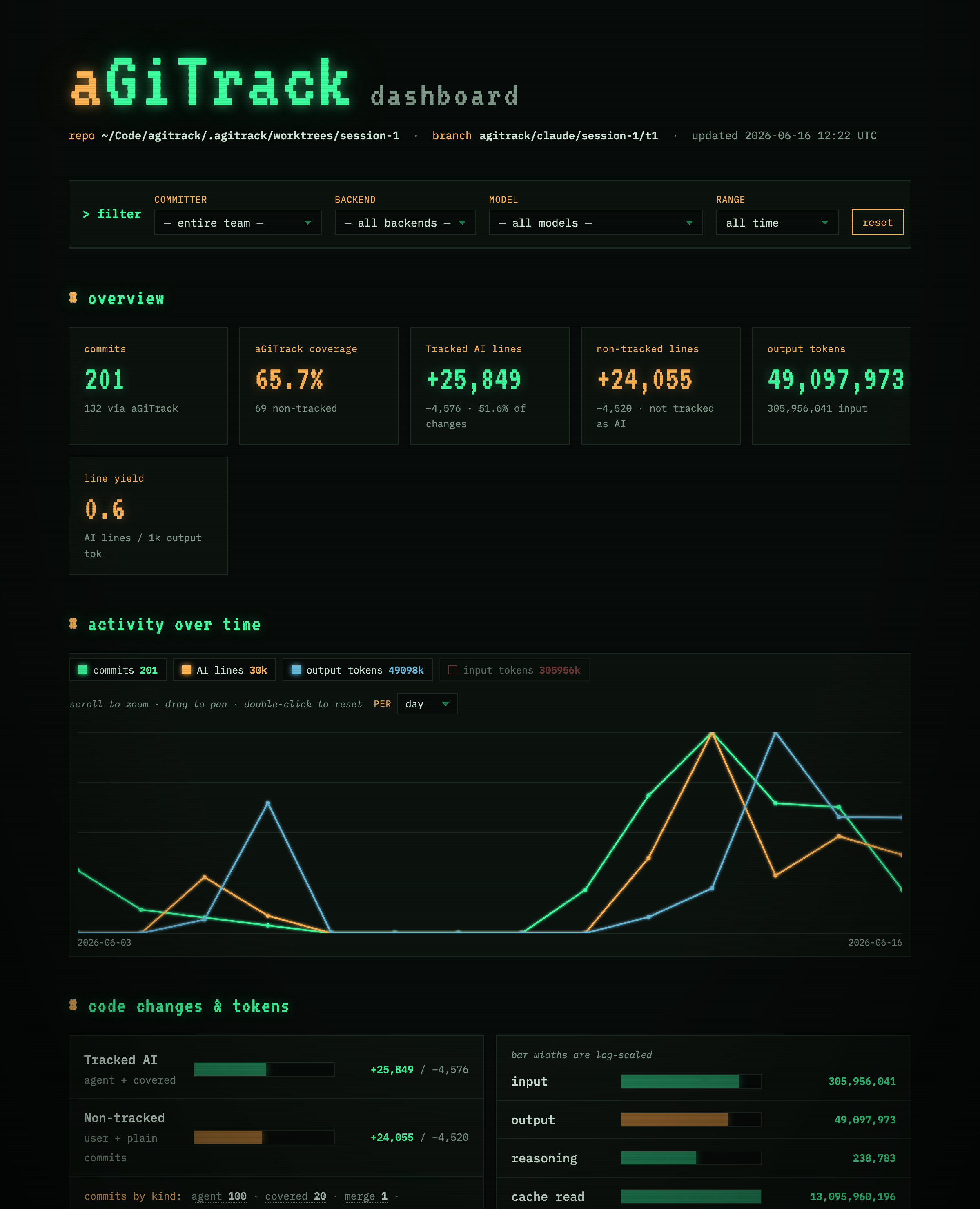
- aGiTrack-tracked AI vs non-tracked lines — what the agents wrote (tracked by aGiTrack) versus everything else; it never claims a human wrote what the model did.
- Filter live — narrow the whole dashboard to one committer (merged to their GitHub ID), a backend, a model, or a time range.
- Tokens, efficiency, and loop detection, plus a commit log you can click to read the full message and jump to the commit on GitHub.
See Repository dashboard below for the full breakdown.
Sharing sessions
You can share a full agent conversation with collaborators through the repo's git remote, and resume each other's sessions. It's opt-in — nothing is ever uploaded until you explicitly share a session. Both backends are supported: Claude shares its per-session transcript, and OpenCode shares its session via the built-in opencode export/import.
From the session menu (Ctrl-G → session) — where each session is also marked ⇪ shared or ⇪ auto-share if you've shared it:
- Share this session — publishes the current conversation to the remote. The first time, aGiTrack asks you to confirm; a transcript can contain file contents, command output, and secrets, so review what's in the session before sharing (aGiTrack also applies best-effort secret masking, but that is not a guarantee — don't rely on it). You can choose to keep the shared copy updated automatically, or re-share manually.
- Resume a shared session — lists teammates' sessions as
<github-id>/<name>and continues one in a fresh session worktree. - Manage shared sessions — see what you've shared (with "up to date" vs "local has newer turns"), push the latest turns, toggle auto-update, or unshare.
Shared sessions also appear in the dashboard under shared sessions. The storage model and the guarantees behind these actions are described under Session tracking.
How It Works
📊 User Flow Diagram — a complete, graph-rendered map of aGiTrack's interactive logic: which file/commit status triggers which prompt, and where every option (and nested option) leads. Read it to understand exactly how aGiTrack behaves.
Backends
aGiTrack runs a separate coding agent rather than talking to an AI model itself. OpenCode and Claude (Claude Code) are interchangeable, and every feature works the same with either. Each repository remembers which agent it uses; your overall default is stored in ~/.agitrack/config.json.
To know what to commit, aGiTrack reads the agent's own record of the conversation: opencode export for OpenCode, and the transcript Claude keeps under ~/.claude/projects/. (In JSON mode it instead runs the agent once per prompt and captures its final reply.)
Session tracking
aGiTrack follows exactly one agent conversation per repository — the one it started — and stays with it, so it won't get confused by other conversations you open in the agent. When it starts, it notes where the conversation currently stands, so the commits, token counts, and conversation records it makes only cover what happens from that point on. Resuming an older conversation won't re-commit its earlier history.
Use the session command to start a new session, switch the tracked session to another existing one, or sync tracking to the most recently active session (for example after starting a fresh conversation inside the backend's own TUI). The session menu marks each session running or idle. A new session is given a friendly random word as its default name (e.g. maple, harbor) — easier to remember than session-1 and, since sessions are shared as <github-id(s)>/<name>, far less likely to clash with a collaborator's; you can accept it or type your own at the prompt, and rename later.
When you start a new session you can make it either a blank session (a fresh conversation) or a fork of the current session — a copy of the current conversation that runs independently. A fork is installed under a brand-new backend id (so it never clashes with the original) and defaults to the current session's merge branch, so you can branch a conversation to try an alternative direction while the original keeps going.
Sharing a session across machines and collaborators (the Sharing sessions actions above) builds on the same per-session transcript, with this storage model and these guarantees. Only sessions you explicitly share are tracked here — a session you haven't shared stays purely local: it is never uploaded, listed, or tracked in the shared store, and nothing about it leaves your machine.
- Only the latest copy is kept — git history never grows. Shared sessions live on a dedicated custom ref
refs/agitrack/shared-sessions, stored as a single, parent-less (orphan) commit built withgit commit-treeand no parent. Every update (manual or auto) rewrites that ref to a brand-new orphan commit holding only the current snapshot. So no matter how many times a session is updated, the ref is always one commit deep — it never accumulates history or bloats the repo, and unsharing removes the session completely (there is no older commit anywhere that still holds it). This deliberately avoids a normal commit chain, whose whole point is to retain every past version — exactly what we don't want for a privacy-sensitive transcript. - Updates still transmit only the diff (git deltifies at the pack level, not via history). Skipping commit history does not mean re-uploading the whole transcript each time. Git delta-compresses by content similarity within a packfile, and a push builds a thin pack that deltas new objects against objects the remote already has — independent of whether the commits share any ancestry. So an orphan-commit rewrite still pushes only the turns that changed. The one requirement is that the previous version still exist locally as a delta base at push time, so aGiTrack defers reclaiming it until after the push (rather than deleting it first, which would have forced a full re-upload every share — costly for an append-only transcript that is re-shared or auto-shared as it grows). Right after the push succeeds, the now-unreferenced previous objects are reclaimed, keeping local storage bounded to just the latest snapshot. Concurrent updates are made safe with
git push --force-with-lease(each contributor edits only their own subtree), retrying after a sync if the lease is stale. - One session is one entry, named by its contributor set. A shared session is displayed as
<id1>+<id2>/<name>— the github ids of everyone who has shared it, sorted (so order never matters), before its name. It is stored once, keyed by its lineage origin (the first sharer's id + name), not by whoever last pushed. So when you resume a teammate'salice/fix-parserand share your continuation, it becomesalice+you/fix-parser— the same entry, now co-owned — rather than a secondyou/fix-parser. Moving a session back and forth between your own machines likewise keeps updating that one entry instead of spawning new names. - Resuming continues the same conversation locally. Picking a shared session downloads its transcript into your local backend store (Claude's project dir, or via
opencode import) and continues it in a fresh worktree — using whichever backend recorded it, regardless of which one you're currently on. Your turns are appended to your local copy; sharing again updates that one entry (above), guarded by newest-wins below. Choosing Keep both instead deliberately forks a separate copy under a new id — a new, independent lineage published as<you>/<name>of its own. - Auto-update rides your commits. When a session is set to auto-update, aGiTrack re-pushes the latest turns at commit time (in the background, only when the content changed) rather than on a busy timer — so it won't hammer the remote. The opt-in is remembered across aGiTrack runs.
- Newest wins — a behind machine can't rewind the shared copy. Transcripts only grow (turns are appended), so aGiTrack compares conversation length on both ends. Sharing from a machine whose copy is behind the shared one is refused (it would erase newer turns), and resuming never replaces a local copy with an older shared one — it tells you the local one is newer and keeps it by default. This keeps the same session consistent as you move between computers, instead of a stale machine (or its auto-update) dragging everyone back to an earlier state.
- No manual git needed. The Resume menu and the dashboard sync the shared ref for you. (A plain
git clone/git fetchdoes not pull custom refs, so teammates rely on those menus; to inspect by hand:git ls-remote origin 'refs/agitrack/*'.) Because it's a custom ref, not a branch or tag, it won't appear on GitHub's web UI. - Scoped and bounded. Sessions are namespaced by the repo's root commit, so only this repo's sessions are ever uploaded or listed; each contributor keeps their most-recent few, with older ones auto-pruned.
Worktrees and branches
So that sessions don't interfere with each other or with the files you're editing, aGiTrack runs each session in its own git worktree — a separate copy of the repository under .agitrack/worktrees/<name>, where the agent does its work. Each turn's commits go onto a temporary, aGiTrack-managed branch (named agitrack/<backend>/<name>/t<turn>); once aGiTrack merges that turn into the session's target branch, it deletes the temporary branch. All of aGiTrack's own branches start with agitrack/, so they're easy to recognize and never clash with your own.
A session's target branch only ever moves forward by merging — aGiTrack merges a session's finished commits into it, rather than committing onto it directly. A single-writer lock means only one aGiTrack process commits or merges at a time, so sessions running side by side stay consistent.
Copying a worktree's leftover files into your directory
A session's committed work reaches your directory through integration, but files that are never committed don't: untracked files you declined to stage, unstaged edits, and git-ignored files (build output, local data, a .env-style local config the agent generated). Those live only in the session's worktree — which is deleted once the session integrates or aGiTrack exits — so aGiTrack offers to copy them into the base repo directory where you actually work.
- The offer appears when a turn finishes, whether or not it produced a commit — a turn that only touches ignored files stages nothing, yet those files may still need to come across.
- Files whose name starts with
_or.are treated as generated/hidden scaffolding (__pycache__,.venv,.env, editor dotfiles) and are never offered; if a turn changed only such files, you aren't asked at all. - Each file is tracked by a content fingerprint, so a file you choose to leave isn't offered again until it changes. If any of the files would overwrite ones that already exist in the base directory, aGiTrack asks up front whether to overwrite them all, keep the base versions (skip just those — the new files still copy), or confirm each one individually.
- If you decline, the files stay in the worktree and aGiTrack tells you where (the worktree path is spelled out) and reminds you that the worktree is removed when aGiTrack exits or the session integrates — so copy out anything you want to keep.
Per-session merge branches
Each session has its own merge destination, independent of the other sessions and of the branch checked out in your repo directory — so you can run concurrent sessions that land on different branches (e.g. one on main, one on feature-x) without ever switching your working directory.
-
Choosing a branch for a new session. When you start a new session (
Ctrl-G → + New session), aGiTrack asks which branch its changes should merge into. The default is the branch checked out in your repo directory ("the base branch"); pick another to point that session elsewhere. aGiTrack does not check that branch out in your directory — it advances the branch's ref directly via fast-forward, so your working tree stays put. -
Status bar emphasis. The status line shows
session → branch. When a session merges into a branch different from the one checked out in your repo directory, that branch name is shown in bold, so it's obvious at a glance that the changes are landing somewhere other than your current directory. The emphasis updates automatically when you check out a different branch in the directory. -
Staying in sync. Sessions keep merging into their own branches by default, even after you check out a different branch in the repo directory. aGiTrack only asks — and only when the active session's merge branch differs from the directory's:
- When you
git checkouta different branch in the repo directory, it offers three choices: do nothing (the default — every session keeps its own branch), switch only the current session to the directory's branch, or switch all idle sessions to it. Only idle sessions are re-pointed — any session running a turn keeps the branch it started on, and is reported so you can re-point it once it's idle. - When you switch sessions and the one you land on diverges, it offers two: keep that session's branch (default) or switch it to the directory's branch.
Switching a session re-points it (flushing its pending work into the old branch first). The session list (
Ctrl-G → session) shows each session's merge branch asname → branch. - When you
-
Startup keeps each session's previous merge branch. aGiTrack persists every session's merge branch across restarts. On startup (and when resuming a dormant session) it would otherwise assume the directory's current branch — so if a session was assigned a different branch in the previous run, aGiTrack keeps that prior assignment and asks you to confirm the change before it takes effect, telling you how to re-point any session (
Ctrl-G → session → ⤳ Change a session's merge branch). -
Changing a session's merge branch.
Ctrl-G → session → ⤳ Change a session's merge branchre-points any session's merge destination. The session keeps running and only that session is affected (its pending work is flushed into its old branch first). -
A running session's branch can't change mid-run. A session's merge branch can only be changed while it is idle — never during an in-flight turn, whose work would otherwise split across branches. If you
git checkouta different branch in the directory while a session is mid-turn, aGiTrack warns that this run still merges into its current branch, and re-asks after that run's changes have merged into the original branch (so the just-finished work lands where it was always headed before you're asked where future work should go). A cancelled run leaves nothing to merge, so the dialog is free to appear. -
Sessions on different branches are never merged across each other. Each worktree records its own merge branch and aGiTrack only ever merges that branch into it; if anything would merge a different branch into a worktree, it is refused with a warning. (This guards against the class of bug where one session's work leaks onto another session's branch.)
Integration and startup recovery
When merging a session's commits hits a conflict, aGiTrack asks the AI agent to resolve it and records the result as an <aGiTrack-merge> commit (which lists the commits it was resolved against).
When it starts, aGiTrack tidies up worktrees left behind by earlier runs: it merges any unfinished commits into their target branch, then removes the worktree. If a worktree can't be merged cleanly (a conflict, or uncommitted changes), aGiTrack keeps it so nothing is lost. The agent's conversation is saved separately and can still be resumed.
Commit message format
aGiTrack commit messages use a consistent Markdown-style structure. The first line is the subject (prefixed with <aGiTrack> for agent commits — including the cover commits placed on top of backend-made commits — <aGiTrack-merge> for agent-resolved merges, or left plain for user commits). The subject is the first sentence of the prompt/summary (up to the first sentence-ending period); the rest flows onto the next line. aGiTrack does not truncate it with an ellipsis — a long subject is left intact and Git shortens its display where needed. When summarization is enabled the summary leads the message: its first line is the subject and the rest is the first paragraph of the body. The rest of the body is organized into # sections — # Prompts (when a summary takes the subject), # Interaction Trace, # aGiTrack Metadata — with ## User / ## Agent subsections inside the interaction trace. Commits are written with git commit -F - (no editor), so the # lines are preserved rather than stripped as git comments. Secrets and terminal escape sequences are masked out of subjects and trace bodies before committing.
Because the conversation is recorded in commit messages, aGiTrack shows a privacy warning at startup — never enter passwords, API keys, or other sensitive information in the chat — which must be acknowledged to continue (skipped when there is no terminal to acknowledge from).
Summarization
When summarization is enabled (the default), aGiTrack runs a second LLM stream alongside the coding session to preserve design context that would otherwise be lost to session compaction or terse commit subjects:
- Commit summaries — each agent commit gets an LLM-written summary of what changed and why. The summary leads the commit message: its first line becomes the subject and the rest follows as the first paragraph of the body (the prompts that used to head the message move to
# Prompts); it is also stored as a git note in theagitrack/commit-summarynamespace.
The summarizer reads only its instruction prompt plus the interaction trace — the same ## User / ## Agent text the commit carries — and nothing else. To enforce that, aGiTrack runs the summarizer backend as a plain text completion with its agent context stripped (no tools, no project/user memory or MCP servers, and the model's large default system prompt replaced with a one-line directive). Without this, a single Claude summary call loaded ~18,000 input tokens of system prompt and tool schemas it never used; stripped, the same call processes only the few hundred tokens of the instruction and trace, so summary_tokens_* reflects the real cost of the summary itself.
- Session summaries — a rolling narrative of the session (goals, architectural decisions, design evolution) is updated on every commit and attached as a git note in the
agitrack/session-summarynamespace. - Pre-compaction capture — when you run
/compactin the backend, aGiTrack first exports the full session transcript and folds it into the session summary, so compaction does not lose the conversation's context.
Because summaries are git notes, they travel with the repository and can be read independently of commit messages:
git notes --ref agitrack/commit-summary show <commit>
git notes --ref agitrack/session-summary show <commit>
Summarization never blocks the session: commits are created immediately with a prompt-based subject, the summary is computed on a background worker (the status line shows "aGiTrack is summarizing commit ..."), and the commit message is then amended in place. The amend only happens while it is safe — the commit is still the latest, unintegrated, and nothing new is staged; integration waits for the summary up to summary_wait_seconds and then proceeds, in which case the summary is recorded in git notes only. The metadata records the summarization cost next to the session's own usage (summary_model, summary_tokens_input, summary_tokens_output, and summary_tokens_cache_read when the summary prompt was served from cache). summary_tokens_input follows the same convention as the session's own input — fresh input including cache-creation tokens (see the token-accounting note below) — so a cache-served summary reports the real input it processed rather than just the tiny uncached remainder.
The status bar shows whether summarization is active (sum:on / sum:off). Toggle it and choose the summarization model under Ctrl-G → settings (the "Write an AI summary for each commit" and "Model used to write commit summaries" options); in JSON mode the :summarizer [on|off|model|status] command does the same. Both the on/off toggle and the model are saved to the global config (~/.agitrack/config.json), so they persist across restarts (a per-session worktree is transient and removed on exit, so a setting written only there would reset on the next launch).
Commit Behavior
When it launches a coding agent, aGiTrack appends a note to the agent's system prompt (where the backend supports it — Claude's --append-system-prompt) telling it that aGiTrack auto-commits each turn, so the agent should not create git commits on its own unless you explicitly ask it to. This keeps aGiTrack's per-turn commits (and their token/line metadata) authoritative. The note is added only for coding sessions, never for the background summarizer. To turn it off, start aGiTrack with --no-commit-guidance (or set commit_guidance: false in the global config).
- Tracked modifications and deletions are staged with
git add -u. - New untracked files require confirmation before staging.
- Declined untracked files are remembered in repository-local
.agitrack/state.json. - Agent commits use the
<aGiTrack>tag and include the full interaction trace since the last code-changing commit. - Agent commit metadata includes context token count and generated token usage accumulated since the last code-changing commit.
- Token figures are read directly from the backend's session transcript (each assistant message's reported usage) and broken out by category:
input,output,cache_read,cache_write, and (when the backend reports it)reasoning. Both backends reportinputas the uncached input (cache reads/writes are tracked separately, never rolled into it), so the categories mean the same thing across backends. The one backend difference is generated tokens: Claude folds extended-thinking and tool-call tokens intooutput(no separatereasoning), whereas OpenCode reportsreasoningas its own bucket alongsideoutput. Sub-agent/sidechain turns are counted separately under the matchingsubagent_*categories rather than dropped (both backends do this). Each category is recorded only when the backend reports a non-zero value, so a field a backend never populates (e.g. Claude's separatereasoning) simply has no line. - The generated-token categories don't overlap:
outputcounts only the main agent's generated tokens andsubagent_outputonly the sub-agents' — neither includes the other, so a grand total of generated tokens is just the sum of the matching pairs (e.g.output + subagent_output, andreasoning + subagent_reasoningfor OpenCode). The input side is different and deliberately does overlap:inputis all fresh input processed since the last commit — the uncached remainder plus the cache-creation tokens — socache_writeis already included ininput(it's shown on its own line only as the "of which was written to the cache" breakdown, not added on top). Counting input this way keeps a first run's input reflecting the full context instead of looking near zero next to the cache.cache_readis the one input figure kept fully separate: those tokens were already counted as input when first written and are merely replayed from the cache, so they are never added intoinput. - The dashboard presents these as a hierarchy (same layout in the text and web views, for both backends): each base category's headline is the main-agent count plus its sub-agent share (
input,output,cache read, and — for OpenCode —reasoning), with the sub-agent amount and, underinput, the cache-write amount shown as indented "of which" subsets of that headline. Categories with no recorded tokens are omitted, so a backend that doesn't report a field (e.g. no reasoning, or no sub-agent usage) simply shows fewer rows. The summarizer's own usage is listed separately as aGiTrack's overhead. - Note — this differs from the provider's billing model, on purpose. Anthropic bills cache writes, cache reads, and uncached input as three separate line items at different prices (a cache write costs more than base input; a cache read costs far less). aGiTrack instead folds cache-creation into
inputso each turn'sinputanswers one easy-to-reason-about question — how much fresh context did this turn actually process? — rather than mirroring the price sheet. The raw breakdown is never lost:cache_write(of which was newly cached) andcache_read(replayed from cache) are recorded on their own lines, so you can recover the exact per-rate figures and compute cost if you want to. The same convention applies to the summarizer's own cost (summary_tokens_inputfolds in its cache-creation, withsummary_tokens_cache_readreported separately). - The figures should still be treated as a lower bound: any consumption the backend does not record in the transcript (e.g. internal compaction, retried requests, or usage a provider omits) is not captured, so actual tokens consumed may be higher than reported.
- Token figures are read directly from the backend's session transcript (each assistant message's reported usage) and broken out by category:
- Proxy mode baselines the continued backend session on startup so token metadata only includes turns after aGiTrack starts tracking new changes.
- Proxy mode preserves the backend's selected model in commit metadata when it can be read from session data.
- User commits use the user-provided subject and include aGiTrack metadata.
- Commits are created only when staged changes exist.
- If the backend commits on its own (e.g. the agent runs
git commititself, or a hook does), aGiTrack never rewrites those commits — their hashes stay exactly what the agent may already have reported in PR or issue comments. Instead, once the turn finishes, aGiTrack adds a cover commit on top carrying the interaction trace and metadata: a merge-shaped commit in the GitHub PR merge style, whose tree is the backend head's tree and whose parents are the turn's start and the backend's head, sogit log --first-parentreads turn-by-turn while the backend's own commits remain reachable via the second parent. Thecovered_commitsmetadata line records the hashes of the backend-made commits the cover accounts for; when aGiTrack also has uncommitted changes to commit, its own (regular) commit carries that line instead.
Repository dashboard
agitrack --dashboard (or -d) opens a live web dashboard of repository metrics computed entirely from the aGiTrack metadata in commit messages — no extra state, so the numbers are identical on every clone. It is served on localhost, opens in your browser, and auto-refreshes (the page polls the server, which recomputes from git log on each request), so you can watch metrics update as an agent commits. Press Ctrl-C to stop.
- Coverage: how many commits are aGiTrack-tracked (agent commits, backend-made commits covered by an aGiTrack cover commit, agent-resolved merges, user commits, and aGiTrack's own integration merges) versus non-tracked.
- Code changes: lines added/removed split two ways — aGiTrack-tracked AI (agent commits + the backend-made commits an aGiTrack cover commit accounts for + agent-resolved merges) and non-tracked (everything else: user commits, plain commits with no aGiTrack metadata, and squash/PR-merge commits whose message concatenates several metadata blocks and so can't be cleanly attributed). There is deliberately no "human" category — even a user-made commit can contain lines an agent produced off the record, so the only honest claim is whether aGiTrack tracked the lines as AI. Cover commits are merges and contribute no line counts of their own, so a turn's lines are never double-counted.
- aGiTrack-ops: the integration merge commits aGiTrack makes itself (e.g. bringing base into a session branch) are shown as their own class, not lumped into non-tracked. They carry no diff, so they add no lines.
- Squashed commits: when several aGiTrack commits are squashed into one (a squash- or PR-merge concatenates their metadata blocks — git flattens this even across multiple rounds of squashing), the dashboard parses every original back out, so their tokens and per-model/backend usage are still counted instead of lost in the aggregate. In the web commit log such a commit is tagged
⧉ N squashedand expands on click into its original commits, each itself expandable to its full message. - Tokens: totals per category (input, output, reasoning, cache read/write, sub-agents, summarizer) and an efficiency ratio — AI-changed lines per 1k output tokens.
- Breakdowns by backend, by model (a cover commit's bucket includes the lines of the backend-made commits it covers), and by committer. Committer identities are merged to GitHub IDs via the
ghCLI when available (every commit GitHub knows is keyed by its real login); withoutghit falls back to merging by email and no-reply login. Each committer's lines are split into the aGiTrack-tracked AI they drove versus non-tracked. - Possible loops: runs of three or more consecutive turns with near-identical prompts (or the same prompt repeated within one turn's trace), with the output tokens they consumed — a sign the conversation is going in circles.
The web page (styled like the project page) lets you filter live — narrow the whole dashboard to one committer or view the entire team, slice by backend or model, or restrict to a time range (presets or a custom from/to). The server recomputes the metrics for each filter, and the commit log is paginated (fetched a page at a time), so the browser never holds the whole history — memory stays bounded no matter how big the repo is. Each log line shows per-line token metrics; clicking a line opens the full commit message rendered as Markdown with a link to the commit on GitHub, and a squash expands into its original commits (each itself expandable). Agent commits also record when the AI-driven conversation started and ended (agent_started_at / agent_ended_at in the metadata block).
agitrack --dashboard text (or -d text) prints the same metrics as a one-shot plain-text report instead of serving — handy for piping or pasting into an issue.
The dashboard is read-only in either form: it never commits, never prompts, and skips the privacy acknowledgment.
Self-update
aGiTrack keeps itself current. On startup, and then about every five minutes while you work, it checks whether a newer aGiTrack is available:
- Source-linked install (the editable
pip install -e .from a git checkout): it compares three commit hashes — the one the running process loaded, the checkout's localHEAD, and the remote target's tip — and offers an update whenever either the local disk or the remote carries newer code. The remote target is the current branch's upstream, or, when the branch tracks nothing (aGiTrack runs on session worktree branches),origin's default branch. When you pickupdatefrom the menu it runs a fresh check on the spot, so a teammate's push or a just-pulled local update is reflected immediately rather than waiting for the next periodic check. - Package install (a wheel from a package index): it compares the installed version with the latest published one.
If an update exists, aGiTrack prompts you at startup and shows a notice during a session (run the update command from the Ctrl-G menu to act on it). When you accept, aGiTrack waits until every session has finished and all commits are integrated, installs the update, then restarts itself automatically. It never interrupts a merge: while any session is resolving a merge/conflict, the notice is held back and an accepted update is deferred until the merge is done. A source update merges the upstream branch into the checkout — a clean checkout fast-forwards and a diverged one (your own commits, or aGiTrack's session integrations) gets a normal merge — so it pulls in new code without discarding local work; if the checkout has uncommitted changes it's skipped with a message, and if the merge hits a genuine conflict aGiTrack aborts it (leaving the source clean) and tells you automatic update isn't possible until you resolve it. When only the running process is behind the on-disk code, no download happens — aGiTrack just restarts to load it. Choose "Stop checking for updates" — or set "check_for_updates": false in ~/.agitrack/config.json — to turn the checks off; tune the cadence with timings.update_check_seconds.
Proxy mode launches the backend's native TUI directly and recovers session metadata for automatic agent commits — via opencode export for OpenCode, or by reading the session transcript under ~/.claude/projects/ for Claude.
Advanced Usage
Show aGiTrack diagnostic messages:
agitrack --verbose
Review each turn before it merges, instead of integrating automatically:
agitrack --delay-merge
By default aGiTrack merges a turn's committed changes into the base branch as soon as the turn finishes. With --delay-merge it holds the merge: after the agent commits, the changes stay in the session's working directory (a git worktree when worktrees are enabled — its path is shown in the notice, since you may not know the worktree's location otherwise) so you can review them and make any further edits. When you're ready, open the session menu and choose "Merge reviewed changes into <base>" to integrate. Nothing is merged until you confirm (on exit, any still-unmerged work stays on its branch and is offered again next time). This is off by default.
Use the structured JSON fallback mode:
agitrack --mode json
JSON mode invokes the backend non-interactively for each prompt (opencode run --format json or claude -p --output-format json) so aGiTrack can capture the final response and create traceable commits.
In JSON mode, plain text is sent to the active agent backend:
> fix the parser bug
JSON mode aGiTrack commands use : so backend-native / input is not intercepted:
:help                      show commands
:status                    show git status
:user-commit               create a user commit
:stage                     review and stage untracked files
:unstaged                  show intentionally unstaged files
:agent-backend <backend>   switch backend (opencode|claude)
:exit                      exit
In JSON mode, aGiTrack shows a bottom status bar with the active backend, target repo, model, and unstaged-new-file count. Typing : shows aGiTrack command completions. Typing / shows common backend command completions, and slash commands are forwarded to the backend rather than handled by aGiTrack.
Scripted runs and the demo
--prompt runs JSON mode fully scripted: each prompt is sent to the backend in order (lines starting with : are aGiTrack commands), every turn that changes files becomes a commit, and aGiTrack exits when the prompts are done.
agitrack --repo path/to/repo --backend claude \
  --prompt "add input validation to parse()" \
  --prompt ":status" \
  --permission-mode acceptEdits
Scripted runs never block on a question: the privacy warning is printed without waiting for acknowledgment, and new untracked files are staged automatically (with a notice) instead of being reviewed interactively. The same non-interactive defaults apply when prompts are piped to agitrack --mode json on stdin. Note that headless Claude needs permission to edit files — forward --permission-mode acceptEdits (or your preferred permission flags) through aGiTrack as shown above; OpenCode's run mode edits by default.
For a programmatic driver, agitrack --mode json --json-events emits one machine-readable JSON line per turn event (response, commit, no_changes, error) alongside the plain output, so another process can render the conversation and see which commit each turn produced. For a driver that also needs to answer aGiTrack's interactive questions, agitrack --mode json --ui-bridge runs a long-lived bidirectional JSON-RPC session over stdin/stdout: the driver sends {"type":"prompt"|"command"|"answer"|"exit", …} lines and aGiTrack streams back the same turn events plus ask events (kind: select/multiselect/input/confirm) for the driver to render and reply to.
scripts/demo.sh is a self-contained showcase of scripted mode: it creates a fresh repository in a temporary directory, has the agent write a small program and its tests through aGiTrack, and leaves the repository behind so you can inspect the <aGiTrack> commit history or continue interactively.
scripts/demo.sh                      # drive the demo with claude
scripts/demo.sh --backend opencode   # ... or with opencode
scripts/demo.sh --model haiku --dir /tmp/agitrack-demo
Editor integration
The VSCode extension — on the Marketplace, source in editors/vscode/ — lets you install aGiTrack as a VSCode plugin and launch it inside VSCode with one click — without opening a terminal and typing agitrack yourself. It's a thin launcher: a brand-icon button in the editor toolbar (or the aGiTrack: Command Palette commands) runs the real aGiTrack CLI in a VSCode terminal, so you get the complete experience (the agent's native interface, the Ctrl-G command menu, sessions, sharing, worktrees, per-turn auto-commits — everything proxy mode does). It also installs the aGiTrack CLI on first use if it's missing, works over Remote-SSH / WSL / containers (running where the code lives), and routes the dashboard to your local browser. The TypeScript side isn't built by the Python CI — see its README to build (npm install && npm run compile), run it (F5 → "Run Extension"), package a .vsix (npm run package), or publish to the Marketplace (npm run publish, needs the maintainer's publisher token).
Forwarding arguments to the backend
aGiTrack does not reduce the backend's own functionality: any argument it doesn't recognize is forwarded verbatim to the backend CLI (claude / opencode).
agitrack --backend opencode --port 12345 # --port 12345 goes to opencode
Use -- to forward an argument that aGiTrack also defines (e.g. --verbose), or to pass a bare prompt:
agitrack -- --verbose "fix the bug" # everything after -- goes to the backend
aGiTrack's own flags (--repo, --verbose, --mode, --backend, --new-session, --no-worktree) bind to aGiTrack when they appear before --. Note that aGiTrack manages session selection itself, so forwarding session flags (--resume, --session-id, --session, --continue) may interfere with its session tracking — it warns when you do.
Help follows the same model: agitrack --help (or -h) prints aGiTrack's own options followed by the active backend's help, so one command documents both layers. To run only the backend's help, forward it explicitly: agitrack -- --help.
Launching the backend under a wrapper
If you run the agent through another tool — a sandbox, a version manager, a profiler, your own launcher — give aGiTrack the custom launch command and it replaces the backend executable, so your wrapper sits directly beneath aGiTrack (aGiTrack's own worktree sandbox still goes on top):
agitrack --backend-command "somewrapper claude" # runs `somewrapper claude …` instead of `claude …`
The value is split like a shell command and must ultimately exec the chosen backend; aGiTrack still appends the backend's own flags (session id, resume, system-prompt note) and any ---forwarded arguments after it. To make it permanent, set backend_command in config — either a single string (applies to whichever backend you launch) or an object keyed by backend name when you switch backends and want each wrapped differently:
// ~/.agitrack/config.json (or a repo's .agitrack/config.json)
"backend_command": "somewrapper claude"
// or, per backend:
"backend_command": { "claude": "somewrapper claude", "opencode": "somewrapper opencode" }
A --backend-command on the command line overrides the config value for that run. The wrapper applies wherever aGiTrack launches the agent — interactive proxy mode, scripted --prompt runs, and the per-turn summarizer.
aGiTrack tracks sessions and transcripts for the selected backend (--backend / the saved default), so the wrapper must ultimately run that same backend. If the launch command clearly names a different known backend than the one selected (e.g. --backend claude with --backend-command "wrap opencode"), aGiTrack warns and asks you to confirm (y) before starting — running a different backend would break session tracking. An opaque wrapper that doesn't name a backend is accepted without prompting.
Configuration
You can edit every option below interactively with the settings command (Ctrl-G → settings): it lists each option with its current value and source, and when you change one it asks whether to save to the repository-local settings (.agitrack/config.json) or the global settings (~/.agitrack/config.json). The menu loops so you can change several at once; ← Back steps back a level and Esc closes the menu. Some options are read only at startup — when you change one of those, aGiTrack saves it and tells you it won't take effect until you restart aGiTrack yourself (it never restarts on its own). You can also edit the JSON files by hand, as described here.
Repository-local configuration can be stored in .agitrack/config.json:
{
  "trace_turn_limit": 5,
  "summarization_enabled": true,
  "summarization_model": null
}
trace_turn_limit controls the maximum number of recent user turns included in an agent commit body. The default is 5.
summarization_enabled (default true) toggles the LLM summarization stream (see Summarization above). summarization_model sets the model the summarizer asks the backend to use; leave it unset (null) to use the backend's default model. Both keys can also be set user-wide in ~/.agitrack/config.json; the repository-local value wins, and the summarizer command writes its changes here.
User-wide settings live in ~/.agitrack/config.json (override the directory with AGITRACK_CONFIG_DIR):
{
  "default_backend": "opencode",
  "menu_key": "ctrl-g",
  "sandbox": true,
  "use_worktrees": true,
  "commit_guidance": true,
  "timings": {
    "base_poll_seconds": 3.0
  }
}
default_backend (opencode or claude) is used for repositories that have no backend recorded yet. It is updated whenever you pass --backend or switch backends with agent-backend.
sandbox (default true) confines the agent's writes to its own session worktree (via sandbox-exec on macOS and bubblewrap on Linux), keeping the base repository and sibling worktrees read-only to the agent. The backend agent's own install/update directories stay writable, so the agent (Claude Code or OpenCode) can still update itself in place while running under aGiTrack. Set it to false to disable confinement (or pass --no-sandbox for a single run); when sandboxing is unavailable, aGiTrack instead warns when the base repository is edited while a session runs.
allowed_edit_paths (default empty) is a list of extra paths the sandbox lets the agent write to, beyond its worktree — for example a shared data directory or a sibling package the agent needs to edit. Specify them in config as a JSON list ("allowed_edit_paths": ["/srv/data", "../shared"]), or for a single run on the command line with --allowed-edit-paths, separating multiple paths with your platform's PATH separator (: on macOS/Linux). A command-line value replaces the config list for that run. On macOS the carve-out covers paths that don't exist yet (the agent can create them); under Linux bubblewrap, a path under the read-only base must already exist to become writable.
use_worktrees (default true) controls whether sessions run in isolated worktrees. Set it to false to run the agent directly on the current branch by default — the same behavior as --no-worktree, which applies it for a single run. See the --no-worktree notes under Usage for the trade-offs.
commit_guidance (default true) controls whether aGiTrack appends a note to the coding agent's system prompt telling it that aGiTrack auto-commits, so it doesn't create its own git commits. Set it to false to disable that note by default — the same as starting aGiTrack with --no-commit-guidance, which applies it for a single run. Only affects backends that support appending to the system prompt (Claude), and never the summarizer.
menu_key sets the key that opens aGiTrack's command menu in proxy mode. The default is ctrl-g; any ctrl-<letter> works except keys the terminal or aGiTrack already uses (ctrl-c exit flow, ctrl-h Backspace, ctrl-i Tab, ctrl-j/ctrl-m Enter). An invalid value falls back to ctrl-g, so a typo can never lock you out of the menu. The status line and aGiTrack's messages show whichever key is configured.
timings tunes aGiTrack's polling and debounce intervals (all in seconds). Specify only the keys you want to change; anything omitted — or set to a non-positive / non-numeric value — keeps its default:
| Key | Default | What it controls |
|---|---|---|
base_poll_seconds |
3.0 |
How often the base branch is re-checked for commits made outside aGiTrack (so worktrees pick them up). |
background_poll_seconds |
2.0 |
How often an idle background session is serviced (committed / integrated). |
file_stable_seconds |
8.0 |
Quiet period after a file change before an auto-commit. |
child_idle_seconds |
4.0 |
No backend output for this long counts as idle. |
parse_cooldown_seconds |
10.0 |
Minimum gap between agent-turn parses. |
base_edit_check_seconds |
3.0 |
How often aGiTrack warns about edits to the base repo when the sandbox is unavailable. |
cwd_check_seconds |
3.0 |
How often aGiTrack checks for the Claude resume-cwd drift bug. |
base_drift_check_seconds |
2.0 |
How often aGiTrack checks whether the base repo was switched to another branch outside aGiTrack. |
summary_wait_seconds |
45.0 |
How long integration waits for a background commit summary before proceeding without it. |
Contributing
Install dependencies and the optional git hooks:
uv sync --group dev
make install-hooks
This installs two hooks:
- commit —
ruff(lint + format) and basic file hygiene, so commits stay fast. - push — the full CI-equivalent gate (
ruff,mypyvs the baseline, tests + coverage), so a push that would break CI fails locally first.
Run the same full gate by hand at any time:
make check # or: ./scripts/check.sh
This is the definition of "done" for a change — it mirrors CI exactly (.github/workflows/ci.yml).
Releases
Every merge to main cuts a release automatically (.github/workflows/release-patch.yml): it bumps the version in pyproject.toml, syncs the VSCode extension to match, publishes to PyPI and the Marketplace, and creates a GitHub Release.
The bump level is taken from the merge commit / squash-PR title:
[major]→ bump major, reset minor and patch to 0 (e.g.0.4.2 → 1.0.0)[minor]→ bump minor, reset patch to 0 (e.g.0.4.2 → 0.5.0)- neither marker → patch bump, the default (e.g.
0.4.2 → 0.4.3)
The markers are case-insensitive and may appear anywhere in the title. So a normal merge releases a patch, and you opt into a larger bump by titling the PR e.g. Add session sharing [minor] — no tags needed.
Release history Release notifications | RSS feed


Download files
Download the file for your platform. If you're not sure which to choose, learn more about installing packages.
Source Distribution
Built Distribution
Filter files by name, interpreter, ABI, and platform.
If you're not sure about the file name format, learn more about wheel file names.
Copy a direct link to the current filters
File details
Details for the file agitrack-0.1.8.tar.gz.
File metadata
- Download URL: agitrack-0.1.8.tar.gz
- Upload date:
- Size: 640.2 kB
- Tags: Source
- Uploaded using Trusted Publishing? No
- Uploaded via: uv/0.11.24 {"installer":{"name":"uv","version":"0.11.24","subcommand":["publish"]},"python":null,"implementation":{"name":null,"version":null},"distro":{"name":"Ubuntu","version":"24.04","id":"noble","libc":null},"system":{"name":null,"release":null},"cpu":null,"openssl_version":null,"setuptools_version":null,"rustc_version":null,"ci":true}
File hashes
| Algorithm | Hash digest | |
|---|---|---|
| SHA256 |
7d1f251563443ef1f3ed73af70853be63a98333f4fde8f198089c4678cac6dd0
|
|
| MD5 |
6019a44ae18188532ceb974ff2de2853
|
|
| BLAKE2b-256 |
61e20d02d75002280e8c3dfb0df8c8972b8ec28ddd8f9d009ae2828312f20492
|
File details
Details for the file agitrack-0.1.8-py3-none-any.whl.
File metadata
- Download URL: agitrack-0.1.8-py3-none-any.whl
- Upload date:
- Size: 397.9 kB
- Tags: Python 3
- Uploaded using Trusted Publishing? No
- Uploaded via: uv/0.11.24 {"installer":{"name":"uv","version":"0.11.24","subcommand":["publish"]},"python":null,"implementation":{"name":null,"version":null},"distro":{"name":"Ubuntu","version":"24.04","id":"noble","libc":null},"system":{"name":null,"release":null},"cpu":null,"openssl_version":null,"setuptools_version":null,"rustc_version":null,"ci":true}
File hashes
| Algorithm | Hash digest | |
|---|---|---|
| SHA256 |
120edbd6122ba9df5890a61021e4c912802949128c14ace3dba2be1bd5669662
|
|
| MD5 |
d6095b7ba425355e50ac93e8a00446f1
|
|
| BLAKE2b-256 |
2a39529999c729e4dc4357285ab174e52b5bd772d09601b28473ecf68f4eb731
|






