
Because using satellite data should not be rocket science.

Project description
AgriGEE.lite

Overview
AgriGEE.lite is a high-performance Google Earth Engine (GEE) wrapper designed to simplify and accelerate the download of Analysis Ready Multimodal Data (ARD) for agricultural and vegetation monitoring. The library focuses on making satellite data as accessible as reading a CSV file with pandas, removing the complexity typically associated with Earth Engine programming.
What makes AgriGEE.lite special?
- Simplified API: Download satellite time series with just a few lines of code
- High Performance: Utilizes async aiohttp downloads under the hood, achieving high throughput in parallel workloads
- Multimodal Support: Seamlessly integrates optical satellites, radar sensors, and derived products
- Vegetation/Agricultural Focus: Optimized for crop monitoring, vegetation analysis, and land use applications
- GeoPolars Core: Uses GeoPolars internally for multi-geometry geospatial processing, while still accepting GeoPandas inputs during the transition
Quick Start Example
To download and view a cloud-free Sentinel-2 time series for a specific field and date range:
import agrigee_lite as agl
import geopandas as gpd
import ee

ee.Initialize()

# Load your area of interest
gdf = gpd.read_parquet("data/sample.parquet")
geometry = gdf.iloc[0].geometry

# Define satellite and download time series
satellite = agl.sat.Sentinel2(bands=["red", "green", "blue"])
time_series = agl.get.sits(geometry, "2022-10-01", "2023-10-01", satellite)
This example demonstrates the library's core philosophy: spatial data analysis should be simple and fast. Public multi-geometry APIs still accept GeoPandas inputs, but the internal execution path now uses GeoPolars. SITS downloads return Polars DataFrames.
Advanced Capabilities
You can also download temporal aggregations, such as spatial median aggregations of vegetation indices from multiple satellites:
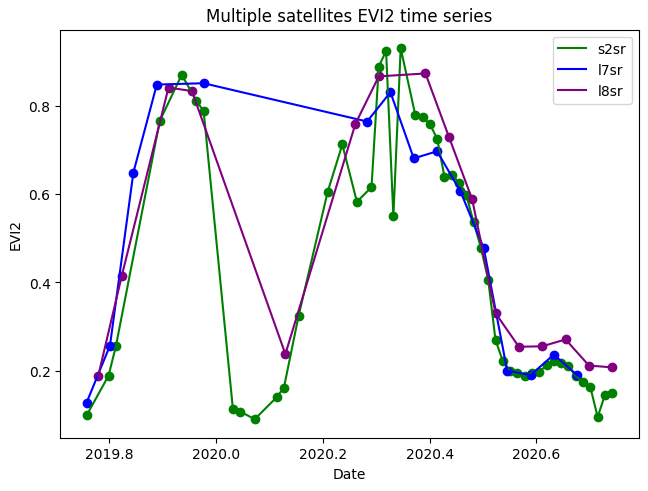
For synchronized multi-satellite analysis, you can use the TwoSatelliteFusion class:
# Combine Landsat 8 and Sentinel-2 data for synchronized analysis
landsat8 = agl.sat.Landsat8(bands=["red", "green", "blue", "nir"])
sentinel2 = agl.sat.Sentinel2(bands=["red", "green", "blue", "nir"])
fusion_sat = agl.sat.TwoSatelliteFusion(landsat8, sentinel2)

# Download synchronized time series with both satellites' data
fused_time_series = agl.get.sits(geometry, "2022-01-01", "2022-12-31", fusion_sat)
For more comprehensive examples, see the examples folder.
Installation
Core library
pip install agrigee_lite
The core package currently keeps geopandas as a required dependency for compatibility-oriented input paths, while geopolars is used as the internal geospatial engine.
Optional extras
| Extra | What it installs | When you need it |
|---|---|---|
visualization |
matplotlib, plotly |
agl.vis plotting functions |
tasks |
smart_open[gcs] |
Cloud task recovery via GCS |
api |
fastapi[standard], uvicorn[standard] |
REST API server (agl_api) |
postgis |
psycopg2-binary |
PostGIS database backend for the SITS cache |
Install any combination of extras:
# API only
pip install "agrigee_lite[api]"

# API + PostGIS backend
pip install "agrigee_lite[api,postgis]"

# Everything
pip install "agrigee_lite[visualization,tasks,api,postgis]"
REST API
AgriGEE.lite ships an optional FastAPI server that exposes the download functionality as a REST API. Long-running downloads are handled asynchronously: every heavy endpoint returns 202 Accepted with a job_id immediately, and you poll /jobs/{job_id} to track progress.
Running the API server
# Default: http://127.0.0.1:8000
agl_api

# Custom host/port
agl_api --host 0.0.0.0 --port 8080

# With hot-reload (development)
agl_api --host 0.0.0.0 --port 8080 --reload
Or programmatically:
import agrigee_lite.api as agl_api

agl_api.serve(host="0.0.0.0", port=8080)
Interactive docs are available at http://127.0.0.1:8000/docs (Swagger UI) once the server is running.
Database backend for the SITS cache
The SITS cache stores previously downloaded time series to avoid redundant GEE requests.
Default — DuckDB (no configuration needed):
The cache is stored in ~/.cache/agrigee_lite/sits_cache.duckdb as a local DuckDB database. No system extensions required.
PostGIS (recommended for production / multi-user deployments):
Set the following environment variables before starting the API. When all three are present, PostGIS is used and the local DuckDB file is ignored:
export AGRIGEE_PG_HOST=localhost
export AGRIGEE_PG_USER=postgres
export AGRIGEE_PG_PASSWORD=secret
export AGRIGEE_PG_PORT=5432   # optional, defaults to 5432
agl_api
The database agrigeelite is created automatically if it does not exist.
API endpoints
| Method | Path | Description |
|---|---|---|
GET |
/health |
Health check |
GET |
/satellites |
List all available satellite names |
POST |
/sits/single |
Download SITS for a single geometry (synchronous) |
POST |
/sits/multiple |
Submit a multi-geometry SITS job (202 → job_id) |
POST |
/images |
Submit an image download job (202 → job_id) |
GET |
/jobs |
List all submitted jobs |
GET |
/jobs/{job_id} |
Get status and result of a job |
DELETE |
/jobs/{job_id} |
Delete a completed or failed job |
GET |
/jobs/{job_id}/download |
Download result as Parquet (SITS) or ZIP (images) |
High-Performance Async Downloads
DuckDB cache schema (visual)
The default DuckDB cache uses three logical tables. The following Mermaid diagram shows the main relationships and important columns.
erDiagram
	GEOMETRIES {
		INTEGER id PK
		TEXT geom_hash
		BLOB geometry
		DOUBLE repr_point_x
		DOUBLE repr_point_y
		TEXT geom_type
		TEXT h3_coarse
		TEXT h3_fine
	}

	SITS_JOBS {
		INTEGER id PK
		TEXT job_hash
		INTEGER geometry_id FK
		TEXT satellite_short_name
		TEXT params_hash
		TEXT reducers
		DOUBLE subsampling_max_pixels
		TIMESTAMP start_date
		TIMESTAMP end_date
		TIMESTAMP fetched_at
	}

	SATELLITE_TABLE {
		INTEGER id PK
		INTEGER job_id FK
		TIMESTAMP timestamp
		DOUBLE <band_columns...>
	}

	GEOMETRIES ||--o{ SITS_JOBS : "geometry_id"
	SITS_JOBS ||--o{ SATELLITE_TABLE : "job_id"
Notes:
SATELLITE_TABLEis a placeholder pattern — each satellite has its own table (e.g.,sentinel2,landsat8) whose columns includetimestampplus numeric columns for each band/index.geom_hashandparams_hashare SHA-1 identifiers used to ensure deduplication and cache identity.- Point geometries are optimized with a fast path using
repr_point_x/repr_point_y.
One of AgriGEE.lite's key features is its use of native async downloads with aiohttp + uvloop. This integration provides:
- Parallel Downloads: Multiple simultaneous connections for faster data retrieval
- Async-first Runtime: Fully asynchronous download pipeline for multi-geometry and multi-image workflows
- Optimized Performance: Achieving 16-22 time series per second (for 1-year cloud-free Sentinel-2 BOA series)
- Reliability: Robust error handling and retry mechanisms
The async integration runs transparently behind the scenes, requiring no additional configuration from users while dramatically improving download speeds compared to traditional sequential downloading methods.
Library Architecture
AgriGEE.lite is organized into three main modules:
-
agl.sat = Data sources, usually coming from satellites/sensors. When defining a sensor, it is possible to choose which bands you want to view/download, or whether you want to use atmospheric corrections or not. By default, all bands are downloaded, and all atmospheric corrections and harmonizations are used.
-
agl.vis = Module that allows you to view data, either through time series or images.
-
agl.get = Module that allows you to download data on a large scale.
Available data sources (satellites, sensors, models and so on)
| Name | Bands | Start Date | End Date | Regionality | Pixel Size | Revisit Time | Variations |
|---|---|---|---|---|---|---|---|
| Sentinel 2 | Blue, Green, Red, Re1, Re2, Re3, Nir, Re4, Swir1, Swir2 | 2016-01-01 | (still operational) | Worldwide | 10 -- 60 | 5 days | BOA, TOA |
| Landsat 5 | Blue, Green, Red, Nir, Swir1, Swir2 | 1984-03-01 | 2013-05-05 | Worldwide* | 15 -- 30 | 16 days | BOA, TOA; Tier 1 and Tier 2; |
| Landsat 7 | Blue, Green, Red, Nir, Swir1, Swir2, Pan | 1999-04-15 | 2022-04-06 | Worldwide* | 15 -- 30 | 16 days | BOA, TOA; Tier 1 and Tier 2; Pan-sharpened |
| Landsat 8 | Blue, Green, Red, Nir, Swir1, Swir2, Pan | 2013-04-11 | (still operational) | Worldwide | 15 -- 30 | 16 days | BOA, TOA; Tier 1 and Tier 2; Pan-sharpened |
| Landsat 9 | Blue, Green, Red, Nir, Swir1, Swir2, Pan | 2021-11-01 | (still operational) | Worldwide | 15 -- 30 | 16 days | BOA, TOA; Tier 1 and Tier 2; Pan-sharpened |
| HLS Landsat | Coastal, Blue, Green, Red, Nir, Swir1, Swir2 | 2013-04-11 | (still operational) | Worldwide | 30 | 2-3 days****** | Harmonized SR |
| HLS Sentinel-2 | Coastal, Blue, Green, Red, Re1, Re2, Re3, Nir, Re4, Swir1, Swir2 | 2015-11-30 | (still operational) | Worldwide | 30 | 2-3 days****** | Harmonized SR |
| NAIP | Blue, Green, Red, Nir | 2003-01-01 | (still operational) | Continental USA (CONUS) | 1 | Annual/Biennial | DOQQ |
| MODIS Daily, 8 days | Red, Nir | 2000-02-18 | (still operational) | Worldwide | 15 -- 30 | daily/8 days | |
| Sentinel 1 | VV, VH - C Band | 2014-10-03 | (still operational) | Worldwide* | 10** | 5 days**** | GRD, ARD*** |
| JAXOS PalSAR 1/2 | HH, HV - L Band | 2014-08-04 | (still operational) | Worldwide | 25** | 15 days | GRD |
| Satellite Embeddings V1 | 64-dimensional embedding | 2017-01-01 | 2024-01-01 | Worldwide | 10 | 1 year | |
| Mapbiomas Brazil | 37 Land Usage Land Cover Classes | 1985-01-01 | 2024-12-31 | Brazil | 30 | 1 year | |
| ANADEM | Slope, Elevation, Aspect | (single image) | (single image) | South America | 30** | (single image) | |
| Copernicus DEM GLO30 | Elevation, Slope, Aspect | (single image) | (single image) | Worldwide | 30 | (single image) | |
| SoilGrids classes | WRB Soil Classes (30 categories) | (single image) | (single image) | Worldwide | 250 | (single image) | |
| Two Satellite Fusion ***** | Intersect common observations from two satellites | (depends on input satellites) | (depends on input satellites) | (depends on input satellites) | (finest of the two satellites) | (depends on input satellites) |
Observations
- *Landsat 7 images began to have artifacts caused by a sensor problem from 2003-05-31.
- **Pixel size/spatial resolution for active sensors (or models that use active sensors) often lacks a clear value, as it depends on the angle of incidence. Here, the GEE value itself is explained, representing the highest resolution captured.
- ***Analysis Ready Data (ARD) is an advanced post-processing method applied to a SAR. However, it is quite costly, and its usefulness must be evaluated on a case-by-case basis.
- ****Sentinel 1 was a twin satellite, one of which went out of service due to a malfunction. Therefore, the revisit time varies greatly depending on the desired geolocation.
- *****Two Satellite Fusion is a meta-satellite that combines data from exactly two optical satellites (e.g., Landsat 8 + Sentinel-2). It automatically finds common observation dates, harmonizes the datasets, and creates synchronized time series with bands from both satellites distinguished by prefixes.
- ******HLS (Harmonized Landsat Sentinel-2) provides atmospherically corrected surface reflectance data harmonized across Landsat-8/9 and Sentinel-2 missions. The 2-3 day revisit time is achieved by combining observations from both satellite constellations.
Available indices
| Index Name | Full Name | Required Bands | Sensor Type | Equation | Description |
|---|---|---|---|---|---|
| NDVI | Normalized Difference Vegetation Index | NIR, RED | Optical | $\frac{NIR - RED}{NIR + RED}$ | Vegetation greenness |
| GNDVI | Green Normalized Difference Vegetation Index | NIR, GREEN | Optical | $\frac{NIR - GREEN}{NIR + GREEN}$ | Vegetation health (chlorophyll) |
| NDWI | Normalized Difference Water Index | NIR, SWIR1 | Optical | $\frac{NIR - SWIR1}{NIR + SWIR1}$ | Water content |
| MNDWI | Modified Normalized Difference Water Index | GREEN, SWIR1 | Optical | $\frac{GREEN - SWIR1}{GREEN + SWIR1}$ | Water body detection |
| SAVI | Soil Adjusted Vegetation Index | NIR, RED | Optical | $\frac{(NIR - RED)}{(NIR + RED + 0.5)} \times 1.5$ | Vegetation, reduces soil effect |
| EVI | Enhanced Vegetation Index | NIR, RED, BLUE | Optical | $2.5 \times \frac{NIR - RED}{NIR + 6 \times RED - 7.5 \times BLUE + 1}$ | Vegetation, minimizes atmospheric effects |
| EVI2 | Two-band Enhanced Vegetation Index | NIR, RED | Optical | $2.5 \times \frac{NIR - RED}{NIR + 2.4 \times RED + 1}$ | Simplified EVI, no blue band |
| MSAVI | Modified Soil Adjusted Vegetation Index | NIR, RED | Optical | $\frac{2 \times NIR + 1 - \sqrt{(2 \times NIR + 1)^2 - 8 \times (NIR - RED)}}{2}$ | Vegetation in areas with bare soil |
| NDRE | Normalized Difference Red Edge Index | NIR, RE1 | Optical | $\frac{NIR - RE1}{NIR + RE1}$ | Chlorophyll content in leaves |
| MCARI | Modified Chlorophyll Absorption in Reflectance Index | NIR, RED, GREEN | Optical | $\left[(NIR - RED) - 0.2 \times (NIR - GREEN)\right] \times \frac{NIR}{RED}$ | Leaf chlorophyll content |
| GCI | Green Chlorophyll Index | NIR, GREEN | Optical | $\frac{NIR}{GREEN} - 1$ | Chlorophyll concentration |
| BSI | Bare Soil Index | BLUE, RED, NIR, SWIR1 | Optical | $\frac{(SWIR1 + RED) - (NIR + BLUE)}{(SWIR1 + RED) + (NIR + BLUE)}$ | Bare soil index |
| CI Red | Red Chlorophyll Index | NIR, RED | Optical | $\frac{NIR}{RED} - 1$ | Chlorophyll index (red) |
| CI Green | Green Chlorophyll Index | NIR, GREEN | Optical | $\frac{NIR}{GREEN} - 1$ | Chlorophyll index (green) |
| OSAVI | Optimized Soil Adjusted Vegetation Index | NIR, RED | Optical | $\frac{NIR - RED}{NIR + RED + 0.16}$ | Like SAVI, for low vegetation |
| ARVI | Atmospherically Resistant Vegetation Index | NIR, RED, BLUE | Optical | $\frac{NIR - (2 \times RED - BLUE)}{NIR + (2 \times RED - BLUE)}$ | Vegetation, reduces atmospheric effects |
| VHVV | VH/VV Ratio | VH, VV | Radar | $\frac{VH}{VV}$ | Vegetation structure (Sentinel-1) |
| HHHV | HH/HV Ratio | HH, HV | Radar | $\frac{HH - HV}{HH + HV}$ | Vegetation structure (PALSAR) |
| RVI | Radar Vegetation Index | HH, HV | Radar | $4 \times \frac{HV}{HH + HV}$ | Radar vegetation index (PALSAR) |
| RAVI | Radar Adapted Vegetation Index | VV, VH | Radar | $4 \times \frac{VH}{VV + VH}$ | Radar vegetation index (Sentinel-1) |
Avaiable reductors
| Name to Use | Full Name | Description |
|---|---|---|
| min | Minimum | Returns the smallest value in the set |
| max | Maximum | Returns the largest value in the set |
| mean | Mean | Returns the average of all values |
| median | Median | Returns the median (middle) value |
| kurt | Kurtosis | Returns the kurtosis (measure of "tailedness") |
| skew | Skewness | Returns the skewness (measure of asymmetry) |
| std | Standard Deviation | Returns the standard deviation |
| var | Variance | Returns the variance |
| mode | Mode | Returns the most frequent value |
| pXX | Percentile XX | Returns the XX-th percentile (e.g., p10 for 10th percentile). You can pass multiple, e.g., p10, p90. |
Motivation: Simplifying Earth Engine for Everyone
My journey with Google Earth Engine began two and a half years ago. While GEE is an incredibly powerful platform that provides access to petabytes of satellite data, it comes with significant complexity challenges:
- Steep Learning Curve: GEE requires extensive boilerplate code and deep understanding of its functional programming paradigms
- Cryptic Error Messages: Server-side execution often produces confusing errors that are difficult to debug
- Harmonization Complexity: Each satellite has different value ranges, cloud masking approaches, and preprocessing requirements
- Inconsistent APIs: Different sensors require different coding approaches, making it hard to switch between data sources
During my master's degree, I found myself constantly rewriting similar code patterns for different projects. This frustration led to a simple but ambitious goal: making satellite data as easy to use as reading a CSV with pandas, without requiring users to be remote sensing experts.
Objectives and Target Audience
AgriGEE.lite aims to be a simple, direct, and high-performance solution for downloading satellite data, serving both academic research and commercial applications. The library is designed for:
- Data Scientists who need satellite data but don't want to become GEE experts
- Agricultural Researchers studying crop monitoring and vegetation dynamics
- Environmental Consultants requiring rapid access to earth observation data
- Students and Educators learning remote sensing applications
- Commercial Users developing scalable earth observation solutions
Contributing
Found this project helpful? ⭐ Give it a star! Want to contribute? 🚀 Open a Pull Request - we welcome all contributions!
Frequently Asked Questions
Why use Google Earth Engine instead of STAC?
While STAC (SpatioTemporal Asset Catalog) is an excellent approach that makes sense for large-scale infrastructure projects, processing satellite data locally can quickly become overwhelming, especially for regions with vast agricultural areas like Australia, the United States, or Brazil.
Key considerations:
- Infrastructure Costs: Building and maintaining your own processing infrastructure vs. GEE usage costs
- Processing Complexity: GEE handles complex atmospheric corrections, cloud masking, and data harmonization automatically
- Scalability: GEE's planetary-scale computing capabilities vs. local processing limitations
- Free Tier: GEE is completely free for academic research and non-commercial projects
The choice depends on your specific use case, scale, and budget requirements.
About Terminology: "Satellites" vs. "Sensors"
Remote sensing experts often note that terms like "satellite" for radar data or "bands" for SAR aren't technically precise. However, we've chosen standardized terminology to:
- Simplify the API: Consistent naming across all data sources reduces cognitive load
- Improve Accessibility: Non-experts can work with different sensors using the same patterns
- Maintain Code Consistency: Unified interfaces make the library easier to maintain and extend
Even excellent projects like MapBiomas (which uses models and algorithms) are treated as "satellites" in our framework. We welcome technical accuracy improvements, but prioritize usability and consistency. Your contributions to improve both aspects are very welcome!
About Our Mascot
The AgriGEE.lite mascot was created using AI tools, with artwork inspired by the "Odd-Eyes Venom Dragon" from Yu-Gi-Oh. The symbolism represents:
- 🌱 Plant Dragon: Agricultural focus
- 🔀 Fusion Card: Multimodal data integration
- 👀 Odd-Eyes: Multiple satellite perspectives on Earth
If you're an artist interested in creating a new mascot design, we'd love to make it official!
Known Bugs
- QuadTree clustering functions produce absurd results when there are very uneven geographic density distributions, for example, thousands of points in one country and a few dozen in another. Some prior geospatial partitioning is recommended.
Development Roadmap
✅ Completed Features
- Optical Satellites: Sentinel-2, Landsat 5/7/8/9 support
- Radar Sensors: Sentinel-1 GRD, ALOS-2 PALSAR-2
- Derived Products: MapBiomas Brazil, MODIS Terra/Aqua
- Time Series: Satellite Image Time Series (SITS) with aggregations
- Downloads: Online and task-based download methods with async aiohttp integration
- Visualizations: matplotlib-based plotting for images and time series
- Cloud Recovery: smart_open[gcs] integration for automatic data recovery
- Advanced Processing: Configurable cloud masking, Landsat pan-sharpening
- REST API: FastAPI server with async job system, Swagger UI, and downloadable results
- SITS Cache: DuckDB (default) and PostGIS backends for caching downloaded time series
🚧 In Development
- Enhanced Visualizations: plotly-based interactive plotting
- Expanded Coverage: All MapBiomas collections (Amazon, Cerrado, etc.)
- Advanced Radar: Sentinel-1 ARD (Analysis Ready Data)
- Ocean Monitoring: Sentinel-3 OLCI/SLSTR sensors
- Historical Data: Landsat 1-4 for long-term analysis
Release history Release notifications | RSS feed


Download files
Download the file for your platform. If you're not sure which to choose, learn more about installing packages.
Source Distribution
Built Distribution
Filter files by name, interpreter, ABI, and platform.
If you're not sure about the file name format, learn more about wheel file names.
Copy a direct link to the current filters
File details
Details for the file agrigee_lite-3.0.1.tar.gz.
File metadata
- Download URL: agrigee_lite-3.0.1.tar.gz
- Upload date:
- Size: 88.5 kB
- Tags: Source
- Uploaded using Trusted Publishing? No
- Uploaded via: twine/6.2.0 CPython/3.14.4
File hashes
| Algorithm | Hash digest | |
|---|---|---|
| SHA256 |
b3638553b829a84c9b4f8fe0722f023f00b7f74c60f6e477489ebfdfd535ec44
|
|
| MD5 |
5c7cc88ca9740d4bb6e8bcd72983022a
|
|
| BLAKE2b-256 |
002a7450a8943b253d8ebff9e8859de73aa135d62baf58699d345a796577b929
|
File details
Details for the file agrigee_lite-3.0.1-py3-none-any.whl.
File metadata
- Download URL: agrigee_lite-3.0.1-py3-none-any.whl
- Upload date:
- Size: 111.6 kB
- Tags: Python 3
- Uploaded using Trusted Publishing? No
- Uploaded via: twine/6.2.0 CPython/3.14.4
File hashes
| Algorithm | Hash digest | |
|---|---|---|
| SHA256 |
11bf6ca88d61d9ec0978667dc7f48f3db1aa3419cf317011ee6f89deecb7325c
|
|
| MD5 |
31c02e35232a9e68533abd25e4453891
|
|
| BLAKE2b-256 |
7b56af45619a4b230d71dc8b94caeab95cabed6969eae72911a29a109001dadf
|






