

ai-blame



Extract provenance from AI agent execution traces.
Like git blame, but for AI-assisted edits. See which AI model wrote each line of code.
Quick Command Reference
| Command | What It Does | Example |
|---|---|---|
stats |
Show trace statistics | ai-blame stats |
timeline |
Chronological edit history | ai-blame timeline |
blame |
Line-by-line attribution | ai-blame blame src/main.rs |
transcript |
Explore AI sessions | ai-blame transcript list |
report |
Preview provenance | ai-blame report |
annotate |
Embed provenance in files | ai-blame annotate |
init |
Create starter config | ai-blame init |
Why ai-blame? AI coding assistants modify your files, but git blame only shows who committed the changes—not which AI model wrote them. ai-blame fills this gap.
Installation
Using Python Package Managers (Recommended)
The easiest way to install ai-blame is using Python package managers. No Rust toolchain required!
# Using uv (recommended)
uv add --dev ai-blame

# Using pip
pip install ai-blame

# Using pipx (for global installation)
pipx install ai-blame
This installs a pre-built binary that works exactly like the Rust version—fast, reliable, and dependency-free.
Using Cargo (Rust)
# Install from crates.io
cargo install ai-blame

# Or install from source
git clone https://github.com/ai4curation/ai-blame
cd ai-blame
cargo install --path .
From Pre-built Binaries
Download the latest release from the releases page.
Quick Start
# Check what traces are available
ai-blame stats

# View timeline of all AI actions
ai-blame timeline

# Preview what would be added (stdout report)
ai-blame report --initial-and-recent

# Apply changes (writes annotations / sidecars)
ai-blame annotate --initial-and-recent

# Filter to specific files
ai-blame annotate --pattern ".py"
Demo
Watch a complete walkthrough of all commands:
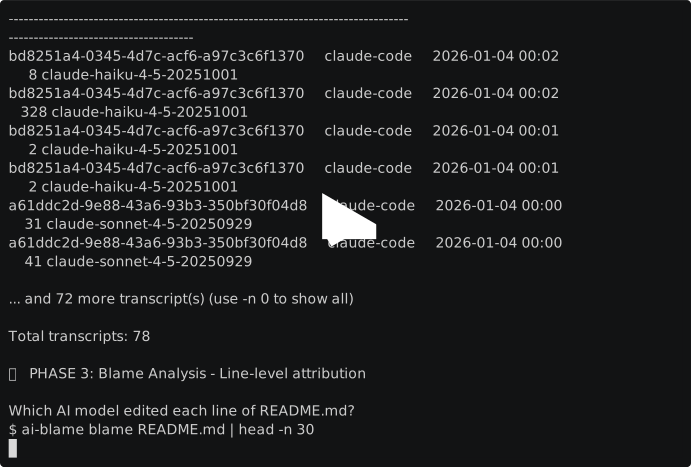
Shows setup, discovery, line-level blame analysis, and annotation workflows using real traces from ai-blame development.
Performance: Caching
The tool includes DuckDB caching enabled by default to speed up repeated runs. Trace files are parsed once and results are cached in .ai-blame.ddb in your trace directory.
Caching enabled by default:
# Cache is automatically used
ai-blame stats

# Rebuild cache (delete existing cache and re-parse)
ai-blame stats --rebuild-cache

# Disable cache for a specific run
ai-blame stats --no-cache
Expected speedup:
- First run: ~55 seconds (builds cache)
- Subsequent runs (unchanged traces): ~3-5 seconds (90% faster 🚀)
- Incremental updates: Proportional to changed files
Cache behavior:
- Claude traces: All-or-nothing invalidation (if any trace file changes, all are re-parsed due to cross-file UUID dependencies)
- Codex traces: Per-file invalidation (each session/file is independent)
- Staleness detection: Modified time + file size comparison
Cache management:
# Delete the cache file to reset
rm .ai-blame.ddb

# Or use the CLI flag to rebuild
ai-blame stats --rebuild-cache

# Disable caching globally
export AI_BLAME_NO_CACHE=1
Desktop App
The Tauri-based desktop app provides a visual interface for exploring AI-assisted code edits.

Features:
- Blame Viewer — Browse files with line-by-line AI attribution and details panel
- Timeline — Chronological view of all AI edits with navigation to source files
- Transcripts — Search and explore AI conversation sessions with full message content
- Settings — Configure project paths and caching options
# Run the desktop app
cd src-tauri && cargo run --release
See the Desktop App documentation for full details.
Documentation
This repo uses MkDocs (Material) for user/CLI documentation.
python -m venv .venv
source .venv/bin/activate
pip install -r docs/requirements.txt
mkdocs serve
Output Examples
YAML/JSON files — Append directly
# config.yaml
name: my-project
version: 1.0

edit_history:
  - timestamp: "2025-12-01T08:03:42+00:00"
    model: claude-opus-4-5-20251101
    agent_tool: claude-code
    action: CREATED
Code files — Sidecar or comments
# main.py (with comment policy)

def hello():
    print("Hello, world!")

# --- edit_history ---
# - timestamp: '2025-12-01T08:03:42+00:00'
#   model: claude-opus-4-5-20251101
#   action: CREATED
# --- end edit_history ---
Or use sidecar files: main.py → main.history.yaml
Configuration
Create .ai-blame.yaml in your project root:
defaults:
  policy: sidecar
  sidecar_pattern: "{stem}.history.yaml"

rules:
  - pattern: "*.yaml"
    policy: append
  - pattern: "*.json"
    policy: append
    format: json
  - pattern: "*.py"
    policy: comment
    comment_syntax: hash
  - pattern: "tests/**"
    policy: skip
Supported Agents
| Agent | Status |
|---|---|
| Claude Code | ✅ Supported |
| OpenAI Codex / GitHub Copilot | ✅ Supported |
| Others | PRs welcome! |
Differences from Python Version
This Rust port maintains CLI compatibility with the Python version but offers significant improvements:
- Better performance - 10-100x faster trace parsing and file processing
- Static typing - Compile-time guarantees for correctness
- Single binary - No runtime dependencies
- Memory safety - Rust's ownership system prevents common bugs
- Easy Python installation - Install via
piporuvwith pre-built wheels
For Python Users
You can still install ai-blame using Python package managers:
uv add --dev ai-blame
# or
pip install ai-blame
This installs the same high-performance Rust binary—no Rust toolchain needed! The CLI commands remain the same, so it's a drop-in replacement for the Python version.
Note: The Python API from the original version is not available in this Rust port. The CLI provides all functionality. If you need programmatic access, please open an issue describing your use case.
Development
# Run tests
cargo test

# Run with debug output
RUST_LOG=debug cargo run -- report

# Build for release
cargo build --release

# Format code
cargo fmt

# Lint code
cargo clippy
Repository Structure
This repository uses a Cargo workspace to organize the CLI and Tauri UI components:
ai-blame/
├── src/                 # Core library (ai-blame crate)
│   ├── lib.rs          # Library root
│   ├── main.rs         # CLI binary entry point
│   ├── cli.rs          # CLI command parsing (feature-gated)
│   ├── blame.rs        # Line-level blame computation
│   ├── config.rs       # Configuration loading
│   ├── extractor.rs    # Trace file parsing
│   ├── models.rs       # Data models
│   └── updater.rs      # File annotation logic
├── src-tauri/           # Tauri desktop app (ai-blame-ui crate)
│   ├── Cargo.toml      # UI-specific dependencies
│   ├── tauri.conf.json # Tauri configuration
│   ├── src/main.rs     # Tauri backend (invokes core library)
│   └── icons/          # Application icons for bundling
├── ui/                  # Static HTML/CSS/JS frontend
│   ├── index.html      # Main UI layout
│   ├── app.js          # UI logic
│   └── styles.css      # Styling
├── tests/               # Integration tests
├── Cargo.toml           # Workspace root + core library config
└── tools/               # Development utilities
    └── generate_icons.py
Workspace Design
- Core Library (
ai-blame): Contains all reusable logic for parsing traces, computing blame, and updating files - CLI Binary: Built with the
clifeature flag (enabled by default) - Tauri UI (
ai-blame-ui): Depends on the core library withdefault-features = falseto avoid pulling in CLI-only dependencies likeclap
This structure follows Tauri best practices by keeping the Tauri binary in src-tauri (required for tauri dev/build to work) while sharing code through the core library.
Feature Flags
cli(default): Enables CLI command parsing with clap. Disable with--no-default-featureswhen using only the library API.
License
BSD-3-Clause
Contributing
Contributions welcome! This is a port of the Python ai-blame project.
PRs especially welcome for:
- Additional agent support (Cursor, Aider, Copilot, etc.)
- Performance improvements
- Bug fixes
- Documentation improvements
1 maintainer

Release files for ai-blame 0.5.3
For a detailed explanation of source distributions (sdists) and built distributions (wheels), please see the package formats documentation.
Source distribution (sdist)
| File | Size | Uploaded | |
|---|---|---|---|
| ai_blame-0.5.3.tar.gz | 152.2 kB | Details |
Built distributions (wheels)
| File | Reset | |||
|---|---|---|---|---|
| ai_blame-0.5.3-py3-none-win_amd64.whl | Python 3 | none | Windows x86-64 | Details |
| ai_blame-0.5.3-py3-none-win32.whl | Python 3 | none | Windows x86-32 | Details |
| ai_blame-0.5.3-py3-none-manylinux_2_28_x86_64.whl | Python 3 | none | Linux glibc 2.28+ x86-64 | Details |
| ai_blame-0.5.3-py3-none-macosx_11_0_arm64.whl | Python 3 | none | macOS 11.0+ ARM64 | Details |
| ai_blame-0.5.3-py3-none-macosx_10_12_x86_64.whl | Python 3 | none | macOS 10.12+ x86-64 | Details |
Total release size: 59.1 MB
Release files / ai_blame-0.5.3.tar.gz
| Download URL | ai_blame-0.5.3.tar.gz |
|---|---|
| Size | 152.2 kB |
| Tags | Source |
|
SHA-256 checksum How to use checksums |
4879c012d2be879eadbdfba21428944e3629fba6971d2999c5906318eedde07a
|
|
BLAKE2b-256 checksum How to use checksums |
d649fd48e08e37d4d57e443b3a875e756d6ef07ec3bebc2c2a4db79f27209d5d
|
| Upload date | |
|
Uploaded using Trusted Publishing? What is trusted publishing? |
Yes |
| Uploaded via |
maturin/1.11.2
|
Release files / ai_blame-0.5.3-py3-none-win_amd64.whl
| Download URL | ai_blame-0.5.3-py3-none-win_amd64.whl |
|---|---|
| Size | 10.6 MB |
| Tags | Python 3 Windows x86-64 |
|
SHA-256 checksum How to use checksums |
dde9b87ea3dd736f7ae388749965112e3452ee8758c5cf11d77e1fd0433ac3e4
|
|
BLAKE2b-256 checksum How to use checksums |
29112692b270d5597c048b3b9a8ad2ef4611d6bf7671fb4d4a3706409bf295eb
|
| Upload date | |
|
Uploaded using Trusted Publishing? What is trusted publishing? |
Yes |
| Uploaded via |
maturin/1.11.2
|
Release files / ai_blame-0.5.3-py3-none-win32.whl
| Download URL | ai_blame-0.5.3-py3-none-win32.whl |
|---|---|
| Size | 9.1 MB |
| Tags | Python 3 Windows x86-32 |
|
SHA-256 checksum How to use checksums |
343a9d1bca5482d174f4ef2e12357ca999e313462122d14252c008b0cd32c0be
|
|
BLAKE2b-256 checksum How to use checksums |
a5cb1b51ef81f6b290dda00d25ba23e26b412cf56cde987949531cc456b29c78
|
| Upload date | |
|
Uploaded using Trusted Publishing? What is trusted publishing? |
Yes |
| Uploaded via |
maturin/1.11.2
|
Release files / ai_blame-0.5.3-py3-none-manylinux_2_28_x86_64.whl
| Download URL | ai_blame-0.5.3-py3-none-manylinux_2_28_x86_64.whl |
|---|---|
| Size | 14.8 MB |
| Tags | Linux glibc 2.28+ x86-64 Python 3 |
|
SHA-256 checksum How to use checksums |
4f5dbc7c1b18eab70d5a84a9a19cba2639b27fc5b3164e72ad20b98c0a438a0b
|
|
BLAKE2b-256 checksum How to use checksums |
b65a75ffa15b2815e297a46aa85f0d96114c10de128905b3d55e17716649cda8
|
| Upload date | |
|
Uploaded using Trusted Publishing? What is trusted publishing? |
Yes |
| Uploaded via |
maturin/1.11.2
|
Release files / ai_blame-0.5.3-py3-none-macosx_11_0_arm64.whl
| Download URL | ai_blame-0.5.3-py3-none-macosx_11_0_arm64.whl |
|---|---|
| Size | 11.5 MB |
| Tags | Python 3 macOS 11.0+ ARM64 |
|
SHA-256 checksum How to use checksums |
589c0131410c4ef1004aa3a64d36fcc87c3a53b5c5d3102f1d22fa735f0810dc
|
|
BLAKE2b-256 checksum How to use checksums |
1b9fa8c214df78b42c4d44ece1bb5166b0a490189ea42e6cc3da4f93caf7d990
|
| Upload date | |
|
Uploaded using Trusted Publishing? What is trusted publishing? |
Yes |
| Uploaded via |
maturin/1.11.2
|
Release files / ai_blame-0.5.3-py3-none-macosx_10_12_x86_64.whl
| Download URL | ai_blame-0.5.3-py3-none-macosx_10_12_x86_64.whl |
|---|---|
| Size | 12.8 MB |
| Tags | Python 3 macOS 10.12+ x86-64 |
|
SHA-256 checksum How to use checksums |
4f89cac7fa5bcbdeff08d0644c3cf9bcb5118612744a66bdb22ba2f28b8c07ba
|
|
BLAKE2b-256 checksum How to use checksums |
d579275e50b44ecd19c91a0d10083d8075866a76841ff4679ad0eccaa6ae0326
|
| Upload date | |
|
Uploaded using Trusted Publishing? What is trusted publishing? |
Yes |
| Uploaded via |
maturin/1.11.2
|














