
AI Fashion House
AI Fashion House is a project created for the ADK Hackathon with Google Cloud. It's a modular, multi-agent system that transforms fashion design ideas into beautiful visuals. It automates the entire creative pipeline — from finding design inspirations to generating fashion images and then cinematic runway videos — by coordinating a set of specialized, intelligent agents. It's built with ADK and various Google Cloud tech.
How It Works
The system relies on a multi-agent framework, where each agent handles a specific step in the creative process. These agents operate asynchronously, enabling a flexible and dynamic design workflow:
-
Input Analysis Interprets user input to identify themes, fashion concepts, and stylistic cues.
-
Visual Reference Retrieval The
met_rag_agentagent searches the Metropolitan Museum of Art's open-access archive (over 500,000 images) to retrieve relevant historical designn references.- BigQuery RAG: Performs semantic retrieval using Retrieval-Augmented Generation (RAG) with BigQuery.
- GenAI Embeddings: Embeds captions using the
text-embedding-005model for similarity comparison (image search). - Gemini Multimodal Analysis: Processes both images and text to extract stylistic and structural fashion details.
-
Internet Search Expansion The
search_agentagent uses Google Search Grounding to retrieve contemporary fashion references from the web. -
Style Prompt Generation The
promp_writer_agent&fashion_designagents organize visual data using a sequential pattern and combines it via an aggregator assistant to produce a detailed, fashion-specific prompt. -
Artifact Creation and Orchestration The
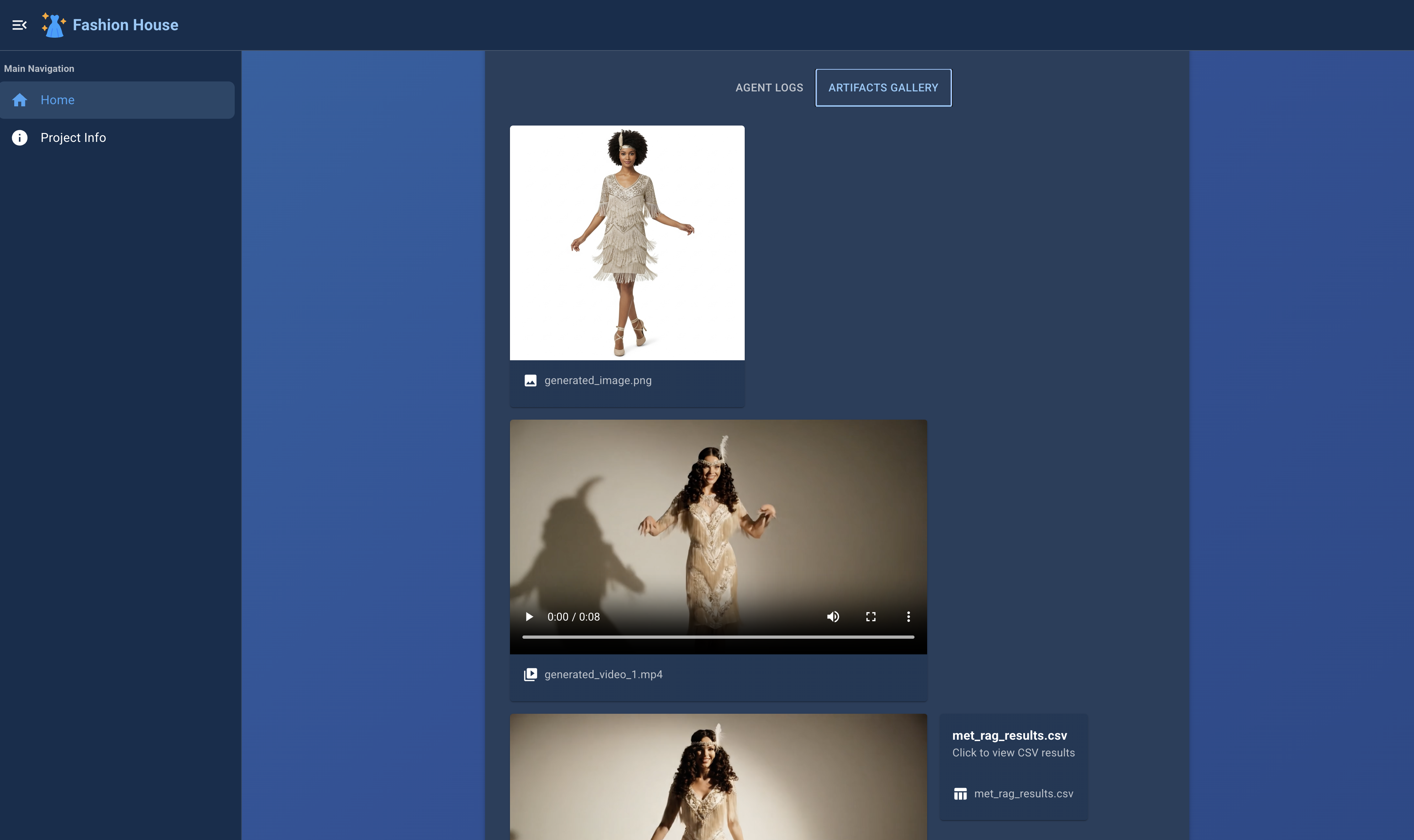
marketing_agentagent uses the style prompt to generate visual outputs:- Imagen 3 is used to produce high-quality fashion images.
- Veo 3 generates stylized runway videos.
- Gemini writes social media posts.
Target Audience
- Fashion designers seeking design inspirations and showcase their designs visually
- Educators or students in fashion design education
- Archivists or curators seeking to combine design history with generative AI
- Creators and developers interested in visual storytelling and AI-powered prototyping
Technology Stack
- Agent Development Kit (ADK)
- Google Cloud (Vertex AI, BigQuery, Cloud Storage)
- Gemini API and GenAI text/image embedding models
- Imagen 3 and Veo 3 for advanced image and video synthesis
- A modular, multi-agent orchestration system
Multi-Agent Architecture
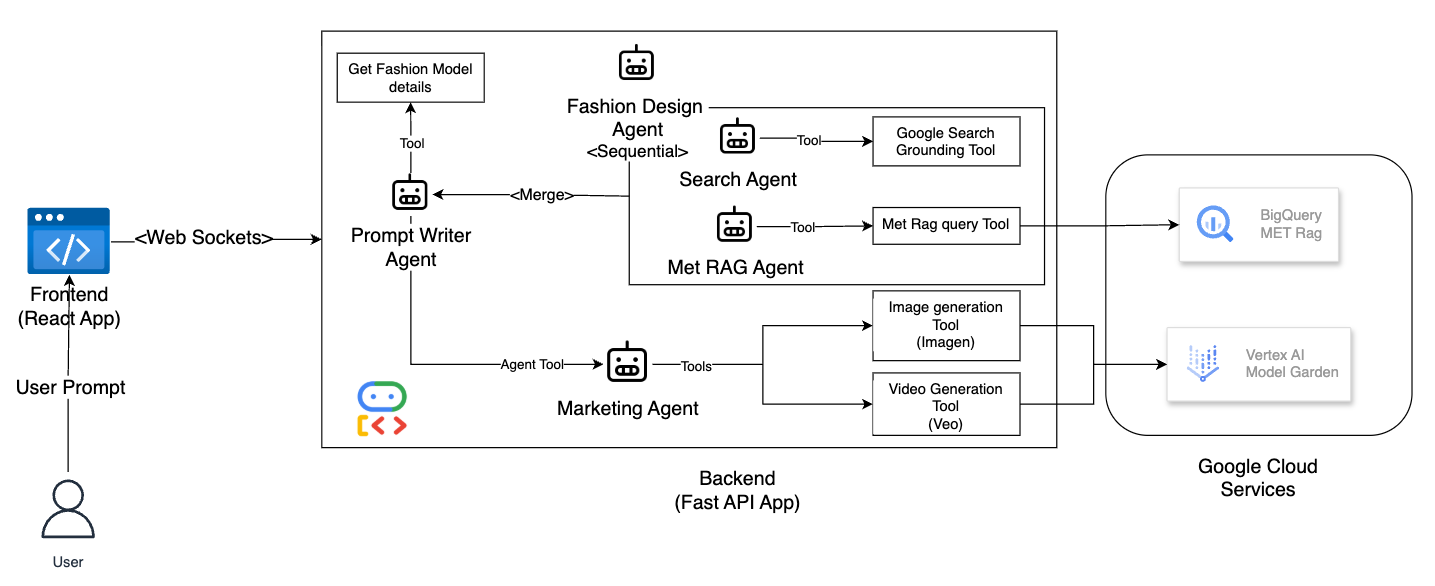
Each step of the workflow is managed by a dedicated agent:
- Input Analysis
- Visual Reference Retrieval (
met_ragagent)- BigQuery-based semantic search
- Embedding generation and filtering
- Multimodal image analysis
- Web Search (
research_agentagent) - Prompt Generation (
fashion_designagent and aggregator) - Visual and Video Generation (
marketing_agentagent using Imagen 3 and Veo 4)
Installation
Prerequisites:
-
Google Cloud SDK (gcloud CLI) installed for authentication.
- Terminal command:
gcloud initand choose the project ID. - Set a default login:
gcloud auth application-default login.
- Terminal command:
-
Access to Google Cloud: BigQuery, Gemini, Imagen 4, Veo 3 (public preview).
Virtual Environment with Python 11.0 or Higher
python -m venv venv
source venv/bin/activate  # On Windows: venv\Scripts\activate
Install Package
pip install ai-fashion-house
Configure Environment Variables to run the application
Create a .env file in the root directory with the following content:
GOOGLE_GENAI_USE_VERTEXAI=1
GOOGLE_API_KEY=<your_google_api_key>
GOOGLE_CLOUD_PROJECT=<your_google_cloud_project_id>
GOOGLE_CLOUD_LOCATION=us-central1

# RAG settings
BIGQUERY_DATASET_ID=met_data
BIGQUERY_CONNECTION_ID=met_data_conn
BIGQUERY_REGION=US

# Embeddings and captioning models
BIGQUERY_EMBEDDINGS_MODEL_ID=embeddings_model
BIGQUERY_EMBEDDINGS_MODEL=text-embedding-005
BIGQUERY_CAPTIONING_MODEL_ID=gemini_model
BIGQUERY_CAPTIONING_MODEL=gemini-2.0-flash
BIGQUERY_TABLE_ID=fashion_ai_met
BIGQUERY_VECTOR_INDEX_ID=met_data_index

VEO2_MODEL_ID=veo-3.0-generate-preview
IMAGEN_MODEL_ID=imagen-4.0-generate-preview-06-06

MEDIA_FILES_BUCKET_GCS_URI=<gs://your-bucket-name>
Note: you will need to update .env with your own:
- Google API key (get it from Google AI Studio)
- Google Cloud project id
- Google Cloud bucket for storing generated images and videos
Set Up MET RAG (Retrieval-Augmented Generation)
To simplify the installation process, you can use the setup-rag command to automatically configure the MET RAG (Retrieval-Augmented Generation) environment on GCP BigQuery.
This command sets up the required dataset, connection, and vector index for the met_rag_agent.
In case the automated setup fails or you prefer manual deployment, we’ve also included the necessary BigQuery SQL scripts in the scripts/ folder.
ai-fashion-house setup-rag
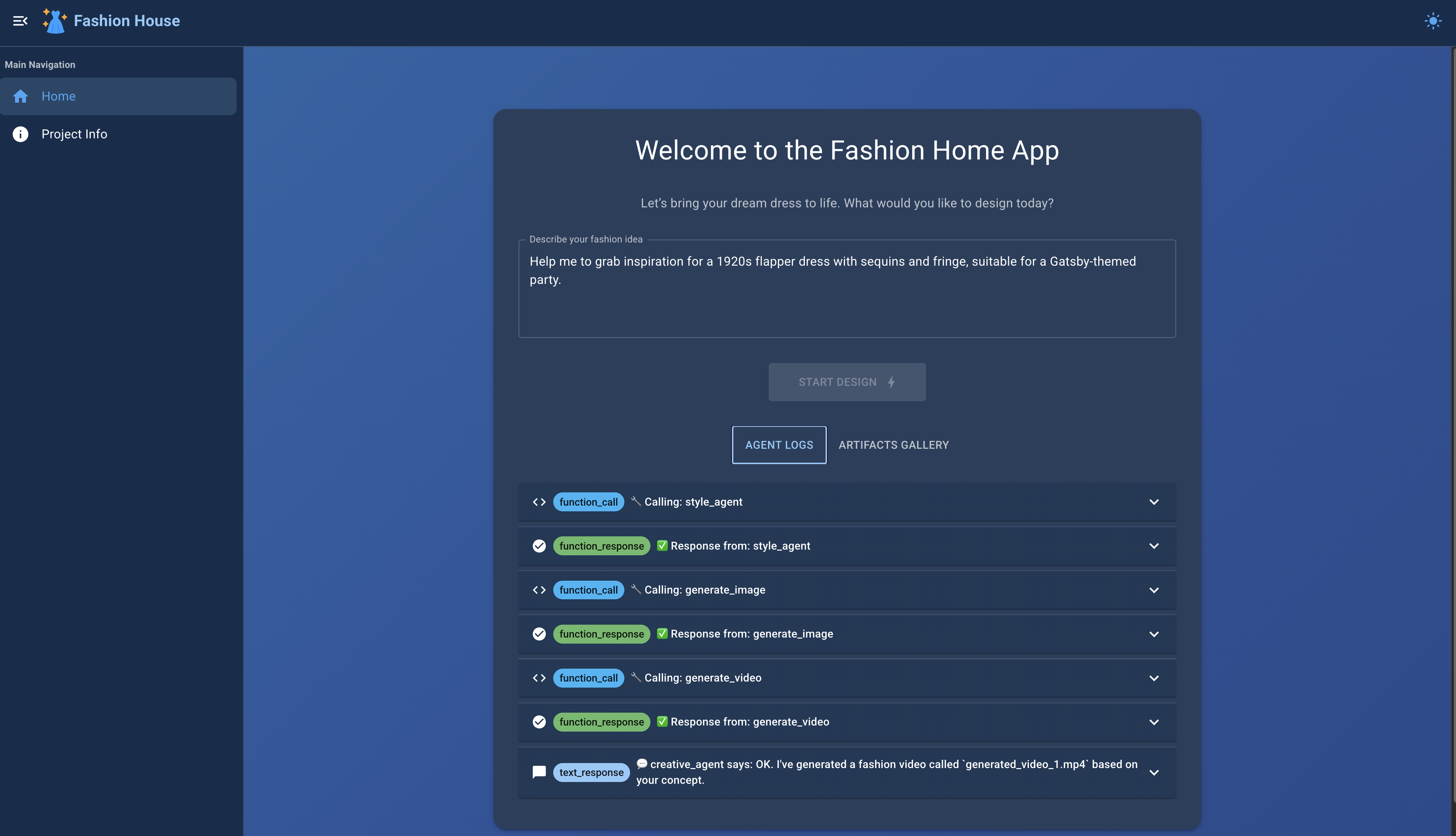
Run the Application
ai-fashion-house start
Open your browser and navigate to:
http://localhost:8080
to access the AI Fashion House web UI interface.
🤝 Contributing
Contributions are welcome and appreciated! To contribute:
- Fork this repository.
- Create a new branch for your feature or fix.
- Commit your changes with clear messages.
- Push to your forked repository.
- Open a Pull Request (PR) to the
mainbranch with a description of your changes and any relevant context.
🛠️ Running the Project Locally
1. Start the Backend
Run the backend server from the root directory:
ai-fashion-house start --reload
💡 Use the
--reloadflag to enable hot-reloading during development.
2. Start the React Frontend
Open a new terminal, navigate to the ui directory, and run:
cd ui
npm install
npm run dev
Then open your browser and navigate to:
http://localhost:5173
3. Build for Production
To generate the production build of the frontend:
npm run build
⚛️ The UI is a React.js app using Vite.
2 maintainers


Metadata
2 maintainers
Release files for ai-fashion-house 0.1.11
For a detailed explanation of source distributions (sdists) and built distributions (wheels), please see the package formats documentation.
Source distribution (sdist)
| File | Size | Uploaded | |
|---|---|---|---|
| ai_fashion_house-0.1.11.tar.gz | 155.9 kB | Details |
Built distribution (wheel)
| File | Interpreter | ABI | Platform | Reset |
|---|---|---|---|---|
| ai_fashion_house-0.1.11-py3-none-any.whl | Python 3 | none | any | Details |
Total release size: 194.0 kB
Release files / ai_fashion_house-0.1.11.tar.gz
| Download URL | ai_fashion_house-0.1.11.tar.gz |
|---|---|
| Size | 155.9 kB |
| Tags | Source |
|
SHA-256 checksum How to use checksums |
aaa92d9da17f7332422168c9c67be3835cfca369112abb7a206bd4f62a6de178
|
|
BLAKE2b-256 checksum How to use checksums |
75156c1aadc44c2a523cce31c2d48afd9e46de769db4ececdd6eaaec37678e5c
|
| Upload date | |
|
Uploaded using Trusted Publishing? What is trusted publishing? |
No |
| Uploaded via |
uv/0.6.2
|
Release files / ai_fashion_house-0.1.11-py3-none-any.whl
| Download URL | ai_fashion_house-0.1.11-py3-none-any.whl |
|---|---|
| Size | 38.1 kB |
| Tags | Python 3 |
|
SHA-256 checksum How to use checksums |
336fd0f6b8810284f41a26f625c2e9265cc83e8b26040bd959b094b6c4b1cd85
|
|
BLAKE2b-256 checksum How to use checksums |
149eba61ba7b1d7ddbe6dc587b110bc2871f537d9b1b9aa5d0802ab37f179928
|
| Upload date | |
|
Uploaded using Trusted Publishing? What is trusted publishing? |
No |
| Uploaded via |
uv/0.6.2
|














