
AI Fashion House, A multi agent adk application for fashion design


Project description
AI Fashion House
A project built for the ADK Hackathon with Google Cloud, AI Fashion House is a multi-agent system designed to assist with design inspiration, fashion image generation, and cinematic runway video creation.
What is AI Fashion House?
AI Fashion House is an AI-powered fashion design assistant that transforms expressive or abstract user prompts into rich visual content. Built on a modular, multi-agent architecture, it automates the entire creative pipeline—from concept interpretation to high-fidelity visual generation—by coordinating a set of intelligent, specialized agents.
How It Works
The system relies on a multi-agent framework, where each agent handles a specific step in the creative process. These agents operate asynchronously, enabling a flexible and dynamic design workflow:
-
Input Analysis Interprets user input to identify themes, fashion concepts, and stylistic cues.
-
Visual Reference Retrieval The
met_rag_agentagent searches the Metropolitan Museum of Art's open-access archive (over 500,000 images) to retrieve relevant historical references.- BigQuery RAG: Performs semantic retrieval using Retrieval-Augmented Generation with BigQuery.
- GenAI Embeddings: Embeds captions using the
text-embedding-005model for similarity comparison. - Gemini Multimodal Analysis: Processes both images and text to extract stylistic and structural fashion details.
-
Internet Search Expansion The
search_agentagent uses Google Search Grounding to retrieve contemporary fashion references from the web. -
Style Prompt Generation The
promp_writer_agent&fashion_designagents organize visual data using a sequential pattern and combines it via an aggregator assistant to produce a detailed, fashion-specific prompt. -
Artifact Creation and Orchestration The
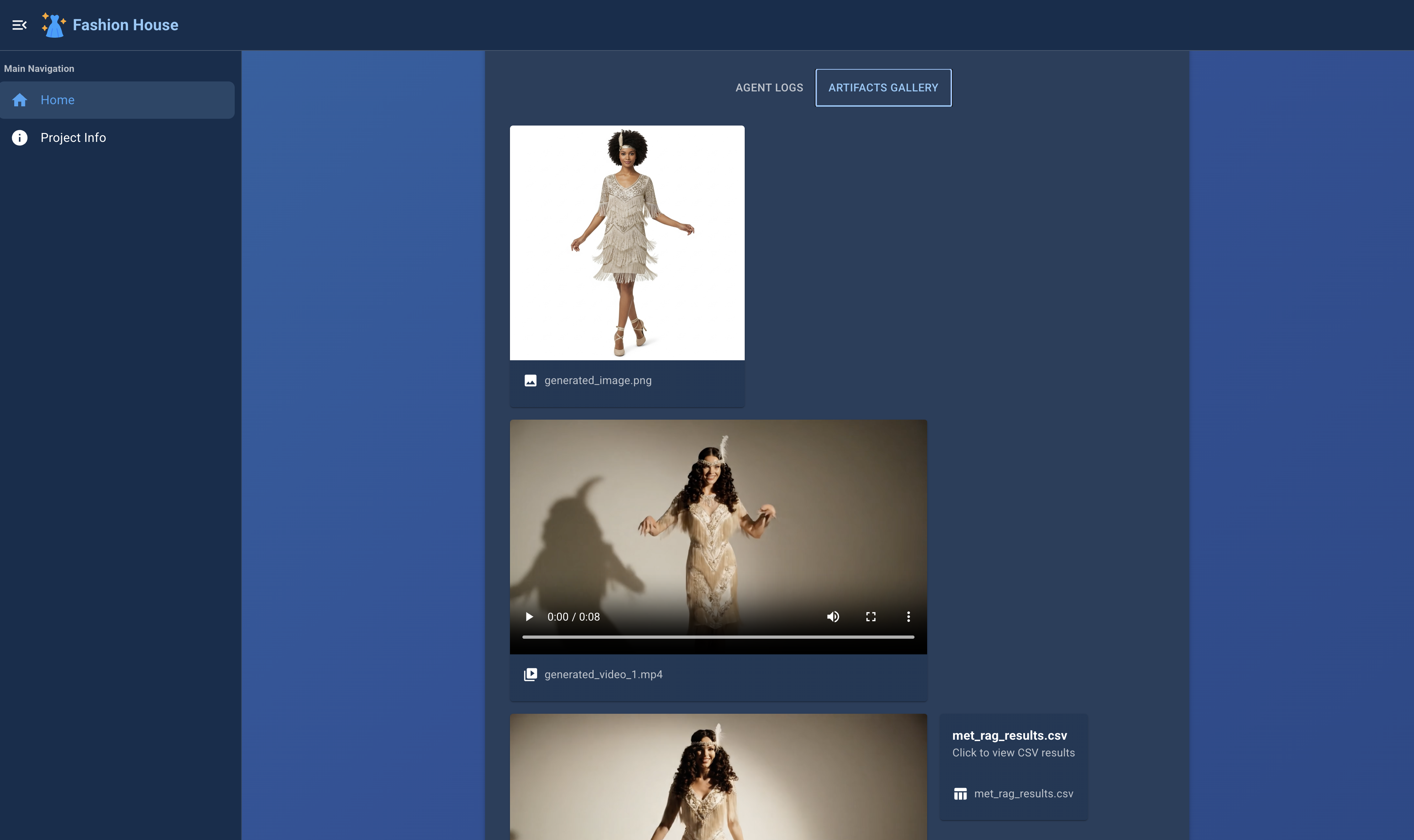
marketing_agentagent uses the style prompt to generate visual outputs:- Imagen 3 is used to produce high-quality fashion images.
- Veo 3 generates stylized runway videos.
Target Audience
AI Fashion House is designed for:
- Fashion designers exploring new creative directions
- Educators and students in fashion design programs
- Archivists and curators seeking to combine history with generative AI
- Creators and developers interested in visual storytelling and AI-powered prototyping
Technology Stack
This project integrates:
- Google Cloud (Vertex AI, BigQuery, Cloud Storage)
- Gemini API and GenAI text/image embedding models
- Imagen 3 and Veo 3 for advanced image and video synthesis
- A modular, multi-agent orchestration system
Multi-Agent Architecture
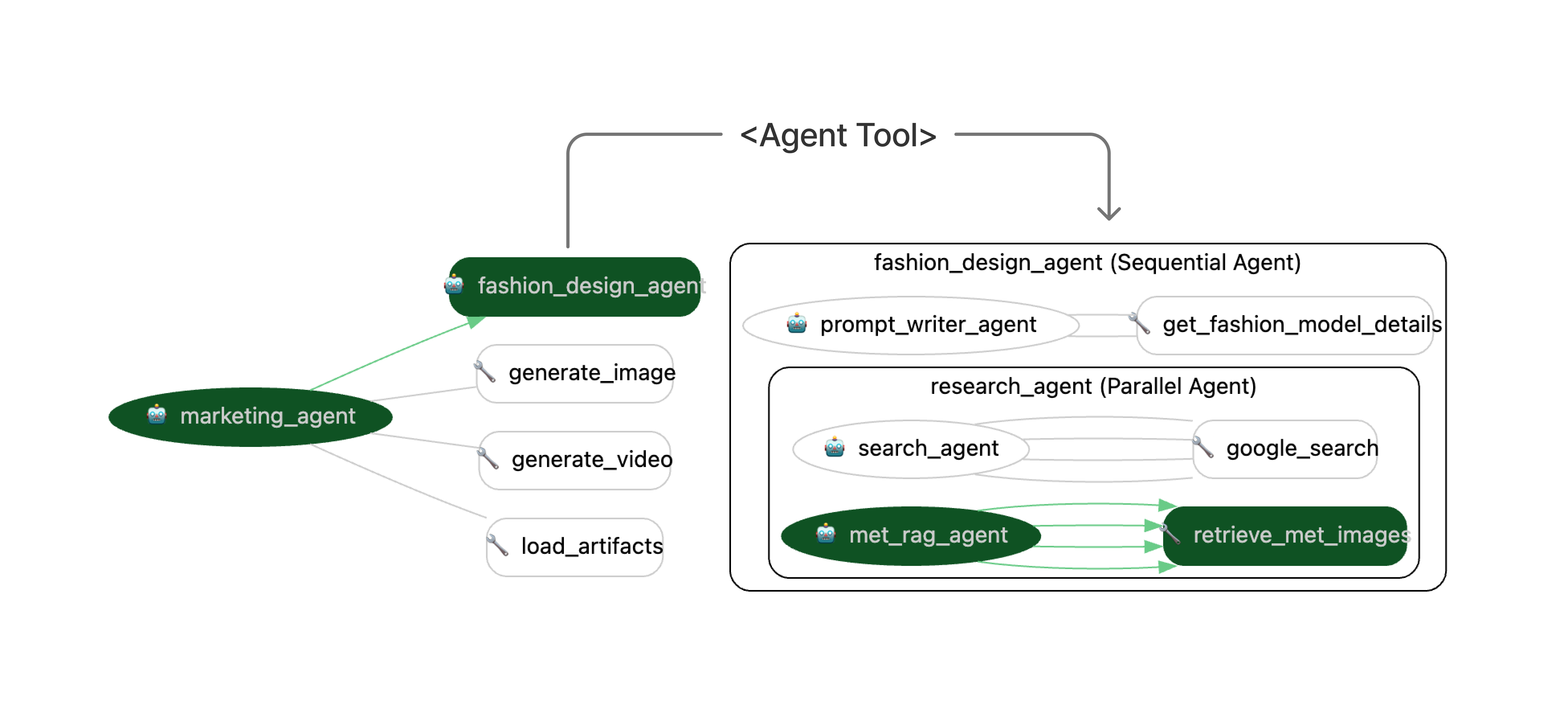
Each step of the workflow is managed by a dedicated agent:
- Input Analysis
- Visual Reference Retrieval (
met_ragagent)- BigQuery-based semantic search
- Embedding generation and filtering
- Multimodal image analysis
- Web Search (
research_agentagent) - Prompt Generation (
fashion_designagent and aggregator) - Visual and Video Generation (
marketing_agentagent using Imagen 3 and Veo 4)
Installation
Create and Activate A Virtual Environment with Python 11.0 or Higher
python -m venv venv
source venv/bin/activate  # On Windows: venv\Scripts\activate
Install Package
pip install ai-fashion-house
Configure Environment Variables to run the application
Create a .env file in the root directory with the following content:
GOOGLE_GENAI_USE_VERTEXAI=1
GOOGLE_API_KEY=<your_google_api_key>
GOOGLE_CLOUD_PROJECT=<your_google_cloud_project_id>
GOOGLE_CLOUD_LOCATION=us-central1

# RAG settings
BIGQUERY_DATASET_ID=met_data2
BIGQUERY_CONNECTION_ID=met_data_conn2
BIGQUERY_REGION=US

# Embeddings and captioning models
BIGQUERY_EMBEDDINGS_MODEL_ID=embeddings_model
BIGQUERY_EMBEDDINGS_MODEL=text-embedding-005
BIGQUERY_CAPTIONING_MODEL_ID=gemini_model
BIGQUERY_CAPTIONING_MODEL=gemini-2.0-flash
BIGQUERY_TABLE_ID=fashion_ai_met
BIGQUERY_VECTOR_INDEX_ID=met_data_index

VEO2_OUTPUT_GCS_URI=gs://myfiles2025
VEO2_MODEL_ID=veo-3.0-generate-preview
IMAGEN_MODEL_ID=imagen-4.0-generate-preview-06-06
Set Up MET RAG(Retrieval-Augmented Generation)
To simplify the installation process, you can use the setup-rag command to automatically configure the MET RAG (Retrieval-Augmented Generation) environment on GCP BigQuery. This command sets up the required dataset, connection, and vector index for the MET RAG agent. In case the automated setup fails or you prefer manual deployment, we’ve also included the necessary BigQuery SQL scripts in the scripts/ folder.
ai-fashion-house setup-rag
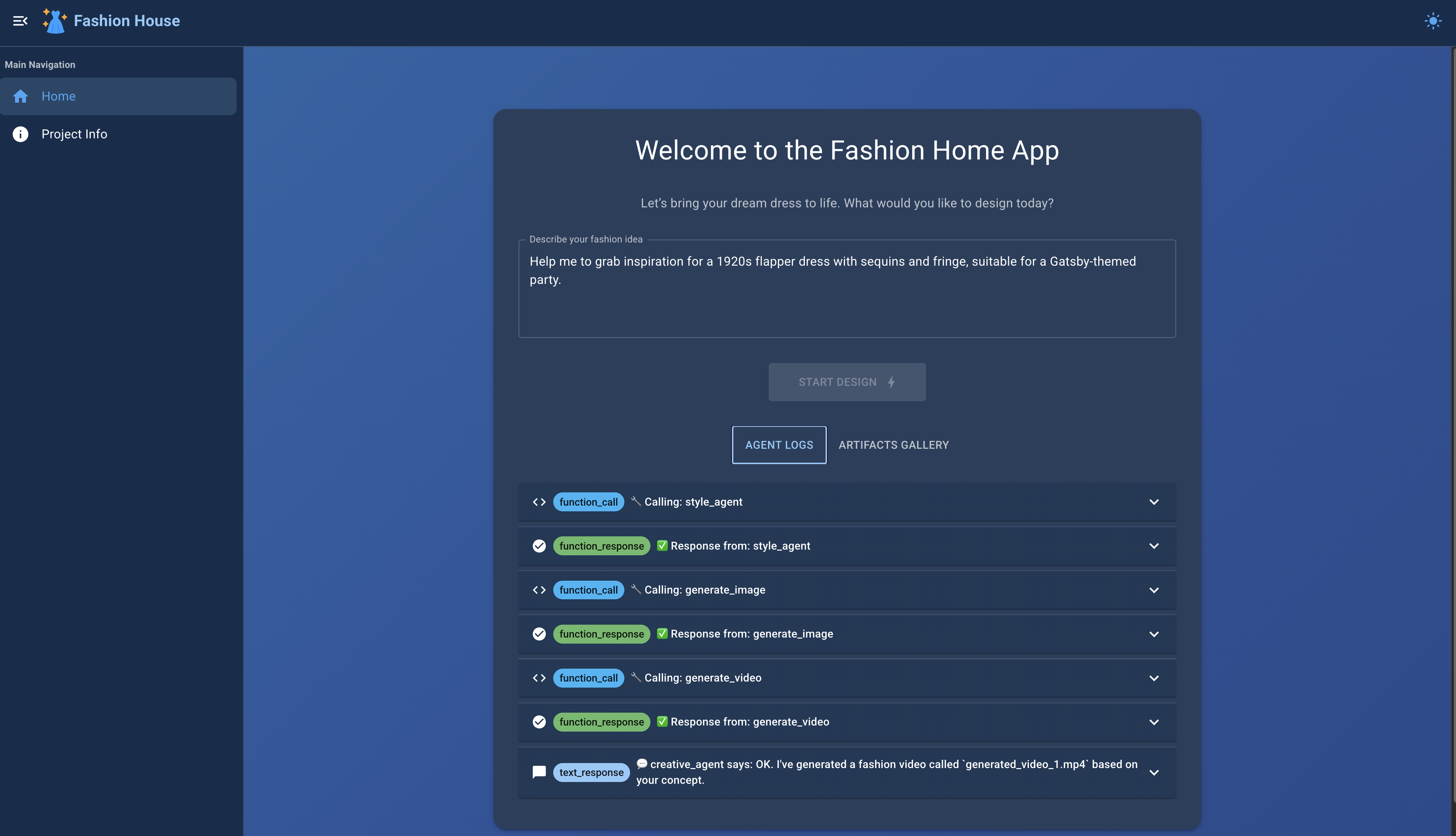
Run the Application
ai-fashion-house start
Open your browser and navigate to:
http://localhost:8080
to access the AI Fashion House interface.
Release history Release notifications | RSS feed


Download files
Download the file for your platform. If you're not sure which to choose, learn more about installing packages.
Source Distribution
Built Distribution
Filter files by name, interpreter, ABI, and platform.
If you're not sure about the file name format, learn more about wheel file names.
Copy a direct link to the current filters
File details
Details for the file ai_fashion_house-0.1.7.tar.gz.
File metadata
- Download URL: ai_fashion_house-0.1.7.tar.gz
- Upload date:
- Size: 117.3 kB
- Tags: Source
- Uploaded using Trusted Publishing? No
- Uploaded via: uv/0.6.2
File hashes
| Algorithm | Hash digest | |
|---|---|---|
| SHA256 |
7d9511e5fdb261301cdabc0c27d0ecd6a57c1dc4c1565d84cd2f5852ebc93f24
|
|
| MD5 |
95eb32760a7a532e48927e5536db664e
|
|
| BLAKE2b-256 |
70215dbb3ac89c9aa2ac2928599b719678d67a829269536d0c8de5e6906f6f33
|
File details
Details for the file ai_fashion_house-0.1.7-py3-none-any.whl.
File metadata
- Download URL: ai_fashion_house-0.1.7-py3-none-any.whl
- Upload date:
- Size: 28.3 kB
- Tags: Python 3
- Uploaded using Trusted Publishing? No
- Uploaded via: uv/0.6.2
File hashes
| Algorithm | Hash digest | |
|---|---|---|
| SHA256 |
53f3724e070519eb857d9b73c604e2f9eadbf3fac6ce8995c7231fd8e7bcb2d1
|
|
| MD5 |
b30991ff5572f5dc9c4906a70f699c4d
|
|
| BLAKE2b-256 |
1f1307748826658f55d8608553b98ef467c4d1183349571113a8f2c6ec7db168
|






