
🐙 AI Commit Generator
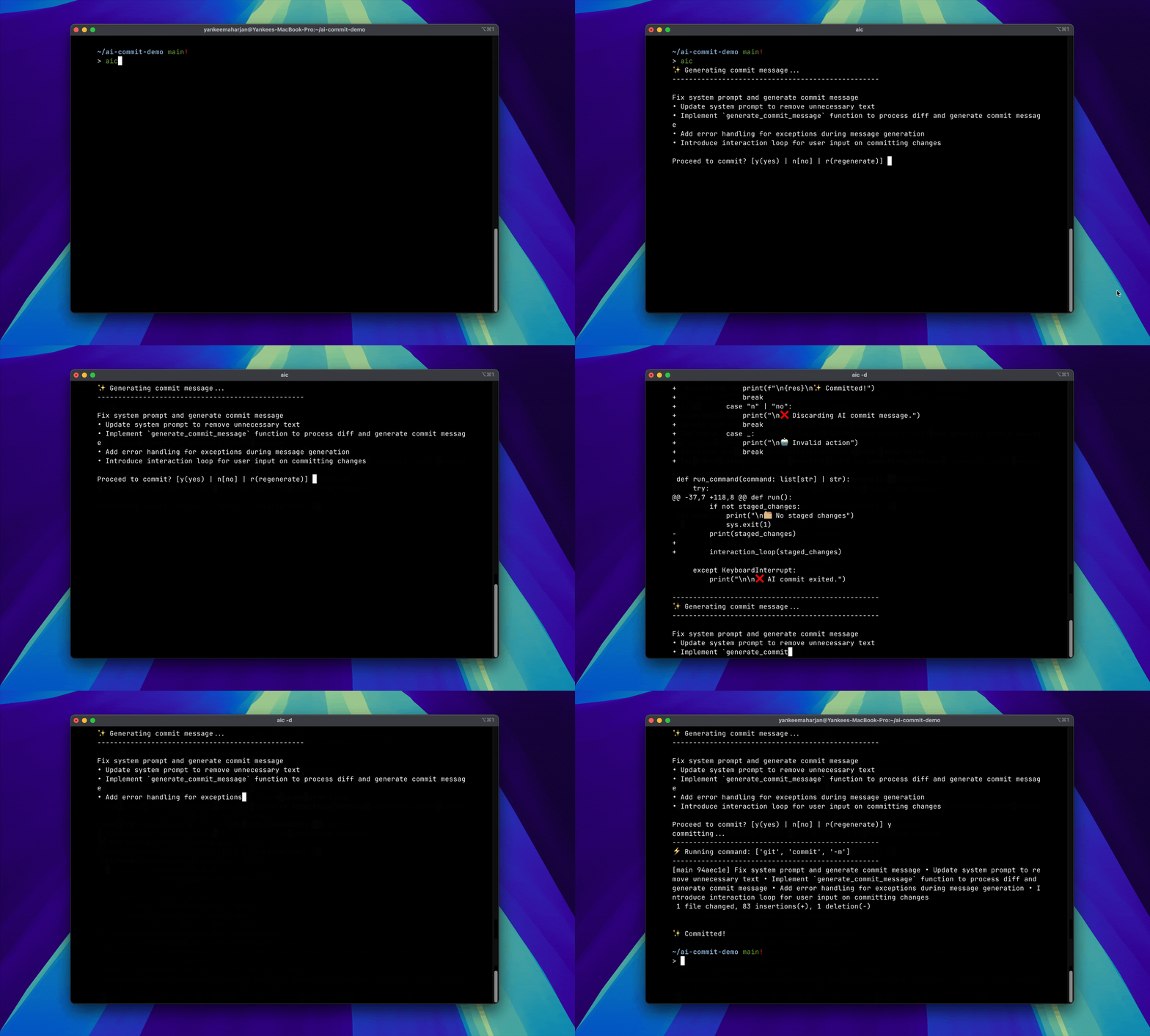
Use AI to generate commit message for your staged changes.
⚡️ Features
- Use local models (via Ollama) or remote models (with OpenAI API compatible providers like:
openai,groq,gemini,togetherai,deepseek,qwen) or your custom provider. - Regenerate commit messages until you find the perfect one
- In-place editing of generated commit
- Define your custom commit message format
- Simple CLI interface with debug mode
⚡️ Install
pip install ai-gen-commit
✨ Generate Commit messages
In any git directory with staged changes, run:
aic
🔍 Run in debug mode
aic -d
🦙 Local Mode [Specify model to use]
aic -m <model-name>

aic -m "llama3.2:3b"

# OR

export OLLAMA_MODEL="llama3.2:3b"
🛜 Remote Mode
To run in remote mode, export your API keys as:
export OPENAI_API_KEY=<your-api-key>
Specify which remote provider to use:
export AI_COMMIT_PROVIDER="gemini" or "openai" or "togetherai" or "groq" or "deepseek" or "mistral"
then enable remote mode:
aic -r
Specify the model to use based on the provider:
export AI_COMMIT_PROVIDER="groq"
export AI_COMMIT_MODEL="qwen-2.5-32b" # pass the model as env var
aic -r

# ---

export AI_COMMIT_PROVIDER="openai"
aic -r -m "gpt-4o-2024-11-20" # pass the model as flag

# ---

export AI_COMMIT_PROVIDER="gemini"
aic -r -m "gemini-1.5-flash"
✨ Bring your own Provider
You can use any OPEN AI compatible provider/server for commit generation.
export AI_COMMIT_PROVIDER=custom # should be set to custom
export AI_COMMIT_MODEL=llama3.2:3b # example
export AI_COMMIT_PROVIDER_BASE_URL=http://localhost:11434/v1 # example
export OPENAI_API_KEY=<your-api-key> # if your custom provider requires one
📝 In-place Editing
Set your editor environment variable:
export EDITOR=vim
export EDITOR=nvim

# For VSCode
export EDITOR='code --wait'
After commit message is generated, press e to edit using the defined $EDITOR.
Defaults to using vi.
🤖 Custom commit message format
Users can generate commit messages based on the format and instructions defined in the system prompt.
To define system prompt on project level
- Create a
.ai-commitfile in your git repository's root directory (same location as the.gitfolder) - Add your system prompt to this file
To define a global system prompt
- Create a file on
~/.$HOME/.ai-commit - Add your system prompt to this file
| Project-level System Prompt > Global System Prompt > Built-in system prompt.
Getting Help
aic -h
🔨 Development
👀 Prerequisites Local mode [default]
🚀 Setting up
make setup
1 maintainer

Metadata
1 maintainer
Release files for ai-gen-commit 0.1.3
For a detailed explanation of source distributions (sdists) and built distributions (wheels), please see the package formats documentation.
Source distribution (sdist)
| File | Size | Uploaded | |
|---|---|---|---|
| ai_gen_commit-0.1.3.tar.gz | 10.3 kB | Details |
Built distribution (wheel)
| File | Interpreter | ABI | Platform | Reset |
|---|---|---|---|---|
| ai_gen_commit-0.1.3-py3-none-any.whl | Python 3 | none | any | Details |
Total release size: 21.1 kB
Release files / ai_gen_commit-0.1.3.tar.gz
| Download URL | ai_gen_commit-0.1.3.tar.gz |
|---|---|
| Size | 10.3 kB |
| Tags | Source |
|
SHA-256 checksum How to use checksums |
17d7b8d4931e877542616fcee693abb5b4ecad91d7c02130d1cb85afea236b31
|
|
BLAKE2b-256 checksum How to use checksums |
76dc0b8bdb6b13260f2de7af598040a68d7a4084f42d5b856b0c01cf76c32720
|
| Upload date | |
|
Uploaded using Trusted Publishing? What is trusted publishing? |
Yes |
| Uploaded via |
twine/7.0.0 CPython/3.13.14
|
Provenance
Provenance describes where a file came from. On PyPI, provenance is shared via attestations, which provide a verifiable record of the build or publishing details. View details, limitations and caveats.


PyPI Publish Attestation
PyPI verified that this artifact, at this checksum, originated from the publisher listed below.
Signed by GitHub Actions, verified by PyPI on Oct 6, 2026.
Transparency logRelease files / ai_gen_commit-0.1.3-py3-none-any.whl
| Download URL | ai_gen_commit-0.1.3-py3-none-any.whl |
|---|---|
| Size | 10.8 kB |
| Tags | Python 3 |
|
SHA-256 checksum How to use checksums |
089c3d0e3c9c0ccd9616364d9f9c3c83faa95ad1046ea5d2523c012ba7f1554f
|
|
BLAKE2b-256 checksum How to use checksums |
1381dc5a85dbca22b4d970f547a05cc85e7f02dbefc28b8403962f41e2bac8fb
|
| Upload date | |
|
Uploaded using Trusted Publishing? What is trusted publishing? |
Yes |
| Uploaded via |
twine/7.0.0 CPython/3.13.14
|
Provenance
Provenance describes where a file came from. On PyPI, provenance is shared via attestations, which provide a verifiable record of the build or publishing details. View details, limitations and caveats.
PyPI Publish Attestation
PyPI verified that this artifact, at this checksum, originated from the publisher listed below.
Signed by GitHub Actions, verified by PyPI on Oct 6, 2026.
Transparency log













