
Evidence-backed, privacy-safe AI collaboration cards and dashboards generated locally from explicit Git provenance.
Verified details
These details have been verified by PyPIProject links
GitHub Statistics
Maintainers

Project description
ai-profile




Show how you collaborate with AI—not just how often you commit. aiprofile
turns explicit AI provenance in your local Git history into evidence-backed,
privacy-safe SVG cards and a self-contained interactive dashboard.
Use it when you want a credible AI portfolio without uploading source code,
guessing attribution from coding style, or exposing repository identities.
It recognizes AI-* commit trailers and verified AI co-author identities,
aggregates activity across repositories, and keeps its database on your
machine.
It is not an AI code detector. Commits without explicit evidence remain
unknown; they are never guessed to be human or assigned to a provider.
- Credible: every AI attribution comes from explicit Git evidence.
- Private by default: repository identities stay hidden, and daily dates appear only when you explicitly publish them.
- Profile-ready: one local workflow produces light and dark summary, heatmap, and badge assets plus an interactive provider view.
Preview
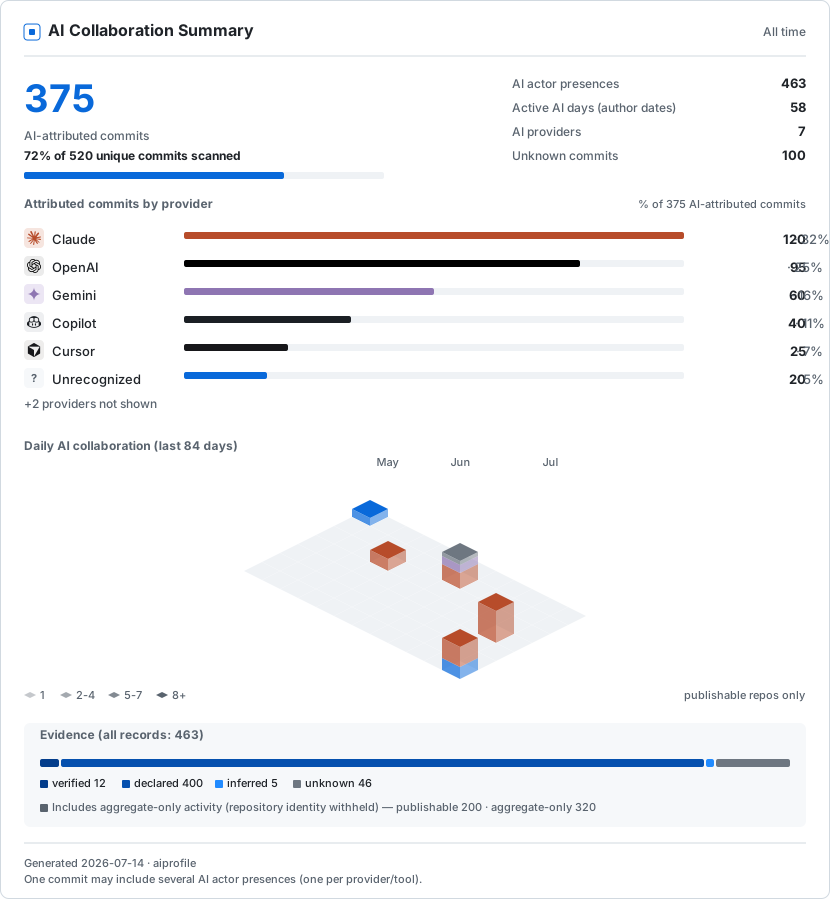
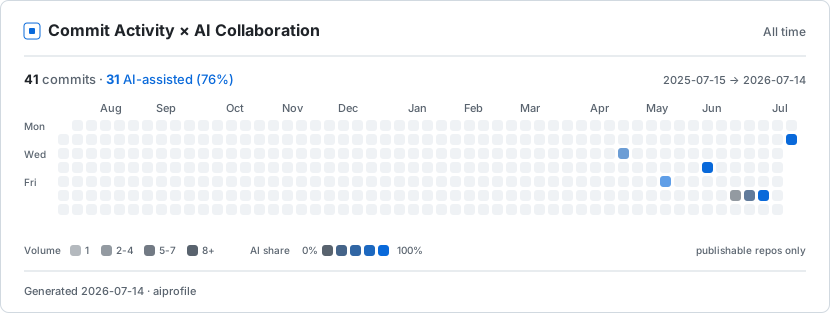

These samples use synthetic data.
Install
Requires Python 3.11–3.14 and Git 2.17 or newer. Windows, macOS, and Linux are supported. Git repositories must use the SHA-1 object format.
pip install ai-profile-cli
The package name is ai-profile-cli; the installed command is
aiprofile.
Quickstart
Run these commands from the root of one of your repositories:
aiprofile init
aiprofile scan .
aiprofile aggregate
aiprofile render
initcreates the local configuration and seeds your identity fromgit config user.email.scanrecords commits authored by your configured identities.aggregateshows the exact privacy-safe statistics that can be published.renderwrites six SVG files,dashboard.html, andprofile.jsontodist/.
Only commits authored by identities in ~/.aiprofile/config.json count.
Review the email seeded by init and add any other addresses you commit with.
Scan additional repositories at any time:
aiprofile scan /path/to/another/repository
Repositories default to aggregate_only: their counts contribute to the
summary, but their identity and daily dates stay private. --full marks that
repository's aggregate activity as explicitly publishable so its dates can
appear in date-based views. This is a policy choice, not a claim about the
repository's GitHub visibility:
aiprofile scan --full /path/to/repository
That choice persists. Scanning the same repository later without --full
does not downgrade it. To stop publishing its dates, change its
publication_level in ~/.aiprofile/config.json to aggregate_only (keep
identity-redacted aggregate totals) or excluded (omit it), then run
aggregate and render again.
Only run one render at a time for a given output directory.
Add the cards to your GitHub profile
Render inside your GitHub profile repository (USERNAME/USERNAME), then
commit the generated dist/ directory. Add this to its README:
<picture>
  <source media="(prefers-color-scheme: dark)" srcset="dist/summary-dark.svg">
  <img alt="AI collaboration summary" src="dist/summary-light.svg">
</picture>
Use heatmap-{light,dark}.svg or badge-{light,dark}.svg in the same
pattern. To refresh your cards, run scan again, run render, and commit
the updated files.
Interactive dashboard
dist/dashboard.html is a self-contained dashboard generated from the same
validated aggregate data as the SVG cards. Open it directly in a browser to:
- switch between All AI and one provider;
- inspect provider-attributed commits, actor presences, and active days without mixing those units;
- inspect the publishable daily collaboration window;
- use light, dark, or system color themes.
The file loads no external script, font, tracker, or API. It contains the
same public aggregate fields as profile.json, so review aiprofile aggregate before publishing either file.
GitHub READMEs do not execute JavaScript. Keep the SVGs in your Profile
README and link them to dashboard.html on GitHub Pages or another static
host. See the
live profile example.
Declare AI participation
Known AI co-author identities are recognized automatically. For other
tools, or when you want richer attribution, add an AI-* trailer block
to the commit message:
feat: add aggregation service

AI-Provider: Anthropic
AI-Model: Claude-Sonnet
AI-Tool: Claude-Code
AI-Role: implementation, documentation
AI-Mode: AI-Assisted
AI-Reviewed-By: Human
Repeat the AI-Provider: key to declare another AI actor in the same
commit. One commit can therefore equal one unique AI-attributed commit
and multiple actor presences. Use AI-Mode: Human-Only only for an
explicitly human-only commit.
Privacy
- No repository data is uploaded. The CLI makes no network calls and sends no telemetry.
- New repositories default to
aggregate_only. Usescan --fullas an explicit publication decision, or set a repository toexcludedin~/.aiprofile/config.json. - Public assets contain aggregate counts, public provider names, evidence totals, and dates. They never contain repository names or paths, organization names, branches, commit SHAs or messages, raw trailers, or email addresses.
aiprofile aggregateis the publication preview. Review it before committing generated assets.- Aggregate-only output is identity redaction, not anonymity. Repeated publication can reveal when totals changed. See the full privacy model.
- Do not publish or sync
~/.aiprofile; it contains private repository paths, identities, and a local salt.
Metrics
- AI-attributed commits are unique commits with at least one explicit AI actor presence.
- Actor presences count distinct provider/tool participation within a commit. Provider totals can therefore exceed unique commit totals.
- Unknown stays separate from human.
- Evidence quality is reported as
verified > declared > imported > inferred > unknown.
Help and support
Run aiprofile --help or aiprofile COMMAND --help for command options.
Use GitHub Issues for
bugs and feature requests. Report vulnerabilities through the
security policy.
Contributing and license
Contributions are welcome; see CONTRIBUTING.md. Licensed under the MIT License.
Project details
Verified details
These details have been verified by PyPIProject links
GitHub Statistics
Maintainers


Download files
Download the file for your platform. If you're not sure which to choose, learn more about installing packages.
Source Distribution
Built Distribution
Filter files by name, interpreter, ABI, and platform.
If you're not sure about the file name format, learn more about wheel file names.
Copy a direct link to the current filters
File details
Details for the file ai_profile_cli-0.4.1.tar.gz.
File metadata
- Download URL: ai_profile_cli-0.4.1.tar.gz
- Upload date:
- Size: 422.6 kB
- Tags: Source
- Uploaded using Trusted Publishing? Yes
- Uploaded via: twine/6.1.0 CPython/3.13.14
File hashes
| Algorithm | Hash digest | |
|---|---|---|
| SHA256 |
7fae1a53a7004dcbc0e651142cd75898a1cb6ce13452489516d2c7237ddde90e
|
|
| MD5 |
8d098664ac318999bbee745ac0933427
|
|
| BLAKE2b-256 |
a675cca6761eb23ccef003142963521bd7724c29cb9777b1abcc131e57050a7b
|
Provenance
The following attestation bundles were made for ai_profile_cli-0.4.1.tar.gz:
Publisher:
publish.yml on WenyuChiou/ai-profile
-
Statement:
-
Statement type:
https://in-toto.io/Statement/v1 -
Predicate type:
https://docs.pypi.org/attestations/publish/v1 -
Subject name:
ai_profile_cli-0.4.1.tar.gz -
Subject digest:
7fae1a53a7004dcbc0e651142cd75898a1cb6ce13452489516d2c7237ddde90e - Sigstore transparency entry: 2244847534
- Sigstore integration time:
-
Permalink:
WenyuChiou/ai-profile@4b9bc294b73a75499b6f35aba8a785f0ecc11c41 -
Branch / Tag:
refs/tags/v0.4.1 - Owner: https://github.com/WenyuChiou
-
Access:
public
-
Token Issuer:
https://token.actions.githubusercontent.com -
Runner Environment:
github-hosted -
Publication workflow:
publish.yml@4b9bc294b73a75499b6f35aba8a785f0ecc11c41 -
Trigger Event:
push
-
Statement type:
File details
Details for the file ai_profile_cli-0.4.1-py3-none-any.whl.
File metadata
- Download URL: ai_profile_cli-0.4.1-py3-none-any.whl
- Upload date:
- Size: 112.8 kB
- Tags: Python 3
- Uploaded using Trusted Publishing? Yes
- Uploaded via: twine/6.1.0 CPython/3.13.14
File hashes
| Algorithm | Hash digest | |
|---|---|---|
| SHA256 |
41553c9355cd9f77f119ebae45f264c1956063680a11fac293e69c24cb235582
|
|
| MD5 |
36a0dcc59788f73dbf06d4ff1fd5330f
|
|
| BLAKE2b-256 |
e9c68b6689415d952a098c3265ed5bfcb984726efec8e65dfd2a4fb5d528e847
|
Provenance
The following attestation bundles were made for ai_profile_cli-0.4.1-py3-none-any.whl:
Publisher:
publish.yml on WenyuChiou/ai-profile
-
Statement:
-
Statement type:
https://in-toto.io/Statement/v1 -
Predicate type:
https://docs.pypi.org/attestations/publish/v1 -
Subject name:
ai_profile_cli-0.4.1-py3-none-any.whl -
Subject digest:
41553c9355cd9f77f119ebae45f264c1956063680a11fac293e69c24cb235582 - Sigstore transparency entry: 2244848170
- Sigstore integration time:
-
Permalink:
WenyuChiou/ai-profile@4b9bc294b73a75499b6f35aba8a785f0ecc11c41 -
Branch / Tag:
refs/tags/v0.4.1 - Owner: https://github.com/WenyuChiou
-
Access:
public
-
Token Issuer:
https://token.actions.githubusercontent.com -
Runner Environment:
github-hosted -
Publication workflow:
publish.yml@4b9bc294b73a75499b6f35aba8a785f0ecc11c41 -
Trigger Event:
push
-
Statement type:






