
Evidence-backed, privacy-safe AI collaboration cards and dashboards generated locally from explicit Git provenance.
Verified details
These details have been verified by PyPIProject links
GitHub Statistics
Maintainers

Project description
ai-profile
Show the evidence behind your AI collaboration.
ai-profile turns explicit Git provenance across your local repositories
into privacy-safe GitHub Profile cards and a filterable provider
dashboard—without uploading source code or guessing attribution.
Explore the live dashboard → · Generate yours in four commands




- Explicit evidence: attribution comes from
AI-*trailers and verified AI co-author identities—not source-code style. - Local-first privacy: scanning, aggregation, and rendering happen on your machine; repository identities stay out of public assets.
- Profile-ready: one render produces theme-aware SVG cards, a self-contained dashboard, and a machine-readable public summary.
ai-profile is not an AI code detector. Commits with no explicit evidence
stay unknown; they are never silently counted as human or assigned to a
provider.
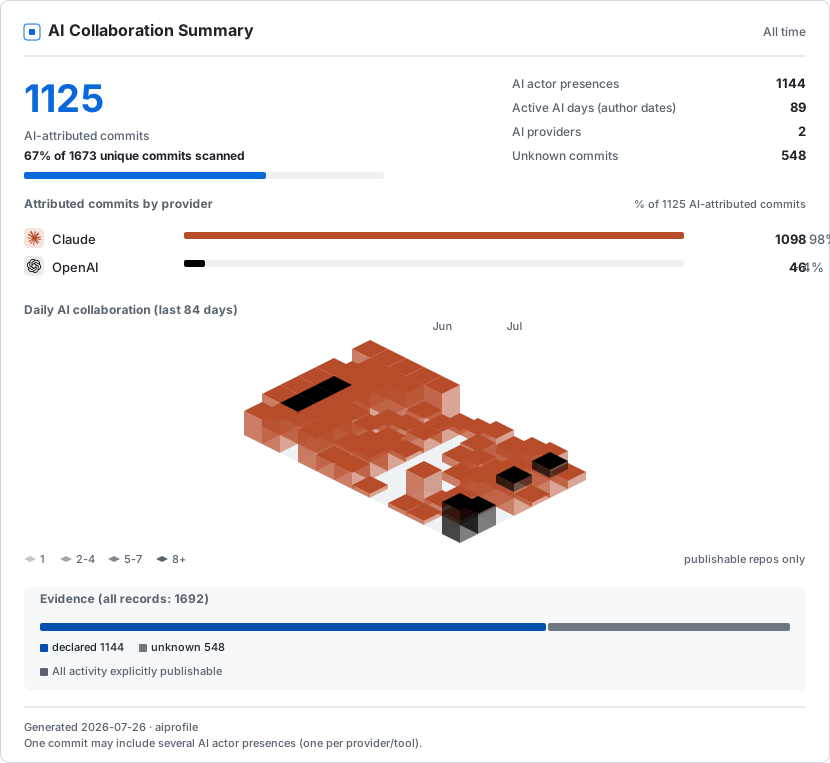
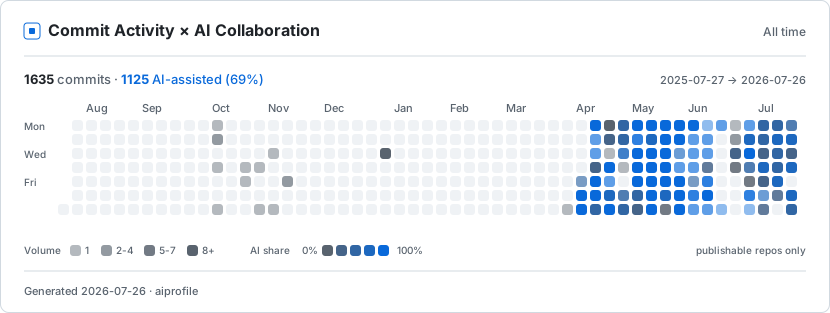
A real GitHub Profile example
This card contains the maintainer's real public aggregate data. Select it to open the provider-filterable dashboard.
Why ai-profile?
- Generic GitHub statistics answer how active a developer is.
- Line-level attribution tools answer which lines a tool changed.
ai-profileanswers how AI participated and what evidence supports that claim across repositories, while keeping the analysis local.
It complements those tools; it does not replace them or infer historical AI use when Git evidence is absent.
Install
Requires Python 3.11 or newer and Git 2.17 or newer. The wheel-onboarding workflow tests Ubuntu, Windows, and macOS on Python 3.12; the full suite also tests Python 3.11–3.14 on Ubuntu. Repositories must use Git's SHA-1 object format.
python -m pip install --upgrade ai-profile-cli
aiprofile --version
The package name is ai-profile-cli; the installed command is aiprofile.
If your shell has not refreshed its script path, use:
python -m aiprofile --version
Quickstart
Run these commands from the root of one of your repositories:
aiprofile init
aiprofile scan .
aiprofile aggregate
aiprofile render
Use python -m aiprofile in place of aiprofile for any command if needed.
initcreates the local configuration and seeds your identity fromgit config user.email.scanreads commits reachable from the repository's currentHEADand records commits authored by your configured identities.aggregateprints the exact privacy-safe statistics eligible for publication.renderwrites exactly eight files todist/:
badge-dark.svg       heatmap-light.svg   summary-dark.svg
badge-light.svg      profile.json        summary-light.svg
dashboard.html       heatmap-dark.svg
Existing commits without explicit AI evidence will appear as unknown.
Large unknown counts are an honest result, not a failed scan. Add trailers to
future commits when you want their AI participation credited.
Configure identities and repository privacy
The configuration file is:
- macOS/Linux:
~/.aiprofile/config.json - Windows:
%USERPROFILE%\.aiprofile\config.json($HOME\.aiprofile\config.jsonin PowerShell) - custom automation:
$AIPROFILE_HOME/config.json
Only commits authored by an address in identities count. After init,
close other aiprofile processes, open the file as UTF-8 JSON, and add every
address you use—including GitHub noreply addresses:
{
  "identities": [
    "you@example.com",
    "12345678+username@users.noreply.github.com"
  ],
  "repositories": [],
  "salt": "keep-the-existing-generated-value"
}
Keep the generated salt unchanged. After a scan, each repository entry also
contains path, repository_uid, and publication_level. Change only
publication_level when adjusting privacy:
On Windows, save with an editor's UTF-8 (no BOM) option. Windows
PowerShell 5.1's Set-Content -Encoding utf8 adds a BOM that strict JSON
readers, including this Public Beta, reject. VS Code's default UTF-8
encoding is suitable; confirm the file still parses before replacing your
backup.
{
  "path": "/local/path/created-by-scan",
  "repository_uid": "keep-the-existing-generated-value",
  "publication_level": "aggregate_only"
}
The allowed values are:
aggregate_only— default; include totals but withhold repository identity and daily dates.full— include identity-redacted daily aggregate activity in date views.excluded— omit that repository entirely.
aiprofile scan --full /path/to/repository is the supported opt-in from
aggregate_only to full. It does not mean the repository is public on
GitHub, and a later scan without --full does not downgrade it. To reduce
publication, edit only the existing entry's publication_level, save valid
UTF-8 JSON, then run:
aiprofile aggregate
aiprofile render
If configuration parsing fails, restore the previous valid JSON; do not
delete or regenerate the salt, path, or repository_uid. Always review
aggregate before publishing.
Scan and refresh multiple repositories
Scan each repository once, then aggregate their local records together:
aiprofile scan /path/to/repository-one
aiprofile scan /path/to/repository-two
aiprofile aggregate
aiprofile render
There is no batch refresh command in this Public Beta. To update a
multi-repository profile, rerun scan separately in every repository whose
history changed, then rerun aggregate and render. Run only one render
at a time for a given output directory.
Publish to your GitHub Profile
Run aiprofile render --out dist inside your USERNAME/USERNAME Profile
repository, commit dist/, and place this clickable card in its README:
<a href="https://USERNAME.github.io/USERNAME/dist/dashboard.html">
  <picture>
    <source media="(prefers-color-scheme: dark)" srcset="dist/summary-dark.svg">
    <img alt="Open my interactive AI collaboration dashboard"
         src="dist/summary-light.svg">
  </picture>
</a>
Add the heatmap with the same <picture> pattern using
heatmap-{light,dark}.svg. GitHub READMEs do not execute JavaScript, so the
SVG remains the Profile view and the link opens dashboard.html.
To host the dashboard with GitHub Pages:
- Push
README.mdanddist/to the Profile repository'smainbranch. - Open Settings → Pages.
- Under Build and deployment, choose Deploy from a branch.
- Select main, / (root), then Save.
- Open
https://USERNAME.github.io/USERNAME/dist/dashboard.html.
A new Pages deployment can return 404 for a few minutes. Wait for the Pages
workflow to finish, then reload the exact case-sensitive URL. If it still
returns 404, confirm that Pages uses main and / (root) and that
dist/dashboard.html exists in the pushed commit.
What gets generated
The static, synthetic previews below demonstrate the complete output family:
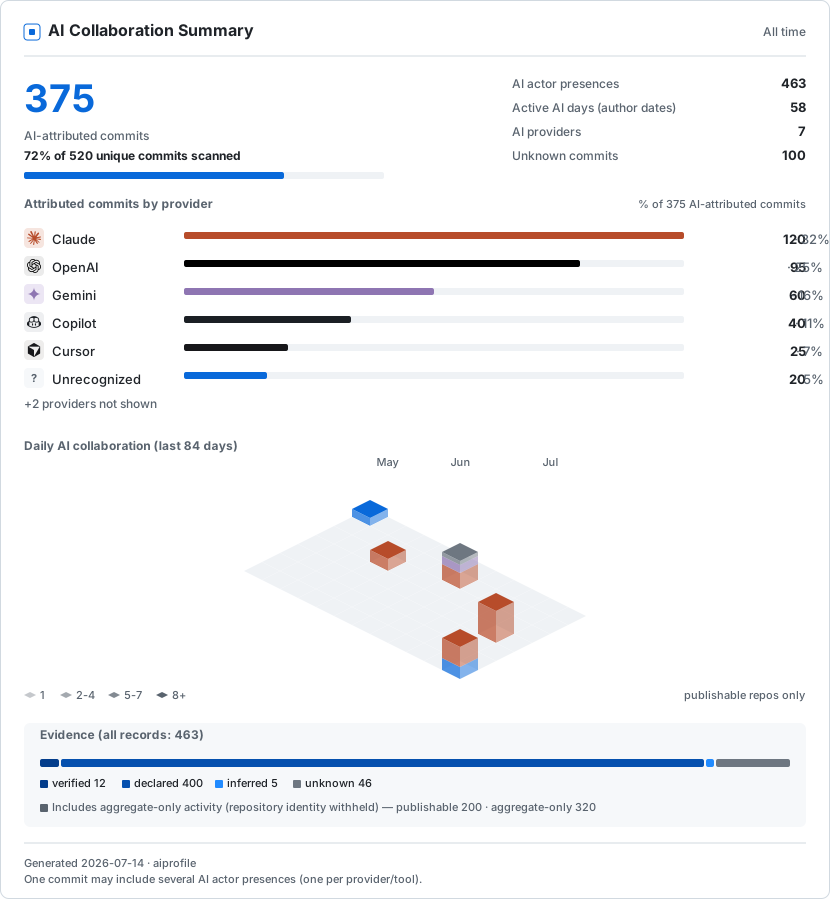

The six SVGs are static and GitHub-ready. dashboard.html is a self-contained
provider-filterable view with light, dark, and system themes. It loads no
external script, font, tracker, or API. profile.json contains the same
validated public aggregate contract used by every renderer.
Declare AI participation
Known AI co-author identities are recognized automatically. For other tools,
or richer attribution, add one contiguous AI-* trailer block after a blank
line in the commit message:
feat: add aggregation service

AI-Provider: Anthropic
AI-Model: Claude-Sonnet
AI-Tool: Claude-Code
AI-Role: implementation, documentation
AI-Mode: AI-Assisted
AI-Reviewed-By: Human
Repeat AI-Provider: without a blank line between actor groups to declare
another AI actor in the same commit. One commit can therefore equal one
unique AI-attributed commit and multiple actor presences. Use
AI-Mode: Human-Only only for an explicitly human-only commit.
Privacy
- The CLI makes no network calls, uploads no repository data, and sends no telemetry.
- Public assets contain the UTC generation date. They may also contain
aggregate counts, public provider names, and evidence totals; repository
activity dates appear only for
fullrepositories. - Public assets never contain repository names or paths, organization names, branches, commit SHAs or messages, raw trailers, prompts, or email addresses.
aggregateis the publication preview. Review it before committing any generated asset.- Aggregate-only output is identity redaction, not anonymity. Repeated publication can reveal when totals changed.
- Never publish or sync
.aiprofile; it contains private paths, identities, repository identifiers, and a local salt.
Read the complete privacy model.
Metrics and current limitations
- AI-attributed commits are unique commits with at least one explicit AI actor presence.
- Actor presences count distinct provider/tool participation inside a commit. Provider totals can exceed unique commit totals.
- Unknown remains separate from human.
- Evidence quality is
verified > declared > imported > inferred > unknown. - Scans cover commits reachable from the current
HEAD, not every branch. - Git repositories using SHA-256 object format are not supported yet.
- Bot-authored commits are outside the author-identity scan unless the bot address is deliberately configured; some bot-plus-human co-author histories may therefore be absent.
- Historical AI use without explicit Git evidence stays unknown. Source-code style is never used to reconstruct attribution.
Help, contributing, and license
Run aiprofile --help or aiprofile COMMAND --help. Use
GitHub Issues for bugs and
feature requests; report vulnerabilities through the
security policy.
Contributions are welcome; see CONTRIBUTING.md. Licensed under the MIT License; vendored icon notices are in THIRD_PARTY_NOTICES.md.
Project details
Verified details
These details have been verified by PyPIProject links
GitHub Statistics
Maintainers


Download files
Download the file for your platform. If you're not sure which to choose, learn more about installing packages.
Source Distribution
Built Distribution
Filter files by name, interpreter, ABI, and platform.
If you're not sure about the file name format, learn more about wheel file names.
Copy a direct link to the current filters
File details
Details for the file ai_profile_cli-0.4.2.tar.gz.
File metadata
- Download URL: ai_profile_cli-0.4.2.tar.gz
- Upload date:
- Size: 453.5 kB
- Tags: Source
- Uploaded using Trusted Publishing? Yes
- Uploaded via: twine/6.1.0 CPython/3.13.14
File hashes
| Algorithm | Hash digest | |
|---|---|---|
| SHA256 |
12e54d2459321b679fd05887a83d2f8cf60d8a0e71560d53afdc8684f7025afd
|
|
| MD5 |
5a2bd9a25f06ac90be678cebc07b1007
|
|
| BLAKE2b-256 |
94a8900c5f37d05108549a5fb186d21d7733d27d89b0da958c459b0734a40837
|
Provenance
The following attestation bundles were made for ai_profile_cli-0.4.2.tar.gz:
Publisher:
publish.yml on WenyuChiou/ai-profile
-
Statement:
-
Statement type:
https://in-toto.io/Statement/v1 -
Predicate type:
https://docs.pypi.org/attestations/publish/v1 -
Subject name:
ai_profile_cli-0.4.2.tar.gz -
Subject digest:
12e54d2459321b679fd05887a83d2f8cf60d8a0e71560d53afdc8684f7025afd - Sigstore transparency entry: 2255979350
- Sigstore integration time:
-
Permalink:
WenyuChiou/ai-profile@45e79a293ceb706943eb9e378c4fcd6de8ebd62e -
Branch / Tag:
refs/tags/v0.4.2 - Owner: https://github.com/WenyuChiou
-
Access:
public
-
Token Issuer:
https://token.actions.githubusercontent.com -
Runner Environment:
github-hosted -
Publication workflow:
publish.yml@45e79a293ceb706943eb9e378c4fcd6de8ebd62e -
Trigger Event:
push
-
Statement type:
File details
Details for the file ai_profile_cli-0.4.2-py3-none-any.whl.
File metadata
- Download URL: ai_profile_cli-0.4.2-py3-none-any.whl
- Upload date:
- Size: 115.8 kB
- Tags: Python 3
- Uploaded using Trusted Publishing? Yes
- Uploaded via: twine/6.1.0 CPython/3.13.14
File hashes
| Algorithm | Hash digest | |
|---|---|---|
| SHA256 |
8b6e28bb2172a63ac4cd37e14023ecee079e4ceb6e8148acb3b3d0438bff332e
|
|
| MD5 |
8d8ae679cf75e92e7687a7fea1c3fb7f
|
|
| BLAKE2b-256 |
d0ad3e633faa7ecb6216f9c534ab8ca8a0ad1a39180cd399db1f0709875d4a01
|
Provenance
The following attestation bundles were made for ai_profile_cli-0.4.2-py3-none-any.whl:
Publisher:
publish.yml on WenyuChiou/ai-profile
-
Statement:
-
Statement type:
https://in-toto.io/Statement/v1 -
Predicate type:
https://docs.pypi.org/attestations/publish/v1 -
Subject name:
ai_profile_cli-0.4.2-py3-none-any.whl -
Subject digest:
8b6e28bb2172a63ac4cd37e14023ecee079e4ceb6e8148acb3b3d0438bff332e - Sigstore transparency entry: 2255979362
- Sigstore integration time:
-
Permalink:
WenyuChiou/ai-profile@45e79a293ceb706943eb9e378c4fcd6de8ebd62e -
Branch / Tag:
refs/tags/v0.4.2 - Owner: https://github.com/WenyuChiou
-
Access:
public
-
Token Issuer:
https://token.actions.githubusercontent.com -
Runner Environment:
github-hosted -
Publication workflow:
publish.yml@45e79a293ceb706943eb9e378c4fcd6de8ebd62e -
Trigger Event:
push
-
Statement type:






