
ai-relay
WebSocket relay that bridges AI coding agent CLIs (Claude Code, Codex, Gemini CLI, Snowflake Cortex, and more) to any web interface — stream reasoning, tool calls, and file changes in real time.
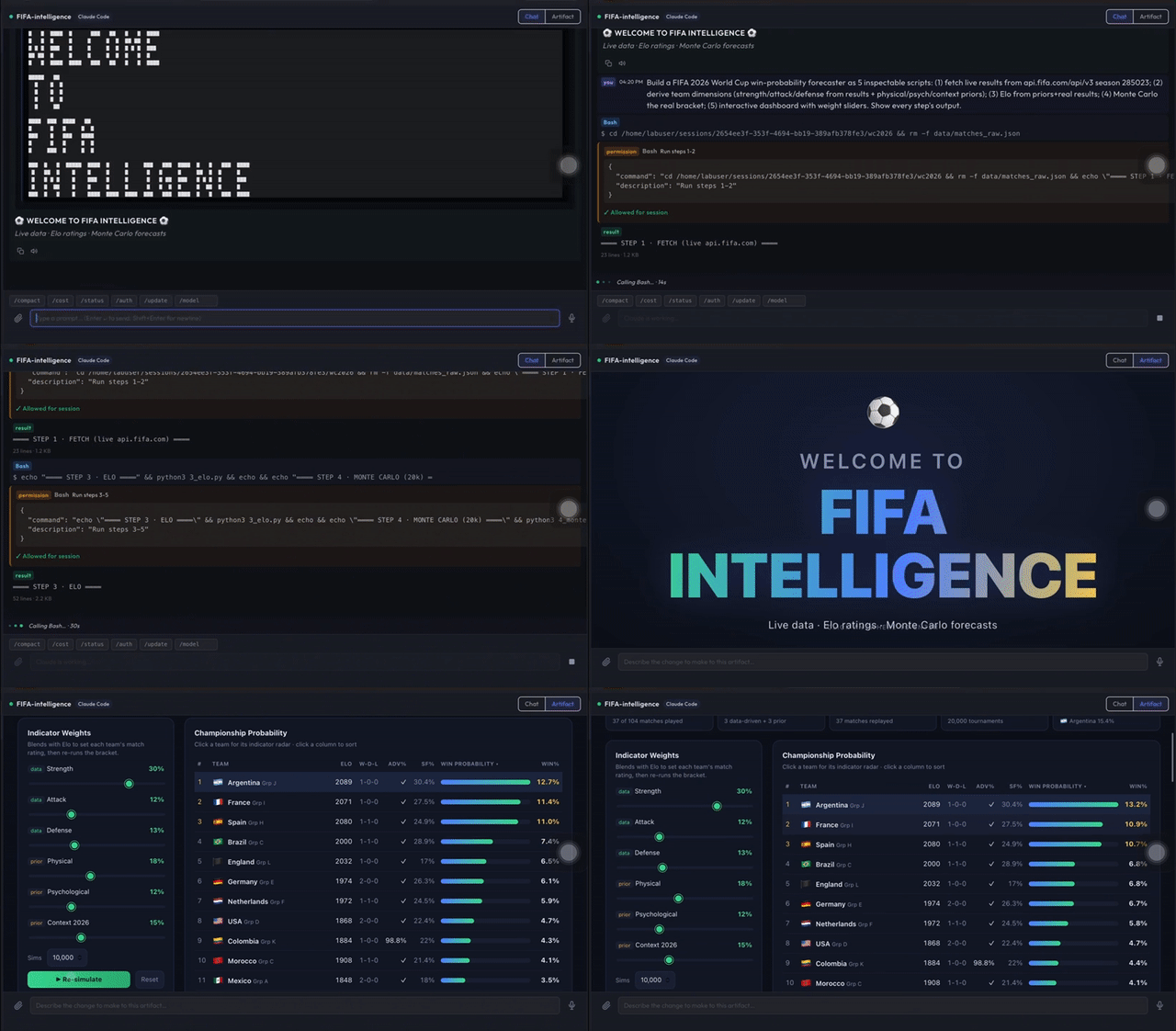
Above: Claude Code, driven through ai-relay, builds and renders a live interactive dashboard in a browser — reasoning, tool calls, and the finished artifact streamed in real time. ▶ Watch the full walkthrough
Install
pip install ai-relay
Quick start
One-shot mode (local dev)
# Start the relay server (default: ws://0.0.0.0:8765)
ai-relay --port 8765
Server mode (container / daemon)
# Persistent server — each WebSocket connection becomes one independent agent session
ai-relay serve --port 9000
Then connect from OhWise Lab (or any WebSocket client) and send a handshake:
{"tool": "claude", "folder": "/path/to/project", "model": "claude-sonnet-4-6"}
The relay streams structured JSON events over WebSocket and forwards your messages to the selected backend. Claude Code and Gemini use native JSONL process protocols, Codex uses the app-server JSON-RPC protocol, and Snowflake Cortex uses HTTP/SSE. The PTY bridge is retained only for generic/legacy CLI tools.
Running in a container
ai-relay serve is designed to run inside a Docker container as a persistent daemon:
FROM python:3.11-slim
RUN pip install ai-relay
# Install your AI CLI here (e.g. npm install -g @anthropic-ai/claude-code)
CMD ["ai-relay", "serve", "--port", "9000"]
Each incoming WebSocket connection spawns an independent agent session. Multiple clients can connect simultaneously.
Recommended architecture (enterprise-grade SaaS)
For a multi-tenant, production SaaS, the recommended design is:
- One isolated compute boundary per tenant/user (the isolation boundary) — use whatever fits your needs: a VM, pod, container, serverless/Lambda sandbox, dedicated server, or on-prem host. Each runs one
ai-relay servethat multiplexes all of that tenant's sessions — one WebSocket connection persession_id. Never share one runtime across tenants, and do not start one process per session. - A server-side orchestrator/hub in front (never expose ai-relay to the browser): it holds one WebSocket per session to the relay, fans out to N browser tabs, enforces auth/RBAC, persists conversation history + state in a database, and keeps the connection open so in-progress turns survive a browser refresh.
- Per-tenant filesystem isolation + dropped capabilities + internal-only networking.
ai-relay is the stateless streaming engine; durability and multi-tenancy live in your orchestrator. Full reference architecture and rationale: docs/architecture.md → Session multiplexing model / Recommended architecture.
Event types
| Type | Description |
|---|---|
session_start |
Process spawned |
session_end |
Process exited (includes exit_code) |
stdout / stderr |
Raw output lines |
reasoning |
Agent thinking/planning text |
tool_call |
Agent invoking a tool (Read, Edit, Bash…) |
tool_result |
Result of a tool call |
file_diff |
File created or edited |
response |
Final answer text |
assistant_message |
Native structured assistant message |
user_message |
Native structured user/tool-result message |
stream_event |
Native streaming event |
status |
Native status/control event |
permission_request |
Tool permission prompt from a structured backend |
permission_cancelled |
Pending permission prompt was cancelled |
control_response |
Native control response acknowledgment |
tool_progress |
Native tool progress event |
quota_warning |
API quota / rate limit detected |
context_warning |
Context window nearing limit (includes context_pct) |
context_compacted |
Context was compacted |
error |
Relay or process error |
input_ack |
Relay confirms your message was sent to the process |
Sending commands
Send JSON over WebSocket:
{"text": "refactor the authentication module to use JWT"}
Claude Code also accepts structured web-client messages:
{"type": "user_message", "content": "refactor the authentication module to use JWT"}
Permission responses:
{"type": "permission_response", "request_id": "req", "behavior": "allow", "updatedInput": {"command": "git status"}}
Codex permission responses can also use:
{"type": "permission_response", "request_id": "req", "allow": true}
Interrupt the active structured turn:
{"type": "interrupt"}
Relay-handled slash commands (Claude per-turn runtime)
In --print / stream-json mode the CLI has no interactive TUI, so the relay
intercepts a few commands and answers them itself (they are never forwarded to
the subprocess):
| Command | Effect |
|---|---|
/status |
Current model, conversation id, turns, last-turn context tokens, cumulative cost |
/cost |
Cumulative cost + input/output tokens + turn count |
/new (alias /clear) |
Drop the resume pointer — the next turn starts a fresh conversation. Use this to recover a bloated/stuck session. |
Auto-reset safeguards (resume durability)
Claude Code resumes a conversation by reloading its on-disk transcript each turn.
A very large transcript makes --resume slow or hang. The relay guards against
this automatically:
- Transcript-size rotation — before resuming, if the transcript exceeds
AI_RELAY_TRANSCRIPT_ROTATE_BYTES(default 5 MB) the relay starts a fresh conversation and emits aresponse(metadata.source = "auto_rotate"). - Resume-hang watchdog — if a resumed turn emits
system/initthen stalls forAI_RELAY_RESUME_HANG_TIMEOUTseconds (default 90) with no result, the relay kills the subprocess and retries once without--resume(metadata.source = "resume_hang_retry").
Earlier conversation history shown in your own UI is unaffected — rotation only resets the CLI's resume context, not your application's stored history.
Codex uses codex app-server --listen stdio:// and keeps a persistent thread behind the WebSocket session:
{"tool": "codex", "folder": "/path/to/project", "model": "gpt-5.2"}
Gemini CLI uses ACP (Agent Communication Protocol) mode. Each text message starts one Gemini turn:
{"tool": "gemini", "folder": "/path/to/project", "model": "gemini-2.5-flash"}
Gemini-specific behavior — per-turn process lifecycle
Unlike Claude Code (persistent process +
--resume) and Codex (persistent app-server), Gemini CLI ACP mode (≥ 0.40.x) exits the subprocess after everysession/promptturn completes (exit code 0). This is by design in the Gemini CLI implementation.The relay handles this transparently:
- On the first turn the relay calls
session/newand saves the returnedsessionIdto.gemini_acp_sessionin the session working folder.- On each subsequent reconnect the relay calls
session/loadwith that ID so Gemini restores conversation context in the new process.- If
session/loadfails (session expired or folder was wiped) the relay falls back tosession/newautomatically.Implication for permission approvals: because the process exits after each turn, permission responses must be sent while the current turn's process is still alive (i.e. before the
session/promptRPC completes). The defaultsession/prompttimeout is 5 minutes, which covers typical interactive permission dialogs.
Snowflake Cortex uses API configuration in the handshake.
Cortex chat mode:
{
  "tool": "cortex",
  "mode": "chat",
  "model": "claude-sonnet-4-5",
  "snowflake": {
    "account_url": "https://<account>.snowflakecomputing.com",
    "token_env": "SNOWFLAKE_PAT"
  }
}
Cortex Analyst mode:
{
  "tool": "cortex",
  "mode": "analyst",
  "snowflake": {
    "account_url": "https://<account>.snowflakecomputing.com",
    "token_env": "SNOWFLAKE_PAT",
    "semantic_view": "DB.SCHEMA.VIEW"
  }
}
To send CLI commands (e.g. /compact, /clear):
{"text": "/compact"}
Supported tools
| Tool | Adapter | tool value |
|---|---|---|
| Claude Code | ClaudeCodeAdapter |
"claude" / "claude-code" |
| OpenAI Codex | CodexAdapter |
"codex" |
| Gemini CLI | GeminiAdapter |
"gemini" |
| Snowflake Cortex | CortexAdapter |
"cortex" |
| Any CLI | GenericAdapter |
"generic" |
Configuration reference (ohwise-lab-ctrl)
When using ohwise-lab alongside ai-relay, all settings are controlled via environment variables — nothing is hardcoded:
| Variable | Default | Description |
|---|---|---|
LAB_MODE |
single |
single = subprocesses in lab-ctrl; multi = per-user Docker containers |
LAB_WORKSPACE_ROOT |
/var/ohwise-lab-workspaces |
Host path for user workspace volumes |
LAB_IMAGE |
ohwise-lab-ctrl:local |
Docker image for user containers (must have ai-relay + CLIs installed) |
LAB_NETWORK |
lab-network |
Docker network user containers join. For Compose: <project>_default |
LAB_CONTAINER_PORT |
9000 |
Internal port ai-relay serve listens on inside user containers |
LAB_CONTAINER_USER |
labuser |
OS user inside user containers |
LAB_CONTAINER_HOME |
/home/<LAB_CONTAINER_USER> |
Home dir inside user containers |
LAB_CONTAINER_STARTUP_DELAY |
1.5 |
Seconds to wait for ai-relay to be ready after container start |
LAB_CONTAINER_WS_TIMEOUT |
15 |
Seconds to wait for WebSocket connection to user container |
LAB_IDLE_TIMEOUT_SECS |
1800 |
Seconds of inactivity before a user container is eligible for cleanup |
Python API
from ai_relay import RelayServer

server = RelayServer(host="0.0.0.0", port=8765)
server.run()
Documentation
- Architecture & Developer Guide — internals, event system, auth, turn lifecycle, reconnect handling, adding providers, containerised deployment
Changelog
See CHANGELOG.md for release notes.
License
Apache-2.0
1 maintainer

Metadata
1 maintainer
Release files for ai-relay 0.4.46
For a detailed explanation of source distributions (sdists) and built distributions (wheels), please see the package formats documentation.
Source distribution (sdist)
| File | Size | Uploaded | |
|---|---|---|---|
| ai_relay-0.4.46.tar.gz | 62.5 kB | Details |
Built distribution (wheel)
| File | Interpreter | ABI | Platform | Reset |
|---|---|---|---|---|
| ai_relay-0.4.46-py3-none-any.whl | Python 3 | none | any | Details |
Total release size: 129.4 kB
Release files / ai_relay-0.4.46.tar.gz
| Download URL | ai_relay-0.4.46.tar.gz |
|---|---|
| Size | 62.5 kB |
| Tags | Source |
|
SHA-256 checksum How to use checksums |
c04769feb36de739c78290755da56e80d01b9fb6025027bc569af519f98646df
|
|
BLAKE2b-256 checksum How to use checksums |
25fd6f6f774628725105492a972303fb31ff7078bc94fc98211d78c250be84c3
|
| Upload date | |
|
Uploaded using Trusted Publishing? What is trusted publishing? |
No |
| Uploaded via |
twine/6.2.0 CPython/3.14.0
|
Release files / ai_relay-0.4.46-py3-none-any.whl
| Download URL | ai_relay-0.4.46-py3-none-any.whl |
|---|---|
| Size | 66.9 kB |
| Tags | Python 3 |
|
SHA-256 checksum How to use checksums |
b91a58859e16b3f4ca5fd7c781acc6d6521d75cef8b682dfbf87bb35043a6507
|
|
BLAKE2b-256 checksum How to use checksums |
33e0bf260338204c8f7cc9c8ab9d602354a5b5228c4ef7c5140106602eb8bd20
|
| Upload date | |
|
Uploaded using Trusted Publishing? What is trusted publishing? |
No |
| Uploaded via |
twine/6.2.0 CPython/3.14.0
|














