
AI Git Utils: 智能 Git Commit 助手 🚀





AI Git Utils 是一个利用 AI 技术增强您 Git 工作流程的智能化工具。它能够根据您的代码变更自动生成规范、清晰且富有表现力的 Commit Message,并智能推荐相关的 Emoji,显著提升版本控制的效率和体验。
✨ 核心特性
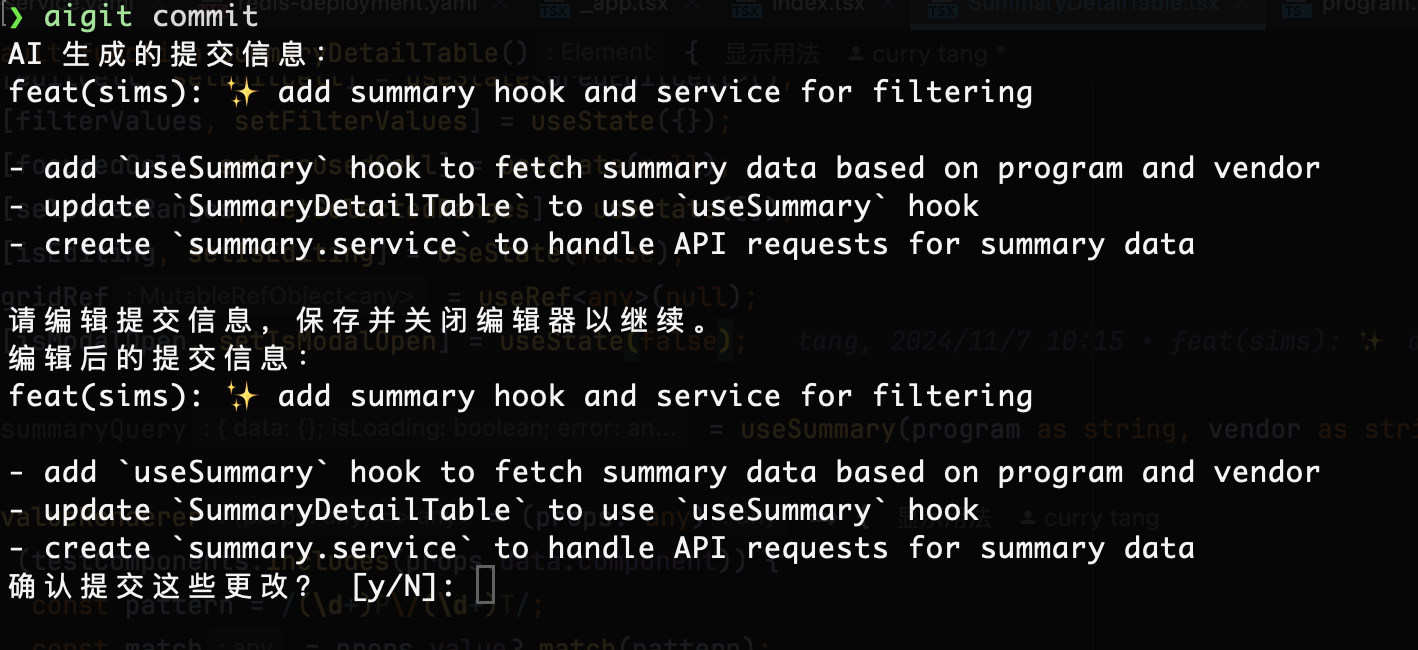
- 🤖 AI 驱动的 Commit Message 生成: 基于代码
diff,智能生成符合 Conventional Commits 规范的提交信息(包含type,scope,subject,body)。 - ✍️ 交互式编辑: 在 AI 生成建议后,提供便捷的交互式编辑界面,允许您轻松修改和确认最终的 Commit Message。
- 😄 智能 Emoji 选择: 根据 Commit 类型自动推荐合适的 Emoji,让您的提交记录更生动、直观。
- 🔌 多模型支持与灵活配置:
- 支持接入多种兼容 OpenAI API 标准的大语言模型 (LLM)。
- 通过简单的命令行指令即可添加、删除、切换和管理不同的 AI 模型配置。
- 📜 增强的 Git Log: 使用
aigit log命令,以美观的表格形式展示提交历史,支持限制数量和时间范围过滤。
🛠️ 安装
确保您已安装 Python 3.10+。然后通过 pip 安装:
pip install ai-git-utils
⚙️ 配置 AI 模型
在使用 aigit commit 功能前,您需要至少配置一个 AI 模型。
-
添加模型配置: 运行
aigit model add并根据提示输入模型信息:aigit model add # Name: my-gpt4o (自定义模型名称) # Model: gpt-4o (模型 ID) # Base Url: https://api.openai.com/v1 (模型服务 API 地址) # Temperature: 0.7 (模型温度参数) # Api Key: sk-xxxx (您的 API 密钥)
添加的第一个模型会自动设为当前激活模型。
-
管理模型:
- 列出所有已配置模型:
aigit model list - 查看当前激活模型的详细配置:
aigit model show - 激活其他已配置模型:
aigit model active(根据提示输入名称) - 删除指定模型配置:
aigit model remove(根据提示输入名称)
- 列出所有已配置模型:
🚀 使用指南
1. 生成 AI Commit Message (核心功能)
在您的 Git 仓库中,当您有暂存的更改 (staged changes) 时,运行:
# 默认使用英文生成
aigit commit

# 指定使用中文生成
aigit commit --lang Chinese

# 只针对特定文件的更改生成 commit message
aigit commit --file path/to/your/file.py
🧪 测试
本项目使用 pytest 进行测试,包含单元测试和集成测试。
运行所有测试
# 使用 uv 运行测试
uv run pytest

# 或使用 pip 安装依赖后运行
pytest
查看测试覆盖率
# 查看终端覆盖率报告
uv run pytest --cov=ai_git_utils --cov-report=term-missing

# 生成 HTML 覆盖率报告
uv run pytest --cov=ai_git_utils --cov-report=html
open htmlcov/index.html
运行特定类型的测试
# 只运行单元测试
uv run pytest -m unit

# 只运行集成测试
uv run pytest -m integration

# 运行需要 AI API 的测试(需要配置环境变量)
uv run pytest -m requires_ai
并行运行测试
# 使用多核并行运行测试(更快)
uv run pytest -n auto
测试覆盖率目标
- 当前覆盖率: 89% (315/353 statements)
- 目标覆盖率: 90%+
环境变量配置
运行集成测试时,需要配置以下环境变量(创建 .env.test 文件):
OPENAI_API_KEY=your-api-key
OPENAI_BASE_URL=https://api.openai.com/v1
OPENAI_MODEL=gpt-4o
🔄 持续集成
工作流配置位于 .github/workflows/test.yml
🤝 贡献
欢迎各种形式的贡献!如果您有任何建议、发现 Bug 或想改进功能,请随时:
- Fork 本仓库
- 创建您的特性分支 (
git checkout -b feature/AmazingFeature) - 提交您的更改 (
aigit commit😉) - 推送到分支 (
git push origin feature/AmazingFeature) - 提交 Pull Request
注意: 提交 PR 前,请确保:
- 所有测试通过 (
uv run pytest) - 代码覆盖率不低于当前水平
- 遵循项目的代码风格
- GitHub Actions 检查通过
1 maintainer

Metadata
1 maintainer
Release files for ai_git_utils 0.5.2
For a detailed explanation of source distributions (sdists) and built distributions (wheels), please see the package formats documentation.
Source distribution (sdist)
| File | Size | Uploaded | |
|---|---|---|---|
| ai_git_utils-0.5.2.tar.gz | 361.8 kB | Details |
Built distribution (wheel)
| File | Interpreter | ABI | Platform | Reset |
|---|---|---|---|---|
| ai_git_utils-0.5.2-py3-none-any.whl | Python 3 | none | any | Details |
Total release size: 380.5 kB
Release files / ai_git_utils-0.5.2.tar.gz
| Download URL | ai_git_utils-0.5.2.tar.gz |
|---|---|
| Size | 361.8 kB |
| Tags | Source |
|
SHA-256 checksum How to use checksums |
8000c158e4fcfa74da9b2852654ce823332657c5ae64f2eae62f9ad5d413a203
|
|
BLAKE2b-256 checksum How to use checksums |
683e12a9cc875d2ad7b7a3ee44c5b8ea4f373c548f327b077fe31db450024821
|
| Upload date | |
|
Uploaded using Trusted Publishing? What is trusted publishing? |
No |
| Uploaded via |
uv/0.9.26 {"installer":{"name":"uv","version":"0.9.26","subcommand":["publish"]},"python":null,"implementation":{"name":null,"version":null},"distro":{"name":"macOS","version":null,"id":null,"libc":null},"system":{"name":null,"release":null},"cpu":null,"openssl_version":null,"setuptools_version":null,"rustc_version":null,"ci":null}
|
Release files / ai_git_utils-0.5.2-py3-none-any.whl
| Download URL | ai_git_utils-0.5.2-py3-none-any.whl |
|---|---|
| Size | 18.8 kB |
| Tags | Python 3 |
|
SHA-256 checksum How to use checksums |
1b5da050841776e86a89919ac21406017481f22d1a1fe764e2730d4c87a1ca98
|
|
BLAKE2b-256 checksum How to use checksums |
f2fff0bdc2cfbffbdd45dc0a98447eea166792878047967c98aa108c5cf7ad9b
|
| Upload date | |
|
Uploaded using Trusted Publishing? What is trusted publishing? |
No |
| Uploaded via |
uv/0.9.26 {"installer":{"name":"uv","version":"0.9.26","subcommand":["publish"]},"python":null,"implementation":{"name":null,"version":null},"distro":{"name":"macOS","version":null,"id":null,"libc":null},"system":{"name":null,"release":null},"cpu":null,"openssl_version":null,"setuptools_version":null,"rustc_version":null,"ci":null}
|














