
AI git utils is an intelligent Git commit assistant that leverages AI to enhance your Git workflow.

Project description
AI Git Utils: 智能 Git Commit 助手 🚀

AI Git Utils 是一个利用 AI 技术增强您 Git 工作流程的智能化工具。它能够根据您的代码变更自动生成规范、清晰且富有表现力的 Commit Message,并智能推荐相关的 Emoji,显著提升版本控制的效率和体验。
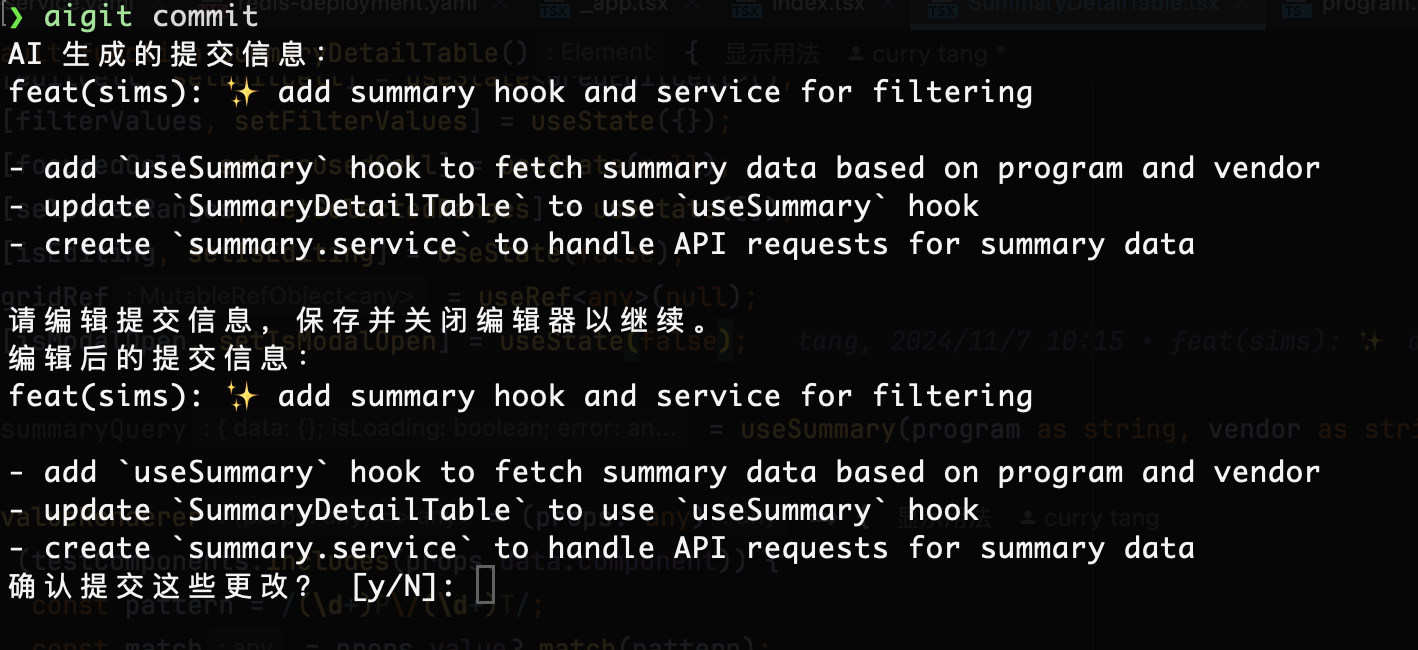
✨ 核心特性
- 🤖 AI 驱动的 Commit Message 生成: 基于代码
diff,智能生成符合 Conventional Commits 规范的提交信息(包含type,scope,subject,body)。 - ✍️ 交互式编辑: 在 AI 生成建议后,提供便捷的交互式编辑界面,允许您轻松修改和确认最终的 Commit Message。
- 😄 智能 Emoji 选择: 根据 Commit 类型自动推荐合适的 Emoji,让您的提交记录更生动、直观。
- 🔌 多模型支持与灵活配置:
- 支持接入多种兼容 OpenAI API 标准的大语言模型 (LLM)。
- 通过简单的命令行指令即可添加、删除、切换和管理不同的 AI 模型配置。
- 📜 增强的 Git Log: 使用
aigit log命令,以美观的表格形式展示提交历史,支持限制数量和时间范围过滤。
🛠️ 安装
确保您已安装 Python 3.8+。然后通过 pip 安装:
pip install ai-git-utils
⚙️ 配置 AI 模型
在使用 aigit commit 功能前,您需要至少配置一个 AI 模型。
-
添加模型配置: 运行
aigit model add并根据提示输入模型信息:aigit model add # Name: my-gpt4o (自定义模型名称) # Model: gpt-4o (模型 ID) # Base Url: https://api.openai.com/v1 (模型服务 API 地址) # Temperature: 0.7 (模型温度参数) # Api Key: sk-xxxx (您的 API 密钥)
添加的第一个模型会自动设为当前激活模型。
-
管理模型:
- 列出所有已配置模型:
aigit model list - 查看当前激活模型的详细配置:
aigit model show - 激活其他已配置模型:
aigit model active(根据提示输入名称) - 删除指定模型配置:
aigit model remove(根据提示输入名称)
- 列出所有已配置模型:
🚀 使用指南
1. 生成 AI Commit Message (核心功能)
在您的 Git 仓库中,当您有暂存的更改 (staged changes) 时,运行:
# 默认使用英文生成
aigit commit

# 指定使用中文生成
aigit commit --lang Chinese

# 只针对特定文件的更改生成 commit message
aigit commit --file path/to/your/file.py
🤝 贡献
欢迎各种形式的贡献!如果您有任何建议、发现 Bug 或想改进功能,请随时:
- Fork 本仓库
- 创建您的特性分支 (
git checkout -b feature/AmazingFeature) - 提交您的更改 (
aigit commit😉) - 推送到分支 (
git push origin feature/AmazingFeature) - 提交 Pull Request
Release history Release notifications | RSS feed


Download files
Download the file for your platform. If you're not sure which to choose, learn more about installing packages.
Source Distribution
Built Distribution
Filter files by name, interpreter, ABI, and platform.
If you're not sure about the file name format, learn more about wheel file names.
Copy a direct link to the current filters
File details
Details for the file ai_git_utils-0.3.8.tar.gz.
File metadata
- Download URL: ai_git_utils-0.3.8.tar.gz
- Upload date:
- Size: 305.7 kB
- Tags: Source
- Uploaded using Trusted Publishing? No
- Uploaded via: twine/5.1.1 CPython/3.12.8
File hashes
| Algorithm | Hash digest | |
|---|---|---|
| SHA256 |
56c36dc9e20055cefbeef6ef62e5ca68a142d7e208e668842bb899ee7b3e899e
|
|
| MD5 |
a7d6ae170ea3a02cc4e29674350b3683
|
|
| BLAKE2b-256 |
769dcf64515fa21c279dc8f70849ea5641b4e381652b59180eb506da2f6b07dd
|
File details
Details for the file ai_git_utils-0.3.8-py3-none-any.whl.
File metadata
- Download URL: ai_git_utils-0.3.8-py3-none-any.whl
- Upload date:
- Size: 10.5 kB
- Tags: Python 3
- Uploaded using Trusted Publishing? No
- Uploaded via: twine/5.1.1 CPython/3.12.8
File hashes
| Algorithm | Hash digest | |
|---|---|---|
| SHA256 |
9963e6feffa558daf2bc0601eb8294c73f7763decb3d3a86bfc97ff277471c0f
|
|
| MD5 |
ee1882122ffc87554943151a22300694
|
|
| BLAKE2b-256 |
f751a4d3cddec9a0267c7f868a2e2aca5ecb484e00ea26301f5ede5acb2237b5
|






