
aiaio

Project description
aiaio (AI-AI-O)
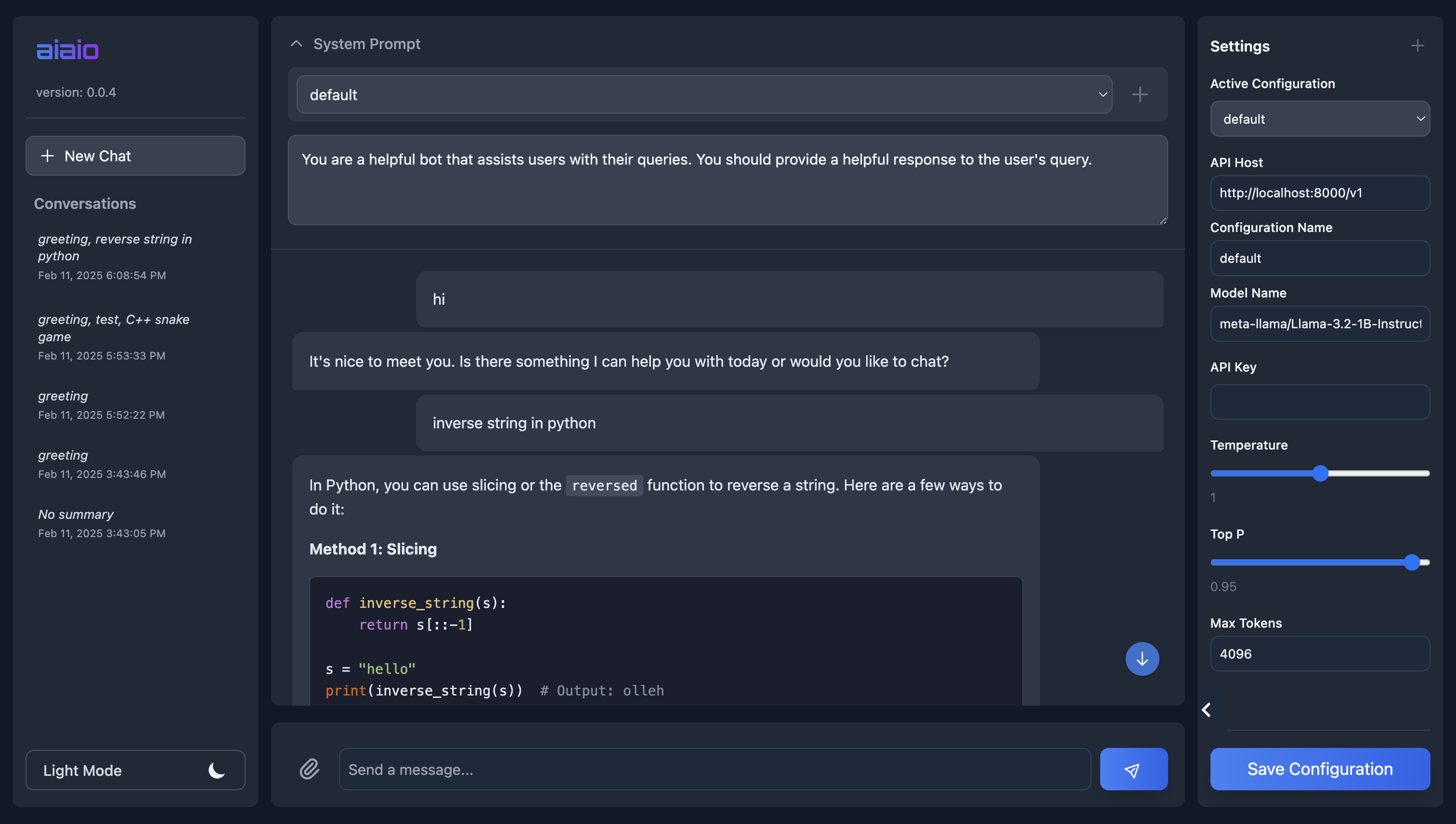
A lightweight, privacy-focused web UI for interacting with AI models. Supports both local and remote LLM deployments through OpenAI-compatible APIs.
Features
- 🌓 Dark/Light mode support
- 💾 Conversation history and management
- 📁 File upload and processing
- ⚙️ Configurable model settings
- 🔒 Privacy-focused (all data stays local)
- 📱 Responsive design for mobile/desktop
- 🎨 Syntax highlighting for code
- 📋 Code block copying
Requirements
- Python 3.8+
- An OpenAI-compatible API endpoint (local or remote)
Supported Frameworks
- vLLM
- TGI
- OpenAI
- Hugging Face
- llama.cpp
- any other custom openai-compatible api
Installation using pip
pip install aiaio
Quick Start
- Start the server:
aiaio app --host 127.0.0.1 --port 5000
- Open your browser and navigate to
http://127.0.0.1:5000
Docker Usage
- Build the Docker image:
docker build -t aiaio .
- Run the container:
docker run -p 9000:9000 aiaio
- Access the UI at
http://localhost:9000
Configuration
Configure these settings through the UI or environment variables:
MODEL_NAME- LLM model to use (default: meta-llama/Llama-3.2-1B-Instruct)API_HOST- API endpoint URLAPI_KEY- Your API key (if required)MAX_TOKENS- Maximum tokens per response (default: 4096)TEMPERATURE- Response randomness (0-2, default: 1.0)TOP_P- Nucleus sampling parameter (0-1, default: 0.95)
Development
# Clone the repository
git clone https://github.com/abhishekkrthakur/aiaio.git
cd aiaio

# Install in development mode
pip install -e .

# Run tests
pytest
Contributing
Contributions are welcome! Please feel free to submit a Pull Request.
License
Apache License - see LICENSE file for details
Acknowledgements
GitHub CoPilot. Most of the code was written by CoPilot. I just pressed the keys on the keyboard.
Release history Release notifications | RSS feed


Download files
Download the file for your platform. If you're not sure which to choose, learn more about installing packages.
Source Distribution
Built Distribution
Filter files by name, interpreter, ABI, and platform.
If you're not sure about the file name format, learn more about wheel file names.
Copy a direct link to the current filters
File details
Details for the file aiaio-0.0.3.tar.gz.
File metadata
- Download URL: aiaio-0.0.3.tar.gz
- Upload date:
- Size: 26.1 kB
- Tags: Source
- Uploaded using Trusted Publishing? No
- Uploaded via: twine/6.1.0 CPython/3.10.16
File hashes
| Algorithm | Hash digest | |
|---|---|---|
| SHA256 |
e7c20c7f061f60d6363dfc4456c0c5f34093503d24378e115669824eec73f124
|
|
| MD5 |
d56b491f7f8efd2e39f412a4890f4e3a
|
|
| BLAKE2b-256 |
e733a87701b918c095b8200971ead7887e9f07fee74121341e032e2ba48a70a6
|
File details
Details for the file aiaio-0.0.3-py3-none-any.whl.
File metadata
- Download URL: aiaio-0.0.3-py3-none-any.whl
- Upload date:
- Size: 26.1 kB
- Tags: Python 3
- Uploaded using Trusted Publishing? No
- Uploaded via: twine/6.1.0 CPython/3.10.16
File hashes
| Algorithm | Hash digest | |
|---|---|---|
| SHA256 |
1d2872dbff2bfad59c83e641ad00a8d2d2dce55875d72319b626309f26dab2f3
|
|
| MD5 |
8cfedb3885a0a726cba1c2afcfec4c7a
|
|
| BLAKE2b-256 |
01510f18ee76eb14432cfd85346c179767e346e90ebb6a5fe397fc20bf8a5ac0
|






