
aiaio

Project description
aiaio (AI-AI-O)
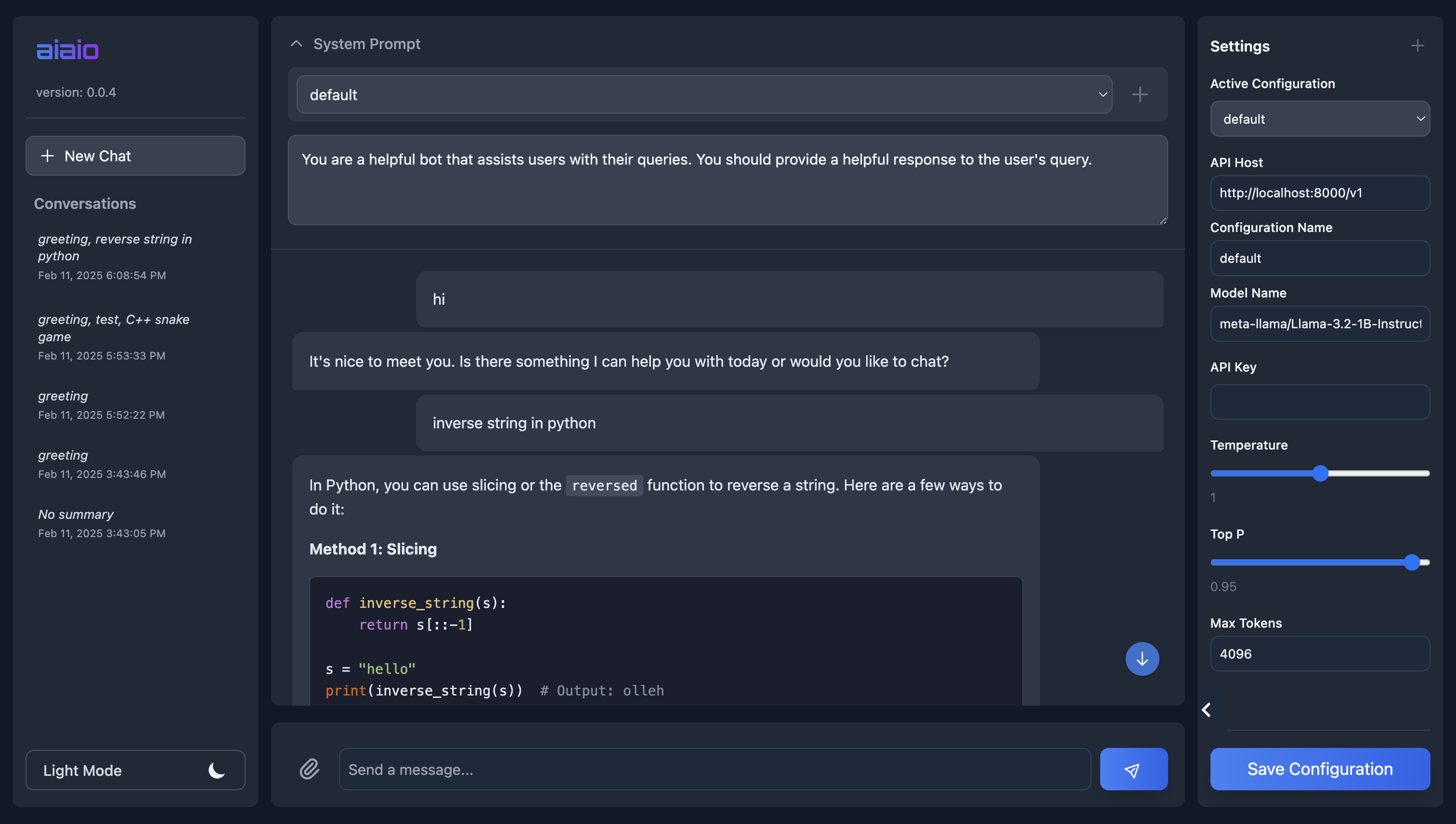
A lightweight, privacy-focused web UI for interacting with AI models. Supports both local and remote LLM deployments through OpenAI-compatible APIs.
Features
- 🌓 Dark/Light mode support
- 💾 Local SQLite database for conversation storage
- 📁 File upload and processing (images, documents, etc.)
- ⚙️ Configurable model parameters through UI
- 🔒 Privacy-focused (all data stays local)
- 📱 Responsive design for mobile/desktop
- 🎨 Syntax highlighting for code blocks
- 📋 One-click code block copying
- 🔄 Real-time conversation updates
- 📝 Automatic conversation summarization
- 🎯 Customizable system prompts
- 🌐 WebSocket support for real-time updates
- 📦 Docker support for easy deploymen
- 📦 Multiple API endpoint support
- 📦 Multiple system prompt support
Requirements
- Python 3.10+
- An OpenAI-compatible API endpoint (local or remote)
Supported API Endpoints
aiaio works with any OpenAI-compatible API endpoint, including:
- OpenAI API
- vLLM
- Text Generation Inference (TGI)
- Hugging Face Inference Endpoints
- llama.cpp server
- LocalAI
- Custom OpenAI-compatible APIs
For example, you can serve llama 8b using vLLM using:
vllm serve Meta-Llama-3.1-8B-Instruct.Q4_K_M.gguf --tokenizer meta-llama/Llama-3.1-8B-Instruct --max_model_len 125000
and once the api is running, you can access it using aiaio ui.
Installation
Using pip
pip install aiaio
From source
git clone https://github.com/abhishekkrthakur/aiaio.git
cd aiaio
pip install -e .
Quick Start
- Start the server:
aiaio app --host 127.0.0.1 --port 5000
-
Open your browser and navigate to
http://127.0.0.1:5000 -
Configure your API endpoint and model settings in the UI
Docker Usage
- Build the Docker image:
docker build -t aiaio .
- Run the container:
docker run --network host \
  -v /path/to/data:/data \
  aiaio
The /data volume mount is optional but recommended for persistent storage of the SQLite database and uploaded files.
UI Configuration
All model and API settings can be configured through the UI:
Model Parameters
- Temperature (0-2): Controls response randomness. Higher values make output more creative but less focused
- Max Tokens (1-32k): Maximum length of generated responses
- Top P (0-1): Controls diversity via nucleus sampling. Lower values make output more focused
- Model Name: Name/path of the model to use (depends on your API endpoint)
API Configuration
- Host: URL of your OpenAI-compatible API endpoint
- API Key: Authentication key if required by your endpoint
These settings are stored in the local SQLite database and persist between sessions.
File Handling
aiaio supports uploading and processing various file types, depending on the model's capabilities:
- Images (PNG, JPG, GIF, etc.)
- Documents (PDF, DOC, DOCX)
- Text files (TXT, CSV, JSON)
- Audio files (depends on model capabilities)
- Video files (depends on model capabilities)
Uploaded files are stored temporarily and can be referenced in conversations.
Database Schema
aiaio uses SQLite for storage with the following main tables:
conversations: Stores chat histories and summariesmessages: Stores individual messages within conversationsattachments: Stores file attachment metadatasettings: Stores UI and model configuration
Advanced Usage
Custom System Prompts
Each conversation can have its own system prompt that guides the AI's behavior. Click the "System Prompt" section above the chat to customize it.
Conversation Management
- Create new conversations using the "+ New Chat" button
- Switch between conversations in the left sidebar
- Delete conversations using the trash icon
- View conversation summaries in the sidebar
Keyboard Shortcuts
Ctrl/Cmd + Enter: Send messageEsc: Clear inputCtrl/Cmd + K: Focus chat inputCtrl/Cmd + /: Toggle settings sidebar
Development
# Clone the repository
git clone https://github.com/abhishekkrthakur/aiaio.git
cd aiaio

# Create a virtual environment
python -m venv venv
source venv/bin/activate  # or `venv\Scripts\activate` on Windows

# Install development dependencies
pip install -e ".[dev]"

# Run tests
pytest

# Run with auto-reload for development
uvicorn aiaio.app.app:app --reload --port 5000
Contributing
Contributions are welcome! Please:
- Fork the repository
- Create a feature branch
- Make your changes
- Run the tests (
pytest) - Submit a pull request
License
Apache License 2.0 - see LICENSE file for details
Acknowledgements
This project was primarily written with GitHub Copilot's assistance. While the human guided the development, Copilot generated much of the actual code.
Release history Release notifications | RSS feed


Download files
Download the file for your platform. If you're not sure which to choose, learn more about installing packages.
Source Distribution
Built Distribution
Filter files by name, interpreter, ABI, and platform.
If you're not sure about the file name format, learn more about wheel file names.
Copy a direct link to the current filters
File details
Details for the file aiaio-0.0.7.tar.gz.
File metadata
- Download URL: aiaio-0.0.7.tar.gz
- Upload date:
- Size: 45.8 kB
- Tags: Source
- Uploaded using Trusted Publishing? No
- Uploaded via: twine/6.1.0 CPython/3.10.16
File hashes
| Algorithm | Hash digest | |
|---|---|---|
| SHA256 |
8a92addf2fe6703f0a4df5be9444d65769423105ec99e716ab2ec567ec29de12
|
|
| MD5 |
9b0ec204a27a299a94453749c105708c
|
|
| BLAKE2b-256 |
23eed5f08dcffea2d5b19e48527a6f6321eef9414381bb8fc18a86fff3cad73d
|
File details
Details for the file aiaio-0.0.7-py3-none-any.whl.
File metadata
- Download URL: aiaio-0.0.7-py3-none-any.whl
- Upload date:
- Size: 45.2 kB
- Tags: Python 3
- Uploaded using Trusted Publishing? No
- Uploaded via: twine/6.1.0 CPython/3.10.16
File hashes
| Algorithm | Hash digest | |
|---|---|---|
| SHA256 |
fed95dbeabc7d1495f47c0af6f3ece81fb455db81d9750565f0cfd023d6b65e8
|
|
| MD5 |
cca80bcf63bf27fc1faea0730264c577
|
|
| BLAKE2b-256 |
48f9bdb03819dc6810fcaab89d080c9a88c3e44230d991ea8e0491a2066854f4
|






