
AIHound
AI Credential & Secrets Scanner










29 AI tool scanners · 4 platforms · BloodHound attack path export · MCP server mode · Watch mode
Get Started · Reports · BloodHound · Scan Tools · Documentation
AIHound is an AI Assistant credential and secrets scanner that detects exposed API keys, OAuth tokens, MCP server secrets, and session credentials across 29 AI tools on Windows, macOS, Linux, and WSL. Beyond one-shot scanning with terminal, it offers a watch mode for continuous monitoring that alerts on new, changed, or escalated credentials in real time.
AIHound includes an MCP server mode that lets AI assistants like Claude Code scan for and remediate credential issues programmatically.
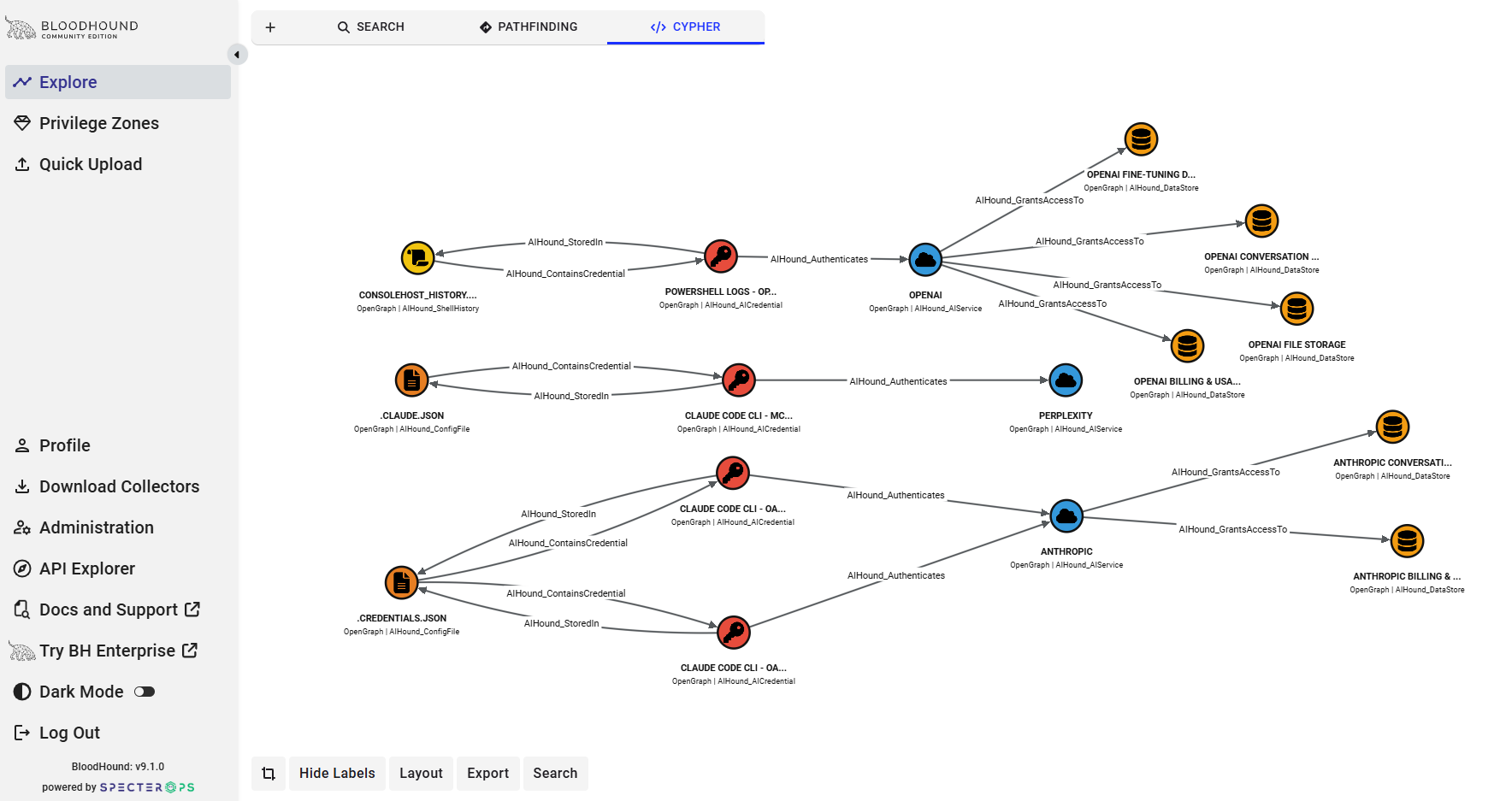
AIHound can export to SpectorOps' BloodHound. Scan results export as OpenGraph JSON that can be ingested into BloodHound to visualize attack paths, showing compromised credential chains through MCP servers, AI services, and datastores. I've included 29 pre-built Cypher queries for blast radius analysis, same-secret detection, and lateral movement mapping.
This is a security research tool. Credentials are redacted by default so output is safe to share in reports and screenshots.
Get scanning in under 2 minutes.
PyInstaller Precompiled .exe version can be found Here
Go Precompiled .exe version can be found Here
AIHound can be run four ways: from Python source, using the Go runtime. as a compiled Go binary, or as a standalone Windows executable.
Full Documentation located Here
Prerequisites
- Python 3.10 or higher
- That's it. No pip install required for basic scanning.
Step 1: Get AIHound
Option A: pip install
pip install aihound
aihound
Option B: Clone from source
git clone https://github.com/netwrix/AIHound.git
cd AIHound
Step 2: Run Your First Scan
python3 -m aihound
You'll see output like this:
╔══════════════════════════════════════════════════════════════╗
║          AIHound - AI Credential & Secrets Scanner           ║
╚══════════════════════════════════════════════════════════════╝

Platform: wsl
WSL detected - scanning both Linux and Windows credential paths

Tool             Credential Type        Storage      Location                            Risk
-------------------------------------------------------------------------------------------------
Claude Code CLI  oauth_access_token     plaintext... ~/.claude/.credentials.json          CRITICAL
                   Value: sk-ant-oat01-Z...eAAA
Claude Code CLI  oauth_refresh_token    plaintext... ~/.claude/.credentials.json          HIGH
                   Value: sk-ant-ort01-r...ygAA

Summary: 2 findings | 1 CRITICAL | 1 HIGH
All secret values are automatically redacted. The tool is read-only and doesn't touch your credentials.
Step 3: Get More Detail
Add -v for verbose output — shows file permissions (with human-readable descriptions), ownership, expiry times, and notes:
python3 -m aihound -v
Claude Code CLI  oauth_access_token     plaintext... ~/.claude/.credentials.json          CRITICAL
                   Value: sk-ant-oat01-Z...eAAA
                   Note: Expires: 2026-03-09 23:30 UTC
                   Perms: 0777 (world-writable, world-readable, DANGEROUS) Owner: ull
Step 4: Generate Reports
HTML Report
Creates a self-contained HTML file with the AIHound banner, dark theme, and color-coded risk table:
python3 -m aihound --html-file report.html
Open report.html in your browser. Great for sharing with your team or including in assessments.
JSON Report
For automation, pipelines, or feeding into other tools:
# Write to file
python3 -m aihound --json-file report.json

# Pipe to stdout
python3 -m aihound --json | jq '.summary'
BloodHound Attack Path Graph
Export to BloodHound CE for interactive attack path visualization — see how credentials chain together across tools, services, and data stores:
python3 -m aihound --bloodhound aihound-bloodhound.json
Then upload aihound-bloodhound.json to BloodHound CE (v9.x) via Quick Upload or Data Collection > File Ingest.
First time? Register the extension schema and import saved Cypher queries (once per BloodHound instance):
python3 -m aihound --import-queries \
  --bloodhound-server http://<bloodhound IP>:8080 \
  --bloodhound-user admin \
  --bloodhound-password <password>
This registers 14 custom node kinds with icons/colors via the OpenGraph extension schema and imports 29 saved Cypher queries into BloodHound's Saved Queries panel. Running it again is safe — it skips existing queries and re-registers the schema.
Example Cypher queries (also available in Saved Queries after import):
// Show the full credential graph
MATCH path = (a:AIHound)-[r]->(b:AIHound) RETURN path

// Blast radius from critical credentials
MATCH path = (c:AIHound_AICredential)-[*1..4]->(target)
WHERE c.risk_level = "critical"
RETURN path

// MCP server attack chain: tool -> server -> credential -> service
MATCH path = (t:AIHound_AITool)-[:AIHound_UsesMCPServer]->(m:AIHound_MCPServer)-[:AIHound_RequiresCredential]->(c:AIHound_AICredential)-[:AIHound_Authenticates]->(s:AIHound_AIService)
RETURN path
See BLOODHOUND_GUIDE.md located Here for the full walkthrough and extension/queries.json for all 29 pre-built queries in SpecterOps Query Library format.
All at once
python3 -m aihound -v --html-file report.html --json-file report.json --bloodhound bloodhound.json
Step 5: Scan Specific Tools
List what's available:
python3 -m aihound --list-tools
Available scanners:
  amazon-q             Amazon Q / AWS                 Applicable: yes
  chatgpt              ChatGPT Desktop                Applicable: yes
  claude-code          Claude Code CLI                Applicable: yes
  claude-desktop       Claude Desktop                 Applicable: yes
  cline                Cline (VS Code)                Applicable: yes
  continue-dev         Continue.dev                   Applicable: yes
  cursor               Cursor IDE                     Applicable: yes
  envvars              Environment Variables          Applicable: yes
  gemini               Gemini CLI / GCloud            Applicable: yes
  github-copilot       GitHub Copilot                 Applicable: yes
  windsurf             Windsurf                       Applicable: yes
Scan only specific tools by slug:
python3 -m aihound --tools claude-code claude-desktop envvars
What Does Each Risk Level Mean?
| Level | What It Means | What To Do |
|---|---|---|
| CRITICAL | Plaintext secret in a world-readable file | Fix file permissions immediately (chmod 600) |
| HIGH | Plaintext secret, only owner can read | Acceptable for some tools, but consider using OS keychain |
| MEDIUM | OS credential store or environment variable | Standard practice, but be aware of the exposure |
| LOW | Encrypted storage | Generally acceptable |
| INFO | Metadata, not an actual secret | No action needed |
WSL Users
If you're running on WSL, AIHound automatically detects it and scans both:
- Linux-native paths (
~/.claude/,~/.aws/, etc.) - Windows paths via
/mnt/c/Users/<you>/AppData/...
This often reveals credentials in Windows app data that have overly permissive permissions (e.g., 0777) when viewed from WSL.
Common Findings & What They Mean
"oauth_access_token" / "oauth_refresh_token" — Claude Code
Claude Code stores OAuth tokens in ~/.claude/.credentials.json. The access token is short-lived (hours), but the refresh token is long-lived and can be used to generate new access tokens.
"mcp_env:ADO_MCP_AUTH_TOKEN" — MCP Servers
MCP server configurations often embed auth tokens directly in JSON config files. If you see inline secrets here, consider using environment variable references (${VAR_NAME}) instead.
"api_key (anthropic)" — Continue.dev
Continue.dev stores API keys in plaintext in ~/.continue/config.json. Use the ${ENV_VAR} syntax in the config to avoid this.
AWS credentials
~/.aws/credentials contains long-lived access keys. Consider using SSO/IAM Identity Center instead of static keys.
Next Steps
- Review findings and fix any CRITICAL/HIGH issues
- Generate an HTML report for your team:
python3 -m aihound --html-file report.html - Export to BloodHound for attack path visualization:
python3 -m aihound --bloodhound bloodhound.json - See
BLOODHOUND_GUIDE.mdfor the full BloodHound walkthrough - Check the full Documentation Here for watch mode, MCP server mode, and advanced usage
1 maintainer

Metadata
1 maintainer
Release files for aihound 3.2.3
For a detailed explanation of source distributions (sdists) and built distributions (wheels), please see the package formats documentation.
Source distribution (sdist)
| File | Size | Uploaded | Provenance | Actions |
|---|---|---|---|---|
| aihound-3.2.3.tar.gz | 98.1 kB | Without provenance | Details for aihound-3.2.3.tar.gz |
Built distribution (wheel)
| File | Interpreter | ABI | Platform | Actions Reset |
|---|---|---|---|---|
| aihound-3.2.3-py3-none-any.whl | Python 3 | none | any | Details for aihound-3.2.3-py3-none-any.whl |
Total release size: 232.6 kB
Release files / aihound-3.2.3.tar.gz
| Download URL | aihound-3.2.3.tar.gz |
|---|---|
| Size | 98.1 kB |
| Tags | Source |
|
SHA-256 checksum How to use checksums |
555ff5573b7428549c671c855bed089283121c07814f9b8bd0f4ef1138d95f1f
|
|
BLAKE2b-256 checksum How to use checksums |
4ebbaa42810b82803d0de64cfc34da99933fe63c82a6a0b42afff3d3ca3d585a
|
| Upload date | |
|
Uploaded using Trusted Publishing? What is trusted publishing? |
No |
| Uploaded via |
twine/6.2.0 CPython/3.12.3
|
Release files / aihound-3.2.3-py3-none-any.whl
| Download URL | aihound-3.2.3-py3-none-any.whl |
|---|---|
| Size | 134.5 kB |
| Tags | Python 3 |
|
SHA-256 checksum How to use checksums |
a64bcd66d48d179e6058accb44a53213952535d57b05824325f498ebef582a95
|
|
BLAKE2b-256 checksum How to use checksums |
a105f1c3b35b99b6a8ef53e3e0774b9fcc7f4b1e1ffe97bd10c9be6e6cf1a2db
|
| Upload date | |
|
Uploaded using Trusted Publishing? What is trusted publishing? |
No |
| Uploaded via |
twine/6.2.0 CPython/3.12.3
|
Security for aihound 3.2.3
Provenance
Provenance describes where a file came from. On PyPI, provenance is shared via attestations, which provide a verifiable record of the build or publishing details. View details, limitations and caveats.
No provenance found
None of the files in this release were uploaded with provenance metadata.
A note on package security
PyPI is a repository for distributing packages, not a service for auditing them. While third-party security researchers and our staff do their best to detect and remove malicious packages, PyPI cannot guarantee the quality, security or suitability of any given package.
To learn more about protecting yourself from malicious actors, visit our package security documentation.














