
AIHound - AI Credential & Secrets Scanner

Project description
AIHound
AI Credential & Secrets Scanner










29 AI tool scanners · 4 platforms · BloodHound attack path export · MCP server mode · Watch mode
Get Started · Reports · BloodHound · Scan Tools · Documentation
AIHound is an AI Assistant credential and secrets scanner that detects exposed API keys, OAuth tokens, MCP server secrets, and session credentials across 29 AI tools on Windows, macOS, Linux, and WSL. Beyond one-shot scanning with terminal, it offers a watch mode for continuous monitoring that alerts on new, changed, or escalated credentials in real time.
AIHound includes an MCP server mode that lets AI assistants like Claude Code scan for and remediate credential issues programmatically.
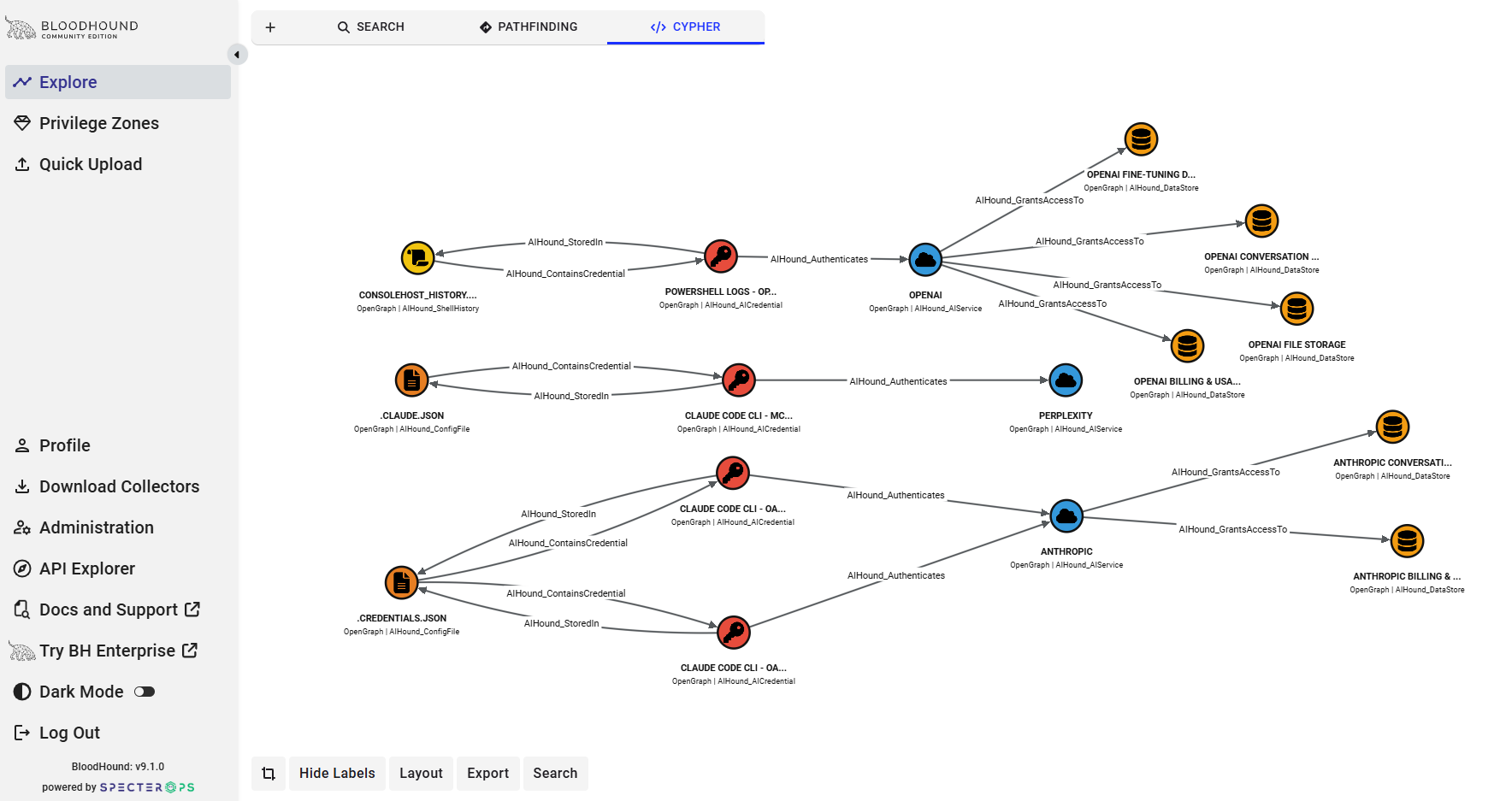
AIHound can export to SpectorOps' BloodHound. Scan results export as OpenGraph JSON that can be ingested into BloodHound to visualize attack paths, showing compromised credential chains through MCP servers, AI services, and datastores. I've included 29 pre-built Cypher queries for blast radius analysis, same-secret detection, and lateral movement mapping.
This is a security research tool. Credentials are redacted by default so output is safe to share in reports and screenshots.
Get scanning in under 2 minutes.
PyInstaller Precompiled .exe version can be found Here
Go Precompiled .exe version can be found Here
AIHound can be run four ways: from Python source, using the Go runtime. as a compiled Go binary, or as a standalone Windows executable.
Full Documentation located Here
Prerequisites
- Python 3.10 or higher
- That's it. No pip install required for basic scanning.
Step 1: Get AIHound
git clone https://github.com/netwrix/AIHound.git
cd AIHound
Step 2: Run Your First Scan
python3 -m aihound
You'll see output like this:
╔══════════════════════════════════════════════════════════════╗
║          AIHound - AI Credential & Secrets Scanner           ║
╚══════════════════════════════════════════════════════════════╝

Platform: wsl
WSL detected - scanning both Linux and Windows credential paths

Tool             Credential Type        Storage      Location                            Risk
-------------------------------------------------------------------------------------------------
Claude Code CLI  oauth_access_token     plaintext... ~/.claude/.credentials.json          CRITICAL
                   Value: sk-ant-oat01-Z...eAAA
Claude Code CLI  oauth_refresh_token    plaintext... ~/.claude/.credentials.json          HIGH
                   Value: sk-ant-ort01-r...ygAA

Summary: 2 findings | 1 CRITICAL | 1 HIGH
All secret values are automatically redacted. The tool is read-only and doesn't touch your credentials.
Step 3: Get More Detail
Add -v for verbose output — shows file permissions (with human-readable descriptions), ownership, expiry times, and notes:
python3 -m aihound -v
Claude Code CLI  oauth_access_token     plaintext... ~/.claude/.credentials.json          CRITICAL
                   Value: sk-ant-oat01-Z...eAAA
                   Note: Expires: 2026-03-09 23:30 UTC
                   Perms: 0777 (world-writable, world-readable, DANGEROUS) Owner: ull
Step 4: Generate Reports
HTML Report
Creates a self-contained HTML file with the AIHound banner, dark theme, and color-coded risk table:
python3 -m aihound --html-file report.html
Open report.html in your browser. Great for sharing with your team or including in assessments.
JSON Report
For automation, pipelines, or feeding into other tools:
# Write to file
python3 -m aihound --json-file report.json

# Pipe to stdout
python3 -m aihound --json | jq '.summary'
BloodHound Attack Path Graph
Export to BloodHound CE for interactive attack path visualization — see how credentials chain together across tools, services, and data stores:
python3 -m aihound --bloodhound aihound-bloodhound.json
Then upload aihound-bloodhound.json to BloodHound CE (v9.x) via Quick Upload or Data Collection > File Ingest.
First time? Register custom node types and saved Cypher queries (once per BloodHound instance):
register_ai_nodes.py script located in docs folder.
python3 docs/register_ai_nodes.py -s http://<bloodhound IP>:8080 -u admin -p <password>
This registers 14 custom node kinds with icons and imports 29 saved Cypher queries into BloodHound's Saved Queries panel. Use --reset to re-register, --unregister to remove everything, or --no-queries to skip query import.
Example Cypher queries (also available in Saved Queries after registration):
// Show the full credential graph
MATCH path = (a:AIHound)-[r]->(b:AIHound) RETURN path

// Blast radius from critical credentials
MATCH path = (c:AICredential)-[*1..4]->(target)
WHERE c.risk_level = "critical"
RETURN path

// MCP server attack chain: tool -> server -> credential -> service
MATCH path = (t:AITool)-[:UsesMCPServer]->(m:MCPServer)-[:RequiresCredential]->(c:AICredential)-[:Authenticates]->(s:AIService)
RETURN path
See BLOODHOUND_GUIDE.md located Here for the full walkthrough and cypher_queries.cy for all 29 pre-built queries.
All at once
python3 -m aihound -v --html-file report.html --json-file report.json --bloodhound bloodhound.json
Step 5: Scan Specific Tools
List what's available:
python3 -m aihound --list-tools
Available scanners:
  amazon-q             Amazon Q / AWS                 Applicable: yes
  chatgpt              ChatGPT Desktop                Applicable: yes
  claude-code          Claude Code CLI                Applicable: yes
  claude-desktop       Claude Desktop                 Applicable: yes
  cline                Cline (VS Code)                Applicable: yes
  continue-dev         Continue.dev                   Applicable: yes
  cursor               Cursor IDE                     Applicable: yes
  envvars              Environment Variables          Applicable: yes
  gemini               Gemini CLI / GCloud            Applicable: yes
  github-copilot       GitHub Copilot                 Applicable: yes
  windsurf             Windsurf                       Applicable: yes
Scan only specific tools by slug:
python3 -m aihound --tools claude-code claude-desktop envvars
What Does Each Risk Level Mean?
| Level | What It Means | What To Do |
|---|---|---|
| CRITICAL | Plaintext secret in a world-readable file | Fix file permissions immediately (chmod 600) |
| HIGH | Plaintext secret, only owner can read | Acceptable for some tools, but consider using OS keychain |
| MEDIUM | OS credential store or environment variable | Standard practice, but be aware of the exposure |
| LOW | Encrypted storage | Generally acceptable |
| INFO | Metadata, not an actual secret | No action needed |
WSL Users
If you're running on WSL, AIHound automatically detects it and scans both:
- Linux-native paths (
~/.claude/,~/.aws/, etc.) - Windows paths via
/mnt/c/Users/<you>/AppData/...
This often reveals credentials in Windows app data that have overly permissive permissions (e.g., 0777) when viewed from WSL.
Common Findings & What They Mean
"oauth_access_token" / "oauth_refresh_token" — Claude Code
Claude Code stores OAuth tokens in ~/.claude/.credentials.json. The access token is short-lived (hours), but the refresh token is long-lived and can be used to generate new access tokens.
"mcp_env:ADO_MCP_AUTH_TOKEN" — MCP Servers
MCP server configurations often embed auth tokens directly in JSON config files. If you see inline secrets here, consider using environment variable references (${VAR_NAME}) instead.
"api_key (anthropic)" — Continue.dev
Continue.dev stores API keys in plaintext in ~/.continue/config.json. Use the ${ENV_VAR} syntax in the config to avoid this.
AWS credentials
~/.aws/credentials contains long-lived access keys. Consider using SSO/IAM Identity Center instead of static keys.
Next Steps
- Review findings and fix any CRITICAL/HIGH issues
- Generate an HTML report for your team:
python3 -m aihound --html-file report.html - Export to BloodHound for attack path visualization:
python3 -m aihound --bloodhound bloodhound.json - See
BLOODHOUND_GUIDE.mdfor the full BloodHound walkthrough - Check the full Documentation Here for watch mode, MCP server mode, and advanced usage
Release history Release notifications | RSS feed


Download files
Download the file for your platform. If you're not sure which to choose, learn more about installing packages.
Source Distribution
Built Distribution
Filter files by name, interpreter, ABI, and platform.
If you're not sure about the file name format, learn more about wheel file names.
Copy a direct link to the current filters
File details
Details for the file aihound-3.2.2.tar.gz.
File metadata
- Download URL: aihound-3.2.2.tar.gz
- Upload date:
- Size: 91.6 kB
- Tags: Source
- Uploaded using Trusted Publishing? No
- Uploaded via: twine/6.2.0 CPython/3.12.3
File hashes
| Algorithm | Hash digest | |
|---|---|---|
| SHA256 |
2678f672319938ef9081d331167f8ad5acc268788a2a987a637712bdc45d5ded
|
|
| MD5 |
2629f255e83ceed6ee408dce017df37a
|
|
| BLAKE2b-256 |
43f809063ea37d1125076eb55b0bf613f0478389e51964f889ec2e0ce432804e
|
File details
Details for the file aihound-3.2.2-py3-none-any.whl.
File metadata
- Download URL: aihound-3.2.2-py3-none-any.whl
- Upload date:
- Size: 127.4 kB
- Tags: Python 3
- Uploaded using Trusted Publishing? No
- Uploaded via: twine/6.2.0 CPython/3.12.3
File hashes
| Algorithm | Hash digest | |
|---|---|---|
| SHA256 |
e31ca34c42dd82f9e450d5a3729caacffbc0f1391b49345506b93113c069111a
|
|
| MD5 |
0f385ff7a84330a83fa0e1aa9b056c06
|
|
| BLAKE2b-256 |
112b65db553394783130d8271486856b938c02cd1f97ca5159567da5a5a6c005
|






