

Aikito
Multi-Agent · Multi-Project · Multi-OS · Multi-Machine





简体中文 · Homepage · Documentation
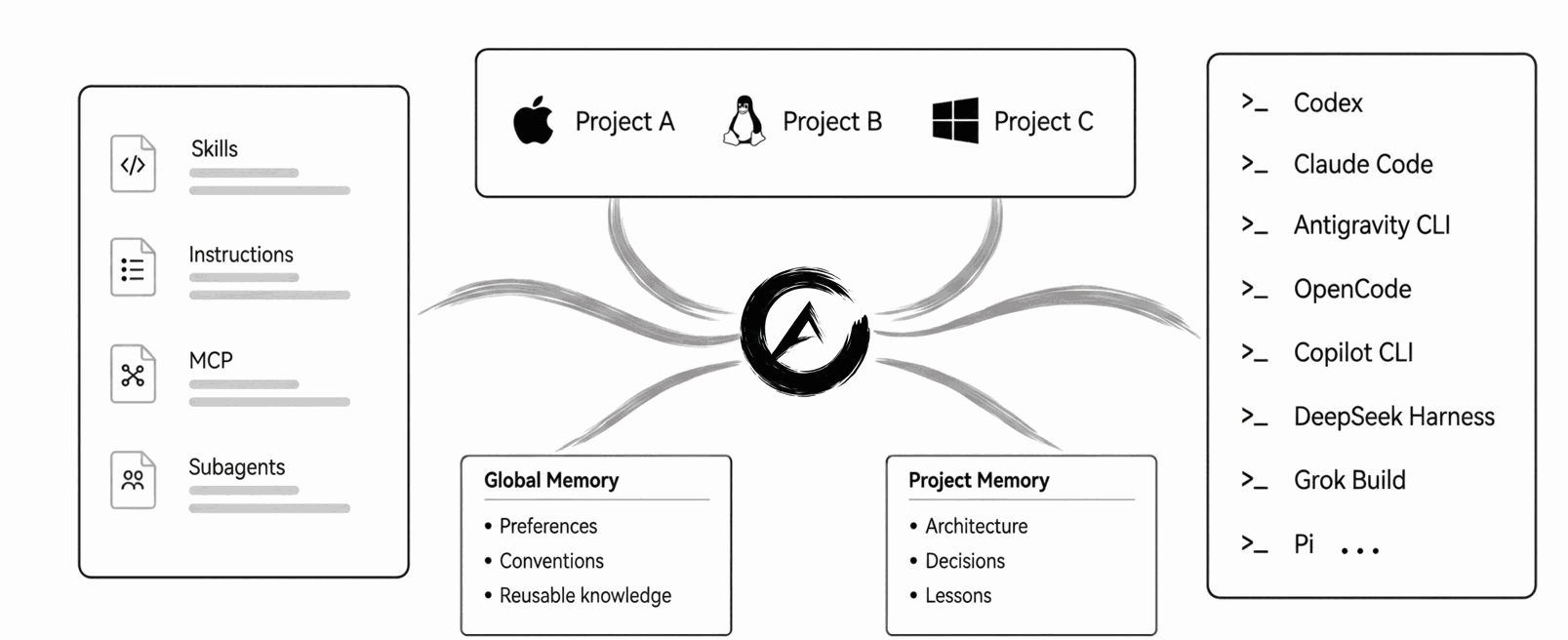
Aikito gives you one place to govern the context your coding agents share.
Manage instructions, skills, MCPs, subagents, and durable memory across agents, projects, and machines.
Quick Start
1. Install
With uv (recommended cross-platform) or Homebrew (macOS / Linux):
uv tool install aikito
# or: brew install lsaint/tap/aikito
2. Set Up Your Workspace
Bring your existing Agent setup under Aikito in 30 seconds:
aikito init workspace ~/aikito
aikito adopt  # use --dry-run to preview, --verbose for full paths
aikito sync
aikito status
adopt and sync preflight their complete plans before writing. Starting from
scratch? Simply skip aikito adopt.
On Windows, enable Developer Mode and see the Windows installation guide.
Prefer your coding agent set it up? (Click to expand prompt)
Paste this prompt into your coding agent:
Install and configure Aikito from https://github.com/lsaint/aikito. Read the README,
src/aikito/templates/skills/aikito/SKILL.md, and any linked documentation relevant to the setup. Inspect the Agent configuration I already use, initialize the Aikito workspace, adopt supported existing resources, synchronize them through Aikito, and verify the result withaikito status.adoptandsyncpreflight their complete plans before writing. If either command stops, explain the findings and ask before using--skip,--force,--prune, or manually resolving a conflict. Preserve my current setup and do not register a project without my confirmation. If there is nothing to adopt, skip that step and tell me.
See the Result
aikito status shows synchronized context and durable memory across all agents and projects:
┌──────────┬───────┬────────┬────────┬───────┬──────┬────────┐
│ Project  │ Instr │ Skills │ Memory │ Paths │ Mode │ Status │
├──────────┼───────┼────────┼────────┼───────┼──────┼────────┤
│ aikito   │ 24L   │ 1      │ 12     │ 2/3   │ link │ ✓      │
│ payments │ 128L  │ 5      │ 14     │ 1/1   │ link │ ✓      │
│ infra    │ 210L  │ 6      │ 21     │ 1/1   │ copy │ ✓      │
│ blog     │ –     │ 2      │ 8      │ 0/1   │ link │ –      │
└──────────┴───────┴────────┴────────┴───────┴──────┴────────┘

Global: ✓ · Instr 24L · Skills 12 · Memory 6 · MCP 1 · Sub 3
Consumers (8): agy · claude · codex · copilot · dsh · grok · opencode · pi
All in one workspace: ~/aikito (AIKITO_DIR)
Prefer a browser view? Run aikito web for
the local, read-only Console.
Why Aikito
AI agent resources fragment in three directions:
- Across tools: each agent invents its own folders, memory formats, and config conventions.
- Across projects: reusable knowledge, skills, and instructions are copied or drift out of sync.
- Across time: valuable decisions and hard-won lessons disappear into ephemeral chat sessions.
Aikito keeps the source files in one personal Git workspace and connects selected resources to each agent and project. No background daemon, vector store, database, or hosted service is required.
Durable Memory
The bundled durable-memory skill guides agents to retrieve relevant notes, record verified conclusions, and update stale knowledge. Notes are plain Markdown files versioned by Git.
- Global scope: cross-project preferences, coding conventions, and tool practices.
- Project scope: architecture decisions, API policies, and local workflows.
See memory usage and opt-out and why memory needs a maintainer.
Safety & Boundaries
Aikito is local-first and predictable by design:
- Preflight before write:
adoptandsyncsimulate and check operations before modifying files. - Plain files & Git: no background service, no proprietary database, no implicit prompt injection.
- You govern secrets: workspace is a local Git repository; review secrets before pushing.
Detailed safety and boundary references:
Documentation
Visit the full documentation site or dive into:
- Getting started: installation through adopting your existing setup.
- Workspace and synchronization: directory layout, scopes, and linking model.
- Connect another machine: multi-machine sync and custom paths.
- CLI reference: commands, options, and shell completion.
- Chat Distiller: distill browser AI chats into Markdown notes in your Inbox.
- Troubleshooting: resolving conflicts and synchronization drift.
Support
If you find Aikito useful, you can support its development.
1 maintainer

Release files for aikito 1.50.0
For a detailed explanation of source distributions (sdists) and built distributions (wheels), please see the package formats documentation.
Source distribution (sdist)
| File | Size | Uploaded | |
|---|---|---|---|
| aikito-1.50.0.tar.gz | 808.5 kB | Details |
Built distribution (wheel)
| File | Interpreter | ABI | Platform | Reset |
|---|---|---|---|---|
| aikito-1.50.0-py3-none-any.whl | Python 3 | none | any | Details |
Total release size: 1.5 MB
Release files / aikito-1.50.0.tar.gz
| Download URL | aikito-1.50.0.tar.gz |
|---|---|
| Size | 808.5 kB |
| Tags | Source |
|
SHA-256 checksum How to use checksums |
ade5308c3ac0f5e440dcd37447c503aa570b700a0727437bdef02329919d3311
|
|
BLAKE2b-256 checksum How to use checksums |
2a356c16a58397fc4a4708d4cfc7bff60fb7f348fa2aff657c0839322aeea2ea
|
| Upload date | |
|
Uploaded using Trusted Publishing? What is trusted publishing? |
Yes |
| Uploaded via |
twine/6.1.0 CPython/3.12.9
|
Provenance
Provenance describes where a file came from. On PyPI, provenance is shared via attestations, which provide a verifiable record of the build or publishing details. View details, limitations and caveats.


PyPI Publish Attestation
PyPI verified that this artifact, at this checksum, originated from the publisher listed below.
Signed by GitHub Actions, verified by PyPI on Sep 23, 2026.
Transparency logRelease files / aikito-1.50.0-py3-none-any.whl
| Download URL | aikito-1.50.0-py3-none-any.whl |
|---|---|
| Size | 674.7 kB |
| Tags | Python 3 |
|
SHA-256 checksum How to use checksums |
d7cb5dd0488fa7e89cf14acd45cd76db140a0e1dd0e30fbb43f4bb0deb8c64b3
|
|
BLAKE2b-256 checksum How to use checksums |
581f0a49036bacf90eed485ca5555854d6a7838211e98d356d47fd8bb9b3b2f3
|
| Upload date | |
|
Uploaded using Trusted Publishing? What is trusted publishing? |
Yes |
| Uploaded via |
twine/6.1.0 CPython/3.12.9
|
Provenance
Provenance describes where a file came from. On PyPI, provenance is shared via attestations, which provide a verifiable record of the build or publishing details. View details, limitations and caveats.
PyPI Publish Attestation
PyPI verified that this artifact, at this checksum, originated from the publisher listed below.
Signed by GitHub Actions, verified by PyPI on Sep 23, 2026.
Transparency log













