
The Artificial Intelligence for Nowcasting Pilot Project - Precipitation Benchmark for Latin America (AINPP-PB-LATAM).
Verified details
These details have been verified by PyPIProject links
GitHub Statistics
Maintainers

Project description
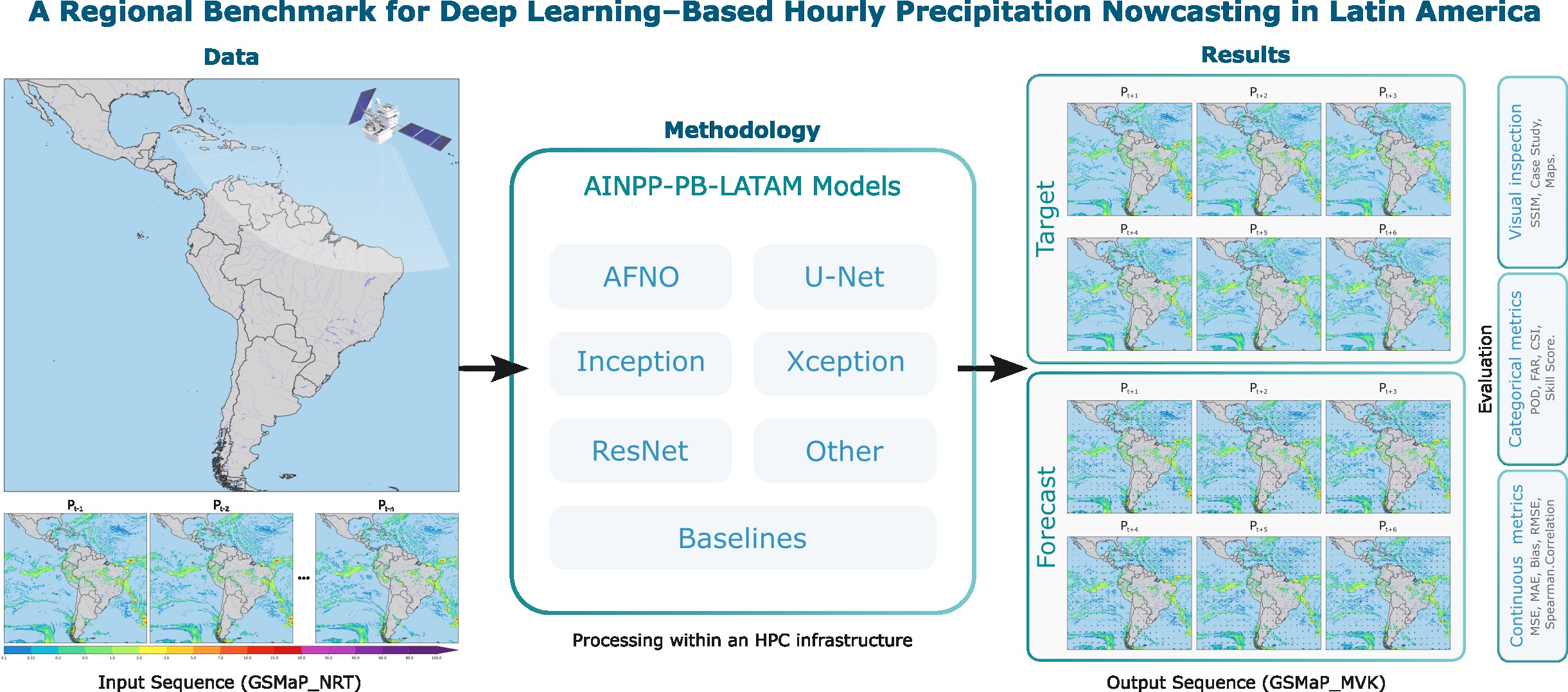








AINPP Precipitation Benchmark
Unified scientific benchmark library for precipitation nowcasting in Latin America using deep learning on high-performance computing (HPC) environments.
Developers
-
Adriano P. Almeida
National Institute for Space Research (INPE/Brazil)
adriano.almeida@inpe.br -
Alan J. P. Calheiros
National Institute for Space Research (INPE/Brazil)
alan.calheiros@inpe.br
This benchmark is developed and maintained by a team focused on scientific machine learning, reproducible evaluation, and scalable HPC workflows for precipitation nowcasting in Latin America. Its goal is not to deliver a single optimized forecasting solution, but to provide a flexible framework for developing and evaluating regionally adapted models. By enabling systematic comparison of methods, it supports incremental improvements and contributes to more reliable predictions in regions of interest. The benchmark is open to the community, and feedback or contributions are welcome.
Key Features
- Extensive Model Zoo: AFNO, ConvLSTM, GAN, InceptionV4, ResNet50, UNet, and Xception.
- Scalable HPC Training: Built-in support for Single GPU, Multi-GPU (Distributed Data Parallel), and Multi-Node clusters.
- Standardized Data Formats: Optimized data loading and processing utilizing Zarr archives with daily/hourly grid matrices.
- Config-Driven Architecture: Fully modular, parameterized via Hydra to completely decouple code from experiments.
- Metrics & Evaluation: Three-pronged evaluation module covering Spatial, Continuous, and Probabilistic metrics.
🛠 Tech Stack
- Language: Python 3.10+
- Deep Learning: PyTorch, Torchvision, TIMM
- Experiment Tracking: MLflow
- Configuration: Hydra, OmegaConf
- Data Processing: Zarr, Xarray, Dask, Pandas, Numpy
- Metrics & Science: Scikit-Learn, SciPy
- Package Manager:
uv
Prerequisites
- Python 3.10 or higher.
- NVIDIA GPUs available (CUDA environment) for practical training and evaluation.
uvinstalled on the system (a blazing-fast Python package installer and resolver).
Getting Started
1. Clone the Repository
git clone git@github.com:SInApSE-INPE/AINPP-PB-LATAM.git
cd AINPP-PB-LATAM
2. Set Up the Environment
The project relies on uv to maintain its isolated environment. Create a virtual environment:
uv venv
Activate the environment:
# On Linux/macOS
source .venv/bin/activate
3. Install Dependencies
CRITICAL: The package must always be installed in editable mode (-e) using uv. Do not use sys.path hacks in your experiments.
# Install the core package along with dev and docs dependencies
uv pip install -e .[dev,docs]
4. Verify Installation
You can check if the CLI is ready and Hydra configuration is locatable:
python main.py --help
Architecture Overview
Data Constraints & Design
The benchmark operates under strict spatio-temporal properties tailored for the Brazilian/Latin-American precipitation models:
- Base Format:
.zarrfile stores. - Data Splits:
train: 2018 to 2022validation: 2023test: 2024
- Structural Properties:
- Matrices of
880 x 970spatial grids. - Hourly granularity.
- Matrices of
- Temporal Configuration:
- Input: 12 consecutive hours originating from
gsmap_nrt. - Target (Prediction): 6 consecutive hours pointing to
gsmap_mvk.
- Input: 12 consecutive hours originating from
- Training Strategies: Models can be trained using either an Autoregressive (predict 1 step, feed-back, repeat) or Direct (predict all 6 steps at once) approach.
Directory Structure
├── conf/                     # Hydra configuration YAMLs
│   ├── config.yaml           # Root configuration
│   ├── dataset/              # Dataloader & data path configs
│   ├── discriminator/        # GAN discriminators (e.g. patchgan)
│   ├── evaluation/           # Evaluation metric definitions
│   ├── loss/                 # Loss functions (e.g., mse, ssim)
│   ├── model/                # Architecture configurations (unet, afno, etc.)
│   ├── training/             # Optimizer, lr scheduler, epochs
│   └── visualization/        # Plotting parameters
├── docs/                     # MkDocs documentation
├── scripts/                  # Utilities (legacy running blocks, bash scripts)
│   ├── check_all.sh          # Full quality-gate workflow
│   └── enforce_coverage.py   # Coverage tools
├── src/
│   └── ainpp_pb_latam/                # Core Python package
│       ├── datasets/         # Zarr loading and sampling logic
│       ├── evaluation/       # Orchestration & benchmark metric calculators applied per threshold/lead_time
│       ├── metrics/          # Pure mathematical calculations agnostic of batch/dataset
│       ├── aggregation/      # Statistical grouping and Tidy dataframe formatting (CSV/Parquet)
│       ├── visualization/    # Handlers for model output plotting (Curves, Diagrams, Maps)
│       ├── inference/        # Unified inference engine for single/historical predictions
│       ├── layers/           # Reusable neural network layers
│       ├── models/           # Model Zoo definitions (UNet, ResNet, etc.)
│       ├── distributed.py    # DDP sync rules for Multi-Node
│       ├── engine.py         # Standard training loops
│       ├── engine_gan.py     # specialized loops for GAN-based setups
│       ├── losses.py         # Specialized precipitation loss implementations
│       └── utils.py          # Object builders (Loss, Optimizer)
├── tests/                    # Pytest suite
├── main.py                   # Unified CLI Entry point
├── pyproject.toml            # Build system definitions
└── uv.lock                   # Deterministic python dependency tree
Evaluation & Metrics Workflow
The library features rigorously separated pipelines for scientific benchmark evaluation. The architecture divides concerns as follows:
metrics/: Computes pure mathematical metrics. Subdivided into 6 categories based on standard precipitation forecasting properties:- Categorical (POD, FAR, CSI, ETS, FSS)
- Continuous (MAE, RMSE, ME, Pearson Correlation)
- Probabilistic (Brier Score, ROC-AUC, CRPS)
- Object-Based (Object CSI, centroid distance for convective cells)
- Sharpness / Blur (SSIM, Total Variation, PSD)
- Consistency (Wasserstein distance, Exceedance curves)
evaluation/: Orchestrates and maps the raw output target against the thresholds (mm/h) and temporal prediction horizons (lead_time).aggregation/: Consolidates statistical properties from the evaluation bounds and builds Tidy long dataframes exportable to bothCSVandParquet.visualization/: Generates diagnostic visual figures over the aggregated benchmark sets directly into theoutputs/figuresdirectories. Supported plots are:- Error & Lead Time continuous curves
- Performance and Taylor Diagrams
- Model Ranking grids and Heatmaps
- CDFs, Histogram Distribution mapping and Spatiotemporal spectral visuals.
Using the Evaluation Modules
The benchmark evaluation generates metrics and plots automatically, but gives you total control via the CLI or Python API.
Running standard evaluation
Execute the unified evaluation over your best model checkpoint:
python main.py task=evaluate checkpoint=outputs/pipelines/unet_direct/checkpoints/best_model.pt
Customizing parameters via Hydra
Overwrite constraints seamlessly to test custom thresholds (e.g., severe storms) or ignore specific modules to speed up processing:
python main.py task=evaluate \
  model=unet/direct \
  checkpoint=outputs/my_model.pt \
  +evaluation.thresholds_mm_h=[5.0, 10.0, 25.0] \
  +evaluation.lead_times_min=[10, 30, 60] \
  +evaluation.probabilistic=false \  # Turn off probabilistic evaluation
  +visualization.output_dir=/custom/plot/path
Calling metrics and visualization dynamically
You can utilize the highly optimized standalone packages on your custom prediction loops or notebooks without the Hydra wrapper:
import numpy as np
from ainpp_pb_latam.metrics.continuous import ContinuousMetrics
from ainpp_pb_latam.metrics.categorical import CategoricalMetrics
from ainpp_pb_latam.visualization.plot_maps import plot_comparison

target_map = np.random.rand(256, 256) * 15 # Synthetic observed mm/h
pred_map = target_map * 0.8 + np.random.rand(256, 256) # Synthetic predicted mm/h

# 1. Compute Math metrics agnostic to thresholds
cont_metrics = ContinuousMetrics.compute(pred_map, target_map)
print(f"RMSE: {cont_metrics['RMSE']:.2f}")

# 2. Compute Categorical metrics for heavy rain (> 10mm/h)
cat_metrics = CategoricalMetrics.compute(pred_map, target_map, threshold=10.0)
print(f"CSI (Threat Score): {cat_metrics['CSI']}")

# 3. Export sharp comparison maps
plot_comparison(
    target=target_map,
    prediction=pred_map,
    output_path="comparison_maps.png",
    title="Heavy Rain Analysis"
)
Request Lifecycle
- You run
python main.py task=<TASK_TYPE>. - Hydra merges
conf/config.yamlwith the sub-dictionaries provided (loss, models, training parameters) and command-line overrides. - Depending on the task (
train,evaluate,infer):- Initializes the Zarr Datasets via
ainpp_pb_latam.datasets. - Compiles the Model defined in
conf/model/and ships it to GPU (or configuresDistributedDataParallel). - Hooks into
ainpp_pb_latam.engine,ainpp_pb_latam.evaluationorainpp_pb_latam.inferenceand streams data until completion.
- Initializes the Zarr Datasets via
Configuration via Hydra
This project delegates all configurations (hyperparameters, variables, dataset paths, training parameters) to Hydra. We do not use argparse or .env files for architecture controls.
Modifying Parameters
You can override any parameter on the command line using the simple .yaml trajectory:
# Change the learning rate and batch size for a training run:
python main.py task=train training.lr=0.0005 dataset.train_loader.batch_size=32

# Change the model to an AFNO and loss to a Hybrid scheme:
python main.py task=train model=afno loss=hybrid_mse_ssim
Understanding Loss Functions
We provide specialized loss functions designed for high-intensity precipitation tasks:
- Pixel-wise:
WeightedMSE(penalizes heavy rain errors),LogCosh,HuberLoss. - Structural:
SSIMLoss(anti-blurring),SpectralLoss,PerceptualLoss(Feature MSE). - Hybrid:
HybridLoss(configurable weighted summation).
Available Commands
Run any stage via main.py.
| Command | Description |
|---|---|
python main.py task=train |
Kickoff training. By default outputs runs to ./outputs/<date>/<time>. |
python main.py task=evaluate checkpoint=/path/to/my_model.pt |
Run spatial, continuous, and probabilistic metric validation on the held-out test data. |
python main.py task=infer inference.mode=single checkpoint=/my_model.pt |
Run prediction for a single isolated sample and output locally formatted as .nc (NetCDF) or .pt. |
python main.py task=infer inference.mode=historical checkpoint=/my_model.pt |
Run bulk batch-by-batch predictions on the whole temporal set via Dataloader, saving cleanly optimized to a Zarr Store. |
./scripts/check_all.sh |
Run all Linters, typecheck, and coverage reports at once. |
mkdocs serve |
Host documentation locally mimicking github pages structure. |
Testing
Quality assurance is mandated globally via the Makefile/Shell scripts. We rely on pytest, coverage, black, isort, and mypy.
Running Tests
# Run all automated tests (Minitest equivalent in Python)
pytest tests/

# Run tests with coverage map pointing at src/ainpp_pb_latam
pytest --cov=src/ainpp_pb_latam tests/

# Shortcut for linting, typing and testing standardly
./scripts/check_all.sh
Training and Deployment in HPC Workspace
The framework utilizes torch.distributed and is meant to be run transparently on massive multi-GPU or multi-Node bounds.
Single Node, Multi GPU Deployment
Run the process under torchrun and declare how many GPUs to map per node:
# Running DDP with 4 GPUs
torchrun --nproc_per_node=4 main.py task=train dataset.train_loader.batch_size=16
(Variables are aggregated per-batch across GPUs, keeping the effective batch-size as GPUs * node_batch_size).
Compute / Checkpointing Rules
- Early Stopping: Models monitor validation loss. If improvement ceases before parameter
patience, training terminates. - Checkpointing: Every epoch emits a checkpoint, defaulting the minimum validation loss state to
best_model.pt.
Troubleshooting
ImportErrors on ainpp_pb_latam.*
Error: ModuleNotFoundError: No module named 'ainpp_pb_latam'
Solution: Ensure you actually installed the package into the current uv environment via the editable command.
uv pip install -e .
CUDA out of memory
Error: torch.cuda.OutOfMemoryError / CUDA out of memory.
Solution: Drop the batch size or hidden dimensions through Hydra.
python main.py task=train dataset.train_loader.batch_size=4 model.hidden_channels=[16,16,16]
Deadlocks in DistributedDataParallel
Error: The system freezes on epoch conclusion or validation phases.
Solution: DDP often hangs if the dataset isn't perfectly sliced, or if evaluation metrics attempt to reduce uneven tensors. Try lowering the number of workers per dataloader using system.num_workers=0 for debug traces.
Acknowledgements
The authors wish to thank the National Council for Scientific and Technological Development (CNPq, processes 438310/2018-7, 141451/2021-1 and 444205/2024-1), the Brazilian Federal Agency for Support and Evaluation of Higher Education (CAPES), the National Institute for Space Research (INPE) and the Brazilian Space Agency (AEB) of the Ministry of Science, Technology and Innovation (MCTI) for their financial support. The project was supported by the \textit{Laboratório Nacional de Computação Científica} (LNCC, MCTI/Brazil) through the resources of the Santos Dumont supercomputer in the projects IDeepS and CPTEC. This work was also supported by the 4th Research Announcement on the Earth Observations of the Japan Aerospace Exploration Agency (JAXA) (ER4GPN102) and World Meteorological Organization (WMO).
License
This architecture operates under an MIT open-source license.
Citation
If you use this benchmark in your research, please cite the following paper:
@article{almeida2026regional,
  author  = {Almeida, Adriano P. and Barbosa, Henrique M. J. and Garcia, S{\^a}mia R. and Gagne, David J. and Zhou, Kanghui and Kubota, Takuji and Ushio, Tomoo and Otsuka, Shigenori and Pfreundschuh, Simon and Calheiros, Alan J. P.},
  title   = {A Regional Benchmark for Deep Learning-Based Hourly Precipitation Nowcasting in Latin America},
  journal = {IEEE Access},
  year    = {2026},
  volume  = {PP},
  number  = {99},
  pages   = {1--1},
  doi     = {10.1109/ACCESS.2026.3670767}
}
Project details
Verified details
These details have been verified by PyPIProject links
GitHub Statistics
Maintainers
Release history Release notifications | RSS feed


Download files
Download the file for your platform. If you're not sure which to choose, learn more about installing packages.
Source Distribution
Built Distribution
Filter files by name, interpreter, ABI, and platform.
If you're not sure about the file name format, learn more about wheel file names.
Copy a direct link to the current filters
File details
Details for the file ainpp_pb_latam-1.0.0b3.tar.gz.
File metadata
- Download URL: ainpp_pb_latam-1.0.0b3.tar.gz
- Upload date:
- Size: 71.5 kB
- Tags: Source
- Uploaded using Trusted Publishing? Yes
- Uploaded via: twine/6.1.0 CPython/3.13.7
File hashes
| Algorithm | Hash digest | |
|---|---|---|
| SHA256 |
adeb20d39b646a2184292acd3075b06329958fb0873c62fafa2e51c4ab0f544d
|
|
| MD5 |
eb41e3ca1f6dffdfd73c3676af0c7faa
|
|
| BLAKE2b-256 |
f14654a21da55ec1c40317123f209f79cafe97fab4bd1e4ab7f719a09f6f8c82
|
Provenance
The following attestation bundles were made for ainpp_pb_latam-1.0.0b3.tar.gz:
Publisher:
release.yml on SInApSE-INPE/AINPP-PB-LATAM
-
Statement:
-
Statement type:
https://in-toto.io/Statement/v1 -
Predicate type:
https://docs.pypi.org/attestations/publish/v1 -
Subject name:
ainpp_pb_latam-1.0.0b3.tar.gz -
Subject digest:
adeb20d39b646a2184292acd3075b06329958fb0873c62fafa2e51c4ab0f544d - Sigstore transparency entry: 1138365667
- Sigstore integration time:
-
Permalink:
SInApSE-INPE/AINPP-PB-LATAM@2ed2990c6f086e047ff3d5146dffd47fad842334 -
Branch / Tag:
refs/tags/v1.0.0b3 - Owner: https://github.com/SInApSE-INPE
-
Access:
public
-
Token Issuer:
https://token.actions.githubusercontent.com -
Runner Environment:
github-hosted -
Publication workflow:
release.yml@2ed2990c6f086e047ff3d5146dffd47fad842334 -
Trigger Event:
push
-
Statement type:
File details
Details for the file ainpp_pb_latam-1.0.0b3-py3-none-any.whl.
File metadata
- Download URL: ainpp_pb_latam-1.0.0b3-py3-none-any.whl
- Upload date:
- Size: 79.1 kB
- Tags: Python 3
- Uploaded using Trusted Publishing? Yes
- Uploaded via: twine/6.1.0 CPython/3.13.7
File hashes
| Algorithm | Hash digest | |
|---|---|---|
| SHA256 |
939f528a72ee26809150be2e79f5c42658afc599e26370baf4d6a2c7564ca9f1
|
|
| MD5 |
ee439f2f56f20e3eb4483c36cc43839c
|
|
| BLAKE2b-256 |
63986656bd61c4cfd5f74cf8c66c20ae4272c5bd906ee67849438ff5a518402b
|
Provenance
The following attestation bundles were made for ainpp_pb_latam-1.0.0b3-py3-none-any.whl:
Publisher:
release.yml on SInApSE-INPE/AINPP-PB-LATAM
-
Statement:
-
Statement type:
https://in-toto.io/Statement/v1 -
Predicate type:
https://docs.pypi.org/attestations/publish/v1 -
Subject name:
ainpp_pb_latam-1.0.0b3-py3-none-any.whl -
Subject digest:
939f528a72ee26809150be2e79f5c42658afc599e26370baf4d6a2c7564ca9f1 - Sigstore transparency entry: 1138365755
- Sigstore integration time:
-
Permalink:
SInApSE-INPE/AINPP-PB-LATAM@2ed2990c6f086e047ff3d5146dffd47fad842334 -
Branch / Tag:
refs/tags/v1.0.0b3 - Owner: https://github.com/SInApSE-INPE
-
Access:
public
-
Token Issuer:
https://token.actions.githubusercontent.com -
Runner Environment:
github-hosted -
Publication workflow:
release.yml@2ed2990c6f086e047ff3d5146dffd47fad842334 -
Trigger Event:
push
-
Statement type:






