
aiogram-dialog-i18n





Translated text widget for aiogram-dialog powered by aiogram-i18n or fluentogram.
The examples use these translations:
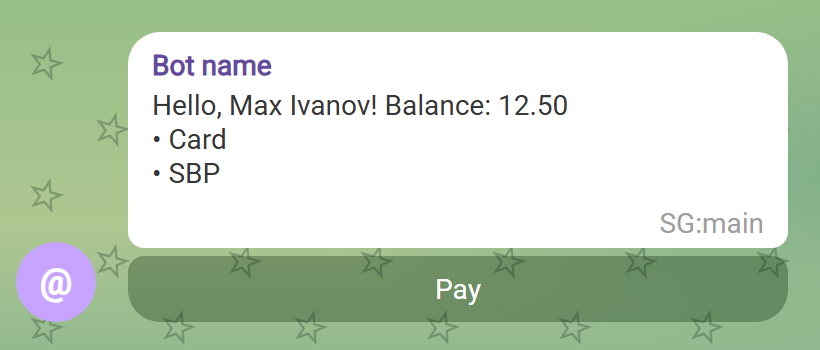
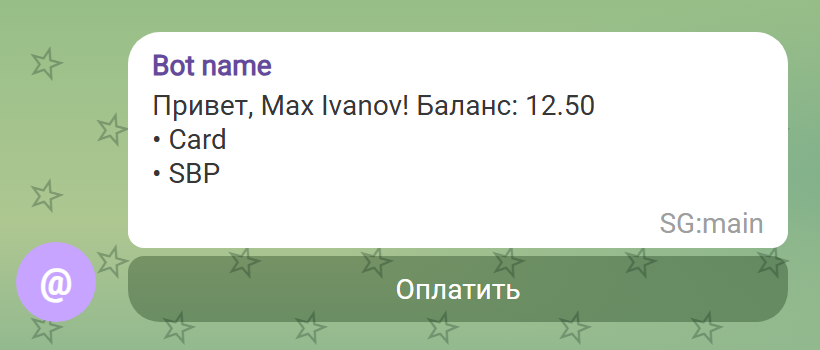
hello-user = Hello, { $name }! Balance: { $balance }
payment-method = • { $method }
pay-btn = Pay
aiogram-i18n
Installation
uv add "aiogram-dialog-i18n[aiogram-i18n]"
# or
pip install "aiogram-dialog-i18n[aiogram-i18n]"
Setup
Set up I18nMiddleware as usual with setup(dp), with any context_key: the widgets take it from the dispatcher of the update, so several bots in one process work.
middleware_key must stay the default "i18n_middleware".
Usage
I18nFormat, short alias T:
from aiogram_dialog import Window
from aiogram_dialog.widgets.kbd import Button
from aiogram_dialog.widgets.text import Format, List
from magic_filter import F

from aiogram_dialog_i18n.aiogram_i18n import I18nFormat, T

Window(
    I18nFormat("hello-user", name=F["user"].full_name, balance=Format("{balance:.2f}")),
    List(T("payment-method", method=F["item"]), F["methods"]),
    Button(T("pay-btn"), id="pay", when=F["methods"]),
    state=...,
)
fluentogram
Installation
uv add "aiogram-dialog-i18n[fluentogram]"
# or
pip install "aiogram-dialog-i18n[fluentogram]"
Setup
FluentogramMiddleware puts the TranslatorRunner of the user and the TranslatorHub into the data, set it up after the other middlewares:
from aiogram_dialog_i18n.fluentogram import FluentogramMiddleware

FluentogramMiddleware(hub).setup(dp)
The locale is language_code of the user. To take it from a database, pass a manager:
from typing import Any

from aiogram.types import Update

from aiogram_dialog_i18n.fluentogram import BaseLocaleManager


class DbLocaleManager(BaseLocaleManager):
    async def get_locale(self, event: Update, data: dict[str, Any]) -> str | None:
        user = await data["repo"].get_user(data["event_from_user"].id)
        return user.language if user else None


FluentogramMiddleware(hub, DbLocaleManager()).setup(dp)
Usage
FluentogramFormat, short alias T:
from aiogram_dialog import Window
from aiogram_dialog.widgets.kbd import Button
from aiogram_dialog.widgets.text import Format, List
from magic_filter import F

from aiogram_dialog_i18n.fluentogram import FluentogramFormat, T

Window(
    FluentogramFormat("hello-user", name=F["user"].full_name, balance=Format("{balance:.2f}")),
    List(T("payment-method", method=F["item"]), F["methods"]),
    Button(T("pay-btn"), id="pay", when=F["methods"]),
    state=...,
)
Outside widgets, take them from the data: i18n is the TranslatorRunner of the user, translator_hub is the TranslatorHub:
from aiogram.filters import Command
from aiogram.types import Message
from fluentogram import TranslatorHub, TranslatorRunner


@router.message(Command("start"))
async def start(message: Message, i18n: TranslatorRunner, translator_hub: TranslatorHub):
    await message.answer(i18n.get("hello-user", name=message.from_user.full_name))
    # another locale
    await message.answer(translator_hub.get_translator_by_locale("en").get("pay-btn"))
In aiogram-dialog callbacks and getters they are in dialog_manager.middleware_data["i18n"] and dialog_manager.middleware_data["translator_hub"].
The keys are set on the middleware, the widgets work with any of them:
FluentogramMiddleware(hub, runner_key="tr", hub_key="hub").setup(dp)
Arguments
I18nFormat(key, locale=None, /, *, when=None, **params)
FluentogramFormat(key, locale=None, /, *, when=None, **params)
key: the translation key.locale: overrides the user's locale; positional-only, solocale=...is still a message param.when: the usual aiogram-dialog condition, not a message param.params: a text widget (rendered), aMagicFilter(resolved against window data) or a constant.Nonebecomes"", so in Jinja2 use{% if x %}, notis none.
locale can be a constant, a magic filter or a text widget:
T("k", "en")  # fixed locale
T("k", F["lang"])  # locale from window data
T("k", locale=F["lang"])  # not a locale: a message param named "locale"
Preview
There is no middleware data in aiogram_dialog.tools.render_preview, so both widgets show the key with its params instead of a translation. An empty value is shown as {name}, like Format does. The window from the examples looks like this:
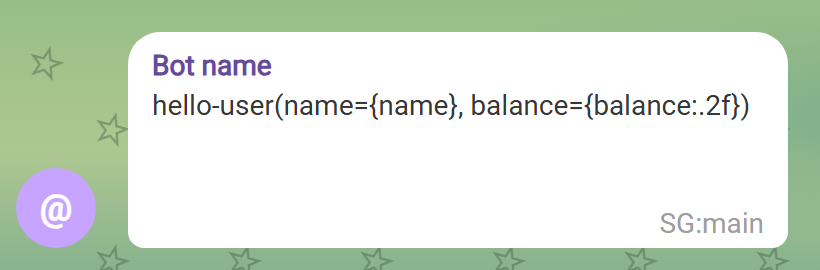
With the middleware the same window is rendered with translations, here in English and Russian:
| English | Русский |
|---|---|
 |
 |
1 maintainer

Metadata
1 maintainer
Release files for aiogram-dialog-i18n 0.3.1
For a detailed explanation of source distributions (sdists) and built distributions (wheels), please see the package formats documentation.
Source distribution (sdist)
| File | Size | Uploaded | Provenance | Actions |
|---|---|---|---|---|
| aiogram_dialog_i18n-0.3.1.tar.gz | 8.0 kB | Without provenance | Details for aiogram_dialog_i18n-0.3.1.tar.gz |
Built distribution (wheel)
| File | Interpreter | ABI | Platform | Actions Reset |
|---|---|---|---|---|
| aiogram_dialog_i18n-0.3.1-py3-none-any.whl | Python 3 | none | any | Details for aiogram_dialog_i18n-0.3.1-py3-none-any.whl |
Total release size: 19.1 kB
Release files / aiogram_dialog_i18n-0.3.1.tar.gz
| Download URL | aiogram_dialog_i18n-0.3.1.tar.gz |
|---|---|
| Size | 8.0 kB |
| Tags | Source |
|
SHA-256 checksum How to use checksums |
cfc11aad029c830b17759178d0e4fc8aec5a2d589c32c9a9a43620591db0ad23
|
|
BLAKE2b-256 checksum How to use checksums |
59c8aae6aa157a86fc504e33d606f83ddd4233dc2e22e7a8bebb05ebb16414cd
|
| Upload date | |
|
Uploaded using Trusted Publishing? What is trusted publishing? |
Yes |
| Uploaded via |
uv/0.13.1 {"installer":{"name":"uv","version":"0.13.1","subcommand":["publish"]},"python":null,"implementation":{"name":null,"version":null},"distro":{"name":"Ubuntu","version":"24.04","id":"noble","libc":null},"system":{"name":null,"release":null},"cpu":null,"openssl_version":null,"setuptools_version":null,"rustc_version":null,"ci":true}
|
Release files / aiogram_dialog_i18n-0.3.1-py3-none-any.whl
| Download URL | aiogram_dialog_i18n-0.3.1-py3-none-any.whl |
|---|---|
| Size | 11.2 kB |
| Tags | Python 3 |
|
SHA-256 checksum How to use checksums |
b26ed49398c1d7aa7ef901812f2aeb44297694c3667a4e04bbc071e2859f879f
|
|
BLAKE2b-256 checksum How to use checksums |
e6c536cc6b74fb3961bbeca4d0f69189552b11ae9ccba8259a4e93eae73aa3d9
|
| Upload date | |
|
Uploaded using Trusted Publishing? What is trusted publishing? |
Yes |
| Uploaded via |
uv/0.13.1 {"installer":{"name":"uv","version":"0.13.1","subcommand":["publish"]},"python":null,"implementation":{"name":null,"version":null},"distro":{"name":"Ubuntu","version":"24.04","id":"noble","libc":null},"system":{"name":null,"release":null},"cpu":null,"openssl_version":null,"setuptools_version":null,"rustc_version":null,"ci":true}
|
Security for aiogram-dialog-i18n 0.3.1
Provenance
Provenance describes where a file came from. On PyPI, provenance is shared via attestations, which provide a verifiable record of the build or publishing details. View details, limitations and caveats.
No provenance found
None of the files in this release were uploaded with provenance metadata.
A note on package security
PyPI is a repository for distributing packages, not a service for auditing them. While third-party security researchers and our staff do their best to detect and remove malicious packages, PyPI cannot guarantee the quality, security or suitability of any given package.
To learn more about protecting yourself from malicious actors, visit our package security documentation.














