
debugtoolbar for aiohttp


Project description


aiohttp_debugtoolbar provides a debug toolbar for your aiohttp web application. Library is port of pyramid_debugtoolbar and still in early development stages. Basic functionality has been ported:
basic panels
intercept redirects
intercept and pretty print exception
interactive python console
show source code
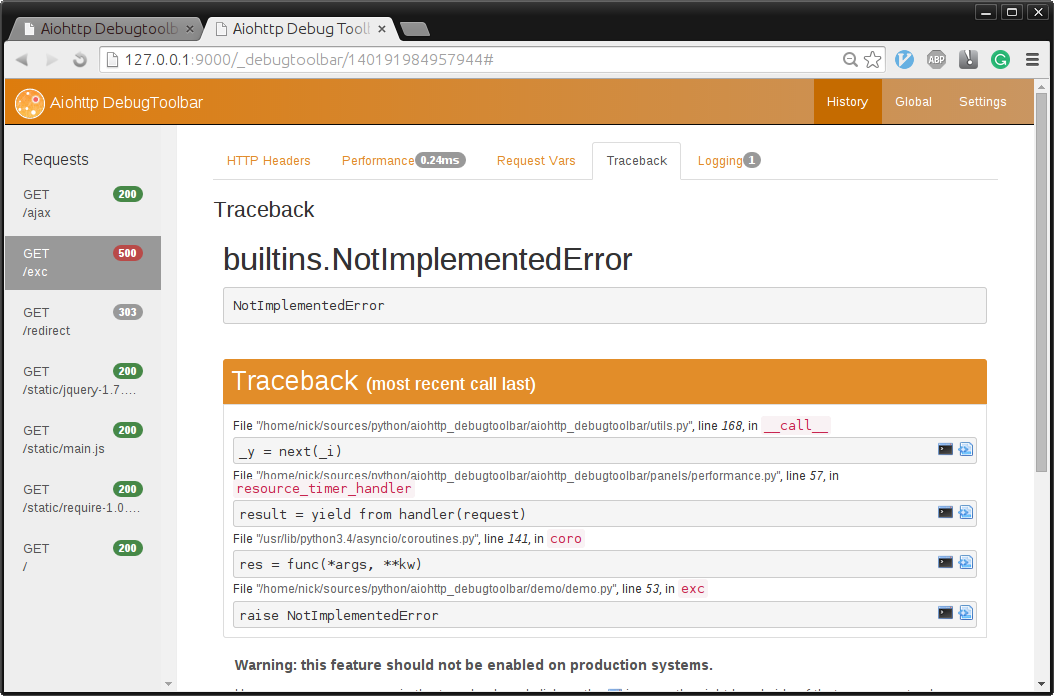
Ported Panels
HeaderDebugPanel, PerformanceDebugPanel, TracebackPanel, SettingsDebugPanel, MiddlewaresDebugPanel, VersionDebugPanel, RoutesDebugPanel, RequestVarsDebugPanel, LoggingPanel
Help Needed
Are you coder looking for a project to contribute to python/asyncio libraries? This is the project for you!
Install and Configuration
$ pip install aiohttp_debugtoolbar
In order to plug in aiohttp_debugtoolbar, call aiohttp_debugtoolbar.setup on your app.
import aiohttp_debugtoolbar
app = web.Application(loop=loop)
aiohttp_debugtoolbar.setup(app)
Full Example
import asyncio
import jinja2
import aiohttp_debugtoolbar
import aiohttp_jinja2

from aiohttp import web


@aiohttp_jinja2.template('index.html')
def basic_handler(request):
    return {'title': 'example aiohttp_debugtoolbar!',
            'text': 'Hello aiohttp_debugtoolbar!',
            'app': request.app}


@asyncio.coroutine
def exception_handler(request):
    raise NotImplementedError


@asyncio.coroutine
def init(loop):
    # add aiohttp_debugtoolbar middleware to you application
    app = web.Application(loop=loop)
    # install aiohttp_debugtoolbar
    aiohttp_debugtoolbar.setup(app)

    template = """
    <html>
        <head>
            <title>{{ title }}</title>
        </head>
        <body>
            <h1>{{ text }}</h1>
            <p>
              <a href="{{ app.router['exc_example'].url() }}">
              Exception example</a>
            </p>
        </body>
    </html>
    """
    # install jinja2 templates
    loader = jinja2.DictLoader({'index.html': template})
    aiohttp_jinja2.setup(app, loader=loader)

    # init routes for index page, and page with error
    app.router.add_route('GET', '/', basic_handler, name='index')
    app.router.add_route('GET', '/exc', exception_handler,
                         name='exc_example')

    handler = app.make_handler()
    srv = yield from loop.create_server(handler, '127.0.0.1', 9000)
    print("Server started at http://127.0.0.1:9000")
    return srv, handler


loop = asyncio.get_event_loop()
srv, handler = loop.run_until_complete(init(loop))
try:
    loop.run_forever()
except KeyboardInterrupt:
    loop.run_until_complete(handler.finish_connections())
Thanks!
I’ve borrowed a lot of code from following projects. I highly recommend to check them out:
Play With Demo
https://github.com/aio-libs/aiohttp_debugtoolbar/tree/master/demo
Requirements
Python 3.4+
CHANGES
0.3.0 (2016-11-18)
Fixed middleware route finding when using sub-apps #65
Add examples for extra panels: pgsql & redis monitor #59
0.2.0 (2016-11-08)
Refactor test suite
0.1.4 (2016-11-07)
Rename to aiohttp-debugtoolbar
Fix imcompatibility with aiohttp==1.1
0.1.3 (2016-10-27)
Fix a link to request info page, sort request information alphabetically #52
0.1.2 (2016-09-27)
Fixed empty functions names in performance panel #43 (Thanks @kammala!)
Fixed flashing message during page rendering issue #46
0.1.1 (2016-02-21)
Fixed a demo
Added syntax highlight in traceback view, switched highlighter from highlight.js to prism.js #31
0.1.0 (2016-02-13)
Fixed python 3.5 support (Thanks @stormandco!)
Added view source button in RoutesDebugPanel (Thanks @stormandco!)
Dropped support for Python 3.3 (Thanks @sloria!)
Add middleware in setup method (Thanks @sloria!)
Fixed bug with interactive console
Fixed support for aiohttp>=0.21.1
0.0.5 (2015-09-13)
Fixed IPv6 socket family error (Thanks @stormandco!)
0.0.4 (2015-09-05)
Fixed support for aiohttp>=0.17. (Thanks @himikof!)
0.0.3 (2015-07-03)
Switched template engine from mako to jinja2. (Thanks @iho!)
Added custom yield from to track context switches inside coroutine.
Implemented panel for collecting request log messages.
Disable toolbar code injecting for non web.Response answers (StreamResponse or WebSocketResponse for example) #12
0.0.2 (2015-05-26)
Redesign UI look-and-feel
Rename toolbar_middleware_factory to just middleware.
0.0.1 (2015-05-18)
Initial release.
Project details
Release history Release notifications | RSS feed


Download files
Download the file for your platform. If you're not sure which to choose, learn more about installing packages.
Source Distribution
Built Distribution
Filter files by name, interpreter, ABI, and platform.
If you're not sure about the file name format, learn more about wheel file names.
Copy a direct link to the current filters
File details
Details for the file aiohttp-debugtoolbar-0.3.0.tar.gz.
File metadata
- Download URL: aiohttp-debugtoolbar-0.3.0.tar.gz
- Upload date:
- Size: 445.9 kB
- Tags: Source
- Uploaded using Trusted Publishing? No
File hashes
| Algorithm | Hash digest | |
|---|---|---|
| SHA256 |
dd216d607f0500c703e43845e13960057f66cbce68341da44455d5d074f18b2e
|
|
| MD5 |
8f0d0bf2f0a3561b5c26850b525ad1e7
|
|
| BLAKE2b-256 |
ee1e60fa9bccb06ca7948c999deb0885b36afb8ca39d7c9adea9af6f5a840370
|
File details
Details for the file aiohttp_debugtoolbar-0.3.0-py3-none-any.whl.
File metadata
- Download URL: aiohttp_debugtoolbar-0.3.0-py3-none-any.whl
- Upload date:
- Size: 465.9 kB
- Tags: Python 3
- Uploaded using Trusted Publishing? No
File hashes
| Algorithm | Hash digest | |
|---|---|---|
| SHA256 |
2e9c1c823646cd7729215579a79a21cd0eb9c3d75766a4bf1d854fdfefe6fa77
|
|
| MD5 |
34632c423b6d3c40cf87c8e3391675db
|
|
| BLAKE2b-256 |
9e71f747cfb56812b973766dded894e7f1d1aadd00a1704d57c190ebfaf14252
|






