
YAML-driven LLM + Python + shell pipelines, runnable from the CLI.
Verified details
These details have been verified by PyPIProject links
GitHub Statistics
Maintainers

Project description

aiorch
YAML-driven pipelines for LLMs, Python, and shell — runnable from your laptop, no infrastructure required.




Table of contents
- What aiorch is
- Why aiorch exists
- Problems aiorch solves
- Where aiorch fits — filling gaps, not competing
- Core concepts
- Architecture
- How primitives actually run on your machine
- Parallel execution
- Cost tracking
- Writing pipelines — a guided tour
- Jinja templating
- Pipeline schema & validation
- Quick start setup
- CLI reference
- Examples
- Roadmap
- The commercial platform
- Contributing
- License
What aiorch is
aiorch turns a YAML file into a runnable pipeline. You describe the work — LLM prompts, Python snippets, shell commands, and how they connect — and aiorch run executes the whole thing from start to finish, in parallel where it can, with logging, retries, and a full history you can replay later.
There is no server to start, no scheduler to configure, and no database to provision. Everything runs on your laptop against a local SQLite file. The same YAML works on a CI runner, a teammate's machine, or a production container — wherever Python 3.11+ is available.
If you've ever written a shell script that glues a curl call, a Python post-processor, and an LLM prompt together with && and hope, aiorch is the declarative version of that script that knows how to parallelise, retry, and remember what it did.
pip install aiorch
export OPENROUTER_API_KEY=sk-or-v1-...
aiorch run examples/llm/01-hello-llm.yaml
Works with any model LiteLLM supports — OpenAI, Anthropic, Gemini, OpenRouter, Ollama, Bedrock, and more.
Why aiorch exists
I kept writing the same three shapes of glue code over and over:
- Call an LLM, then post-process the answer with Python, then write the result somewhere. Classic LLM app work.
- Fan work out across a list — tag every row in a CSV, score every ticket in a backlog, summarise every chunk of a long document — and fold the results back in at the end.
- Chain a handful of shell commands where one step produces something the next step needs, and I want it to stop cleanly when anything fails.
Every time, the starting question was: "do I just write a shell script, or should I reach for a real orchestrator?" Shell scripts got ugly quickly — no retries, no parallelism without ampersands and hope, no record of what ran. Real orchestrators (Airflow, Prefect, Dagster) demanded a server, a database, a scheduler, a worker, and an hour of configuration before a single task ran. For a 50-line pipeline I wanted to run from my laptop, the setup cost dwarfed the work.
aiorch is what I wished existed: the expressiveness of a real DAG orchestrator (retries, parallelism, replay) with the zero-setup of a shell script, and with LLM calls as a first-class step type instead of something I bolted on with subprocess.
Problems aiorch solves
Concrete situations where reaching for aiorch is the shortest path to done:
1. "I have a CSV and I want to tag every row with an LLM"
Fan-out over the list, one LLM call per row, aggregate the results back, write a new CSV. Without aiorch you're hand-rolling a thread pool, a retry loop, a rate-limit backoff, and a CSV writer. With aiorch it's a foreach: with parallel: true, a prompt: step, and a final python: step — maybe 30 lines of YAML.
2. "My pipeline is an LLM call followed by deterministic post-processing"
Extract structured data from a PDF, then validate the extraction against a schema. Or summarise an article, then check the summary mentions certain required terms. aiorch lets you wire an LLM step to a Python step where the Python step treats the LLM's output as untrusted input — you get deterministic validation without having to hand-prompt the LLM into "please return valid JSON" gymnastics.
3. "I need to run the same job nightly from CI"
GitHub Actions cron → aiorch run pipeline.yaml. No Airflow cluster to maintain, no Prefect agent to deploy. The pipeline YAML is in the repo, the run history goes to an artifact, job done. For something beyond one pipeline and one cron, you'd want a real scheduler — but there's a big range of "actually useful automation" below that line.
4. "I want to stitch a shell command, an LLM call, and a Python snippet together without writing an app"
aiorch run is the whole framework. You write YAML. Nothing to install beyond pip install aiorch.
5. "I want to see what happened on that run two weeks ago"
Every run and every step — inputs, outputs, duration, cost, errors — lands in a local SQLite file. aiorch trace <run-id> replays what happened end-to-end. No log aggregator, no observability stack, no Datadog bill.
6. "I want to run the same pipeline against three different LLMs and compare"
Write the pipeline once with a model: override per step, or parameterise the model and run it with different -i flags. Multi-model comparison is a one-page YAML.
7. "I want my pipeline's steps to be cached so I can iterate cheaply"
LLM responses are cached by hash of (prompt, model, temperature, max_tokens). Re-running a pipeline where only the last step changed costs nothing for the upstream LLM calls — they come straight back from the cache.
8. "I want the pipeline YAML in git, reviewable in PRs, runnable locally the same way it runs in CI"
The YAML is the source of truth. There is no drift between "what runs in production" and "what runs on your laptop" because there is no production — there's just the YAML and whatever machine you run it on.
Where aiorch fits — filling gaps, not competing
aiorch isn't trying to replace Airflow, Prefect, Dagster, LangChain, or your shell scripts. Each of those tools is the right answer in the right place. aiorch fills a specific gap: declarative LLM+Python+shell pipelines that run from your laptop with zero infrastructure, version-controlled as plain YAML.
Here's roughly where each tool shines and where it doesn't:
| Tool | Right when | Reach for aiorch instead when |
|---|---|---|
| Airflow / Prefect / Dagster | You need a scheduler, distributed workers, a web UI for operators, fine-grained SLAs, and an organisation that will run the infrastructure long-term. | Your pipeline runs on one machine, takes minutes not hours, and you don't want to stand up a server. |
| LangChain / LlamaIndex | You're building an LLM application where the flow is dynamic and programmatic — agents with tool choice, RAG chains with streaming, custom retrievers. Python is the right interface. | Your flow is mostly static and declarative — the shape of the work is known at design time, and YAML is more readable than Python for that shape. |
| Make / bash scripts | Everything is deterministic, local, and under ~10 steps. You want it in your muscle memory and you don't need a history. | You want retries, parallelism, LLM steps, persisted runs, or the pipeline to survive one of its steps going flaky. |
| n8n / Zapier / Make.com | You want a visual no-code builder, SaaS-hosted, integrations-first. Non-engineers edit the flow. | You want the flow in git, reviewable in a PR, runnable from a CLI, LLM-native. |
| Raw Python scripts with asyncio | You're already in Python, the flow is programmatic, and you're comfortable managing concurrency yourself. | You want the flow to be a readable YAML artefact, not a 300-line async function. |
aiorch is the tool you reach for when the right abstraction for your problem is a YAML file describing a DAG of primitives, running on the machine that invokes aiorch run. That's the gap.
Core concepts
Five concepts cover everything aiorch does.
1. A pipeline is a YAML file that describes work
Every aiorch run starts from a pipeline file. The file names the pipeline, optionally declares inputs, and lists the steps that do the work.
name: hello
steps:
  greet:
    run: echo "hello, world"
That's a legal, runnable pipeline. aiorch run hello.yaml executes echo "hello, world" and you're done.
2. A step is one unit of work
A step has a name and exactly one primitive that says how the work is done. Primitives are the first-class citizens of aiorch:
prompt:— call an LLM via LiteLLMpython:— execute a Python bodyrun:— execute a shell commandflow:— invoke another pipeline as a single stepforeach:— fan the step out over a list of itemscondition:— only run the step if a boolean expression is true
Primitives are composable. A foreach: can wrap a prompt: (tag every row with an LLM). A condition: can gate a python: (only run the expensive step if the cheap step said it was worth it).
3. Steps declare their dependencies, and aiorch figures out the order
steps:
  fetch:
    run: curl -s https://example.com/api/data.json
    output: raw

  parse:
    python: |
      import json
      result = json.loads(inputs["raw"])
    depends: [fetch]
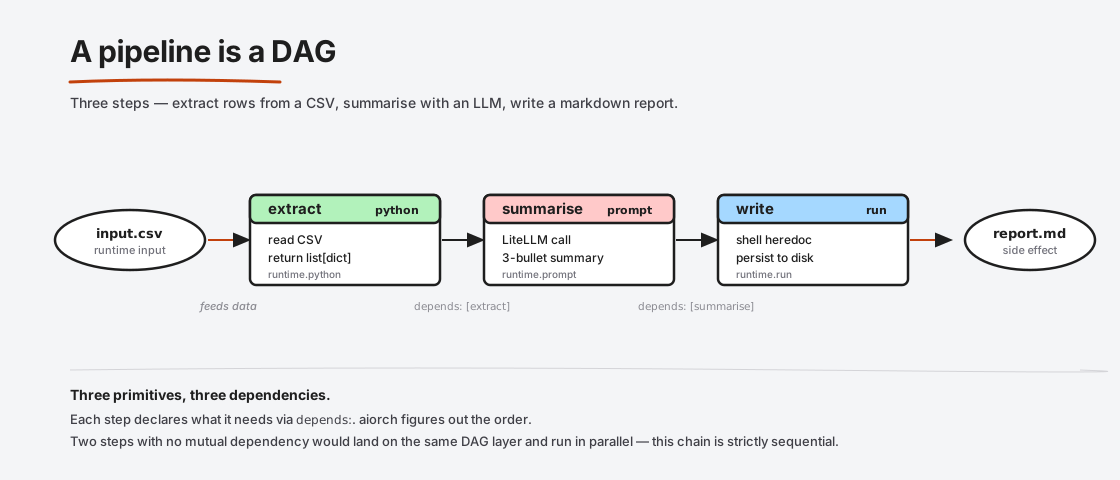
parse depends on fetch, so fetch runs first. If you had two steps that didn't depend on each other, they'd run in parallel. This is what "pipeline is a DAG" means — aiorch treats your steps as a directed acyclic graph, layers them by dependency depth, and runs every step on the same layer concurrently.
4. The DAG, pictured
A three-step pipeline that extracts rows from a CSV, summarises them with an LLM, and writes the summary to disk looks like:
steps:
  extract:
    python: |
      import csv
      rows = list(csv.DictReader(open(inputs["file"])))
      result = [r["comment"] for r in rows]

  summarise:
    prompt: |
      Summarise these customer comments in 3 bullets:
      {% for c in extract %}- {{c}}
      {% endfor %}
    depends: [extract]

  write:
    run: |
      cat > report.md <<'EOF'
      {{summarise}}
      EOF
    depends: [summarise]
Every step declares what it needs (depends:) and what it produces (implicit — the step's name becomes a variable downstream steps can reference). aiorch figures out the order, the parallelism, and the retries.
5. Every run is recorded
Each aiorch run writes a row to ~/.aiorch/history.db, and each step within the run writes a row to the steps table — inputs, outputs, duration, token counts, cost, error if any. aiorch history lists past runs; aiorch trace <run-id> reconstructs a single run step-by-step.
LLM responses are additionally cached by hash of (prompt, model, temperature, max_tokens). If you re-run a pipeline after changing only the last step, the upstream LLM calls return from cache — free and instant.
Architecture
Here's the whole run lifecycle on one line, before we zoom in:
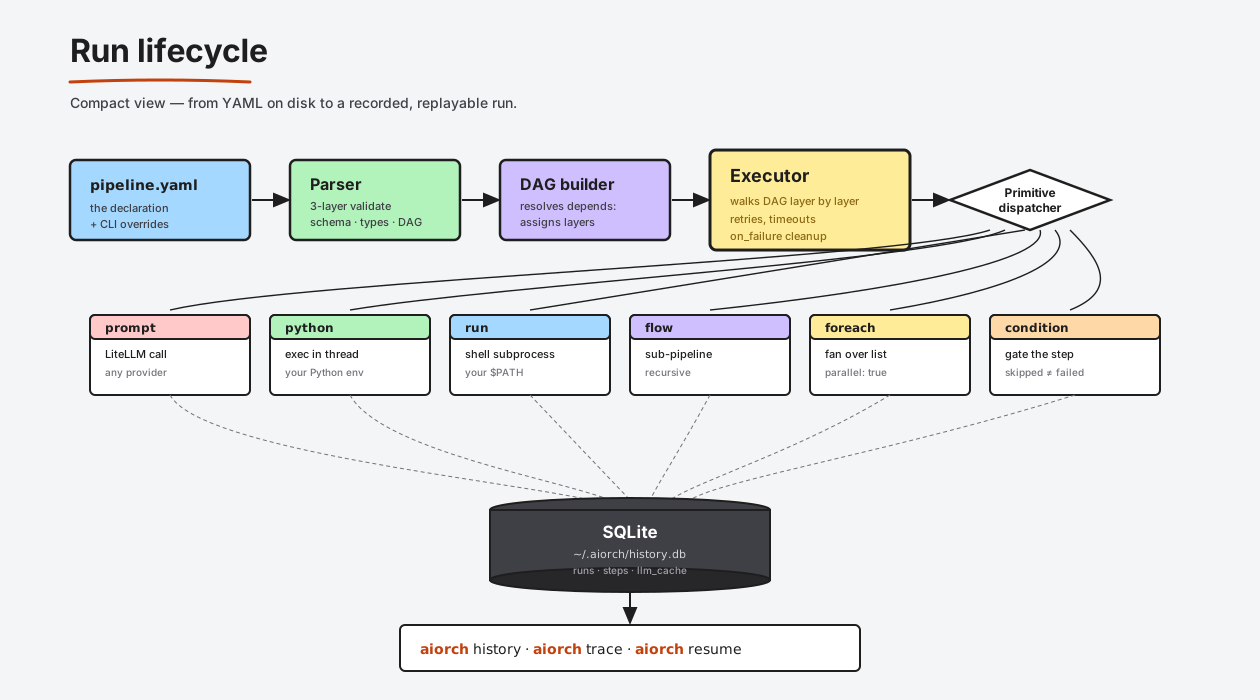
And here's the same thing with every stage's responsibility and boundary spelled out:
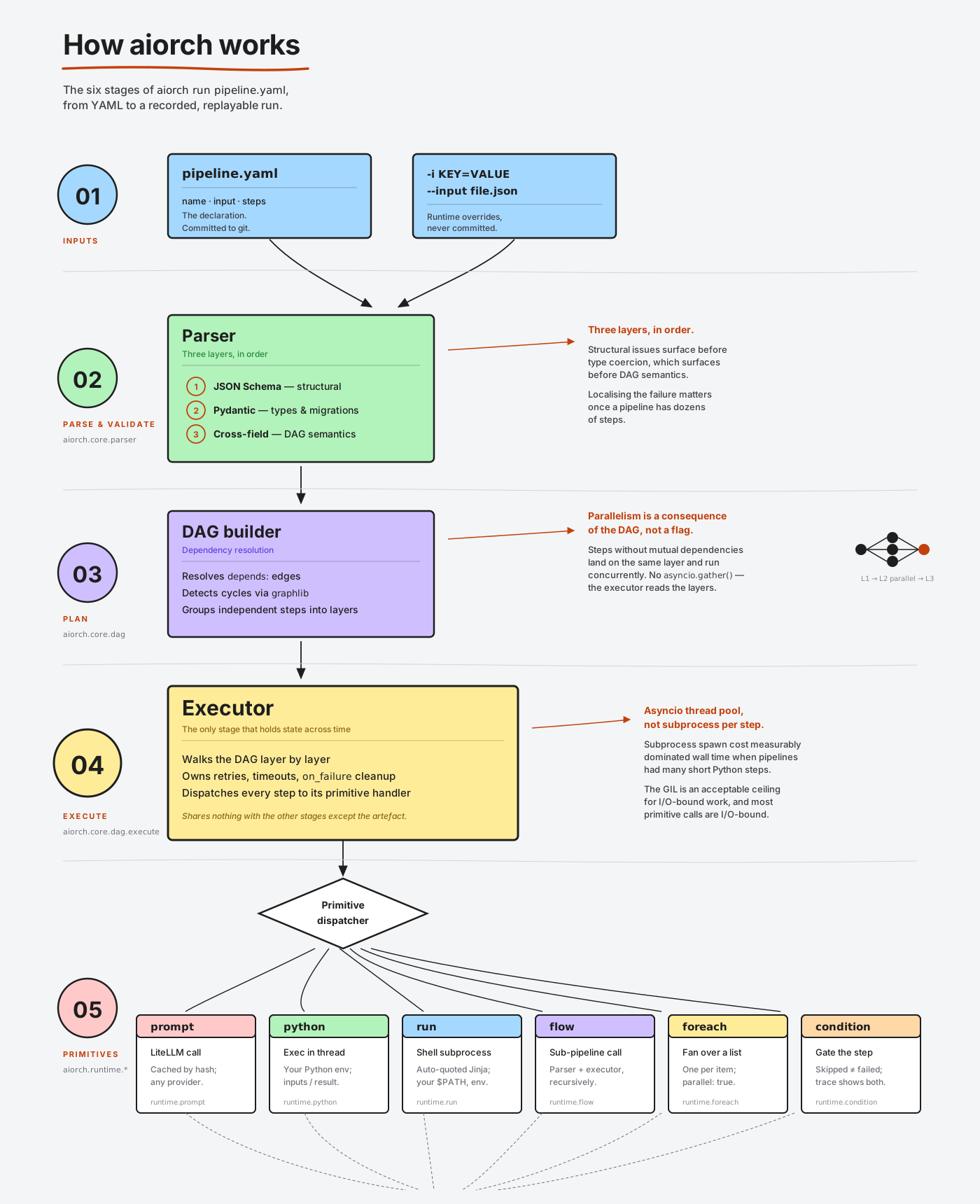
Six stages, each with a single responsibility. The boundary between them is deliberately narrow — each stage can be tested in isolation.
1. Parser (aiorch.core.parser)
Reads the YAML and produces a typed pipeline object (Agentfile). The parser runs three layers of validation:
- JSON Schema (
src/aiorch/schemas/pipeline.v1.schema.json) — structural correctness: are all field names spelled right, are enums respected, are required fields present. - Pydantic models — type correctness:
retry: 3is an int,retry_delay: 2sparses as a duration,type: envsurfaces a migration error. - Cross-field semantics — e.g. every step must declare exactly one primitive;
depends:entries must reference real steps.
If any layer fails, the run terminates before spending a single token or running a single subprocess.
2. DAG builder (aiorch.core.dag)
Resolves depends: into a graph dict[step_name, set[dep_names]], detects cycles via graphlib.CycleError, and produces layers — groups of steps with no dependencies between them. Layer 0 is every step with no depends:. Layer 1 is every step whose depends: were all satisfied in layer 0. And so on.
This layering is how parallelism happens: all steps on the same layer are dispatched concurrently.
3. Executor
Walks the DAG layer by layer. For each step on the current layer, it builds the step's input context (outputs of dependencies, runtime inputs, Jinja context) and hands it to the appropriate primitive dispatcher. When every step on a layer finishes, the executor moves to the next layer.
If a step fails after exhausting its retries, the executor marks the pipeline as failed and short-circuits any downstream steps that depended on it. Independent branches continue to run.
4. Primitive dispatchers
Each primitive has a handler under aiorch.runtime.*:
prompt.py→ wraps a LiteLLM call with caching, cost tracking, and the{prompt, model, temperature, max_tokens}cache key.python.py→ compiles the Python body withcompile(code, "<pipeline step name>", "exec"), runs it in a thread from asyncio's executor, captures stdout to the trace.run.py→ invokes/bin/sh -c <command>viasubprocess.run, Jinja-resolved against the context.flow.py→ opens the sub-pipeline file and invokes the parser + executor recursively.foreach.py→ expands the step into N sibling steps, one per item, optionally parallel.condition.py→ evaluates the boolean expression and either dispatches the step or marks itskipped.
5. Persistence (SQLite)
Writes to ~/.aiorch/history.db:
- runs — id, pipeline name, inputs, status, started_at, completed_at, total cost
- steps — run_id, name, primitive, inputs, outputs, duration_ms, token_counts, error, status
- llm_cache — hash of (prompt, model, temperature, max_tokens) → response
Everything is append-only during a run. The same schema works fine under concurrent reads from aiorch history / aiorch trace while a run is in progress.
6. Replay surface
aiorch history, aiorch history <run-id>, aiorch trace <run-id>, and aiorch resume <run-id> are thin read views over the SQLite tables. resume is the one exception — it re-enters the executor at the failed step using the persisted state, so a 20-minute pipeline that failed on step 18 doesn't need to re-run steps 1-17.
How primitives actually run on your machine
This is the section most orchestrator docs skip. It's important.
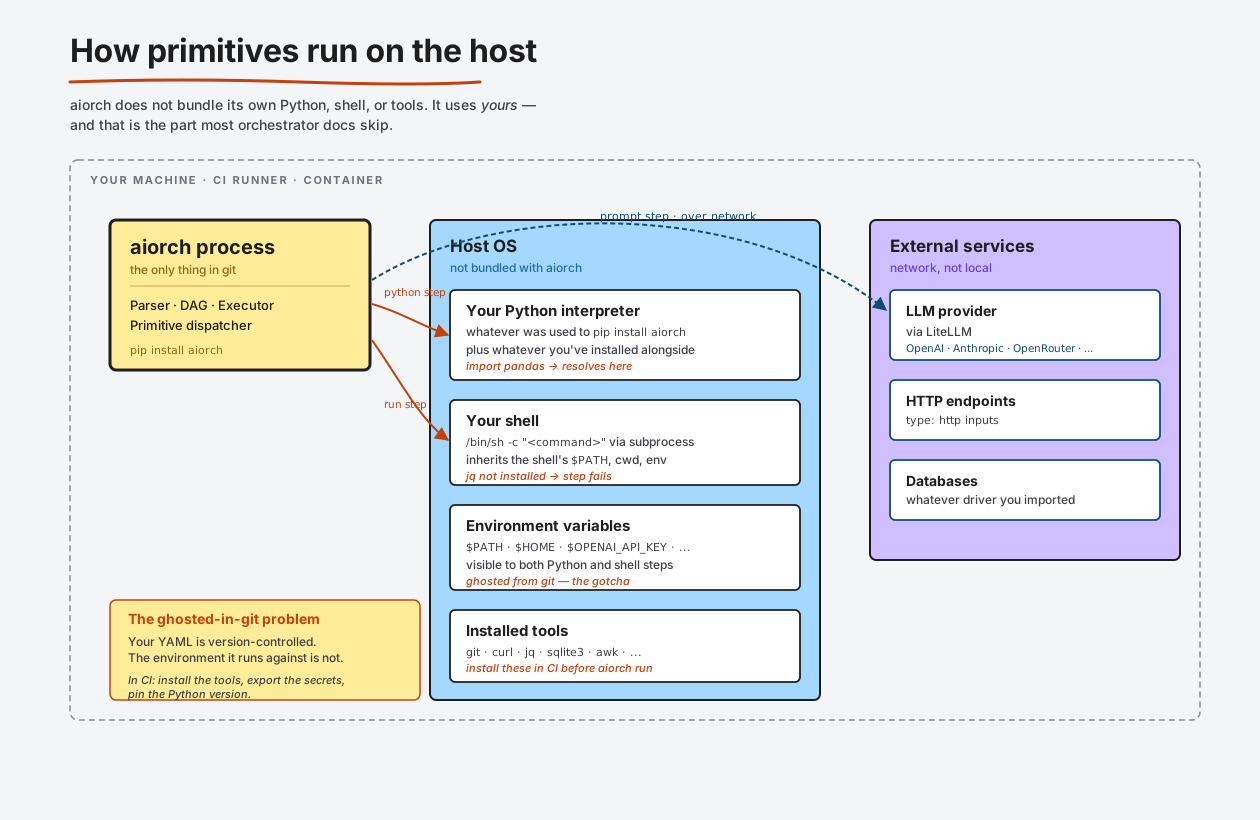
aiorch does not bundle its own Python runtime, its own shell, or its own tools. It uses yours.
run: steps use your shell, your $PATH, your installed tools
When a step says:
my_step:
  run: curl -s https://api.example.com/thing | jq '.items[0].id'
…aiorch hands that string to /bin/sh -c via Python's subprocess module. Three consequences matter:
curlandjqcome from whichever binaries are first on$PATHin the shell where you launchedaiorch run. If you don't havejqinstalled, the step fails with "jq: command not found" — aiorch never sees or installs it.- Environment variables from your shell leak in.
$HOME,$USER, your API keys, your$VIRTUAL_ENV— all visible to the shell running the command. This is usually what you want for secrets ($STRIPE_KEY) but it means your pipeline's behaviour is a function of your shell environment, which is not captured in git. Two machines with different env vars will produce different results. - The working directory is wherever you ran
aiorch runfrom, not the pipeline file's directory. This matters if your step doescat inputs/sample.log— it'll fail unless youcdthere first.
python: steps run against the Python that installed aiorch
When a step says:
crunch:
  python: |
    import pandas as pd
    df = pd.read_csv(inputs["file"])
    result = df.describe().to_dict()
…aiorch compiles the body and runs it in a thread in the aiorch process itself. Two consequences:
- The
import pandas as pdresolves against the Python environment that hasaiorchinstalled. Not against your system Python, not against a sandboxed venv — whichever Python was used to runaiorch. If youpip install pandasinto that same venv, the import works. If you installed pandas into a different Python, it doesn't. - Each
python:body sees aninputsdict containing the outputs of its dependencies and the pipeline's declared inputs, and writes aresult =variable that becomes its output. No subprocess overhead, no serialisation — justexec(code, namespace)in a thread.
prompt: steps make HTTPS calls to a provider
LiteLLM routes the call. Your aiorch.yaml (or your environment variables like $OPENAI_API_KEY) determines which provider. Network access is required. The response is cached in SQLite keyed on the exact prompt + model + temperature + max_tokens; re-running the step with the same four is free.
The "ghosted in git" problem
Your pipeline YAML is version-controlled. The environment the pipeline runs against is not. Things not in git that affect what your pipeline does:
- Which binaries are on
$PATH(isjqinstalled? which version?) - Which packages are in the Python environment (does
import pandaswork?) - Which environment variables are set (which API key? which
$OPENROUTER_API_KEY? which$DATABASE_URL?) - The Python version (3.11 vs 3.13 behaves slightly differently for some libraries)
- The shell (
/bin/shon Alpine vs. on macOS behaves differently for edge cases)
This is not a bug. It's the same deal shell scripts have had since 1971. It's worth being honest about because new users are sometimes surprised.
Implications for automated workflows (CI, GitHub Actions, etc.)
When you run aiorch in CI, the runner has a completely different environment from your laptop. To get consistent results:
-
Install all the tools your
run:steps need as an explicit CI step. Example GitHub Actions:- name: Install pipeline dependencies run: | sudo apt-get install -y jq sqlite3 pip install aiorch pandas - name: Run the pipeline env: OPENROUTER_API_KEY: ${{ secrets.OPENROUTER_API_KEY }} run: aiorch run pipelines/nightly.yaml
-
Export every environment variable your pipeline reads via the CI's secrets system. If your YAML references
$API_KEY, the CI step needsenv: { API_KEY: ${{ secrets.API_KEY }} }. -
Pin your Python version in the workflow (
actions/setup-pythonwithpython-version: "3.12"). Matching what you use locally prevents "works on my laptop" surprises. -
Commit a
requirements.txtorpyproject.tomlif yourpython:steps import non-stdlib packages. Install it beforeaiorch run.
aiorch deliberately doesn't try to solve the "my environment isn't in git" problem — it would have to bundle Docker or nix or a venv-per-pipeline mechanism, and those are proper infrastructure decisions that the commercial Platform makes. The CLI's deal is: you manage the environment, aiorch runs the pipeline.
Parallel execution
aiorch parallelises two ways.
1. Independent steps on the same DAG layer run concurrently
If four steps all depend only on step A and none depend on each other, they all run in parallel:
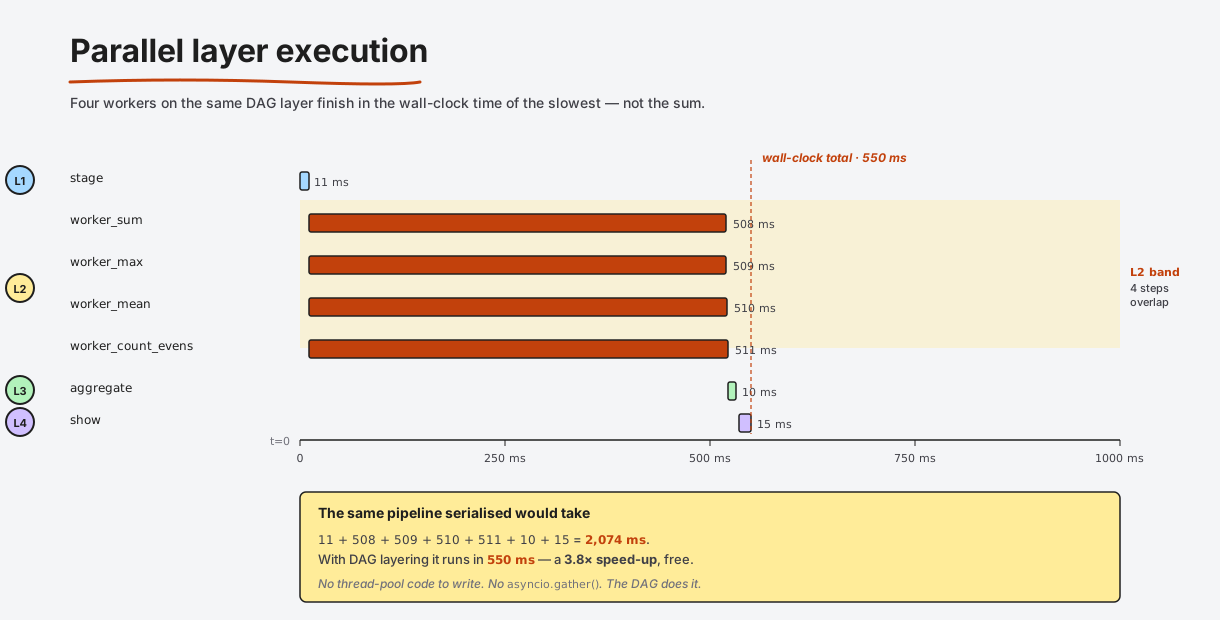
The four workers finish in roughly the wall-clock time of the slowest one, not the sum. This is the primary win over a shell script's && chain, which runs strictly sequentially.
What "parallel" actually means:
- For
prompt:steps (network-bound), parallelism is almost free — asyncio dispatches the HTTPS calls and they overlap. - For
python:steps, each body runs in a thread from asyncio's default executor. Python's GIL means CPU-bound Python bodies don't speed up, but I/O-bound ones (reading files, hitting databases, making HTTP calls) do. - For
run:steps, each shell command is a real OS subprocess — true OS-level parallelism.
2. Foreach with parallel: true fans a step over a list
steps:
  extract_urls:
    python: |
      result = ["https://a.com", "https://b.com", "https://c.com"]

  fetch_each:
    foreach: extract_urls
    parallel: true
    run: curl -s "{{item}}"
    depends: [extract_urls]
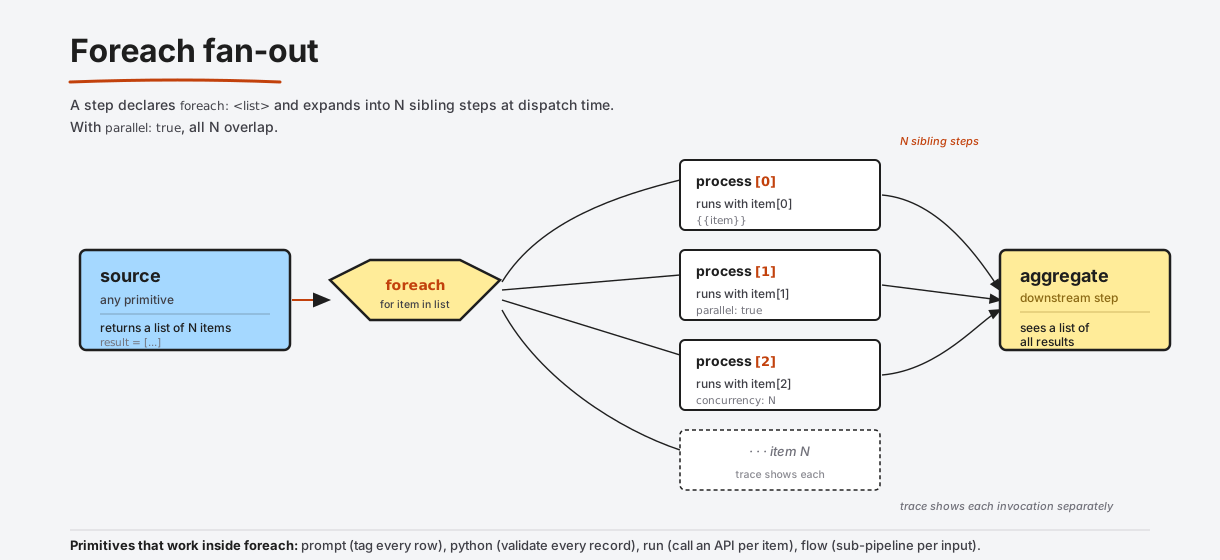
Every item gets its own step invocation with item bound in the Jinja context. parallel: true runs all invocations concurrently; without it, they run sequentially in list order (useful when item N depends on the side effects of item N-1).
Bound the fan-out when the list is large. 1,000 parallel LLM calls will rate-limit you. Use concurrency: 10 to cap how many foreach iterations run at once.
Retries, backoff, and failure handling
Steps can declare retries and a fixed delay between attempts:
call_flaky_api:
  run: curl --fail -s https://api.example.com/thing
  retry: 3
  retry_delay: 2s
  on_failure: cleanup_and_alert
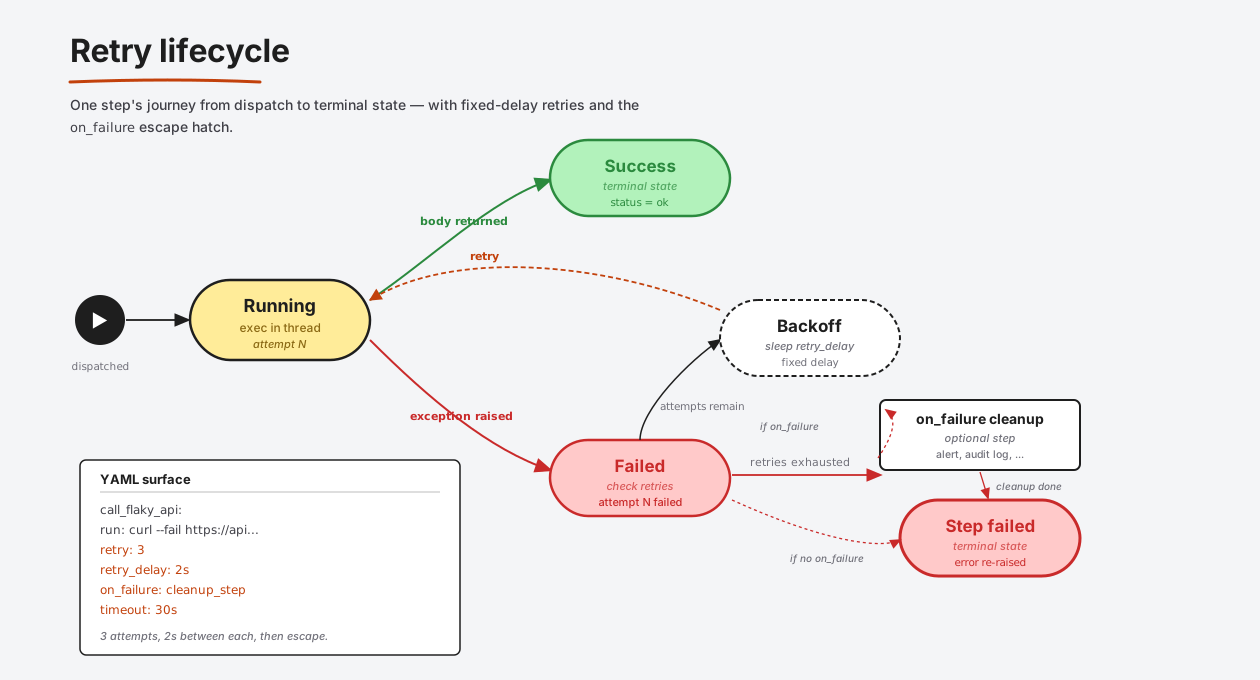
On failure, aiorch re-dispatches the step after retry_delay. If retries are exhausted and the step declares on_failure: <step>, that cleanup step runs before the error is re-raised. If there is no on_failure, the error propagates immediately.
aiorch's built-in retry uses fixed delay, not exponential backoff. If you need exponential backoff (slow-recovering upstream, rate-limited API), put the retry loop inside a python: body with time.sleep(2 ** attempt). Example 38-retry-strategies.yaml shows both patterns side by side.
Conditional branching
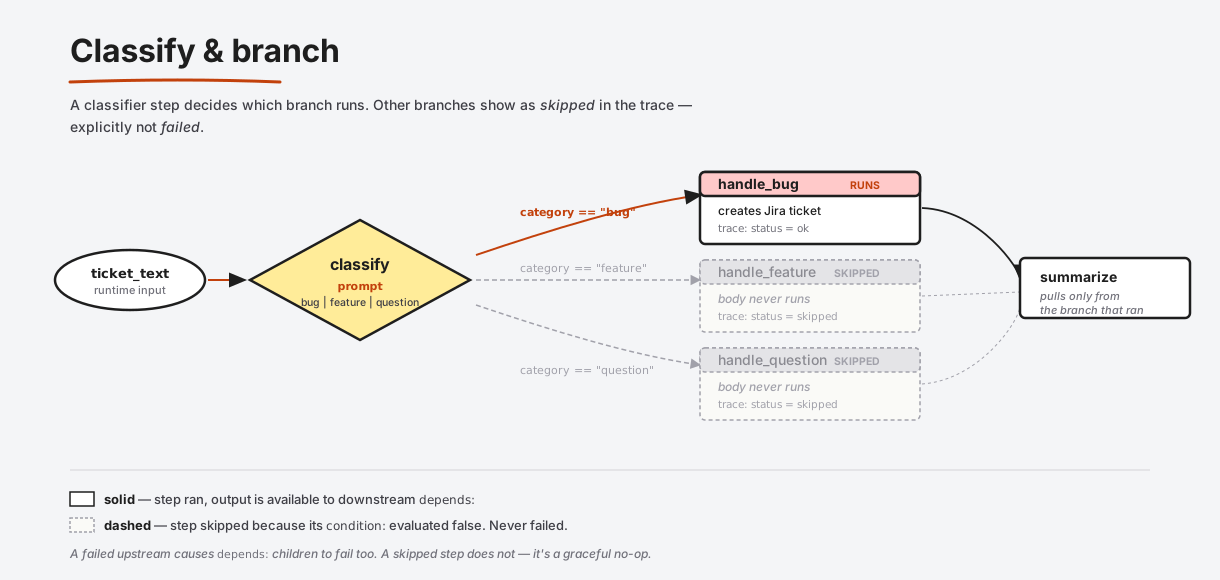
A classifier step decides which branch runs; other branches are marked skipped in the trace (not failed).
classify:
  prompt: |
    Classify this ticket as one of: bug, feature, question.
    Ticket: {{ticket_text}}
    Respond with only the word.
  output: category

handle_bug:
  condition: category == "bug"
  run: ./triage-bug.sh "{{ticket_text}}"
  depends: [classify]

handle_feature:
  condition: category == "feature"
  run: ./add-to-backlog.sh "{{ticket_text}}"
  depends: [classify]
Downstream steps that depends: [handle_bug, handle_feature] receive output only from whichever branch actually ran.
Cost tracking
Every prompt: step records its prompt tokens, completion tokens, and an estimated USD cost to SQLite. Every python:, run:, and flow: step costs exactly $0.00. At the end of a run you see:
  parallel-fanout-fanin
  7 steps, 0.5s, $0.0000
Important: the USD number aiorch shows is predictive, not actual. It's computed by taking the token counts the model returned and multiplying them by a per-model rate from LiteLLM's pricing database. It is not pulled from your provider's billing API — aiorch never talks to the invoice. The authoritative amount your credit card gets charged lives only in your provider's dashboard (OpenAI, Anthropic, OpenRouter, etc.). Treat aiorch's number as a reliable indicator of relative cost — perfect for catching "this pipeline is 100x pricier than expected" — but not as an accounting figure. Expect ~10-20% variance vs. the real invoice.
How cost is calculated
aiorch defers to LiteLLM's pricing database because it covers every provider LiteLLM supports and is maintained by that project:
LiteLLM response
     ↓
litellm.completion_cost(completion_response=response)
     ↓
cost (USD, float)
LiteLLM knows the per-model input/output token rates for OpenAI, Anthropic, Gemini, OpenRouter, Bedrock, Ollama (free), and dozens of others. For streaming responses, tokens are counted from the final chunk's usage object; LiteLLM then prices the call.
The fallback — when LiteLLM can't price it
If LiteLLM returns no cost (new model, self-hosted endpoint, unknown provider), aiorch falls back to a built-in pricing table (aiorch/runtime/llm.py → MODEL_PRICING) keyed on canonical model names. It does fuzzy prefix matching — gpt-4o-mini-2024-07-18 matches gpt-4o-mini pricing. If nothing matches, it uses DEFAULT_INPUT_COST_PER_M / DEFAULT_OUTPUT_COST_PER_M sentinels so you see a number, not a crash — but the number is a rough estimate, flagged in the trace as the fallback path.
The formula, when the fallback runs:
cost_usd = (prompt_tokens × input_rate_per_million / 1_000_000)
         + (completion_tokens × output_rate_per_million / 1_000_000)
Where the numbers live
Three places:
-
In the run summary at the bottom of
aiorch run— total cost across all steps, wall-clock time, step count. -
Per-step in
aiorch trace <run-id>— eachprompt:step line showstokens: NNNN in / MMM out $0.0012. -
In
~/.aiorch/history.db— thestepstable hasprompt_tokens,completion_tokens,cost_usdcolumns. SQL-queryable:sqlite3 ~/.aiorch/history.db \ "SELECT pipeline_name, SUM(cost_usd) FROM runs JOIN steps USING(run_id) \ WHERE started_at > datetime('now','-7 days') GROUP BY pipeline_name ORDER BY 2 DESC"
Estimation before you run — aiorch plan / aiorch cost
aiorch plan <file> and aiorch cost <file> do a dry-run that produces a cost estimate without spending any tokens. The estimator reads each prompt: step's template length, estimates prompt tokens from character count (roughly chars / 4), assumes a default completion length (~500 tokens unless max_tokens says otherwise), and multiplies by the configured model's rates.
$ aiorch plan examples/llm/11-map-reduce-summarize.yaml -i document=@./inputs/long-article.txt

Pipeline: map-reduce-summarize
Layers:
  0: split           [python]
  1: map × 8         [prompt — gpt-4o-mini]     ~$0.0032
  2: reduce          [prompt — gpt-4o-mini]     ~$0.0011
  3: show            [run]
Total estimated cost: ~$0.0043
The estimate is deliberately rough. Real costs vary because:
- Completion lengths differ from the estimator's 500-token assumption.
- Prompts with
{{foreach_output}}have template-time lengths that only resolve at render time. - Model caching on the provider side (Anthropic, OpenAI) reduces your bill in ways the estimator can't predict.
The estimator's job is to catch a "whoops, that's $50 not $0.50" mistake before you run, not to give you accounting-grade numbers. The post-run cost in SQLite is the accounting-grade number.
The prompt cache — cost that doesn't happen
LLM responses are keyed in ~/.aiorch/history.db on the exact hash of (prompt, model, temperature, max_tokens). A cache hit:
- Returns the stored response in microseconds
- Logs the step with
cost_usd = 0.0and a cache-hit marker in the trace - Makes iterative development free — if you run a 7-step pipeline, change step 7, and re-run, steps 1-6 return from cache
Cache is enabled by default in CLI mode. Skip it for a specific step with cache: false, or globally with AIORCH_NO_CACHE=1.
Things the cost number is NOT
Worth spelling out so nobody treats aiorch's number as a bill:
- It is not your actual invoice. aiorch never calls a billing API. The number is
reported_tokens × known_rate, computed locally. Your provider is the source of truth for what you actually pay. - It does not include infrastructure cost. CI runner minutes, your laptop's electricity, the S3 bucket your
run:step writes to, network egress — none of that is priced. aiorch only prices LLM tokens. - It does not reflect provider-side caching discounts. Anthropic and OpenAI offer prompt-caching APIs that can halve your billed cost for repeat prompts. LiteLLM doesn't always surface the discount inline, so aiorch's number is an upper bound on what you'll actually pay in those cases.
- It does not price self-hosted models. Ollama and other local providers return
cost=0from LiteLLM. If you want to capture your own GPU hours, that's a custom metric outside aiorch's scope. - It does not price non-chat endpoints yet. Embeddings, vision, and audio model calls may report
$0.00in the trace until that surface is wired in. LiteLLM has the pricing; aiorch's current scope is chat completions. - It does not replace your provider dashboard. Use aiorch's number to compare model choices, catch runaway pipelines, and sanity-check relative cost. Use the provider's dashboard when you need the actual number for accounting.
Writing pipelines — a guided tour
Let's build a pipeline up from the smallest thing that runs to something real.
Level 0 — hello, world
# hello.yaml
name: hello
steps:
  greet:
    run: echo "hello, aiorch"
Run it:
$ aiorch run hello.yaml
[greet]   hello, aiorch
Level 1 — inputs with types and defaults
name: greet-user
input:
  name:
    type: string
    default: world
    description: Who to greet.
  times:
    type: integer
    default: 1
    minimum: 1
    maximum: 10

steps:
  greet:
    run: |
      for i in $(seq 1 {{times}}); do
        echo "hello, {{name}} (#$i)"
      done
Run it with defaults, or override:
aiorch run greet-user.yaml
aiorch run greet-user.yaml -i name=Eresh -i times=3
Input types available: string, integer, number, boolean, list, file (a path on disk whose contents are loaded), http (a URL whose content is fetched lazily), artifact (Platform-only — content-addressed file store).
Level 2 — step outputs and dependencies
steps:
  fetch:
    run: curl -s https://api.github.com/repos/ereshzealous/aiorch-cli
    output: repo_json

  stars:
    python: |
      import json
      repo = json.loads(inputs["repo_json"])
      result = repo["stargazers_count"]
    depends: [fetch]
    output: star_count

  announce:
    run: echo "The repo has {{star_count}} stars"
    depends: [stars]
Two things to notice:
- The
output:field names the variable downstream steps see. If you omitoutput:, the step's own name is used as the variable ({{fetch}}in this case). - Dependencies are declared explicitly with
depends:. aiorch doesn't try to infer them from template references — explicitness prevents subtle ordering bugs.
Level 3 — parallel work + fan-in
steps:
  stage:
    python: |
      result = list(range(1, 101))   # numbers 1-100

  worker_sum:
    python: |
      result = sum(inputs["stage"])
    depends: [stage]

  worker_max:
    python: |
      result = max(inputs["stage"])
    depends: [stage]

  worker_mean:
    python: |
      nums = inputs["stage"]
      result = sum(nums) / len(nums)
    depends: [stage]

  report:
    run: echo "sum={{worker_sum}} max={{worker_max}} mean={{worker_mean}}"
    depends: [worker_sum, worker_max, worker_mean]
The three worker steps all depend only on stage, so they're on the same DAG layer and run in parallel. report waits for all three.
Level 4 — foreach
name: tag-comments
input:
  comments:
    type: list
    default:
      - "Love the new feature, super fast"
      - "The app crashed after my last update"
      - "Can you add dark mode?"

steps:
  tag_each:
    foreach: comments
    parallel: true
    concurrency: 5
    prompt: |
      Classify this customer comment as one of: praise, bug, feature_request.
      Comment: {{item}}
      Respond with only the label.
    output: tag

  summarise:
    python: |
      from collections import Counter
      counts = Counter(inputs["tag_each"])
      result = dict(counts)
    depends: [tag_each]
foreach: comments expands tag_each into N sibling steps, one per item in the comments list. Inside the prompt: body, {{item}} refers to the current list element. With parallel: true, the LLM calls overlap; concurrency: 5 caps in-flight calls to five at a time.
Level 5 — conditional branching
name: route-ticket
input:
  ticket_text:
    type: string

steps:
  classify:
    prompt: |
      Classify this support ticket. Respond with EXACTLY one of:
      - bug
      - feature
      - question
      Ticket: {{ticket_text}}
    output: category

  handle_bug:
    condition: category == "bug"
    run: ./scripts/create-jira-bug.sh "{{ticket_text}}"
    depends: [classify]

  handle_feature:
    condition: category == "feature"
    run: ./scripts/add-to-roadmap.sh "{{ticket_text}}"
    depends: [classify]

  handle_question:
    condition: category == "question"
    prompt: |
      Answer this user question directly and concisely: {{ticket_text}}
    depends: [classify]
    output: answer
Only one of the three branches runs. The other two show as skipped in the trace.
Level 6 — composition with flow:
Once you have a useful sub-pipeline, you can call it from other pipelines:
# nightly-report.yaml
steps:
  extract_data:
    flow: ./pipelines/extract.yaml
    output: records

  generate_summary:
    flow: ./pipelines/summarise.yaml
    input:
      records: "{{records}}"
    depends: [extract_data]
    output: summary
Each sub-pipeline runs as a self-contained DAG. Its outputs bubble up to the caller.
Full anatomy reference
name: pipeline-name              # required, used in logs and history
description: |                   # optional, free text
  What this pipeline does, run contract, etc.

input:                           # optional, declares runtime inputs
  my_string:
    type: string                 # string | integer | number | boolean | list | file | http
    default: "fallback value"
    description: "What this is for."
    required: false              # if true, must be provided via -i or --input
    minimum: 0                   # for integer/number types
    maximum: 100

steps:
  my_step:
    # exactly one primitive per step:
    prompt: "Template with {{variables}}"    # OR
    python: |                                # OR
      result = "something"
    run: "echo hello"                        # OR
    flow: ./other-pipeline.yaml              # OR

    # all of these are optional:
    model: gpt-4o-mini           # override the LLM model for prompt: steps
    temperature: 0.3
    max_tokens: 500

    depends: [other_step]         # list of step names this one waits for
    condition: "category == 'bug'"   # only run if this is truthy

    foreach: some_list            # expand into N sibling steps
    parallel: true                # run iterations concurrently
    concurrency: 10               # cap in-flight parallelism

    retry: 3                      # retry count on failure
    retry_delay: 2s               # fixed delay between attempts
    on_failure: cleanup_step      # run this step if retries exhaust

    timeout: 30s                  # step-level timeout

    output: variable_name         # downstream steps reference via {{variable_name}}
                                  # defaults to the step's own name
Jinja templating
aiorch uses Jinja2 to interpolate step outputs and runtime inputs into prompt:, run:, and string-valued step fields. If you've used Ansible or Flask templates, you've used Jinja.
The basics
steps:
  greet:
    run: echo "hello, {{name}}"            # simple substitution
  announce:
    run: echo "{{ name | upper }}"         # Jinja filters work
  loop:
    run: |                                 # for loops inside run: are fine
      {% for item in items %}
      echo "{{item}}"
      {% endfor %}
  branch:
    prompt: |
      {% if strict %}
      Respond in strict JSON only.
      {% else %}
      Respond conversationally.
      {% endif %}
      {{message}}
What's in the context
At the moment a step renders, Jinja sees:
- All declared pipeline inputs (the
input:block) - The outputs of all already-completed dependencies (by their
output:name, or step name if omitted) - Standard Jinja filters (
upper,lower,length,default,join, …)
{{item}} inside a foreach: step additionally binds the current list element.
Shell safety (the subtle one)
When Jinja renders into a run: step, aiorch quotes the rendered value so it arrives at /bin/sh as a single safe argument:
greet:
  run: echo {{name}}              # CORRECT — auto-quoted
If name = "Eresh; rm -rf /", the auto-quoting produces echo 'Eresh; rm -rf /' — the injection is neutralised.
Do not wrap Jinja expressions in your own quotes inside run::
greet:
  run: echo "{{name}}"            # WRONG — aiorch refuses to render
Double-quoting breaks the auto-quoter's contract (you'd end up with shell-interpreted quotes around an already-escaped value, which is unsafe in general). The resolver raises ShellTemplateError rather than producing an unsafe command.
The rule: bare {{var}} in run:, nothing around it. If you need the value to appear inside a larger string, do the string composition in a python: step and pass the composed value to run:.
Downsides of Jinja you should know about
-
No type preservation in shell contexts. Jinja renders everything to a string before substitution.
{{count + 1}}wherecount = 5renders to the string"6". Inside apython:step you get the native type viainputs["count"]— but inrun:andprompt:, it's always a string. -
StrictUndefinedmode — missing variables explode early. This is good: a typo like{{countx}}raisesUndefinedErrorat render time rather than silently rendering empty. But it means you can't use{{maybe_missing | default("x")}}— you must declare the input with a default or reference a real variable. -
Whitespace-control gotchas. Jinja's
{%- -%}whitespace stripping can produce surprising output in multi-linerun:bodies. If a command looks right in your editor but breaks when run, check for stripped newlines. -
No access to Python objects in templates. Your
python:step can return a complex nested dict; Jinja can reach into it ({{report.items[0].name}}) but it can only read, not execute methods. If you needmy_obj.do_something(), do it inside thepython:step and return the final value. -
String-heavy pipelines become hard to read. When a prompt gets long and dynamic, escaping and interpolation accumulate. At that point, prefer composing the prompt in a
python:step (where you have real string operations and f-strings) and passing the final string toprompt:via{{composed_prompt}}. -
Jinja is a template engine, not a programming language. Resist the urge to put complex logic in templates. If you find yourself writing nested
{% if %}blocks, move the logic into apython:step and template the result.
Pipeline schema & validation
aiorch validates pipelines in three layers, any of which can fail the run before execution:
Layer 1 — JSON Schema (structural)
The canonical schema lives at src/aiorch/schemas/pipeline.v1.schema.json and ships inside the wheel. It enforces:
- Top-level keys:
name,description,input,steps,envand nothing else. - Every step has exactly one primitive (
prompt,python,run,flow— plus primitive-specific fields). - Input types are drawn from a fixed enum.
- Field types match their declared JSON Schema types (
retry: "3"fails becauseretrymust be an integer).
This is the fastest check and catches 80% of typos before the parser even looks at semantics. It's cached in memory after the first load, so the cost is near-zero per run.
Layer 2 — Pydantic models (type correctness + migrations)
parser.py declares Agentfile, Step, and InputField as Pydantic v2 models. This layer handles:
- Coercion and normalisation (duration strings like
"2s"→2.0seconds). - Retired-type errors with migration messages. Example:
type: envraises "Input type 'env' has been removed. Use workspace secrets instead…". - Custom validators for cross-field constraints (e.g., a step can't have both
prompt:andrun:).
Layer 3 — DAG semantics
dag.py builds the dependency graph and checks:
- Every
depends:entry references a real step. - There are no cycles (detected via
graphlib.CycleError). - Steps referenced by
foreach:andcondition:exist and are on an ancestor layer.
Failures at this layer raise DAGError with a message naming the offending step and dependency.
Lint your pipelines locally
aiorch validate <file> runs all three layers without executing any step. Use it in pre-commit hooks, in CI before deploy, and during editing to catch typos immediately. Exit code is 0 (valid) or non-zero (some layer failed).
aiorch validate pipelines/nightly.yaml    # OK
aiorch validate pipelines/broken.yaml     # Exit 1 with specific error
Quick start setup
1. Install
pip install aiorch                   # the CLI — prompt / python / run / flow / foreach
pip install 'aiorch[validation]'     # + jsonschema for stricter input validation
Requires Python 3.11+.
2. Configure a provider
aiorch works with any model LiteLLM supports. Export the key for the provider you're using:
export OPENROUTER_API_KEY=sk-or-v1-...     # OpenRouter (multi-provider, recommended)
export OPENAI_API_KEY=sk-...                # direct OpenAI
export ANTHROPIC_API_KEY=sk-ant-...         # direct Anthropic
export GOOGLE_API_KEY=...                   # direct Google AI
Optionally, drop an aiorch.yaml alongside your pipelines to pin provider, model, and storage:
# aiorch.yaml
llm:
  api_key: ${OPENROUTER_API_KEY}
  api_base: https://openrouter.ai/api/v1
  model: google/gemini-2.5-flash

storage:
  type: sqlite        # default — ~/.aiorch/history.db
aiorch auto-discovers aiorch.yaml by walking up from the current directory, so cd into the folder holding it before running.
3. Write a pipeline
# hello.yaml
name: hello
steps:
  answer:
    prompt: |
      In one sentence, what is aiorch?
    output: summary

  show:
    run: echo "{{summary}}"
    depends: [answer]
4. Run it
$ aiorch run hello.yaml
[answer]  aiorch runs declarative YAML pipelines...
[show]    aiorch runs declarative YAML pipelines...
Override inputs with -i KEY=VALUE (scalars), -i KEY=@./path (file contents), or --input file.json (bulk).
5. Inspect
aiorch history                 # list recent runs
aiorch trace <run-id>          # full step-by-step timeline
aiorch run hello.yaml --dry    # plan without executing (skips LLM calls)
aiorch run hello.yaml -v       # verbose — print each step's input and output
Every run is persisted to ~/.aiorch/history.db. LLM responses are cached by (prompt, model, temperature, max_tokens) — re-running the same step with identical inputs costs nothing.
CLI reference
| Command | Purpose |
|---|---|
aiorch run <file> |
Execute a pipeline |
aiorch validate <file> |
Run all 3 validation layers without executing |
aiorch list <file> |
List steps in a pipeline with their primitives and dependencies |
aiorch visualize <file> |
ASCII DAG diagram |
aiorch plan <file> |
DAG layers + cost estimate (dry) |
aiorch init <template> |
Scaffold a new pipeline from a template |
aiorch history |
List recent runs and their status |
aiorch history <run-id> |
Show summary for one run |
aiorch trace <run-id> |
Step-by-step trace: inputs, outputs, timing, cost |
aiorch resume <run-id> |
Resume a failed run from its last completed step |
aiorch explain <file> <step> |
Describe what a step does |
aiorch cost <file> |
Estimate LLM cost for a pipeline |
aiorch doctor |
Check setup — API keys, Python version, config discoverability |
Run aiorch --help for the full list including flags.
Examples
72 runnable pipelines ship under examples/, split into two tracks:
| Directory | Count | What's inside |
|---|---|---|
examples/llm/ |
30 | LLM pipelines — prompts, structured extraction, chains, fan-out, hybrid LLM + Python |
examples/core/ |
42 | Zero-LLM pipelines — every primitive, every DAG shape, input types, developer utilities |
Each track has its own walkthrough:
examples/README.md— start here for secrets, model selection, input patterns.examples/llm/README.md— LLM pipelines grouped by tier.examples/core/README.md— core pipelines grouped by concern.
A rich example — CSV → LLM enrichment → markdown report
This pipeline (examples/llm/20-csv-to-markdown-report.yaml) takes a CSV of projects, asks an LLM to score each project on impact vs. effort, and writes a ranked markdown report:
name: csv-to-markdown-report
input:
  data:
    type: file
    format: csv

steps:
  parse_rows:
    python: |
      result = inputs["data"]     # already parsed as list[dict]
    output: rows

  score_each:
    foreach: rows
    parallel: true
    concurrency: 3
    prompt: |
      Given this project:
        name: {{item.name}}
        description: {{item.description}}
      Score it on:
        - impact: 1-10 (how much customer value if done well)
        - effort: 1-10 (how hard is it to build)
      Return ONLY a JSON object: {"impact": <int>, "effort": <int>, "rationale": "<one sentence>"}
    output: score

  rank:
    python: |
      import json
      enriched = []
      for row, score_str in zip(inputs["rows"], inputs["score_each"]):
          score = json.loads(score_str)
          enriched.append({**row, **score, "ratio": score["impact"] / max(score["effort"], 1)})
      enriched.sort(key=lambda r: r["ratio"], reverse=True)
      result = enriched
    depends: [parse_rows, score_each]

  write_report:
    python: |
      lines = ["# Project prioritisation\n"]
      for i, p in enumerate(inputs["rank"], 1):
          lines.append(f"## {i}. {p['name']}")
          lines.append(f"- Impact: {p['impact']} / Effort: {p['effort']} (ratio {p['ratio']:.1f})")
          lines.append(f"- Rationale: {p['rationale']}\n")
      open("report.md", "w").write("\n".join(lines))
      result = {"wrote": "report.md", "projects": len(inputs["rank"])}
    depends: [rank]
Run it:
aiorch run examples/llm/20-csv-to-markdown-report.yaml -i data=@./examples/llm/inputs/sample-projects.csv
cat report.md
What you get for ~50 lines of YAML:
- Parallel LLM scoring of N projects, with a concurrency cap to stay under rate limits.
- Deterministic Python ranking that treats the LLM output as untrusted input.
- A markdown report written to disk.
- Full trace of every LLM call, cost, and token count in
aiorch history. - Cacheable — re-running after editing the
write_reportstep costs $0 because all LLM calls come from cache.
Roadmap
This is v0.1 alpha — YAML schema and CLI flags may change. Pin an exact version in CI (aiorch==0.1.3).
Planned:
- Additional LLM primitives (structured output schemas, streaming sinks).
- Richer
flow:composition (parameter forwarding, outputs passthrough). - First-class Windows support.
- Exponential backoff as a native
retry_strategy:option (currently Python-side only).
The commercial platform
Everything above is the OSS CLI — LLM orchestration, YAML DAG, local SQLite history. It fills the "single-machine declarative pipeline" gap.
The aiorch Platform fills a different gap: the team-scale, long-running, multi-tenant one. Same YAML, same primitives, different infrastructure story:
- Production connectors — Postgres, S3 / MinIO / R2 / GCS, Kafka, SMTP, webhook — with workspace-scoped secrets and audit logs.
agent:primitive with MCP — function-calling agents over stdio + Streamable HTTP, with a session-pooled MCP registry.- Artifact store — content-addressed file storage with dedup, quotas, and UI download.
- Multi-tenant workspaces + RBAC — orgs, workspaces, roles (viewer / operator / editor / admin / owner).
- Scheduler + webhook triggers — cron, HMAC-verified webhooks, per-trigger rate limits, delivery history.
- Executor fleet — distributed, admission-controlled, Redis-coordinated run execution with per-workspace concurrency caps.
- Web UI — pipeline editor, trace viewer, cost analytics, health page.
- Prometheus metrics + /api/health — production observability.
- Postgres storage — team-shared run history, audit trail, query-able metadata.
The CLI and Platform share the same core: parser, DAG builder, and primitive semantics are identical, so a pipeline that runs in the CLI runs in the Platform. You upgrade when the "my laptop" model stops being the right fit.
Open an issue if that's you.
Contributing
Issues and pull requests welcome at github.com/ereshzealous/aiorch-cli. For substantial changes, open an issue first so we can agree on shape before you write code.
License
Apache 2.0 — see LICENSE.
Project details
Verified details
These details have been verified by PyPIProject links
GitHub Statistics
Maintainers
Release history Release notifications | RSS feed


Download files
Download the file for your platform. If you're not sure which to choose, learn more about installing packages.
Source Distribution
Built Distribution
Filter files by name, interpreter, ABI, and platform.
If you're not sure about the file name format, learn more about wheel file names.
Copy a direct link to the current filters
File details
Details for the file aiorch-0.1.4.tar.gz.
File metadata
- Download URL: aiorch-0.1.4.tar.gz
- Upload date:
- Size: 314.3 kB
- Tags: Source
- Uploaded using Trusted Publishing? Yes
- Uploaded via: twine/6.1.0 CPython/3.13.12
File hashes
| Algorithm | Hash digest | |
|---|---|---|
| SHA256 |
978126826acf78b26e39b2638ec8d2e819363f6e211076ae407ef817779fbb72
|
|
| MD5 |
402f6a91fd9af19ed92392179e69d01d
|
|
| BLAKE2b-256 |
6d41489533604a360f447c182589e1d035eb4e240caeadb3256b6950736846e9
|
Provenance
The following attestation bundles were made for aiorch-0.1.4.tar.gz:
Publisher:
cd.yml on ereshzealous/aiorch-cli
-
Statement:
-
Statement type:
https://in-toto.io/Statement/v1 -
Predicate type:
https://docs.pypi.org/attestations/publish/v1 -
Subject name:
aiorch-0.1.4.tar.gz -
Subject digest:
978126826acf78b26e39b2638ec8d2e819363f6e211076ae407ef817779fbb72 - Sigstore transparency entry: 1343297761
- Sigstore integration time:
-
Permalink:
ereshzealous/aiorch-cli@d0bee43d0827e3fe62c2fd3a8b87ece14649ff35 -
Branch / Tag:
refs/heads/main - Owner: https://github.com/ereshzealous
-
Access:
public
-
Token Issuer:
https://token.actions.githubusercontent.com -
Runner Environment:
github-hosted -
Publication workflow:
cd.yml@d0bee43d0827e3fe62c2fd3a8b87ece14649ff35 -
Trigger Event:
workflow_dispatch
-
Statement type:
File details
Details for the file aiorch-0.1.4-py3-none-any.whl.
File metadata
- Download URL: aiorch-0.1.4-py3-none-any.whl
- Upload date:
- Size: 163.7 kB
- Tags: Python 3
- Uploaded using Trusted Publishing? Yes
- Uploaded via: twine/6.1.0 CPython/3.13.12
File hashes
| Algorithm | Hash digest | |
|---|---|---|
| SHA256 |
34efba64306dbb207ed90e60d51c1a8d76b83dac4ce4f4fe21402305d4f1f589
|
|
| MD5 |
c807a049d209edcdb2baea22d18e5115
|
|
| BLAKE2b-256 |
79c46cf07da974bd97ef4ccb44083f52d559167dec809249e9585f33acac5211
|
Provenance
The following attestation bundles were made for aiorch-0.1.4-py3-none-any.whl:
Publisher:
cd.yml on ereshzealous/aiorch-cli
-
Statement:
-
Statement type:
https://in-toto.io/Statement/v1 -
Predicate type:
https://docs.pypi.org/attestations/publish/v1 -
Subject name:
aiorch-0.1.4-py3-none-any.whl -
Subject digest:
34efba64306dbb207ed90e60d51c1a8d76b83dac4ce4f4fe21402305d4f1f589 - Sigstore transparency entry: 1343297776
- Sigstore integration time:
-
Permalink:
ereshzealous/aiorch-cli@d0bee43d0827e3fe62c2fd3a8b87ece14649ff35 -
Branch / Tag:
refs/heads/main - Owner: https://github.com/ereshzealous
-
Access:
public
-
Token Issuer:
https://token.actions.githubusercontent.com -
Runner Environment:
github-hosted -
Publication workflow:
cd.yml@d0bee43d0827e3fe62c2fd3a8b87ece14649ff35 -
Trigger Event:
workflow_dispatch
-
Statement type:






