
AIPerf is a package for performance testing of AI models

Project description
AIPerf





Architecture| Design Proposals | Migrating from Genai-Perf | CLI Options
AIPerf is a comprehensive benchmarking tool that measures the performance of generative AI models served by your preferred inference solution. It provides detailed metrics using a command line display as well as extensive benchmark performance reports.
AIPerf provides multiprocess support out of the box for a single scalable solution.
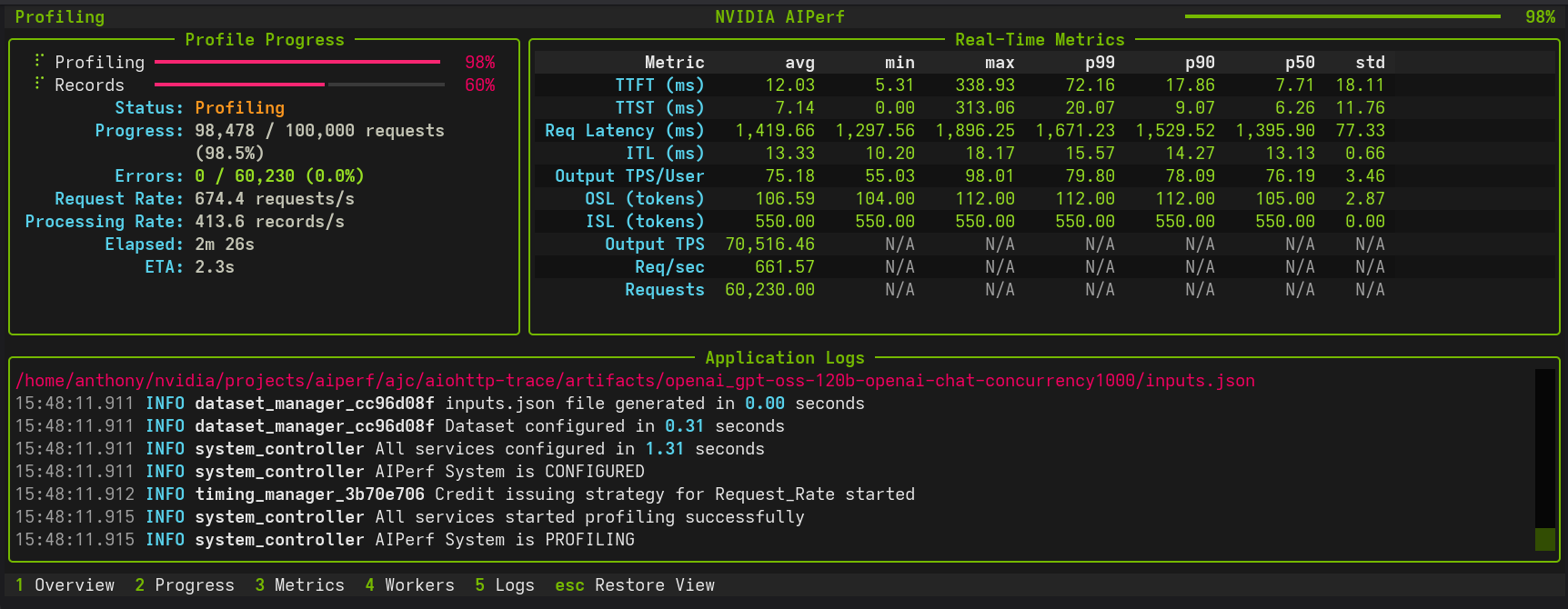
Features
- Scalable via multiprocess support
- Modular design for easy user modification
- Several benchmarking modes:
- concurrency
- request-rate
- request-rate with a maximum concurrency
- trace replay
- Public dataset support
Tutorials & Advanced Features
Getting Started
- Basic Tutorial - Learn the fundamentals with Dynamo and vLLM examples
Advanced Benchmarking Features
| Feature | Description | Use Cases |
|---|---|---|
| Random Number Generation & Reproducibility | Deterministic dataset generation with --random-seed |
Debugging, regression testing, controlled experiments |
| Request Cancellation | Test timeout behavior and service resilience | SLA validation, cancellation modeling |
| Trace Benchmarking | Deterministic workload replay with custom datasets | Regression testing, A/B testing |
| Fixed Schedule | Precise timestamp-based request execution | Traffic replay, temporal analysis, burst testing |
| Time-based Benchmarking | Duration-based testing with grace period control | Stability testing, sustained performance |
| Timeslice Metrics | Split up benchmark into timeslices and calculate metrics for each timeslice | Load pattern impact, detecting warm-up effects, performance degradation analysis |
| Sequence Distributions | Mixed ISL/OSL pairings | Benchmarking mixed use cases |
| Goodput | Throughput of requests meeting user-defined SLOs | SLO validation, capacity planning, runtime/model comparisons |
| Request Rate with Max Concurrency | Dual control of request timing and concurrent connection ceiling (Poisson or constant modes) | Testing API rate/concurrency limits, avoiding thundering herd, realistic client simulation |
| GPU Telemetry | Real-time GPU metrics collection via DCGM (power, utilization, memory, temperature, etc) | Performance optimization, resource monitoring, multi-node telemetry |
| Template Endpoint | Benchmark custom APIs with flexible Jinja2 request templates | Custom API formats, rapid prototyping, non-standard endpoints |
Working with Benchmark Data
- Profile Exports - Parse and analyze
profile_export.jsonlwith Pydantic models, custom metrics, and async processing
Quick Navigation
# Basic profiling
aiperf profile --model Qwen/Qwen3-0.6B --url localhost:8000 --endpoint-type chat

# Request timeout testing
aiperf profile --request-timeout-seconds 30.0 [other options...]

# Trace-based benchmarking
aiperf profile --input-file trace.jsonl --custom-dataset-type single_turn [other options...]

# Fixed schedule execution
aiperf profile --input-file schedule.jsonl --fixed-schedule --fixed-schedule-auto-offset [other options...]

# Time-based benchmarking
aiperf profile --benchmark-duration 300.0 --benchmark-grace-period 30.0 [other options...]
Supported APIs
- OpenAI chat completions
- OpenAI completions
- OpenAI embeddings
- OpenAI audio: request throughput and latency
- OpenAI images: request throughput and latency
- NIM rankings
Installation
pip install aiperf
Quick Start
Basic Usage
Run a simple benchmark against a model:
aiperf profile \
  --model your_model_name \
  --url http://localhost:8000 \
  --endpoint-type chat \
  --streaming
Example with Custom Configuration
aiperf profile \
  --model Qwen/Qwen3-0.6B \
  --url http://localhost:8000 \
  --endpoint-type chat \
  --concurrency 10 \
  --request-count 100 \
  --streaming
Example output:
NVIDIA AIPerf | LLM Metrics
┏━━━━━━━━━━━━━━━━━━━━━━━━━━━━━━━━━━━━━━┳━━━━━━━━━━━┳━━━━━━━━┳━━━━━━━━┳━━━━━━━━┳━━━━━━━━┳━━━━━━━━┳━━━━━━━┓
┃                               Metric ┃       avg ┃    min ┃    max ┃    p99 ┃    p90 ┃    p75 ┃   std ┃
┡━━━━━━━━━━━━━━━━━━━━━━━━━━━━━━━━━━━━━━╇━━━━━━━━━━━╇━━━━━━━━╇━━━━━━━━╇━━━━━━━━╇━━━━━━━━╇━━━━━━━━╇━━━━━━━┩
│             Time to First Token (ms) │     18.26 │  11.22 │ 106.32 │  68.82 │  27.76 │  16.62 │ 12.07 │
│            Time to Second Token (ms) │     11.40 │   0.02 │  85.91 │  34.54 │  12.59 │  11.65 │  7.01 │
│                 Request Latency (ms) │    487.30 │ 267.07 │ 769.57 │ 715.99 │ 580.83 │ 536.17 │ 79.60 │
│             Inter Token Latency (ms) │     11.23 │   8.80 │  13.17 │  12.48 │  11.73 │  11.37 │  0.45 │
│     Output Token Throughput Per User │     89.23 │  75.93 │ 113.60 │ 102.28 │  90.91 │  90.29 │  3.70 │
│                    (tokens/sec/user) │           │        │        │        │        │        │       │
│      Output Sequence Length (tokens) │     42.83 │  24.00 │  65.00 │  64.00 │  52.00 │  47.00 │  7.21 │
│       Input Sequence Length (tokens) │     10.00 │  10.00 │  10.00 │  10.00 │  10.00 │  10.00 │  0.00 │
│ Output Token Throughput (tokens/sec) │ 10,944.03 │    N/A │    N/A │    N/A │    N/A │    N/A │   N/A │
│    Request Throughput (requests/sec) │    255.54 │    N/A │    N/A │    N/A │    N/A │    N/A │   N/A │
│             Request Count (requests) │    711.00 │    N/A │    N/A │    N/A │    N/A │    N/A │   N/A │
└──────────────────────────────────────┴───────────┴────────┴────────┴────────┴────────┴────────┴───────┘
Known Issues
- Output sequence length constraints (
--output-tokens-mean) cannot be guaranteed unless you passignore_eosand/ormin_tokensvia--extra-inputsto an inference server that supports them. - Very high concurrency settings (typically >15,000 concurrency) may lead to port exhaustion on some systems, causing connection failures during benchmarking. If encountered, consider adjusting system limits or reducing concurrency.
- Startup errors caused by invalid configuration settings can cause AIPerf to hang indefinitely. If AIPerf appears to freeze during initialization, terminate the process and check configuration settings.
Release history Release notifications | RSS feed


Download files
Download the file for your platform. If you're not sure which to choose, learn more about installing packages.
Source Distributions
Built Distribution
Filter files by name, interpreter, ABI, and platform.
If you're not sure about the file name format, learn more about wheel file names.
Copy a direct link to the current filters
File details
Details for the file aiperf-0.3.0-py3-none-any.whl.
File metadata
- Download URL: aiperf-0.3.0-py3-none-any.whl
- Upload date:
- Size: 2.9 MB
- Tags: Python 3
- Uploaded using Trusted Publishing? No
- Uploaded via: twine/6.2.0 CPython/3.14.0
File hashes
| Algorithm | Hash digest | |
|---|---|---|
| SHA256 |
0dd938066723cbed647197a0f874a4388b5c9aaab82962cc3b6f40ffd40def54
|
|
| MD5 |
837fac27890973f38323b6a8922890dd
|
|
| BLAKE2b-256 |
7c8158f8d175da9b72dfb2934fdee687265b5ac98bd87e13724c2407516c3b55
|






