
An airflow provider for anomaly detection.

Project description
Anomaly Detection with Apache Airflow
Painless anomaly detection (using PyOD) with Apache Airflow.




How
How it works in a 🌰:
- Create and express your metrics via SQL queries (example here).
- Some YAML configuration fun (example here).
- Receive useful alerts when metrics look anomalous (example here).
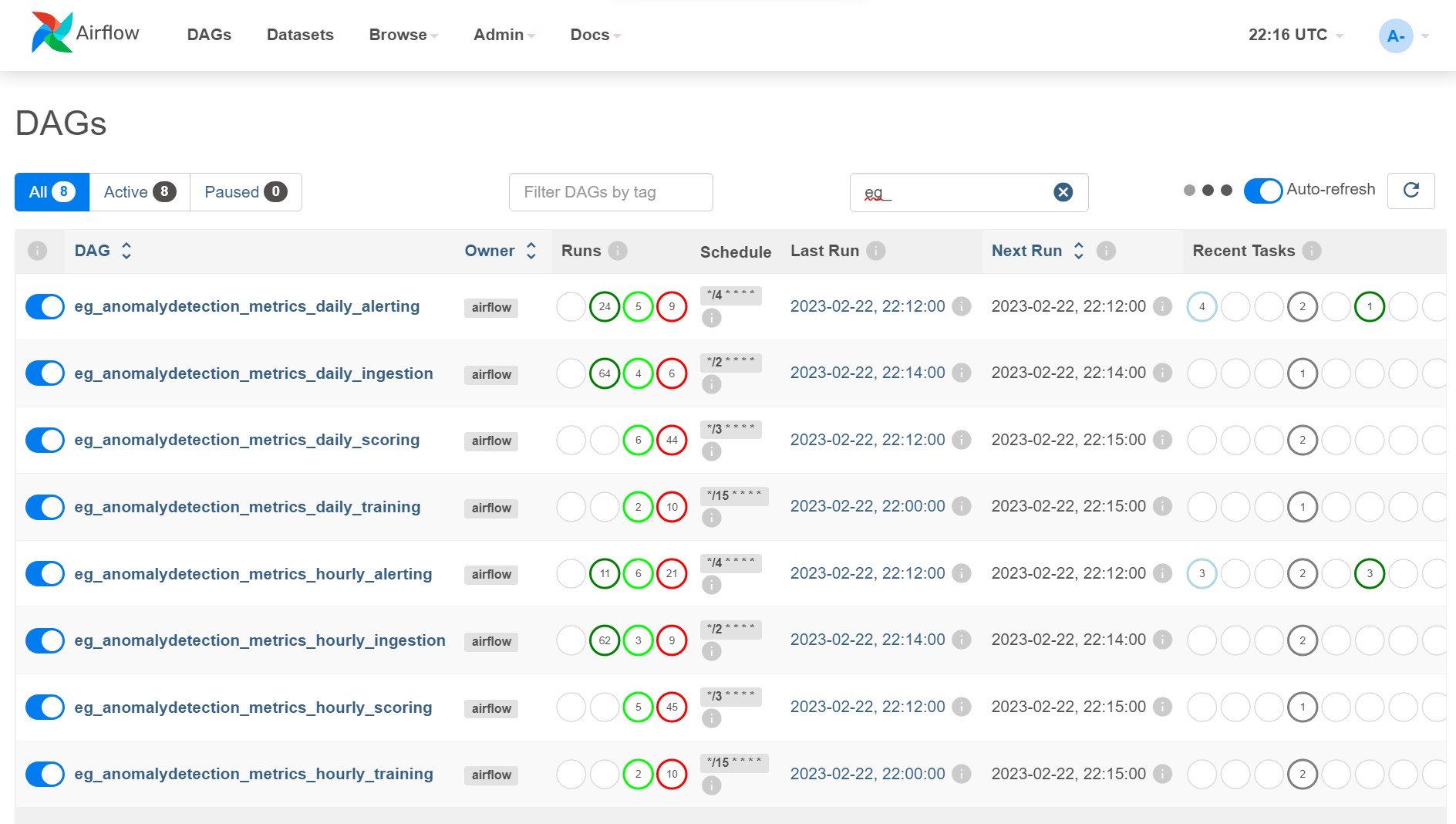
The example dag will create 4 dags for each "metric batch" (a metric batch is just the resulting table of 1 or more metrics create in step 1 above):
<dag_name_prefix><metric_batch_name>_ingestion<dag_name_suffix>: Ingests the metric data into a table in BigQuery.<dag_name_prefix><metric_batch_name>_training<dag_name_suffix>: Uses recent metrics andpreprocess.sqlto train an anomaly detection model for each metric and save it to GCS.<dag_name_prefix><metric_batch_name>_scoring<dag_name_suffix>: Uses latest metrics andpreprocess.sqlto score recent data using latest trained model.<dag_name_prefix><metric_batch_name>_alerting<dag_name_suffix>: Uses recent scores andalert_status.sqlto trigger an alert email if alert conditions are met.
Example Alert
Example output of an alert. Horizontal bar chart used to show metric values over time.
Smoothed anomaly score is shown as a % and any flagged anomalies are marked with *.
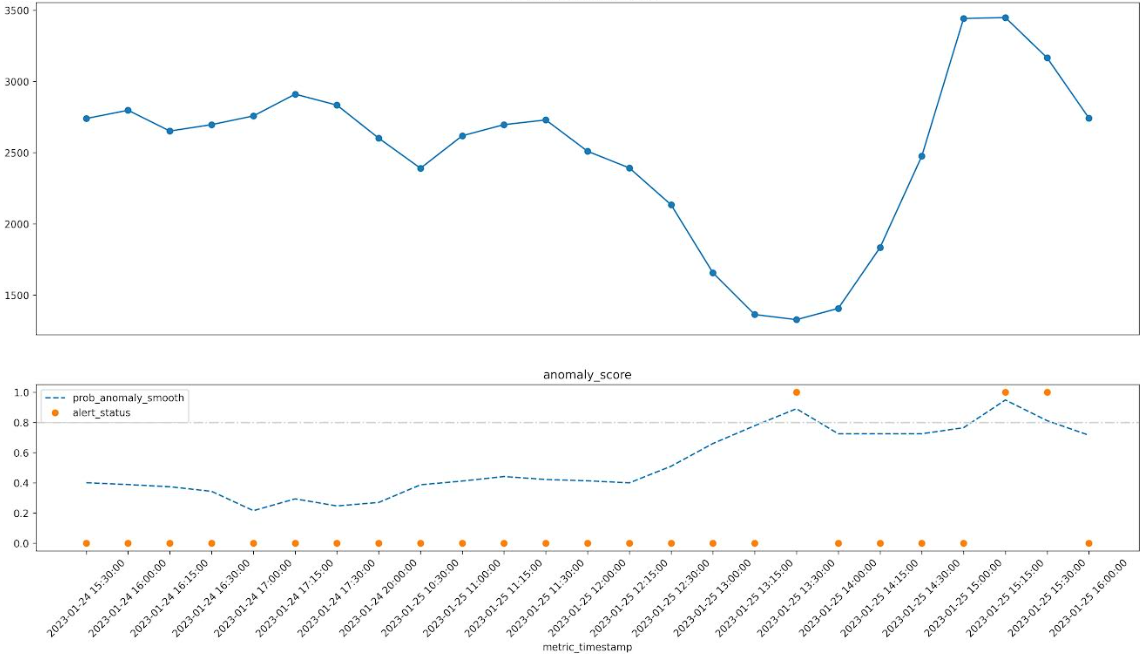
In the example below you can see that the anomaly score is elevated when the metric dips and also when it spikes.
Alert Text (ascii art yay!)
🔥 [some_metric_last1h] looks anomalous (2023-01-25 16:00:00) 🔥
some_metric_last1h (2023-01-24 15:30:00 to 2023-01-25 16:00:00)

t=0   ~~~~~~~~~~~~~~~~~~~~~~~~~~~~~~~~~~~~~~~             2,742.00    72% 2023-01-25 16:00:00
t=-1  ~~~~~~~~~~~~~~~~~~~~~~~~~~~~~~~~~~~~~~~~~~~~~       3,165.00  * 81% 2023-01-25 15:30:00
t=-2  ~~~~~~~~~~~~~~~~~~~~~~~~~~~~~~~~~~~~~~~~~~~~~~~~~~  3,448.00  * 95% 2023-01-25 15:15:00
t=-3  ~~~~~~~~~~~~~~~~~~~~~~~~~~~~~~~~~~~~~~~~~~~~~~~~~   3,441.00    76% 2023-01-25 15:00:00
t=-4  ~~~~~~~~~~~~~~~~~~~~~~~~~~~~~~~~~~~                 2,475.00    72% 2023-01-25 14:30:00
t=-5  ~~~~~~~~~~~~~~~~~~~~~~~~~~                          1,833.00    72% 2023-01-25 14:15:00
t=-6  ~~~~~~~~~~~~~~~~~~~~                                1,406.00    72% 2023-01-25 14:00:00
t=-7  ~~~~~~~~~~~~~~~~~~~                                 1,327.00  * 89% 2023-01-25 13:30:00
t=-8  ~~~~~~~~~~~~~~~~~~~                                 1,363.00    78% 2023-01-25 13:15:00
t=-9  ~~~~~~~~~~~~~~~~~~~~~~~~                            1,656.00    66% 2023-01-25 13:00:00
t=-10 ~~~~~~~~~~~~~~~~~~~~~~~~~~~~~~                      2,133.00    51% 2023-01-25 12:30:00
t=-11 ~~~~~~~~~~~~~~~~~~~~~~~~~~~~~~~~~~                  2,392.00    40% 2023-01-25 12:15:00
t=-12 ~~~~~~~~~~~~~~~~~~~~~~~~~~~~~~~~~~~~                2,509.00    41% 2023-01-25 12:00:00
t=-13 ~~~~~~~~~~~~~~~~~~~~~~~~~~~~~~~~~~~~~~~             2,729.00    42% 2023-01-25 11:30:00
t=-14 ~~~~~~~~~~~~~~~~~~~~~~~~~~~~~~~~~~~~~~~             2,696.00    44% 2023-01-25 11:15:00
t=-15 ~~~~~~~~~~~~~~~~~~~~~~~~~~~~~~~~~~~~~               2,618.00    41% 2023-01-25 11:00:00
t=-16 ~~~~~~~~~~~~~~~~~~~~~~~~~~~~~~~~~~                  2,390.00    39% 2023-01-25 10:30:00
t=-17 ~~~~~~~~~~~~~~~~~~~~~~~~~~~~~~~~~~~~~               2,601.00    27% 2023-01-24 20:00:00
t=-18 ~~~~~~~~~~~~~~~~~~~~~~~~~~~~~~~~~~~~~~~~~           2,833.00    25% 2023-01-24 17:30:00
t=-19 ~~~~~~~~~~~~~~~~~~~~~~~~~~~~~~~~~~~~~~~~~~          2,910.00    28% 2023-01-24 17:15:00
t=-20 ~~~~~~~~~~~~~~~~~~~~~~~~~~~~~~~~~~~~~~~             2,757.00    22% 2023-01-24 17:00:00
t=-21 ~~~~~~~~~~~~~~~~~~~~~~~~~~~~~~~~~~~~~~~             2,696.00    34% 2023-01-24 16:30:00
t=-22 ~~~~~~~~~~~~~~~~~~~~~~~~~~~~~~~~~~~~~~              2,651.00    37% 2023-01-24 16:15:00
t=-23 ~~~~~~~~~~~~~~~~~~~~~~~~~~~~~~~~~~~~~~~~            2,797.00    39% 2023-01-24 16:00:00
t=-24 ~~~~~~~~~~~~~~~~~~~~~~~~~~~~~~~~~~~~~~~             2,739.00    40% 2023-01-24 15:30:00
Below is the sql to pull the metric in question for investigation (this is included in the alert for convenience).
select *
from `metrics.metrics` m
join `metrics.metrics_scored` s
on m.metric_name = s.metric_name and m.metric_timestamp = s.metric_timestamp
where m.metric_name = 'some_metric_last1h'
order by m.metric_timestamp desc
Alert Chart
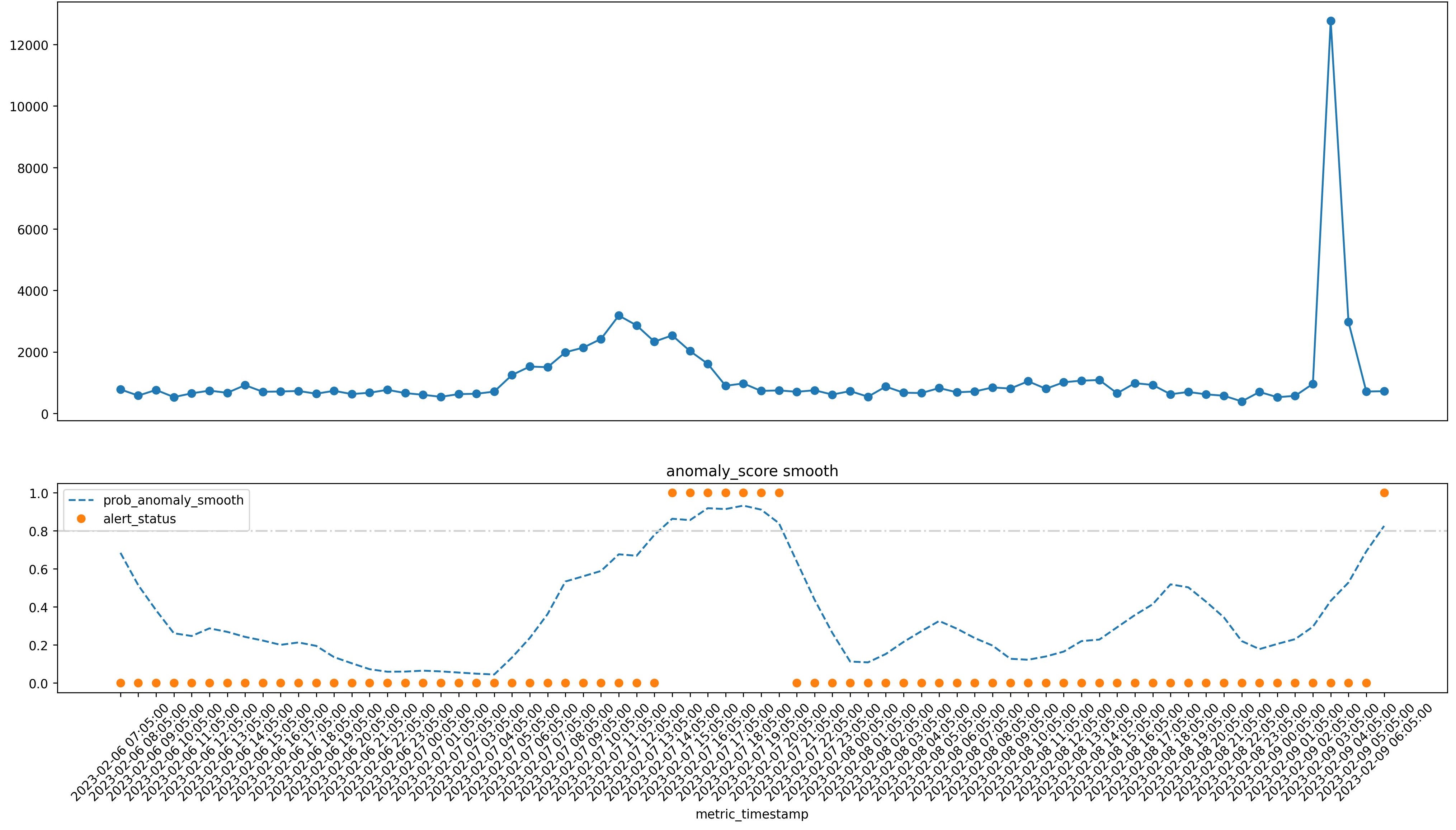
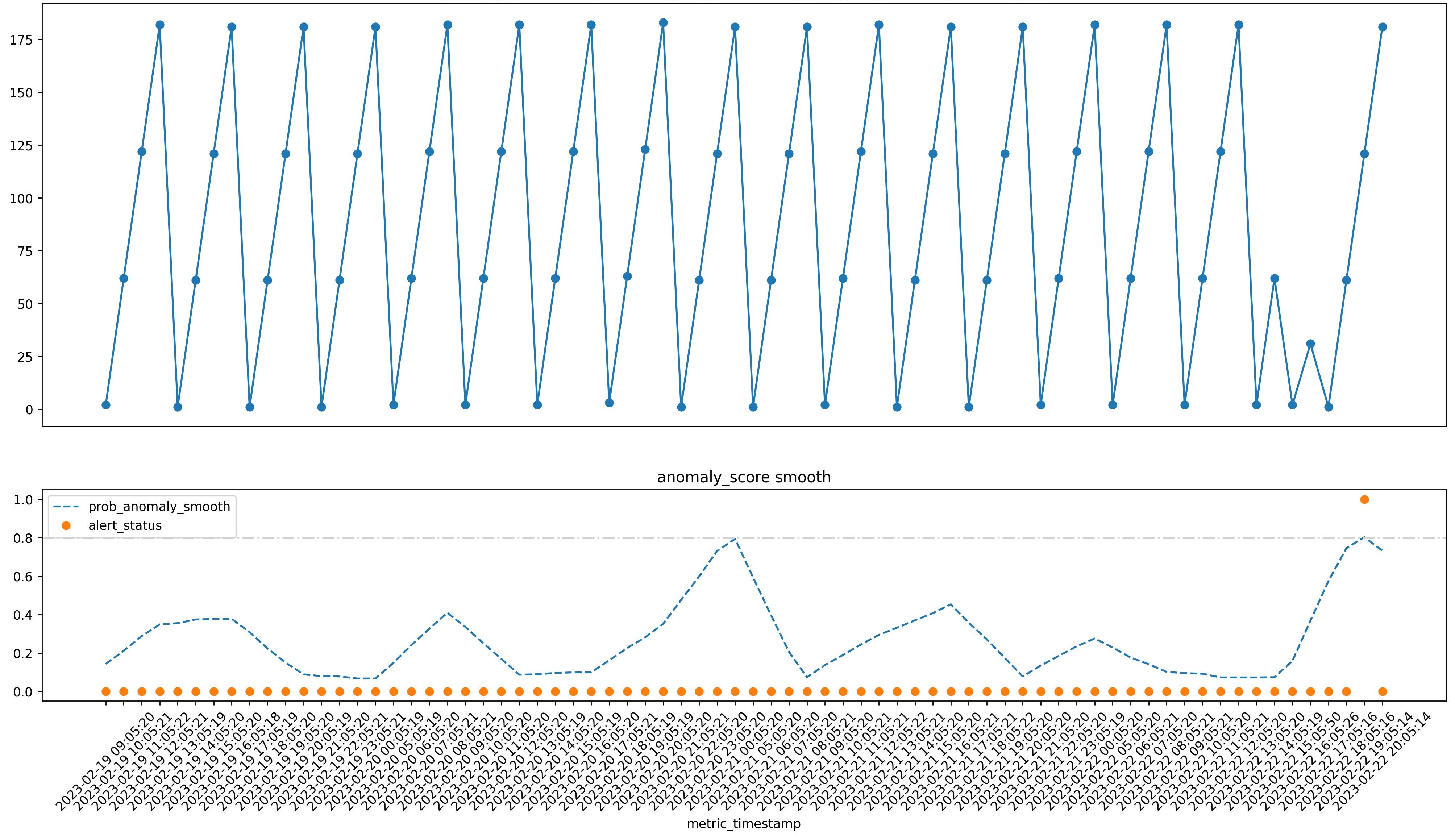
A slightly more fancy chart is also attached to alert emails. The top line graph shows the metric values over time. The bottom line graph shows the smoothed anomaly score over time along with the alert status for any flagged anomalies where the smoothed anomaly score passes the threshold.
Getting Started
Check out the example dag to get started.
Prerequisites
- Currently only Google BiqQuery is supported as a data source. The plan is to add Snowflake next and then probably Redshift. PR's to add other data sources are very welcome (some refactoring probably needed).
- Requirements are listed in requirements.txt.
- You will need to have sendgrid_default connection setup in airflow to send emails. You can also use the
sendgrid_api_keyvia environment variable if you prefer. See.example.envfor more details. - You will need to have a
google_cloud_defaultconnection setup in airflow to pull data from bigquery. See.example.envfor more details.
Installation
Install from PyPI as usual.
pip install airflow-provider-anomaly-detection
Configuration
See the example configuration files in the example dag folder. You can use a defaults.yaml or specific <metric-batch>.yaml for each metric batch if needed.
Docker
You can use the docker compose file to spin up an airflow instance with the provider installed and the example dag available. This is useful for quickly trying it out locally. It will mount the local folders (you can see this in docker-compose.yaml) into the container so you can make changes to the code or configs and see them reflected in the running airflow instance.
docker compose up -d
Anomaly Gallery
Look at some of these beautiful anomalies! (More at /anomaly_gallery/README.md)
(these are all real anomalies from various business metrics as i have been dogfooding this at work for a little while now)
Sharpe drop in metric followed by an elevated anomaly score.
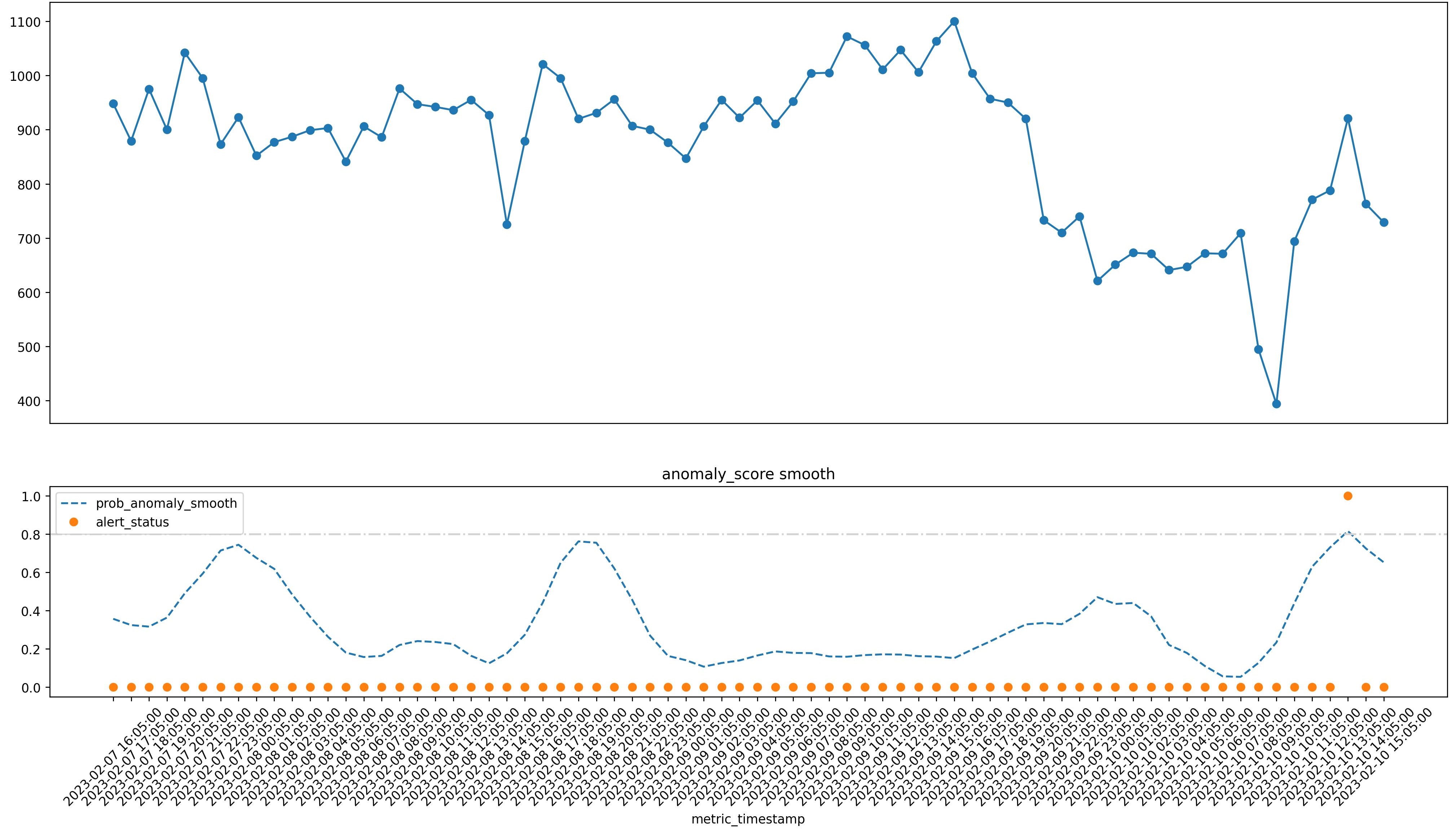
A subtle change and some "saw tooth" behaviour leading to an anomaly.
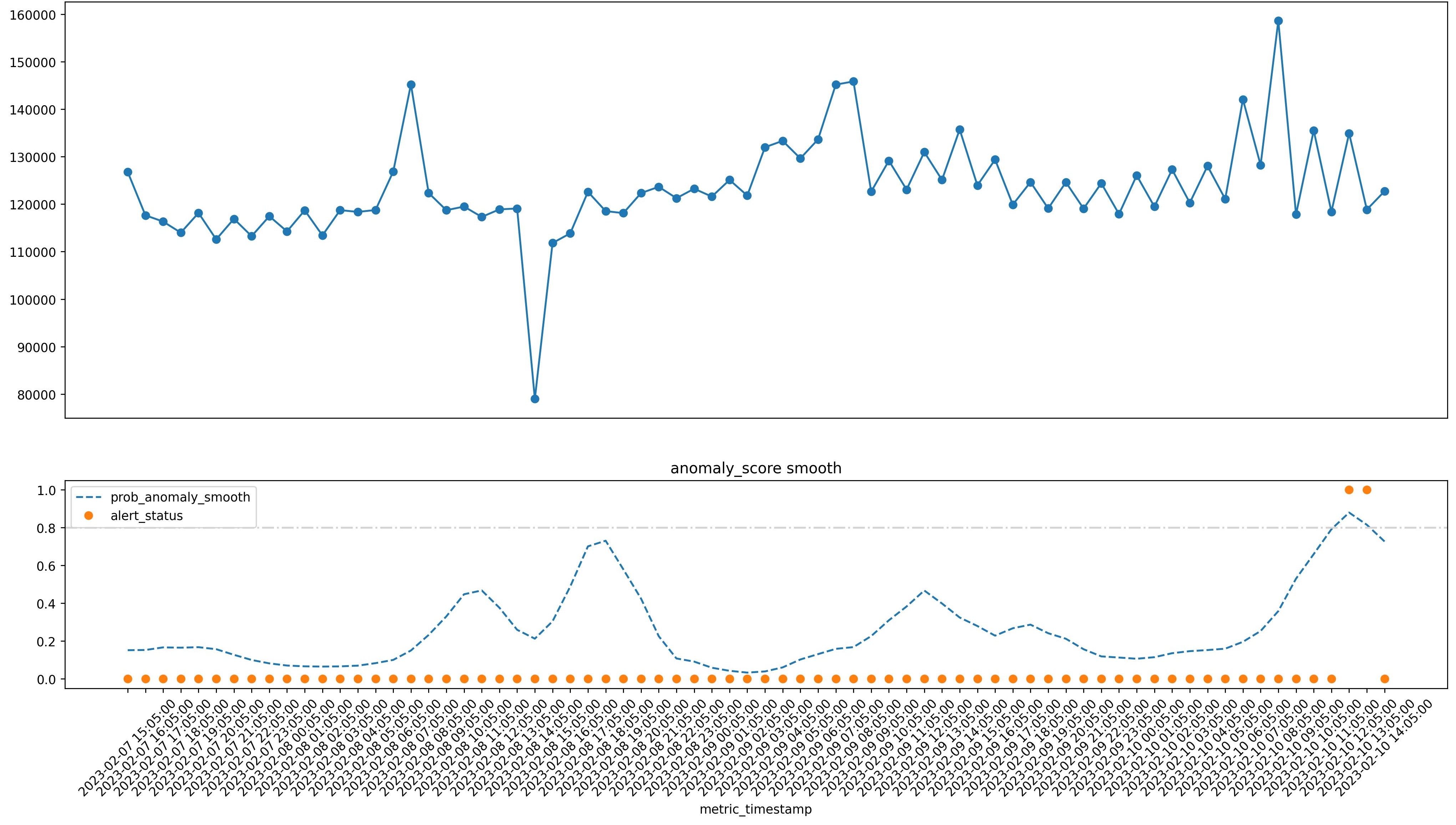
A bump and spike example - two anomalies for one!
An example of a regular ETL timing delay.
Release history Release notifications | RSS feed


Download files
Download the file for your platform. If you're not sure which to choose, learn more about installing packages.
Source Distribution
Built Distribution
Filter files by name, interpreter, ABI, and platform.
If you're not sure about the file name format, learn more about wheel file names.
Copy a direct link to the current filters
File details
Details for the file airflow_provider_anomaly_detection-0.0.21.tar.gz.
File metadata
- Download URL: airflow_provider_anomaly_detection-0.0.21.tar.gz
- Upload date:
- Size: 3.8 MB
- Tags: Source
- Uploaded using Trusted Publishing? No
- Uploaded via: twine/4.0.2 CPython/3.10.6
File hashes
| Algorithm | Hash digest | |
|---|---|---|
| SHA256 |
51611923668f34de011e0d31d8f2ed2a882e69c073b4c95442b7d1b5ece76a5b
|
|
| MD5 |
e920b93a826185bdd8031acb606c397f
|
|
| BLAKE2b-256 |
6e2e1592ee0728128197a318c881bbcad290d1b3155a6c88662c7d0589716598
|
File details
Details for the file airflow_provider_anomaly_detection-0.0.21-py3-none-any.whl.
File metadata
- Download URL: airflow_provider_anomaly_detection-0.0.21-py3-none-any.whl
- Upload date:
- Size: 19.9 kB
- Tags: Python 3
- Uploaded using Trusted Publishing? No
- Uploaded via: twine/4.0.2 CPython/3.10.6
File hashes
| Algorithm | Hash digest | |
|---|---|---|
| SHA256 |
7478e57439487bd451a1bbd92c0e0a798c718f70bb558a6463896c4ab6b03ade
|
|
| MD5 |
64988e2c58ed7ef5cc6a4e7ccd6903cd
|
|
| BLAKE2b-256 |
25a54c010fe1728a43d259c864ab78300bfef5eab68a00695be0cb530ada83c9
|






