
airflow provider for intersystems

Project description
airflow-provider-iris
Table of Contents
Overview






InterSystems IRIS Provider for Apache Airflow enables seamless integration between Airflow workflows and the InterSystems IRIS data platform. It provides native connection support and operators for executing IRIS SQL and automating IRIS-driven tasks within modern ETL/ELT pipelines.
Designed for reliability and ease of use, this provider helps data engineers and developers build scalable, production-ready workflows for healthcare, interoperability, analytics, and enterprise data processing—powered by InterSystems IRIS.
Features
- ✔️
IrisHook– for managing IRIS connections - ✔️
IrisSQLOperator– for running SQL queries - ✔️ Support for both SELECT/CTE and DML statements
- ✔️ Native Airflow connection UI customization
- ✔️ Examples for real-world ETL patterns
Installation
pip install airflow-provider-iris
Quick Start
Configure Connection in Airflow UI Go to Admin → Connections → Add Connection
- Conn Id: Connection ID
- Description : Connection Description
- Conn Type: InterSystems IRIS
- Host: IRIS server hostname
- Username: User Name
- Password: Password
- Port : IRIS Superserver Port
- Namespace : Namespace
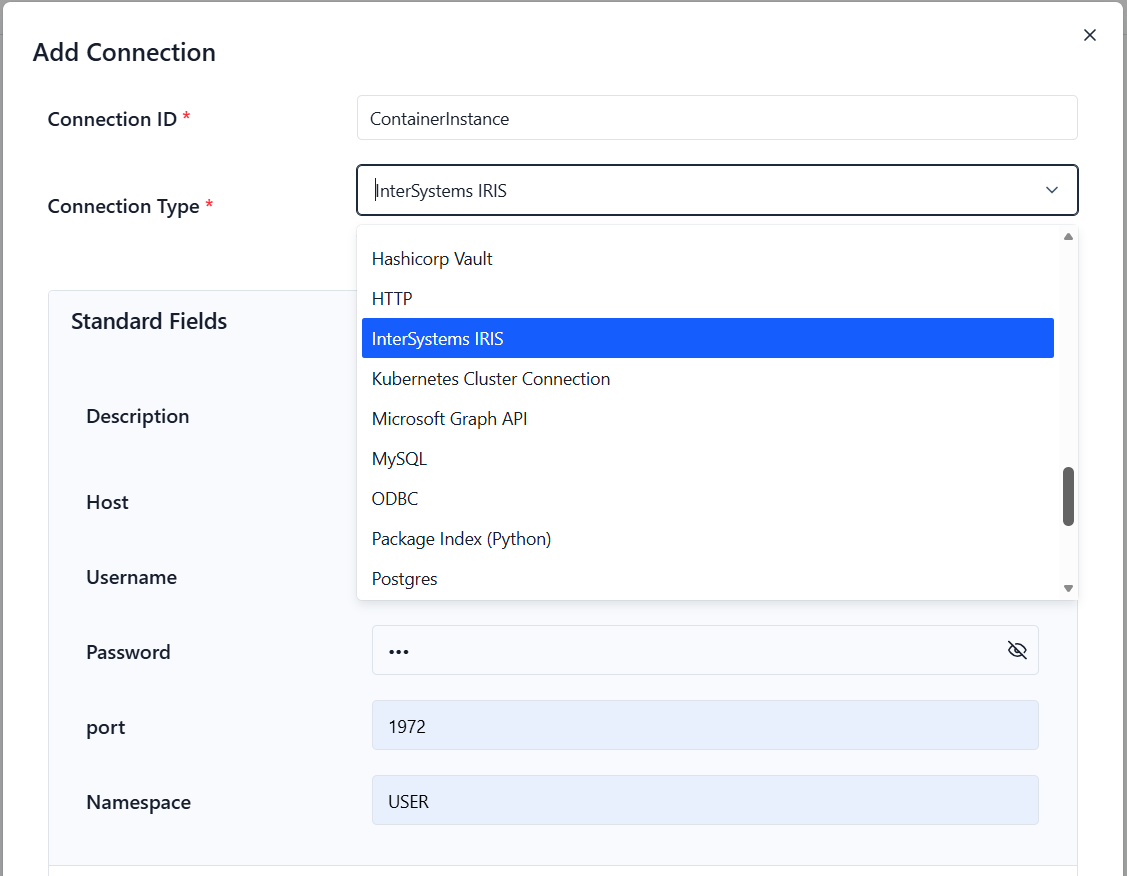
Use your InterSystems IRIS connection by setting the iris_conn_id parameter in any of the provided operators.
In the example below, the IrisSQLOperator uses the iris_conn_id parameter to connect to the IRIS instance when the DAG is defined:
from airflow_provider_iris.operators.iris_operator import IrisSQLOperator

with DAG(
    dag_id="01_IRIS_Raw_SQL_Demo_Local",
    start_date=datetime(2025, 12, 1),
    schedule=None,
    catchup=False,
    tags=["iris-contest"],
) as dag:

    create_table = IrisSQLOperator(
        task_id="create_table",
        iris_conn_id="ContainerInstance",
        sql="""CREATE TABLE IF NOT EXISTS Test.AirflowDemo (
               ID INTEGER IDENTITY PRIMARY KEY,
               Message VARCHAR(200),
               RunDate TIMESTAMP DEFAULT CURRENT_TIMESTAMP
            )""",
    )
Connector Parameters
When you create a connection in Airflow UI (Admin → Connections), use the following fields:
| Parameter | Description | Type / Default | Required |
|---|---|---|---|
| sql | SQL query or template | str |
Yes |
| iris_conn_id | IRIS connection identifier | str / iris_default |
Yes |
| task_id | DAG task name | str |
Yes |
| autocommit | Commit changes automatically | bool / True |
No |
| **kwargs | Airflow BaseOperator arguments | -- | No |
Examples
1. IRIS Raw SQL Demo
# dags/01_IRIS_Raw_SQL_Demo.py
from datetime import datetime
from airflow import DAG
from airflow_provider_iris.operators.iris_operator import IrisSQLOperator

with DAG(
    dag_id="01_IRIS_Raw_SQL_Demo",
    start_date=datetime(2025, 12, 1),
    schedule=None,
    catchup=False,
    tags=["iris-contest"],
) as dag:

    create_table = IrisSQLOperator(
        task_id="create_table",
        sql="""CREATE TABLE IF NOT EXISTS Test.AirflowDemo (
               ID INTEGER IDENTITY PRIMARY KEY,
               Message VARCHAR(200),
               RunDate TIMESTAMP DEFAULT CURRENT_TIMESTAMP
            )""",
    )

    insert = IrisSQLOperator(
        task_id="insert_row",
        sql="INSERT INTO Test.AirflowDemo (Message) VALUES ('Hello from raw SQL operator')",
    )

    select = IrisSQLOperator(
        task_id="select_rows",
        sql="SELECT ID, Message, RunDate FROM Test.AirflowDemo ORDER BY ID DESC",
    )

    create_table >> insert >> select
2. IRIS ORM Demo
Uses SQLAlchemy + pandas with the only known reliable method for bulk inserts into IRIS.
# dags/example_sqlalchemy_dag.py

from datetime import datetime
from airflow import DAG
from airflow.operators.python import PythonOperator
import pandas as pd

# Import your hook and model
from airflow_provider_iris.hooks.iris_hook import IrisHook
from sqlalchemy import Column, Integer, String, DateTime, Float
from sqlalchemy.orm import declarative_base

Base = declarative_base()

class SalesRecord(Base):
    __tablename__ = "SalesRecord"
    __table_args__ = {"schema": "Test"}

    id        = Column(Integer, primary_key=True)
    region    = Column(String(50))
    amount    = Column(Float)
    sale_date = Column(DateTime)

def create_and_insert_orm(**context):
    hook = IrisHook()
    engine = hook.get_engine()

    # Create table if not exists
    Base.metadata.create_all(engine)

    # THIS IS THE ONLY METHOD THAT WORKS RELIABLY WITH IRIS RIGHT NOW
    data = [
        {"region": "Europe",        "amount": 12500.50, "sale_date": "2025-12-01"},
        {"region": "Asia",          "amount": 8900.00,  "sale_date": "2025-12-02"},
        {"region": "North America", "amount": 56700.00, "sale_date": "2025-12-03"},
        {"region": "Africa",        "amount": 34200.00, "sale_date": "2025-12-03"},
    ]
    df = pd.DataFrame(data)
    df["sale_date"] = pd.to_datetime(df["sale_date"])

    # pandas.to_sql with single-row inserts → IRIS accepts this perfectly
    df.to_sql(
        name="SalesRecord",
        con=engine,
        schema="Test",
        if_exists="append",
        index=False,
        method="multi",           # still fast
        chunksize=1               # ← THIS IS THE MAGIC LINE
    )
    print(f"Successfully inserted {len(df)} rows using pandas.to_sql() (chunksize=1)")


def query_orm(**context):
    hook = IrisHook()
    engine = hook.get_engine()
    df = pd.read_sql("SELECT * FROM Test.SalesRecord ORDER BY id", engine)
    for _, r in df.iterrows():
        print(f"ORM → {int(r.id):>3} | {r.region:<15} | ${r.amount:>10,.2f} | {r.sale_date.date()}")


with DAG(
    dag_id="02_IRIS_ORM_Demo",
    start_date=datetime(2025, 12, 1),
    schedule=None,
    catchup=False,
    tags=["iris-contest", "orm"],
) as dag:

    orm_create = PythonOperator(task_id="orm_create_and_insert", python_callable=create_and_insert_orm)
    orm_read   = PythonOperator(task_id="orm_read",               python_callable=query_orm)

    orm_create >> orm_read
3. Synthetic Sales Pipeline
Generate realistic sales data and load efficiently.
from datetime import datetime, timedelta
from airflow import DAG
from airflow.operators.python import PythonOperator
import pandas as pd
import numpy as np
from airflow_provider_iris.hooks.iris_hook import IrisHook
from sqlalchemy import Column, Integer, String, DateTime, Float
from sqlalchemy.orm import declarative_base

Base = declarative_base()

class SalesRecord(Base):
    __tablename__ = "SalesRecord"
    __table_args__ = {"schema": "Test"}

    id        = Column(Integer, primary_key=True)
    region    = Column(String(50))
    amount    = Column(Float)
    sale_date = Column(DateTime)


# ----------- SYNTHETIC DATA GENERATION -----------
def generate_synthetic_sales(num_rows=500):
    """Create synthetic sales data for testing."""

    regions = [
        "North America", "South America", "Europe",
        "Asia-Pacific", "Middle East", "Africa"
    ]

    # Randomly pick regions
    region_data = np.random.choice(regions, size=num_rows)

    # Generate synthetic amounts between 10k and 120k
    amounts = np.random.uniform(10000, 120000, size=num_rows).round(2)

    # Generate random dates within last 30 days
    start_date = datetime(2025, 11, 1)
    sale_dates = [start_date + timedelta(days=int(x)) for x in np.random.randint(0, 30, size=num_rows)]

    df = pd.DataFrame({
        "region": region_data,
        "amount": amounts,
        "sale_date": sale_dates
    })

    return df


# ----------- AIRFLOW TASK FUNCTION -----------
def bulk_load_from_csv(**context):

    df = generate_synthetic_sales(num_rows=200)   # Change number as needed

    hook = IrisHook()
    engine = hook.get_engine()

    Base.metadata.create_all(engine)

    df.to_sql("SalesRecord", con=engine, schema="Test", if_exists="append", index=False)
    print(f"Bulk loaded {len(df)} synthetic rows via pandas.to_sql()")


# ----------- DAG DEFINITION -----------
with DAG(
    dag_id="03_IRIS_Load_CSV_Synthetic_Demo",
    start_date=datetime(2025, 12, 1),
    schedule=None,
    catchup=False,
    tags=["iris-contest", "etl", "synthetic"],
) as dag:

    bulk_task = PythonOperator(
        task_id="bulk_load_synthetic_to_iris",
        python_callable=bulk_load_from_csv
    )
Release history Release notifications | RSS feed


Download files
Download the file for your platform. If you're not sure which to choose, learn more about installing packages.
Source Distribution
Built Distribution
Filter files by name, interpreter, ABI, and platform.
If you're not sure about the file name format, learn more about wheel file names.
Copy a direct link to the current filters
File details
Details for the file airflow_provider_iris-0.2.6.tar.gz.
File metadata
- Download URL: airflow_provider_iris-0.2.6.tar.gz
- Upload date:
- Size: 10.5 kB
- Tags: Source
- Uploaded using Trusted Publishing? No
- Uploaded via: twine/6.2.0 CPython/3.11.0
File hashes
| Algorithm | Hash digest | |
|---|---|---|
| SHA256 |
f9d091d4fcfb34bee8aec297fa12a6dc31e35eae64718712d871891d30c77bc0
|
|
| MD5 |
b4f270ac022b88751f636faa6c95b2b0
|
|
| BLAKE2b-256 |
9853a6d91d4371e5cba1e13403dbac61eb71f720638b153ef9131d3a9871533c
|
File details
Details for the file airflow_provider_iris-0.2.6-py3-none-any.whl.
File metadata
- Download URL: airflow_provider_iris-0.2.6-py3-none-any.whl
- Upload date:
- Size: 8.2 kB
- Tags: Python 3
- Uploaded using Trusted Publishing? No
- Uploaded via: twine/6.2.0 CPython/3.11.0
File hashes
| Algorithm | Hash digest | |
|---|---|---|
| SHA256 |
e9cc081f2ff2c88a9e74288b5ff2bfe3cf9b070a548e029abe7551711cb82b8b
|
|
| MD5 |
3ce146dff4f55649bb8c7cb687fc4a8f
|
|
| BLAKE2b-256 |
c4ffad167ad1a8d3addb399809ac380c3bafb0dbd2e88ce84afad19264012716
|






