
airflow provider for intersystems

Project description
airflow-provider-iris






Table of Contents
- Overview
- Installation
- Quick Start
- IrisSQLOperator Parameters
- SQLOperator Examples
- 01_IRIS_Raw_SQL_Demo
- 02_IRIS_ORM_Demo
- 03_IRIS_Load_Synthetic_Data_Demo
- IrisSensor
- IrisSensor Example
- 04_IRIS_Daily_Sales_Report_Sensor.py
Overview
InterSystems IRIS Provider for Apache Airflow enables seamless integration between Airflow workflows and the InterSystems IRIS data platform. It provides native connection support and operators for executing IRIS SQL and automating IRIS-driven tasks within modern ETL/ELT pipelines.
Designed for reliability and ease of use, this provider helps data engineers and developers build scalable, production-ready workflows for healthcare, interoperability, analytics, and enterprise data processing—powered by InterSystems IRIS.
Features
- ✔️
IrisHook– for managing IRIS connections - ✔️
IrisSQLOperator– for running SQL queries - ✔️ Support for both SELECT/CTE and DML statements
- ✔️ Native Airflow connection UI customization
- ✔️ Examples for real-world ETL patterns
Installation
pip install airflow-provider-iris
Quick Start
Configure Connection in Airflow UI Go to Admin → Connections → Add Connection
- Conn Id: Connection ID
- Description : Connection Description
- Conn Type: InterSystems IRIS
- Host: IRIS server hostname
- Username: User Name
- Password: Password
- Port : IRIS Superserver Port
- Namespace : Namespace
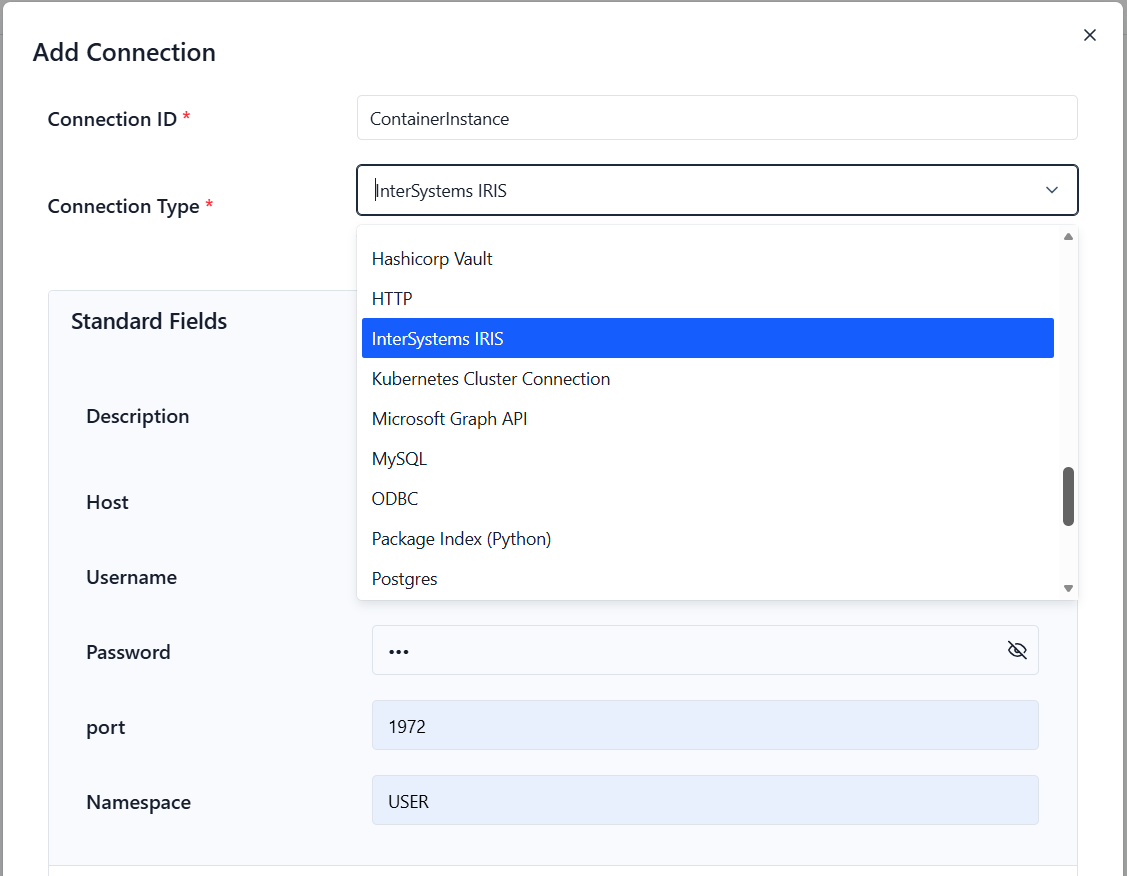
Use your InterSystems IRIS connection by setting the iris_conn_id parameter in any of the provided operators.
In the example below, the IrisSQLOperator uses the iris_conn_id parameter to connect to the IRIS instance when the DAG is defined:
from airflow_provider_iris.operators.iris_operator import IrisSQLOperator

with DAG(
    dag_id="01_IRIS_Raw_SQL_Demo_Local",
    start_date=datetime(2025, 12, 1),
    schedule=None,
    catchup=False,
    tags=["iris-contest"],
) as dag:

    create_table = IrisSQLOperator(
        task_id="create_table",
        iris_conn_id="ContainerInstance",
        sql="""CREATE TABLE IF NOT EXISTS Test.AirflowDemo (
               ID INTEGER IDENTITY PRIMARY KEY,
               Message VARCHAR(200),
               RunDate TIMESTAMP DEFAULT CURRENT_TIMESTAMP
            )""",
    )
IrisSQLOperator Parameters
| Parameter | Description | Type / Default | Required |
|---|---|---|---|
| sql | SQL query or template | str |
Yes |
| iris_conn_id | IRIS connection identifier | str / iris_default |
Yes |
| task_id | DAG task name | str |
Yes |
| autocommit | Commit changes automatically | bool / True |
No |
| **kwargs | Airflow BaseOperator arguments | -- | No |
SQLOperator Examples
1. IRIS Raw SQL Demo
Usage of RAW SQL statements
# dags/01_IRIS_Raw_SQL_Demo.py
from datetime import datetime
from airflow import DAG
from airflow_provider_iris.operators.iris_operator import IrisSQLOperator

# ---------------------------------------------------------------------
# Example DAG showing how to run raw SQL statements on InterSystems IRIS
# using the IrisSQLOperator included in the provider.
# ---------------------------------------------------------------------

with DAG(
    dag_id="01_IRIS_Raw_SQL_Demo",
    start_date=datetime(2025, 12, 1),
    schedule=None,        # Run manually – no recurring schedule
    catchup=False,
    tags=["iris-contest"],
) as dag:

    # Create a simple table to store demo entries.
    # IF NOT EXISTS ensures the DAG can be re-run without errors.
    create_table = IrisSQLOperator(
        task_id="create_table",
        sql="""
            CREATE TABLE IF NOT EXISTS AirflowDemo.Test (
                ID INTEGER IDENTITY PRIMARY KEY,
                Message VARCHAR(200),
                RunDate TIMESTAMP DEFAULT CURRENT_TIMESTAMP
            )
        """,
    )

    # Insert a sample row into the table.
    # This demonstrates a basic INSERT operation using the operator.
    insert = IrisSQLOperator(
        task_id="insert_row",
        sql="""
            INSERT INTO AirflowDemo.Test (Message)
            VALUES ('Hello from raw SQL operator')
        """,
    )

    # Retrieve all rows so the results appear in the Airflow logs.
    # Useful to confirm end-to-end connectivity with IRIS.
    select = IrisSQLOperator(
        task_id="select_rows",
        sql="""
            SELECT ID, Message, RunDate
            FROM AirflowDemo.Test
            ORDER BY ID DESC
        """,
    )

    # Task order: create table → insert row → select rows
    create_table >> insert >> select
2. IRIS ORM Demo
Uses SQLAlchemy + pandas with the only known reliable method for bulk inserts into IRIS.
# dags/02_IRIS_ORM_Demo.py

from datetime import datetime
from airflow import DAG
from airflow.operators.python import PythonOperator
import pandas as pd
import numpy as np

# Import IRIS hook and SQLAlchemy components
from airflow_provider_iris.hooks.iris_hook import IrisHook
from sqlalchemy import Column, Integer, String, DateTime, Float
from sqlalchemy.orm import declarative_base

Base = declarative_base()

# ---------------------------------------------------------------------
# ORM MODEL
# Defines the structure of the AirflowDemo.ORMSales table in IRIS.
# ---------------------------------------------------------------------
class SalesRecord(Base):
    __tablename__ = "ORMSales"
    __table_args__ = {"schema": "AirflowDemo"}

    id        = Column(Integer, primary_key=True)
    region    = Column(String(50))
    amount    = Column(Float)
    sale_date = Column(DateTime)


# ---------------------------------------------------------------------
# TASK 1: Create table and insert synthetic sample records.
# Uses pandas.to_sql() with chunksize=1 → most consistent for IRIS.
# ---------------------------------------------------------------------
def create_and_insert_orm(**context):
    # If you use a non-default connection → ALWAYS pass iris_conn_id explicitly
    # e.g hook = IrisHook(iris_conn_id="iris_Connection_ID")
    hook = IrisHook()
    engine = hook.get_engine()

    # Ensure the table exists
    Base.metadata.create_all(engine)

    # ---- Generate synthetic generic sample data ----
    num_records = 5
    regions = [f"Region {i}" for i in range(1, num_records + 1)]

    sample_data = [
        {
            "region": region,
            "amount": round(np.random.uniform(5000, 50000), 2),
            "sale_date": pd.Timestamp("2025-12-01") + pd.Timedelta(days=i)
        }
        for i, region in enumerate(regions)
    ]

    df = pd.DataFrame(sample_data)

    # Insert rows → IRIS requires single-batch inserts for reliability
    df.to_sql(
        name="ORMSales",
        con=engine,
        schema="AirflowDemo",
        if_exists="append",
        index=False,
        method="multi",
        chunksize=1,   # key setting for IRIS compatibility
    )

    print(f"Inserted {len(df)} generated rows into AirflowDemo.ORMSales")


# ---------------------------------------------------------------------
# TASK 2: Query back data and print rows in Airflow logs.
# ---------------------------------------------------------------------
def query_orm(**context):
    hook = IrisHook()
    engine = hook.get_engine()

    df = pd.read_sql(
        "SELECT * FROM AirflowDemo.ORMSales ORDER BY id",
        engine
    )

    for _, r in df.iterrows():
        print(
            f"ORM → {int(r.id):>3} | "
            f"{r.region:<15} | "
            f"${r.amount:>10,.2f} | "
            f"{r.sale_date.date()}"
        )


# ---------------------------------------------------------------------
# DAG DEFINITION
# ---------------------------------------------------------------------
with DAG(
    dag_id="02_IRIS_ORM_Demo",
    start_date=datetime(2025, 12, 1),
    schedule=None,
    catchup=False,
    tags=["iris-contest", "orm"],
) as dag:

    orm_create = PythonOperator(
        task_id="orm_create_and_insert",
        python_callable=create_and_insert_orm,
    )

    orm_read = PythonOperator(
        task_id="orm_read",
        python_callable=query_orm,
    )

    orm_create >> orm_read
3. Synthetic Sales Pipeline
Generate realistic sales data and load efficiently.
# dags/03_IRIS_Load_Synthetic_Data_Demo

from datetime import datetime, timedelta
from airflow import DAG
from airflow.operators.python import PythonOperator
import pandas as pd
import numpy as np
from airflow_provider_iris.hooks.iris_hook import IrisHook
from sqlalchemy import Column, Integer, String, DateTime, Float
from sqlalchemy.orm import declarative_base

Base = declarative_base()

# ---------------------------------------------------------------------
# ORM model representing a generic sales table in the "AirflowDemo" schema.
# Reusable for both table creation and data insertion.
# ---------------------------------------------------------------------
class SalesRecord(Base):
    __tablename__ = "BulkSales"
    __table_args__ = {"schema": "AirflowDemo"}

    id        = Column(Integer, primary_key=True)
    region    = Column(String(50))
    amount    = Column(Float)
    sale_date = Column(DateTime)


# ---------------------------------------------------------------------
# Generate synthetic sales data for testing or demo purposes.
# Supports dynamic number of rows and produces realistic random data.
# ---------------------------------------------------------------------
def generate_synthetic_sales(num_rows=500):
    """Create synthetic sales data as a pandas DataFrame."""

    regions = [
        "North America", "South America", "Europe",
        "Asia-Pacific", "Middle East", "Africa"
    ]

    # Randomly pick a region for each row
    region_data = np.random.choice(regions, size=num_rows)

    # Random sales amounts between 10k and 120k
    amounts = np.random.uniform(10000, 120000, size=num_rows).round(2)

    # Random sale dates within last 30 days
    start_date = datetime(2025, 11, 1)
    sale_dates = [
        start_date + timedelta(days=int(x))
        for x in np.random.randint(0, 30, size=num_rows)
    ]

    # Construct a DataFrame
    df = pd.DataFrame({
        "region": region_data,
        "amount": amounts,
        "sale_date": sale_dates
    })

    return df


# ---------------------------------------------------------------------
# Airflow task: bulk load synthetic sales data into IRIS.
# ---------------------------------------------------------------------
def bulk_load_synthetic_sales(**context):

    # Generate synthetic dataset
    df = generate_synthetic_sales(num_rows=200)

    # Create SQLAlchemy engine via IRIS hook
    # If you use a non-default connection → ALWAYS pass iris_conn_id explicitly
    # e.g hook = IrisHook(iris_conn_id="iris_Connection_ID")
    hook = IrisHook()
    engine = hook.get_engine()

    # Ensure table exists
    Base.metadata.create_all(engine)

    # Bulk insert into IRIS
    df.to_sql(
        "BulkSales",
        con=engine,
        schema="AirflowDemo",
        if_exists="append",
        index=False
    )

    print(f"Bulk loaded {len(df)} synthetic rows into AirflowDemo.BulkSales")


# ---------------------------------------------------------------------
# DAG definition
# Demonstrates ETL-style bulk load of synthetic sales data into IRIS.
# ---------------------------------------------------------------------
with DAG(
    dag_id="03_IRIS_Load_Synthetic_Data_Demo",
    start_date=datetime(2025, 12, 1),
    schedule=None,
    catchup=False,
    tags=["iris-contest", "etl", "synthetic"],
) as dag:

    bulk_task = PythonOperator(
        task_id="bulk_load_synthetic_sales",
        python_callable=bulk_load_synthetic_sales
    )
IrisSensor
The IrisSensor is a purpose-built Airflow sensor that repeatedly runs a SQL query against IRIS until a condition is satisfied.
It solves the most common real-world need when integrating Airflow with IRIS:
“Don’t start my downstream jobs until the data has actually landed in IRIS.”
Why you’ll use it every day
- Wait for daily bulk loads (CSV, EDI, API, replication, etc.)
- Wait for upstream systems to flip a status flag
- Wait for a minimum number of rows in a staging table
- Wait for a specific value (e.g.,
Status = 'COMPLETED') - Wait for stored procedures or class methods that write results to a table
Key Features
- Full Jinja templating support (
{{ ds }},{{ tomorrow_ds }}, custom macros) - Smart numeric tolerance – perfect for “at least ~N rows” checks
- Safe parameter binding via
params=(strongly recommended with IRIS to avoid date-format headaches) mode="reschedule"by default → doesn’t block workers during long waits- Works out-of-the-box with the same
irisconnection type used byIrisSQLOperator
IrisSensor Parameters
The IrisSensor repeatedly executes a SQL query against InterSystems IRIS until the result meets the defined condition.
Ideal for waiting on bulk loads, external feeds, status flags, or minimum row-count thresholds.
| Parameter | Description | Type / Default | Required |
|---|---|---|---|
| sql | SQL query to execute (supports Airflow templating with {{ ds }}, {{ tomorrow_ds }}, etc.) |
str |
Yes |
| iris_conn_id | Connection ID defined in Airflow (type = iris) |
str / iris_default |
No |
| expected_result | Value that the first column of the result must match. • None → succeed on any non-empty row• int/str → exact match• numeric → tolerance applies |
Any / None |
No |
| tolerance | Allowed +/- deviation when comparing numeric values (only used with expected_result) |
float / None |
No |
| poke_interval | Seconds to wait between pokes | float / 300.0 (5 min) |
No |
| timeout | Maximum seconds the sensor may run before failing | float / 6 * 3600 (6 hours) |
No |
| mode | "poke" (block worker) or "reschedule" (free worker slot – recommended for long waits) |
str / "reschedule" |
No |
| params | Optional named parameters for the query (highly recommended with IRIS to avoid date-format issues) | dict / None |
No |
| task_id | Unique task identifier in the DAG | str |
Yes |
| **kwargs | Additional arguments passed to Airflow’s BaseSensorOperator |
– | No |
Common Usage Examples
# Wait for any row (e.g. flag table)
IrisSensor(task_id="wait_for_flag", sql="SELECT 1 FROM ETL.Status WHERE RunDate = '{{ ds }}' AND Status = 'READY'")

# Wait for at least ~150 rows today
IrisSensor(
    task_id="wait_for_bulk_load",
    sql="SELECT COUNT(*) FROM AirflowDemo.BulkSales WHERE CAST(entry_date AS DATE) = '{{ ds }}'",
    expected_result=150,
    tolerance=50,
)

# Wait using safe parameters (recommended with IRIS)
IrisSensor(
    task_id="wait_for_today_data",
    sql="SELECT COUNT(*) FROM AirflowDemo.BulkSales WHERE entry_date >= :start AND entry_date < :end",
    params={"start": "{{ ds }} 00:00:00", "end": "{{ tomorrow_ds }} 00:00:00"},
    expected_result=100,
)
IrisSensor Example
04_IRIS_Daily_Sales_Report_Sensor.py
# dags/04_IRIS_Daily_Sales_Report_Sensor.py
#
# Example DAG that shows the full power of the airflow-provider-iris package:
#   • IrisSensor  – waits until the daily bulk load has finished
#   • IrisSQLOperator – creates table + truncates + inserts summary data
#
# This DAG depends on the bulk-load DAG (03_IRIS_Load_Synthetic_Data_Demo)
# which populates AirflowDemo.BulkSales with ~200 synthetic rows per day.

from datetime import datetime
from airflow import DAG

# Provider classes – install with: pip install airflow-provider-iris
from airflow_provider_iris.sensors.iris_sensor import IrisSensor
from airflow_provider_iris.operators.iris_sql_operator import IrisSQLOperator


with DAG(
    dag_id="04_IRIS_Daily_Sales_Report_Sensor",
    schedule="0 5 * * *",                 # Run every day at 05:00 AM (after bulk load expected)
    start_date=datetime(2025, 12, 1),
    catchup=False,                         # Don't backfill historic dates
    tags=["iris", "sales", "demo", "reporting"],
    doc_md=__doc__,                        # Shows this header comment in the UI
) as dag:

    # ------------------------------------------------------------------
    # 1. Wait until today's bulk load has delivered enough rows
    # ------------------------------------------------------------------
    wait_for_bulk_load = IrisSensor(
        task_id="wait_for_today_bulk_load",
        sql="""
            SELECT COUNT(*)
            FROM AirflowDemo.BulkSales
            WHERE CAST(entry_date AS DATE) = '{{ ds }}'
        """,
        expected_result=200,      # We normally get ~200 rows from the bulk load
        tolerance=80,             # Accept anything from ~120 upwards
        poke_interval=60,         # Check every minute
        timeout=6 * 3600,         # Give up after 6 hours if data never arrives
        mode="reschedule",        # Free the worker slot while waiting
    )

    # ------------------------------------------------------------------
    # 2. Make sure the summary table exists (idempotent – safe to run every day)
    # ------------------------------------------------------------------
    create_summary_table = IrisSQLOperator(
        task_id="create_summary_table_if_not_exists",
        sql="""
            CREATE TABLE IF NOT EXISTS AirflowDemo.RegionalSummary (
                ReportDate     DATE,
                Region         VARCHAR(50),
                Transactions   INTEGER,
                TotalRevenue   DECIMAL(16,2),
                AvgDealSize    DECIMAL(16,2)
            )
        """,
    )

    # ------------------------------------------------------------------
    # 3. Remove any previous summary for today (in case we re-run the DAG)
    # ------------------------------------------------------------------
    truncate_today = IrisSQLOperator(
        task_id="truncate_today_data",
        sql="""
            DELETE FROM AirflowDemo.RegionalSummary
            WHERE ReportDate = TO_DATE('{{ ds }}', 'YYYY-MM-DD')
        """,
    )

    # ------------------------------------------------------------------
    # 4. Build the regional sales summary for the execution date
    #    TO_DATE() is required – IRIS does not implicitly convert 'YYYY-MM-DD' strings to DATE
    # ------------------------------------------------------------------
    insert_today_summary = IrisSQLOperator(
        task_id="insert_today_regional_summary",
        sql="""
            INSERT INTO AirflowDemo.RegionalSummary
            SELECT
                TO_DATE('{{ ds }}', 'YYYY-MM-DD') AS ReportDate,
                region,
                COUNT(*)                  AS Transactions,
                SUM(amount)               AS TotalRevenue,
                AVG(amount)               AS AvgDealSize
            FROM AirflowDemo.BulkSales
            WHERE CAST(entry_date AS DATE) = '{{ ds }}'
            GROUP BY region
        """,
    )

    # ------------------------------------------------------------------
    # Task dependencies – Airflow executes in this exact order
    # ------------------------------------------------------------------
    (
        wait_for_bulk_load
        >> create_summary_table
        >> truncate_today
        >> insert_today_summary
    )
Release history Release notifications | RSS feed


Download files
Download the file for your platform. If you're not sure which to choose, learn more about installing packages.
Source Distribution
Built Distribution
Filter files by name, interpreter, ABI, and platform.
If you're not sure about the file name format, learn more about wheel file names.
Copy a direct link to the current filters
File details
Details for the file airflow_provider_iris-0.2.9.tar.gz.
File metadata
- Download URL: airflow_provider_iris-0.2.9.tar.gz
- Upload date:
- Size: 18.3 kB
- Tags: Source
- Uploaded using Trusted Publishing? No
- Uploaded via: twine/6.2.0 CPython/3.11.0
File hashes
| Algorithm | Hash digest | |
|---|---|---|
| SHA256 |
db61b190ed8e3c48c093205f60ae9db4a3a2faf5cc01b75766dae416b2781e83
|
|
| MD5 |
52c19a8c695d6f0a0766c34d3d600720
|
|
| BLAKE2b-256 |
fafaedf47a392ffcf3c25138cb5cbff9645df55999934da3a7d958198ba98ab0
|
File details
Details for the file airflow_provider_iris-0.2.9-py3-none-any.whl.
File metadata
- Download URL: airflow_provider_iris-0.2.9-py3-none-any.whl
- Upload date:
- Size: 12.9 kB
- Tags: Python 3
- Uploaded using Trusted Publishing? No
- Uploaded via: twine/6.2.0 CPython/3.11.0
File hashes
| Algorithm | Hash digest | |
|---|---|---|
| SHA256 |
320502f272f36945b5a1fd9e4d42ace74155c0f28a7fc60a9779821f8e0332ba
|
|
| MD5 |
cac83c1341e2b169cd6b429bda38351e
|
|
| BLAKE2b-256 |
ce7c17cb5efdd43ac9a8e03466f070a235302a0ea10b08f8b0a09c99691959cf
|






