

AirLLM optimizes inference memory usage, allowing 70B large language models to run inference on a single 4GB GPU card. No quantization, distillation, pruning or other model compression techniques that would result in degraded model performance are needed.
AirLLM优化inference内存,4GB单卡GPU可以运行70B大语言模型推理。不需要任何损失模型性能的量化和蒸馏,剪枝等模型压缩。
Updates
[2023/12/02] added support for safetensors. Now support all top 10 models in open llm leaderboard.
[2023/12/01] airllm 2.0. Support compressions: 3x run time speed up!
[2023/11/20] airllm Initial verion!
Quickstart
1. install package
First, install airllm pip package.
首先安装airllm包。
pip install airllm
如果找不到package,可能是因为默认的镜像问题。可以尝试制定原始镜像:
pip install -i https://pypi.org/simple/ airllm
2. Inference
Then, initialize AirLLMLlama2, pass in the huggingface repo ID of the model being used, or the local path, and inference can be performed similar to a regular transformer model.
然后,初始化AirLLMLlama2,传入所使用模型的huggingface repo ID,或者本地路径即可类似于普通的transformer模型进行推理。
(You can can also specify the path to save the splitted layered model through layer_shards_saving_path when init AirLLMLlama2.
如果需要指定另外的路径来存储分层的模型可以在初始化AirLLMLlama2是传入参数:layer_shards_saving_path。)
from airllm import AirLLMLlama2

MAX_LENGTH = 128
# could use hugging face model repo id:
model = AirLLMLlama2("garage-bAInd/Platypus2-70B-instruct")

# or use model's local path...
#model = AirLLMLlama2("/home/ubuntu/.cache/huggingface/hub/models--garage-bAInd--Platypus2-70B-instruct/snapshots/b585e74bcaae02e52665d9ac6d23f4d0dbc81a0f")

input_text = [
        'What is the capital of United States?',
        #'I like',
    ]

input_tokens = model.tokenizer(input_text,
    return_tensors="pt",
    return_attention_mask=False,
    truncation=True,
    max_length=MAX_LENGTH,
    padding=True)

generation_output = model.generate(
    input_tokens['input_ids'].cuda(),
    max_new_tokens=20,
    use_cache=True,
    return_dict_in_generate=True)

output = model.tokenizer.decode(generation_output.sequences[0])

print(output)
Note: During inference, the original model will first be decomposed and saved layer-wise. Please ensure there is sufficient disk space in the huggingface cache directory.
注意:推理过程会首先将原始模型按层分拆,转存。请保证huggingface cache目录有足够的磁盘空间。
3. Model Compression - 3x Inference Speed Up!
We just added model compression based on block-wise quantization based model compression. Which can further speed up the inference speed for up to 3x , with almost ignorable accuracy loss! (see more performance evaluation and why we use block-wise quantization in this paper)
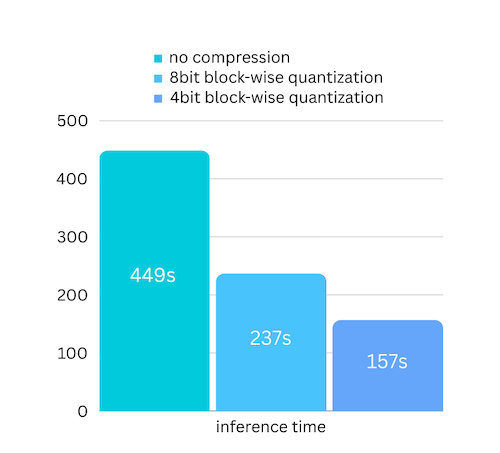
how to enalbe model compression speed up:
- Step 1. make sure you have bitsandbytes installed by
pip install -U bitsandbytes - Step 2. make sure airllm verion later than 2.0.0:
pip install -U airllm - Step 3. when initialize the model, passing the argument compression ('4bit' or '8bit'):
model = AirLLMLlama2("garage-bAInd/Platypus2-70B-instruct",
                     compression='4bit' # specify '8bit' for 8-bit block-wise quantization
                    )
4. All supported configurations
When initialize the model, we support the following configurations:
- compression: supported options: 4bit, 8bit for 4-bit or 8-bit block-wise quantization, or by default None for no compression
- profiling_mode: supported options: True to output time consumptions or by default False
- layer_shards_saving_path: optionally another path to save the splitted model
5. Supported Models
HF open llm leaderboard top models
@12/01/23
| Rank | Model | Supported |
|---|---|---|
| 1 | TigerResearch/tigerbot-70b-chat-v2 | ✅ |
| 2 | upstage/SOLAR-0-70b-16bit | ✅ |
| 3 | ICBU-NPU/FashionGPT-70B-V1.1 | ✅ |
| 4 | sequelbox/StellarBright | ✅ |
| 5 | bhenrym14/platypus-yi-34b | ✅ |
| 6 | MayaPH/GodziLLa2-70B | ✅ |
| 7 | 01-ai/Yi-34B | ✅ |
| 8 | garage-bAInd/Platypus2-70B-instruct | ✅ |
| 9 | jondurbin/airoboros-l2-70b-2.2.1 | ✅ |
| 10 | chargoddard/Yi-34B-Llama | ✅ |
opencompass leaderboard top models
@12/01/23
| Rank | Model | Supported |
|---|---|---|
| 1 | GPT-4 | closed.ai😓 |
| 2 | TigerResearch/tigerbot-70b-chat-v2 | ✅ |
| 3 | THUDM/chatglm3-6b-base | ⏰(adding, to accelerate😀) |
| 4 | Qwen/Qwen-14B | ⏰(adding, to accelerate😀) |
| 5 | 01-ai/Yi-34B | ✅ |
| 6 | ChatGPT | closed.ai😓 |
| 7 | OrionStarAI/OrionStar-Yi-34B-Chat | ✅ |
| 8 | Qwen/Qwen-14B-Chat | ⏰(adding, to accelerate😀) |
| 9 | Duxiaoman-DI/XuanYuan-70B | ✅ |
| 10 | internlm/internlm-20b | ⏰(adding, to accelerate😀) |
Acknowledgement
A lot of the code are based on SimJeg's great work in the Kaggle exam competition. Big shoutout to SimJeg:
GitHub account @SimJeg, the code on Kaggle, the associated discussion.
FAQ
1. MetadataIncompleteBuffer
safetensors_rust.SafetensorError: Error while deserializing header: MetadataIncompleteBuffer
If you run into this error, most possible cause is you run out of disk space. The process of splitting model is very disk-consuming. See this. You may need to extend your disk space, clear huggingface .cache and rerun.
如果你碰到这个error,很有可能是空间不足。可以参考一下这个 可能需要扩大硬盘空间,删除huggingface的.cache,然后重新run。
Contribution
Welcome contribution, ideas and discussions!
If you find it useful, please ⭐ or buy me a coffee! 🙏

1 maintainer

Metadata
1 maintainer
Release files for airllm 2.1.0
For a detailed explanation of source distributions (sdists) and built distributions (wheels), please see the package formats documentation.
Source distribution (sdist)
| File | Size | Uploaded | Provenance | Actions |
|---|---|---|---|---|
| airllm-2.1.0.tar.gz | 18.9 kB | Without provenance | Details for airllm-2.1.0.tar.gz |
Built distribution (wheel)
| File | Interpreter | ABI | Platform | Actions Reset |
|---|---|---|---|---|
| airllm-2.1.0-py3-none-any.whl | Python 3 | none | any | Details for airllm-2.1.0-py3-none-any.whl |
Total release size: 44.5 kB
Release files / airllm-2.1.0.tar.gz
| Download URL | airllm-2.1.0.tar.gz |
|---|---|
| Size | 18.9 kB |
| Tags | Source |
|
SHA-256 checksum How to use checksums |
97385141c7a828f0aa91f2e2fb4a59f45170bff4119a79a327585393577ca99c
|
|
BLAKE2b-256 checksum How to use checksums |
ef367ab9b11675ff1f1beb71733321bf1499f83cdab1d8afcc4bfa2059828005
|
| Upload date | |
|
Uploaded using Trusted Publishing? What is trusted publishing? |
No |
| Uploaded via |
twine/4.0.2 CPython/3.8.13
|
Release files / airllm-2.1.0-py3-none-any.whl
| Download URL | airllm-2.1.0-py3-none-any.whl |
|---|---|
| Size | 25.7 kB |
| Tags | Python 3 |
|
SHA-256 checksum How to use checksums |
2cf38b2b989cabd1bab0a1da6a3cd242215d20ecad348d84818152edc29150b1
|
|
BLAKE2b-256 checksum How to use checksums |
ec85da103a0293fa01d8c35d535688cb6ca86f32820e9fd6a4a1c396b6310b1e
|
| Upload date | |
|
Uploaded using Trusted Publishing? What is trusted publishing? |
No |
| Uploaded via |
twine/4.0.2 CPython/3.8.13
|
Security for airllm 2.1.0
Provenance
Provenance describes where a file came from. On PyPI, provenance is shared via attestations, which provide a verifiable record of the build or publishing details. View details, limitations and caveats.
No provenance found
None of the files in this release were uploaded with provenance metadata.
A note on package security
PyPI is a repository for distributing packages, not a service for auditing them. While third-party security researchers and our staff do their best to detect and remove malicious packages, PyPI cannot guarantee the quality, security or suitability of any given package.
To learn more about protecting yourself from malicious actors, visit our package security documentation.














