
AirLLM allows single 4GB GPU card to run 70B large language models without quantization, distillation or pruning.

Project description

AirLLM optimizes inference memory usage, allowing 70B large language models to run inference on a single 4GB GPU card. No quantization, distillation, pruning or other model compression techniques that would result in degraded model performance are needed.
AirLLM优化inference内存,4GB单卡GPU可以运行70B大语言模型推理。不需要任何损失模型性能的量化和蒸馏,剪枝等模型压缩。
Updates
[2023/12/25] v2.8: Support MacOS running 70B large language models.
支持苹果系统运行70B大模型!
[2023/12/20] v2.7: Support AirLLMMixtral.
[2023/12/20] v2.6: Added AutoModel, automatically detect model type, no need to provide model class to initialize model.
提供AuoModel,自动根据repo参数检测模型类型,自动初始化模型。
[2023/12/18] v2.5: added prefetching to overlap the model loading and compute. 10% speed improvement.
[2023/12/03] added support of ChatGLM, QWen, Baichuan, Mistral, InternLM!
支持ChatGLM, QWEN, Baichuan, Mistral, InternLM!
[2023/12/02] added support for safetensors. Now support all top 10 models in open llm leaderboard.
支持safetensor系列模型,现在open llm leaderboard前10的模型都已经支持。
[2023/12/01] airllm 2.0. Support compressions: 3x run time speed up!
airllm2.0。支持模型压缩,速度提升3倍。
[2023/11/20] airllm Initial verion!
airllm发布。
Table of Contents
- Quick start
- Model Compression
- Configurations
- Run on MacOS
- Example notebooks
- Supported Models
- Acknowledgement
- FAQ
Quickstart
1. install package
First, install airllm pip package.
首先安装airllm包。
pip install airllm
如果找不到package,可能是因为默认的镜像问题。可以尝试制定原始镜像:
pip install -i https://pypi.org/simple/ airllm
2. Inference
Then, initialize AirLLMLlama2, pass in the huggingface repo ID of the model being used, or the local path, and inference can be performed similar to a regular transformer model.
然后,初始化AirLLMLlama2,传入所使用模型的huggingface repo ID,或者本地路径即可类似于普通的transformer模型进行推理。
(You can can also specify the path to save the splitted layered model through layer_shards_saving_path when init AirLLMLlama2.
如果需要指定另外的路径来存储分层的模型可以在初始化AirLLMLlama2是传入参数:layer_shards_saving_path。)
from airllm import AutoModel

MAX_LENGTH = 128
# could use hugging face model repo id:
model = AutoModel.from_pretrained("garage-bAInd/Platypus2-70B-instruct")

# or use model's local path...
#model = AutoModel.from_pretrained("/home/ubuntu/.cache/huggingface/hub/models--garage-bAInd--Platypus2-70B-instruct/snapshots/b585e74bcaae02e52665d9ac6d23f4d0dbc81a0f")

input_text = [
        'What is the capital of United States?',
        #'I like',
    ]

input_tokens = model.tokenizer(input_text,
    return_tensors="pt",
    return_attention_mask=False,
    truncation=True,
    max_length=MAX_LENGTH,
    padding=False)

generation_output = model.generate(
    input_tokens['input_ids'].cuda(),
    max_new_tokens=20,
    use_cache=True,
    return_dict_in_generate=True)

output = model.tokenizer.decode(generation_output.sequences[0])

print(output)
Note: During inference, the original model will first be decomposed and saved layer-wise. Please ensure there is sufficient disk space in the huggingface cache directory.
注意:推理过程会首先将原始模型按层分拆,转存。请保证huggingface cache目录有足够的磁盘空间。
Model Compression - 3x Inference Speed Up!
We just added model compression based on block-wise quantization based model compression. Which can further speed up the inference speed for up to 3x , with almost ignorable accuracy loss! (see more performance evaluation and why we use block-wise quantization in this paper)
我们增加了基于block-wise quantization的模型压缩,推理速度提升3倍几乎没有精度损失。精度评测可以参考此paper:this paper
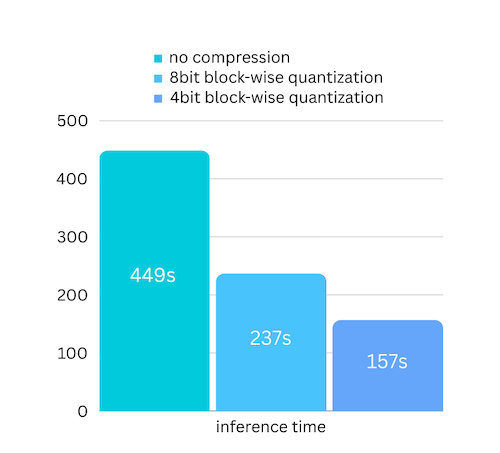
how to enalbe model compression speed up:
- Step 1. make sure you have bitsandbytes installed by
pip install -U bitsandbytes - Step 2. make sure airllm verion later than 2.0.0:
pip install -U airllm - Step 3. when initialize the model, passing the argument compression ('4bit' or '8bit'):
model = AutoModel.from_pretrained("garage-bAInd/Platypus2-70B-instruct",
                     compression='4bit' # specify '8bit' for 8-bit block-wise quantization
                    )
how model compression here is different from quantization?
Quantization normally needs to quantize both weights and activations to really speed things up. Which makes it harder to maintain accuracy and avoid the impact of outliers in all kinds of inputs.
While in our case the bottleneck is mainly at the disk loading, we only need to make the model loading size smaller. So we get to only quantize the weights part, which is easier to ensure the accuracy.
Configurations
When initialize the model, we support the following configurations:
初始化model的时候,可以指定以下的配置参数:
- compression: supported options: 4bit, 8bit for 4-bit or 8-bit block-wise quantization, or by default None for no compression
- profiling_mode: supported options: True to output time consumptions or by default False
- layer_shards_saving_path: optionally another path to save the splitted model
- hf_token: huggingface token can be provided here if downloading gated models like: meta-llama/Llama-2-7b-hf
- prefetching: prefetching to overlap the model loading and compute. By default turned on. For now only AirLLMLlama2 supports this.
MacOS
Just install airllm and run the code the same as on linux. See more in Quick Start.
- make sure you installed mlx and torch
- you probabaly need to install python native see more here
- only Apple silicon is supported
Example python notebook
Example Python Notebook
Example colabs here:

Supported Models
HF open llm leaderboard top models
Including but not limited to the following: (Most of the open models are based on llama2, so should be supported by default)
@12/01/23
| Rank | Model | Supported | Model Class |
|---|---|---|---|
| 1 | TigerResearch/tigerbot-70b-chat-v2 | ✅ | AirLLMLlama2 |
| 2 | upstage/SOLAR-0-70b-16bit | ✅ | AirLLMLlama2 |
| 3 | ICBU-NPU/FashionGPT-70B-V1.1 | ✅ | AirLLMLlama2 |
| 4 | sequelbox/StellarBright | ✅ | AirLLMLlama2 |
| 5 | bhenrym14/platypus-yi-34b | ✅ | AirLLMLlama2 |
| 6 | MayaPH/GodziLLa2-70B | ✅ | AirLLMLlama2 |
| 7 | 01-ai/Yi-34B | ✅ | AirLLMLlama2 |
| 8 | garage-bAInd/Platypus2-70B-instruct | ✅ | AirLLMLlama2 |
| 9 | jondurbin/airoboros-l2-70b-2.2.1 | ✅ | AirLLMLlama2 |
| 10 | chargoddard/Yi-34B-Llama | ✅ | AirLLMLlama2 |
| ? | mistralai/Mistral-7B-Instruct-v0.1 | ✅ | AirLLMMistral |
| ? | mistralai/Mixtral-8x7B-v0.1 | ✅ | AirLLMMixtral |
opencompass leaderboard top models
Including but not limited to the following: (Most of the open models are based on llama2, so should be supported by default)
@12/01/23
| Rank | Model | Supported | Model Class |
|---|---|---|---|
| 1 | GPT-4 | closed.ai😓 | N/A |
| 2 | TigerResearch/tigerbot-70b-chat-v2 | ✅ | AirLLMLlama2 |
| 3 | THUDM/chatglm3-6b-base | ✅ | AirLLMChatGLM |
| 4 | Qwen/Qwen-14B | ✅ | AirLLMQWen |
| 5 | 01-ai/Yi-34B | ✅ | AirLLMLlama2 |
| 6 | ChatGPT | closed.ai😓 | N/A |
| 7 | OrionStarAI/OrionStar-Yi-34B-Chat | ✅ | AirLLMLlama2 |
| 8 | Qwen/Qwen-14B-Chat | ✅ | AirLLMQWen |
| 9 | Duxiaoman-DI/XuanYuan-70B | ✅ | AirLLMLlama2 |
| 10 | internlm/internlm-20b | ✅ | AirLLMInternLM |
| 26 | baichuan-inc/Baichuan2-13B-Chat | ✅ | AirLLMBaichuan |
example of other models (ChatGLM, QWen, Baichuan, Mistral, etc):
- ChatGLM:
from airllm import AutoModel
MAX_LENGTH = 128
model = AutoModel.from_pretrained("THUDM/chatglm3-6b-base")
input_text = ['What is the capital of China?',]
input_tokens = model.tokenizer(input_text,
    return_tensors="pt",
    return_attention_mask=False,
    truncation=True,
    max_length=MAX_LENGTH,
    padding=True)
generation_output = model.generate(
    input_tokens['input_ids'].cuda(),
    max_new_tokens=5,
    use_cache= True,
    return_dict_in_generate=True)
model.tokenizer.decode(generation_output.sequences[0])
- QWen:
from airllm import AutoModel
MAX_LENGTH = 128
model = AutoModel.from_pretrained("Qwen/Qwen-7B")
input_text = ['What is the capital of China?',]
input_tokens = model.tokenizer(input_text,
    return_tensors="pt",
    return_attention_mask=False,
    truncation=True,
    max_length=MAX_LENGTH)
generation_output = model.generate(
    input_tokens['input_ids'].cuda(),
    max_new_tokens=5,
    use_cache=True,
    return_dict_in_generate=True)
model.tokenizer.decode(generation_output.sequences[0])
- Baichuan, InternLM, Mistral, etc:
from airllm import AutoModel
MAX_LENGTH = 128
model = AutoModel.from_pretrained("baichuan-inc/Baichuan2-7B-Base")
#model = AutoModel.from_pretrained("internlm/internlm-20b")
#model = AutoModel.from_pretrained("mistralai/Mistral-7B-Instruct-v0.1")
input_text = ['What is the capital of China?',]
input_tokens = model.tokenizer(input_text,
    return_tensors="pt",
    return_attention_mask=False,
    truncation=True,
    max_length=MAX_LENGTH)
generation_output = model.generate(
    input_tokens['input_ids'].cuda(),
    max_new_tokens=5,
    use_cache=True,
    return_dict_in_generate=True)
model.tokenizer.decode(generation_output.sequences[0])
To request other model support: here
Acknowledgement
A lot of the code are based on SimJeg's great work in the Kaggle exam competition. Big shoutout to SimJeg:
GitHub account @SimJeg, the code on Kaggle, the associated discussion.
FAQ
8.1. MetadataIncompleteBuffer
safetensors_rust.SafetensorError: Error while deserializing header: MetadataIncompleteBuffer
If you run into this error, most possible cause is you run out of disk space. The process of splitting model is very disk-consuming. See this. You may need to extend your disk space, clear huggingface .cache and rerun.
如果你碰到这个error,很有可能是空间不足。可以参考一下这个 可能需要扩大硬盘空间,删除huggingface的.cache,然后重新run。
8.2. ValueError: max() arg is an empty sequence
Most likely you are loading QWen or ChatGLM model with Llama2 class. Try the following:
For QWen model:
from airllm import AutoModel #<----- instead of AirLLMLlama2
AutoModel.from_pretrained(...)
For ChatGLM model:
from airllm import AutoModel #<----- instead of AirLLMLlama2
AutoModel.from_pretrained(...)
8.3. 401 Client Error....Repo model ... is gated.
Some models are gated models, needs huggingface api token. You can provide hf_token:
model = AutoModel.from_pretrained("meta-llama/Llama-2-7b-hf", #hf_token='HF_API_TOKEN')
8.4. ValueError: Asking to pad but the tokenizer does not have a padding token.
Some model's tokenizer doesn't have padding token, so you can set a padding token or simply turn the padding config off:
input_tokens = model.tokenizer(input_text,
   return_tensors="pt",
   return_attention_mask=False,
   truncation=True,
   max_length=MAX_LENGTH,
   padding=False  #<-----------   turn off padding
)
Contribution
Welcome contribution, ideas and discussions!
If you find it useful, please ⭐ or buy me a coffee! 🙏

Release history Release notifications | RSS feed


Download files
Download the file for your platform. If you're not sure which to choose, learn more about installing packages.
Source Distribution
Built Distribution
Filter files by name, interpreter, ABI, and platform.
If you're not sure about the file name format, learn more about wheel file names.
Copy a direct link to the current filters
File details
Details for the file airllm-2.8.tar.gz.
File metadata
- Download URL: airllm-2.8.tar.gz
- Upload date:
- Size: 34.3 kB
- Tags: Source
- Uploaded using Trusted Publishing? No
- Uploaded via: twine/4.0.2 CPython/3.7.3
File hashes
| Algorithm | Hash digest | |
|---|---|---|
| SHA256 |
4cc96f19f62841bf63ffea3f0bd69d036791b7b1b5e9e8bd27dc1729db13e541
|
|
| MD5 |
2b79685b923148aaa7bf3ae07b07919e
|
|
| BLAKE2b-256 |
b82af65d4e6e6e2c32f9ba2d5979d255e6734441073380b870ae2ac43910dd9e
|
File details
Details for the file airllm-2.8-py3-none-any.whl.
File metadata
- Download URL: airllm-2.8-py3-none-any.whl
- Upload date:
- Size: 41.1 kB
- Tags: Python 3
- Uploaded using Trusted Publishing? No
- Uploaded via: twine/4.0.2 CPython/3.7.3
File hashes
| Algorithm | Hash digest | |
|---|---|---|
| SHA256 |
e825f2662cc58e53e64ba67fcd1e2b1ff3b84ba093091749c48add648a15229e
|
|
| MD5 |
25dd1e0be88901f5f4ee58c830ebe128
|
|
| BLAKE2b-256 |
1444a0372f4f7aac8860a7d0e417d5a62ab073e406c70bd5fc2cf47f3bd2a681
|






