

Aksara
An AI-native Python backend framework for async PostgreSQL apps.
Define your model once and generate REST APIs, migrations, Studio/admin surfaces, diagnostics, and MCP tools — with runtime field enforcement, tenant-aware policies, and release-trust security controls.



What is Aksara?
Aksara is an AI-native backend framework for building PostgreSQL-powered APIs with automatic REST endpoints, migrations, Admin, an experimental Studio UI, generated MCP tools, and launch diagnostics.
Current release documented here: v0.6.0 — Production Mode.
The v0.5.55 correctness candidate and v0.6.0 release-candidate evidence remain available as historical validation records. See the supported runtime contract.
The release provides a bounded Production Mode contract, strict release diagnostics, restricted-role tenant and abuse gates, and a packaged support desk reference app. It includes official-SDK MCP Streamable HTTP execution with the same authorization, tenancy, field-policy, transaction, and RLS boundary as generated REST. Studio AI internals, process-local investigation sessions, provider-specific behavior, and autonomous agent workflows remain experimental.
What Aksara Does
You define a model once. Aksara generates everything else from it:
from aksara import Aksara, Model, fields
from aksara.api import ModelViewSet, action

class Incident(Model):
    title = fields.String(
        max_length=200,
        ai_description="Short summary of the incident",
    )
    severity = fields.String(
        choices=["low", "medium", "high", "critical"],
        ai_description="Impact level for triage priority",
    )
    resolved = fields.Boolean(
        default=False,
        ai_agent_writable=False,  # AI agents can read this but not flip it
    )
    notes = fields.Text(
        ai_description="Internal investigation notes",
        ai_sensitive=True,        # Excluded from AI context by default
    )

class IncidentViewSet(ModelViewSet):
    model = Incident
    prefix = "/incidents"

    @action(detail=True, methods=["POST"], ai_exposed=True)
    async def escalate(self, pk: str, request):
        """
        Escalate incident to critical.
        This custom action is automatically exposed as an MCP tool.
        """
        incident = await self.model.objects.get(id=pk)
        incident.severity = "critical"
        await incident.save()
        return {"status": "escalated"}

app = Aksara(database_url="postgresql://localhost/myapp")
app.register_viewsets([IncidentViewSet])
From this single definition, you get:
| What | Where |
|---|---|
| REST API | GET/POST/PATCH/DELETE /incidents/ |
| Real-time stream | GET /incidents/stream — subscribe to insert/update/delete events via SSE |
| MCP protocol server | /mcp/ — clients discover and invoke permitted generated tools over Streamable HTTP |
| AI Console | /studio/ui → natural-language queries against your live backend |
| Studio dashboard | /studio/ui — models, routes, queries, migrations, diagnostics |
| Admin UI | /admin/ |
| Database table | aksara migrate |
The ai_description, ai_sensitive, and ai_agent_writable metadata flows
into AI context and generated MCP schemas automatically. Each MCP invocation
uses the same generated application authorization and persistence path as REST.
Quickstart
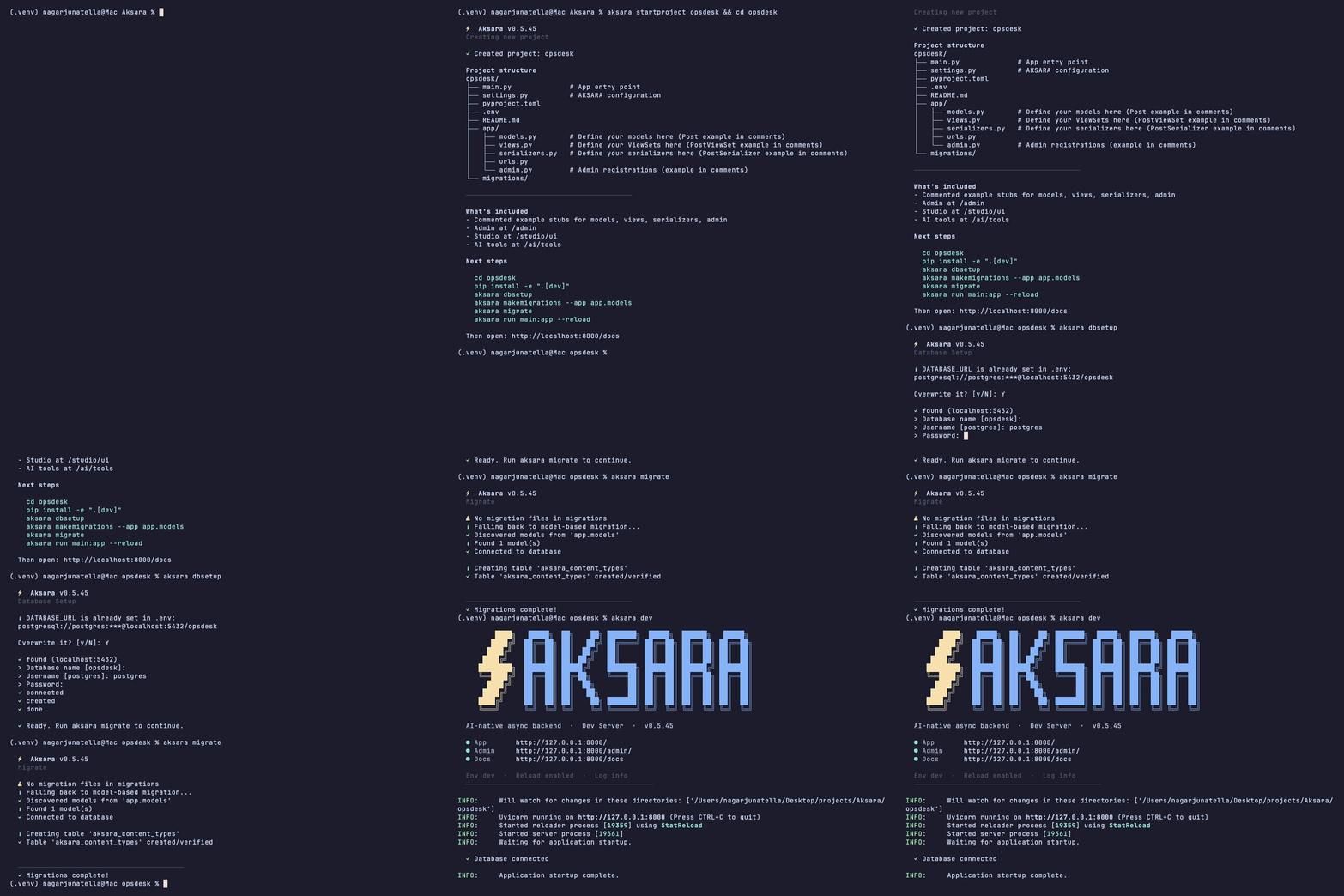
10-Minute Quickstart
pip install aksara-framework
aksara startproject opsdesk && cd opsdesk
aksara dbsetup
aksara migrate
aksara doctor launch-check
aksara dev
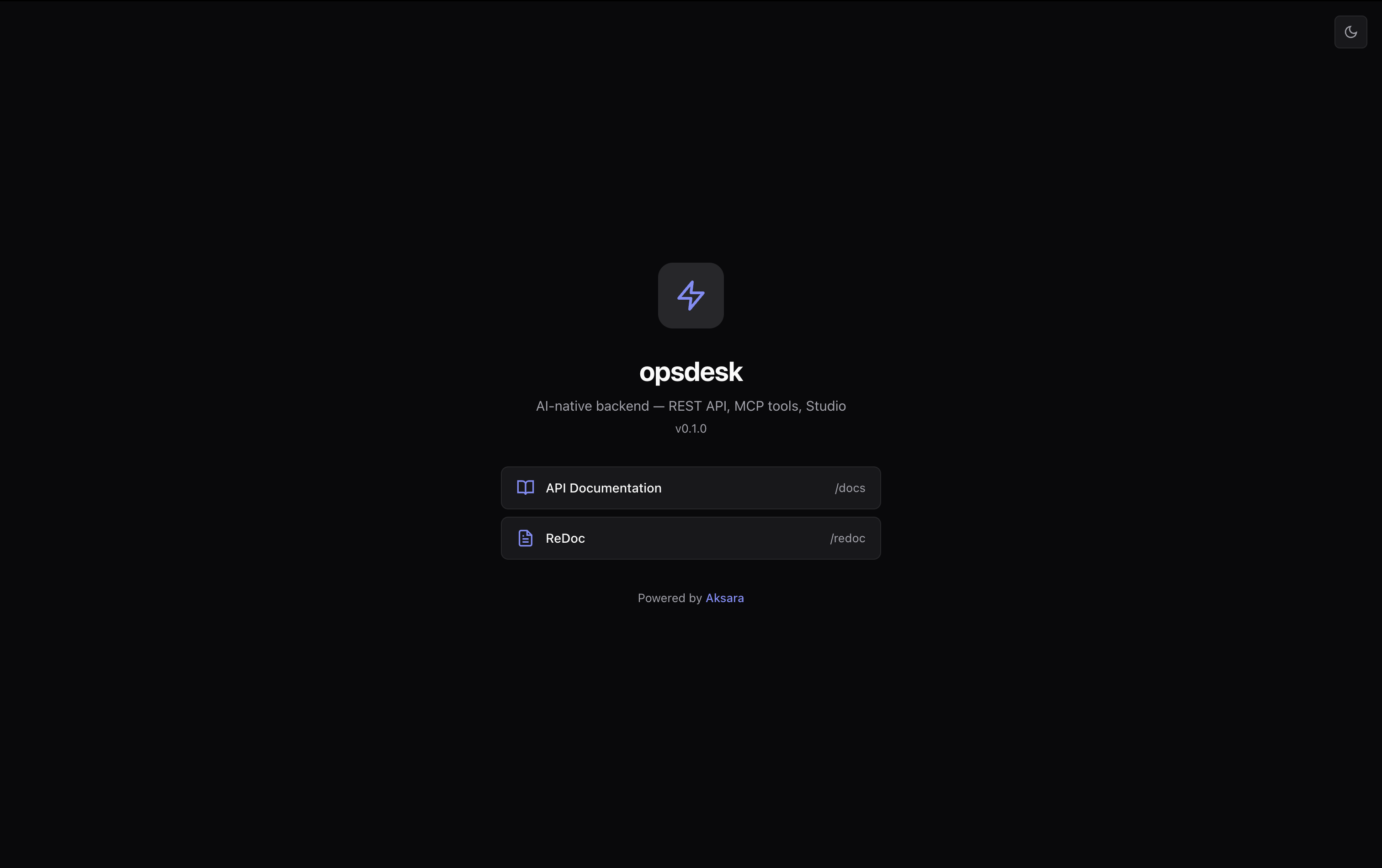
The auto-generated welcome page every new project starts with — API docs, ReDoc, and Studio links built in.
Now open three things:
| What to try | URL / Command |
|---|---|
| API docs | http://127.0.0.1:8000/docs — inspect generated OpenAPI |
| Studio + AI Console | http://127.0.0.1:8000/studio/ui — ask "explain the Incident model" |
| MCP server | http://127.0.0.1:8000/mcp/ — connect an MCP Streamable HTTP client |
| Launch check | aksara doctor launch-check — verify project, DB, Studio, MCP, AI, examples, and dev-mode readiness |
| Fix plan | aksara doctor fix-plan — diagnose and print the remediation path |
That's what makes Aksara different from pip install fastapi && pip install sqlalchemy && .... The AI and diagnostic surfaces exist from the first aksara dev.
Aksara is built on FastAPI, so you get its performance and full ecosystem out of the box. The rest — ORM, migrations, admin, Studio, MCP export, AI Console, doctor — is what you'd otherwise spend a sprint assembling yourself. I did that part for you.
Open Studio
Studio lives at http://127.0.0.1:8000/studio/ui. It gives you models, routes, query tools, migrations, diagnostics, AI Console, AI Inspector, Project Graph, Architecture Review, Performance Analyzer, Investigation Sessions, and Daily Briefing from the same running app.
If the first run is incomplete, Studio now surfaces clearer states for missing database configuration, pending migrations, missing AI provider setup, and project graph availability.
Use AI
AI features are optional on day one. You can run the framework, inspect Studio, browse API docs, and view MCP output without OpenAI, Anthropic, Azure, or Ollama.
When you want AI features:
aksara ai-hub status
aksara ai-hub configure
For a local-first path, use Ollama:
ollama serve
ollama pull llama3
Use MCP
Aksara exposes generated tools over Streamable HTTP at
http://127.0.0.1:8000/mcp/. ViewSets, model fields, custom @action
endpoints, and AI metadata define the schemas. The server negotiates MCP,
rechecks the principal and policy at invocation, then uses the generated API,
transaction, tenant context, and PostgreSQL RLS path. The inspection catalog
remains at /ai/tools/mcp.
Core Features
| Feature | What it does | |
|---|---|---|
| 🔌 | MCP server | Generated tools over official-SDK Streamable HTTP at /mcp/ |
| 💬 | AI Console | Natural-language queries against your live backend in Studio |
| 🩺 | Doctor & Fix Plans | aksara doctor fix-plan diagnoses DB, migrations, AI config, security — prints the fix sequence |
| 🐛 | AI Debugger | Root-cause analysis: issue clustering, heuristic patterns, confidence-ranked causes |
| 🏗️ | Architecture Review | Automated health scoring (A–F), coupling/schema/API findings |
| 📊 | Performance Analyzer | Detects slow queries, N+1, missing indexes, heavy joins |
| ⚡ | AI Flows | In-context AI actions for models, routes, queries, migrations with risk badges |
| 🗄️ | Async ORM | Postgres-first: models, typed fields, relations, migrations, asyncpg |
| 🔁 | Auto-REST | ModelViewSet → full CRUD endpoints, serializers, pagination |
| 🏢 | Native Multi-Tenancy | TenantModel + PostgreSQL RLS + tenant-aware connection context |
| 🗂️ | Media Storage | FileField / ImageField + FieldFile helpers + filesystem or S3-backed storage |
| ✉️ | Async Email | Console, locmem, and SMTP backends with send_mail() and send_mass_mail() |
| 🌐 | i18n & Timezones | LocaleMiddleware, TimezoneMiddleware, lazy _() strings, and UTC-normalized datetime storage |
| 🔗 | Generic Relations | fields.GenericForeignKey() with auto-managed ContentType resolution across registered models |
| ♻️ | Durable Workflows | DurableStep persists successful step results in PostgreSQL and reuses them on resume |
| 🧵 | Background Tasks | @task, enqueue_task(), and TaskWorker provide PostgreSQL-backed jobs with retries |
| 🧠 | JSONB + Vectors | Nested JSON path filters plus fields.Vector() and cosine/euclidean distance expressions |
| 📦 | TypeScript SDK | aksara generate sdk --language typescript builds a typed fetch client from your ViewSets |
| 📡 | Real-Time Streams | GET /<prefix>/stream emits model lifecycle events through tenant-safe SSE |
| 🖥️ | Studio | Built-in web UI at /studio/ui — inspect models, routes, queries, migrations |
| 🛡️ | Admin | Browse and edit data without extra setup |
| 🔎 | Semantic Search | ⌘K spotlight across models, routes, settings, playbooks |
Why Aksara?
Because the first ten minutes of a backend project should prove the system works, not force you to assemble the same stack again. Aksara gives you the database layer, API layer, Studio, AI context, tool catalog, diagnostics, and example paths together, while keeping the model definition as the source of truth.
The Aksara Difference
Most frameworks stop at the database and the HTTP layer. You define a model, you get a table and an endpoint. Aksara keeps going.
The same ai_description="Short summary of the incident" you put on a field:
- Describes the column for any developer reading the code
- Appears as an MCP tool at
/mcp/so protocol clients can discover and invoke the permitted operation. Custom ViewSet endpoints using@actioncan also appear. - Populates the AI Console context so you can type "show me all critical unresolved incidents" in Studio and the AI knows which fields to query
- Drives the Schema Doctor which checks that your AI metadata is complete and consistent
ai_agent_writable=False on resolved means the MCP catalog marks that field read-only — an AI agent can see it but can't change it. ai_sensitive=True on notes excludes it from AI context entirely.
You write this metadata once, next to the field definition, and it propagates to the generated REST and MCP surfaces.
Security-First Generated Surfaces
Generated surfaces are security boundaries. A generated OpenAPI schema, an MCP tool catalog, a Studio admin view — these all face external callers, and they all multiply exposure. Aksara's approach is to keep the security boundary server-side rather than trusting the generated schema to stop bad input.
Principal model. Covered request paths resolve to an immutable Principal
representing an anonymous caller, human user, AI/MCP agent, or trusted system
operation. The PolicyEngine makes authorization decisions per principal:
which actions, fields, and rows are allowed.
Runtime field enforcement. Generated write paths enforce field policy at
runtime before the database write. A field marked ai_agent_writable=False is
not only hidden from the MCP schema — it is actively blocked when an AI agent
sends it in a payload. The rejection is explicit: a 403 with denied_fields in
the response, not a silent strip.
Tenant isolation. Tenant-aware models carry PolicyEngine.query_filter()
that scopes every queryset to the caller's tenant. tenant_id mutation is
blocked on covered write paths. Adversarial tests cover cross-tenant access,
missing tenant context, and forged tenant headers.
MCP/AI credential boundaries. MCP is disabled by default. When enabled,
credential helpers validate scopes, audience, tenant binding, and expiration.
AI agents resolve to AIAgent principals and can be made more restrictive than
human user principals for the same resource.
Fuzz coverage. Generated filter parameters, ordering fields, serializer inputs, and migration identifiers have bounded adversarial test coverage. The goal is to catch generation logic bugs before they reach callers.
Release trust. Security CI, release gates, CodeQL, dependency audit, SBOM generation, and PyPI Trusted Publishing are in place. They make the release process observable, not just the code. See the Release Security guide for the gate criteria.
The v0.6 release supports real production backends only within the documented stability and production contract. See the Security Overview for the current posture and known limitations.
Migration Safety
File-based Aksara migrations are applied through a canonical executor that uses
PostgreSQL advisory locks, per-migration transactions, checksum verification, SQL
statement splitting, cycle detection, and clearer failure reporting. The CLI and
the testing helpers share that executor for file-based runs, so local, CI, and
production file-based runs get the same guarantees. When no migration files
exist, aksara migrate can still use a legacy model-based bootstrap fallback;
that path is intended for initial/simple setup and does not provide the full
file-based migration integrity model.
See the Migration Safety guide for details.
Patterns & Examples
The bundled examples are the golden paths for learning and launch validation:
| Example | Use Case | Where to start |
|---|---|---|
| basic_app | Smallest working Aksara app | examples/basic_app/ |
| Blog | Posts, comments, publish workflow; models, relations, APIs, Studio, MCP | aksara startproject myblog --template blog |
| CRM | Customers, deals, pipeline stages; business data model and reporting patterns | aksara startproject mycrm --template crm |
| Multitenant | Tenant-aware SaaS apps and tenant-aware app structure | aksara startproject saas --template multitenant |
| AI Providers | BYO LLM wiring examples; local and remote AI setup with no secrets | examples/ai_providers/ |
| Support Desk | Packaged production profile: auth, forced-RLS tenancy, tasks, Doctor, recovery | examples/support_desk/ |
Browse: examples/ | Docs: Patterns
Validate the examples in a source checkout:
aksara examples validate
aksara examples validate --format json
Documentation
| Section | Description |
|---|---|
| Quickstart | Build and deploy in 5 minutes |
| Getting Started | Install, first project, Studio, AI, MCP, examples |
| ORM Guide | Models, fields, relations, queries |
| API Guide | ViewSets, actions, serializers |
| Advanced Guide | Background tasks, media/email, i18n, generic relations |
| AI Mode | MCP, AI Console, Debugger, Architecture Review |
| Security Guide | Security posture, hardening, tenant isolation, MCP boundaries |
| Studio Guide | Visual inspector & debugging |
| Admin Guide | Admin site customization |
| CLI Reference | All CLI commands, including SDK generation |
Roadmap
Current release: v0.6.0 — Production Mode.
Release milestones:
| Version | Focus |
|---|---|
| v0.5.55 | Historical unpublished correctness/hardening candidate |
| v0.6.0 | Production Mode within the documented stable contract |
See the Roadmap for the full release path.
Status
Aksara is pre-1.0 and actively evolving. Current version: 0.6.0
(v0.6.0 release label).
Stable in the v0.6 contract: the documented ORM and migration core, generated REST APIs and serializers, authentication, Principal propagation, permissions and PolicyEngine enforcement, restricted-role tenant isolation, CLI and Doctor production surfaces, generated MCP discovery and execution over Streamable HTTP, execution-time authorization, field-write enforcement, bounded approval grants, deterministic audit events, structured tool errors, and runtime execution limits.
Experimental or unsupported: planner behavior, Studio AI internals, AI analysis and provider-specific behavior, process-local investigation sessions, persistent AI conversations, agent memory, multi-agent and durable autonomous workflows, lazy relation-object loading, and custom through models. See the full contract.
Release trust: Security and release-gate workflows cover dependency audit, static analysis, secret scanning, SBOM generation, package verification, and Trusted Publishing. This evidence does not represent external security review or certification.
See the Roadmap for what's next.
Contributing
Please read the Contributing Guide and follow the Code of Conduct.
- Check existing issues or open a new one.
- Fork the repo and create a feature branch.
- Run tests and docs checks relevant to your change.
- Submit a pull request using the project template.
Community


License
A note from the author
Hello my fellow builder!
You didn't start any project because you wanted to spend a week wiring up an ORM, migrations, admin, AI adapters, and debugging surfaces. You started because you have something you want to build, and every hour spent on infrastructure is an hour further from that.
Aksara is my attempt to get you past that part faster. Not by hiding the complexity, but by making the right defaults obvious so you can spend your attention on what actually matters to you.
That said, a framework is a long chain of judgment calls. What should be automatic? What should stay explicit? When does "helpful" become too much magic? I've made those calls with care, but I can only see what I've seen. The gaps I don't know about yet are the ones that will cost you an hour when you hit them.
That's why your experience matters here. The rough edge you found. The docs that didn't explain the thing you needed. The feature that clicked immediately. The place where Aksara got out of your way and let you move. That signal is what makes this better.
So if you decide to build with it, I want to hear what you ran into:
- Open an issue on GitHub, even a rough one. "This didn't work and I'm not sure why" is more useful than a polished bug report.
- Show me what you're building. A link, a screenshot, a one line description, I read every one.
- Tell me what tipped the scale, if you started here and moved to something else. That kind of honesty is how good frameworks get made.
Aksara is pre-1.0 on purpose. I don't want 1.0 to be a monument to my assumptions, I want it to reflect the shape of what you actually tried to ship with it. If you're one of the people who tries, you're not just a user. You're a co-author of where this lands.
Thanks for taking the time to look.
Nagarjuna
Built with ❤️ by Nagarjuna Tella.
1 maintainer

Release files for aksara-framework 0.6.0
For a detailed explanation of source distributions (sdists) and built distributions (wheels), please see the package formats documentation.
Source distribution (sdist)
| File | Size | Uploaded | |
|---|---|---|---|
| aksara_framework-0.6.0.tar.gz | 3.6 MB | Details |
Built distribution (wheel)
| File | Interpreter | ABI | Platform | Reset |
|---|---|---|---|---|
| aksara_framework-0.6.0-py3-none-any.whl | Python 3 | none | any | Details |
Total release size: 4.5 MB
Release files / aksara_framework-0.6.0.tar.gz
| Download URL | aksara_framework-0.6.0.tar.gz |
|---|---|
| Size | 3.6 MB |
| Tags | Source |
|
SHA-256 checksum How to use checksums |
a92de2f4d4603a7495789891f7ca33265c8ca2d80cc4355df131ce3b382e1c79
|
|
BLAKE2b-256 checksum How to use checksums |
ad64d148417ba330b19d7520cdba3d39373bf987f014a94ac9f9801380f78e48
|
| Upload date | |
|
Uploaded using Trusted Publishing? What is trusted publishing? |
Yes |
| Uploaded via |
twine/7.0.0 CPython/3.13.14
|
Provenance
Provenance describes where a file came from. On PyPI, provenance is shared via attestations, which provide a verifiable record of the build or publishing details. View details, limitations and caveats.


PyPI Publish Attestation
PyPI verified that this artifact, at this checksum, originated from the publisher listed below.
Signed by GitHub Actions, verified by PyPI on Sep 10, 2026.
Transparency logRelease files / aksara_framework-0.6.0-py3-none-any.whl
| Download URL | aksara_framework-0.6.0-py3-none-any.whl |
|---|---|
| Size | 930.4 kB |
| Tags | Python 3 |
|
SHA-256 checksum How to use checksums |
d4fa02c13e25a3acdb97099c46dec1e2e15727f561bb4955a96ce9d01a6d152d
|
|
BLAKE2b-256 checksum How to use checksums |
eeae0e2ec25718b8c8f2e7cc5c474718a18c36e4bd5b0471c08c391ee1cb3003
|
| Upload date | |
|
Uploaded using Trusted Publishing? What is trusted publishing? |
Yes |
| Uploaded via |
twine/7.0.0 CPython/3.13.14
|
Provenance
Provenance describes where a file came from. On PyPI, provenance is shared via attestations, which provide a verifiable record of the build or publishing details. View details, limitations and caveats.
PyPI Publish Attestation
PyPI verified that this artifact, at this checksum, originated from the publisher listed below.
Signed by GitHub Actions, verified by PyPI on Sep 10, 2026.
Transparency log













