
Aliasr


Aliasr is a modern, feature-rich TUI launcher for penetration testing commands inspired by Arsenal, but with significantly improved functionality.
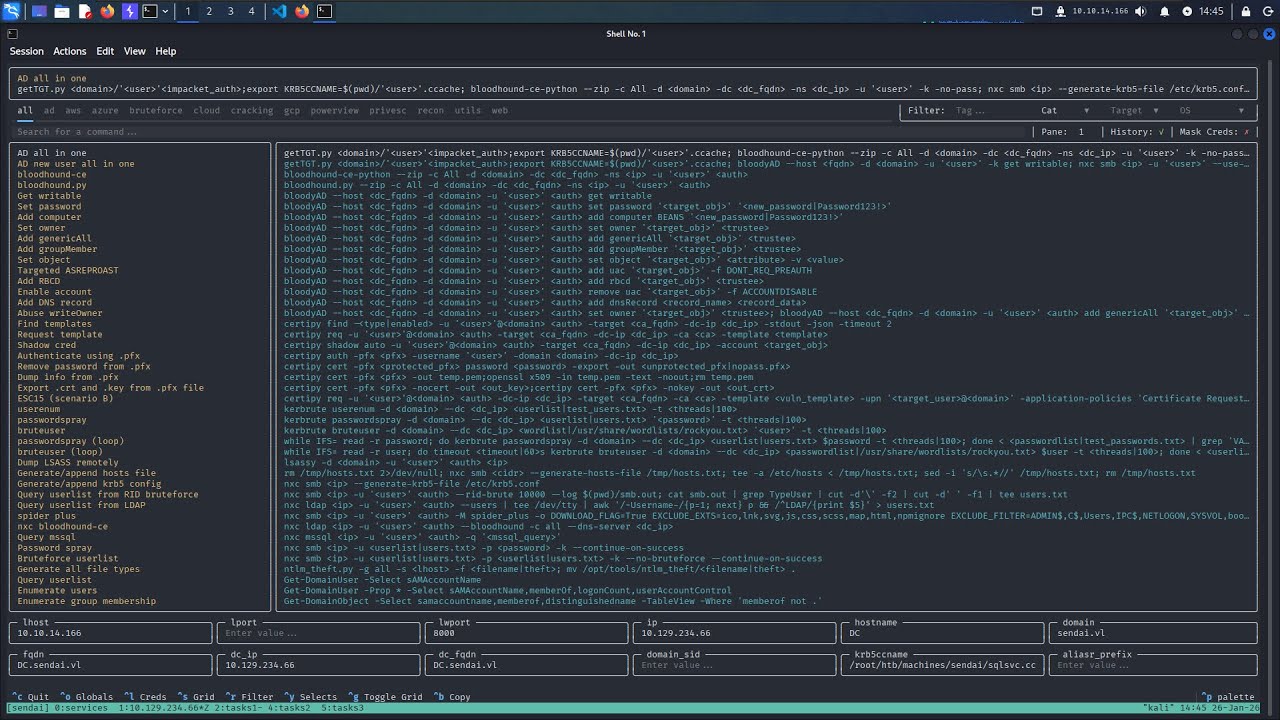
Features
Some of the largest improvements Aliasr implements include:
- Significantly expanded tmux integration.
- Cheat variations that allow for different authentication methods to be built into a single parameter.
- Automatic parameter population based on history and other sources.
- Exegol-history (SQLite) integration for credential and host management.
- NetExec (
nxcdb) integration - credentials and hosts are pulled in on startup and kept in sync. - A built-in
scanthat fingerprints a target with NetExec and auto-fills your globals.
Documentation
Full documentation lives in the wiki, which serves as a table of contents for the detailed guides:
- Commands - the
audit,send,scan,list, andclearsubcommands - Cheats - the cheat markdown format, placeholders, and tags
- Variations - per-parameter command variations
- Configuration - the config file, precedence, options, and project setups
- Credentials & Hosts - Exegol-history and NetExec sync, and the in-app menu
Install
# Latest release (PyPI)
uv tool install aliasr
pipx install aliasr

# Latest commit (GitHub)
uv tool install git+https://github.com/Mojo8898/aliasr
pipx install git+https://github.com/Mojo8898/aliasr
Add the following to your ~/.zshrc to wrap aliasr in a shell function, so the credential and host you select follow you into your shell:
function a { aliasr "$@" && exec zsh }
aliasr records the credential and host you build with as Exegol-history's current credential/host, writing them to its profile.sh. The && exec zsh re-sources your shell when aliasr exits, so those values refresh live instead of on the next new shell. This relies on Exegol-history's profile.sh being sourced by your shell; the prompt setup below does that and also surfaces the current credential. See aliasr's Credentials & Hosts guide for the full picture.
Add the following to your ~/.zshrc to source profile.sh and show the current USER (and DOMAIN, when set) in your prompt. It overrides Kali's default configure_prompt:
[ -f ~/.exegol_history/profile.sh ] && source ~/.exegol_history/profile.sh
export U="$USER" P="$PASSWORD" H="$NT_HASH" D="$DOMAIN" I="$IP"

configure_prompt() {
    local db_prompt=""
    if [[ -n "$USER" ]] && grep -q '^export USER=' ~/.exegol_history/profile.sh 2>/dev/null; then
        if [[ -n "$DOMAIN" ]]; then
            db_prompt="%F{white}[%F{yellow}${USER}@${DOMAIN}%F{white}]%F{%(#.blue.green)}─"
        else
            db_prompt="%F{white}[%F{yellow}${USER}%F{white}]%F{%(#.blue.green)}─"
        fi
    fi

    case "$PROMPT_ALTERNATIVE" in
        twoline)
            PROMPT=$'%F{%(#.blue.green)}┌──'"${db_prompt}"$'${debian_chroot:+($debian_chroot)─}${VIRTUAL_ENV:+($(basename $VIRTUAL_ENV))─}(%B%F{%(#.red.blue)}%n%b%F{%(#.blue.green)})-[%B%F{reset}%(6~.%-1~/…/%4~.%5~)%b%F{%(#.blue.green)}]\n└─%B%(#.%F{red}#.%F{blue}$)%b%F{reset} '
            ;;
        oneline)
            PROMPT="${db_prompt}"$'${debian_chroot:+($debian_chroot)}${VIRTUAL_ENV:+($(basename $VIRTUAL_ENV))}%B%F{%(#.red.blue)}%n@%m%b%F{reset}:%B%F{%(#.blue.green)}%~%b%F{reset}%(#.#.$) '
            RPROMPT=
            ;;
        backtrack)
            PROMPT="${db_prompt}"$'${debian_chroot:+($debian_chroot)}${VIRTUAL_ENV:+($(basename $VIRTUAL_ENV))}%B%F{red}%n@%m%b%F{reset}:%B%F{blue}%~%b%F{reset}%(#.#.$) '
            RPROMPT=
            ;;
    esac
}

configure_prompt
Because Kali already calls configure_prompt earlier in ~/.zshrc, the block ends by calling the redefined function again — add it to the end of your ~/.zshrc (which is what aliasr init does) so this call wins. The trailing export also gives you short $U / $P / $H / $D / $I handles for the current credential and target IP. On a non-Kali prompt, drop the final configure_prompt call if PROMPT_ALTERNATIVE isn't set.
To use aliasr's extended tmux integration, add the following to your ~/.tmux.conf:
# Add to ~/.tmux.conf
bind U split-window "aliasr send -pp"
bind K split-window "aliasr -e send -pp"

# Recommended tmux settings
set -s escape-time 0
set -s focus-events on
set -s default-terminal "tmux-256color"
set -as terminal-overrides ",*:Tc"
You can now use the prefix+K hotkey to open aliasr below the current pane and send commands automatically to the pane that was focused previously. prefix+U does the same but without also sending the enter key to execute the command.
Usage
$ aliasr -h
usage: aliasr [-h] [-e] {audit,send,scan,list,init,clear} ...

aliasr - Modern TUI launcher for pentest commands

positional arguments:
  {audit,send,scan,list,init,clear}
    audit               Audit cheatsheets and configs (no flag = brief summary
                        of all)
    send                Modify how commands are sent
    scan                Auto-populate globals from a target IP
    list                List globals and/or credentials (default: both)
    init                Append aliasr's zsh/tmux integration to your dotfiles
                        (default: both)
    clear               Clear session data (default: globals)

options:
  -h, --help            show this help message and exit
  -e, --exec            Execute the command immediately
Run bare aliasr (optionally aliasr -e to execute on selection) to open the TUI, and see the Commands guide for the subcommands. Note: Almost all hotkeys can be found in the footer of the application when running.
Configuration
Aliasr allows you to configure pretty much everything. Refer to the built-in config.toml found here to see what configuration options are available, and the Configuration guide for a detailed walkthrough.
Edit ~/.aliasr/config.toml (created automatically on first run) to override any defaults; your changes are merged at runtime.
Cheats
A detailed reference guide on writing cheats can be found in the Cheats guide.
Contributing
Contributions are welcome. If you're contributing cheats, please follow the format and tag conventions in the Cheats guide. Feel free to open an issue if you want to add other features.
Detailed development setup instructions can be found in the official Textual documentation.
Acknowledgments
- Inspired by Arsenal by Orange Cyberdefense
- Built with Textual
- Special thanks to the members of the S4U2SelfEnjoyers HackTheBox team for beta testing and providing essential feedback.
1 maintainer

Metadata
1 maintainer
Release files for aliasr 1.1.6
For a detailed explanation of source distributions (sdists) and built distributions (wheels), please see the package formats documentation.
Source distribution (sdist)
| File | Size | Uploaded | Provenance | Actions |
|---|---|---|---|---|
| aliasr-1.1.6.tar.gz | 156.9 kB | With provenance | Details for aliasr-1.1.6.tar.gz |
Built distribution (wheel)
| File | Interpreter | ABI | Platform | Actions Reset |
|---|---|---|---|---|
| aliasr-1.1.6-py3-none-any.whl | Python 3 | none | any | Details for aliasr-1.1.6-py3-none-any.whl |
Total release size: 309.9 kB
Release files / aliasr-1.1.6.tar.gz
| Download URL | aliasr-1.1.6.tar.gz |
|---|---|
| Size | 156.9 kB |
| Tags | Source |
|
SHA-256 checksum How to use checksums |
5916449a98218c2e2ca100c6f8492004de88487bc1d5affed2a037b2845b0c5c
|
|
BLAKE2b-256 checksum How to use checksums |
996120d951c17dd95d85ca62e5e7b543326e403007efa946cb8a0192e9c40de0
|
| Upload date | |
|
Uploaded using Trusted Publishing? What is trusted publishing? |
Yes |
| Uploaded via |
twine/7.0.0 CPython/3.13.16
|
Provenance
Provenance describes where a file came from. On PyPI, provenance is shared via attestations, which provide a verifiable record of the build or publishing details. View details, limitations and caveats.


PyPI Publish Attestation
PyPI verified that this artifact, at this checksum, originated from the publisher listed below.
Signed by GitHub Actions, verified by PyPI on Oct 30, 2026.
Transparency logRelease files / aliasr-1.1.6-py3-none-any.whl
| Download URL | aliasr-1.1.6-py3-none-any.whl |
|---|---|
| Size | 153.0 kB |
| Tags | Python 3 |
|
SHA-256 checksum How to use checksums |
55f6e11579e3660470c29ab9a28ad6468dbe35ef2c356e95e38cce76e4e48091
|
|
BLAKE2b-256 checksum How to use checksums |
ff55634bf3be0abb6ff9684f17d0ca1299a30c3b19c936972fdd0c0fada71d20
|
| Upload date | |
|
Uploaded using Trusted Publishing? What is trusted publishing? |
Yes |
| Uploaded via |
twine/7.0.0 CPython/3.13.16
|
Provenance
Provenance describes where a file came from. On PyPI, provenance is shared via attestations, which provide a verifiable record of the build or publishing details. View details, limitations and caveats.
PyPI Publish Attestation
PyPI verified that this artifact, at this checksum, originated from the publisher listed below.
Signed by GitHub Actions, verified by PyPI on Oct 30, 2026.
Transparency logSecurity for aliasr 1.1.6
Provenance
Provenance describes where a file came from. On PyPI, provenance is shared via attestations, which provide a verifiable record of the build or publishing details. View details, limitations and caveats.
Full provenance
Both files in this release have been uploaded with provenance metadata.
Attestation for aliasr-1.1.6.tar.gz
PyPI Publish Attestation
PyPI verified that this artifact, at this checksum, originated from the publisher listed below.
Signed by GitHub Actions, verified by PyPI on Oct 30, 2026.
Transparency logA note on package security
PyPI is a repository for distributing packages, not a service for auditing them. While third-party security researchers and our staff do their best to detect and remove malicious packages, PyPI cannot guarantee the quality, security or suitability of any given package.
To learn more about protecting yourself from malicious actors, visit our package security documentation.














