

A web interface for Google DeepMind's AlphaGenome genomic prediction model.
Quick Start · Features · Deployment · License
What is this?
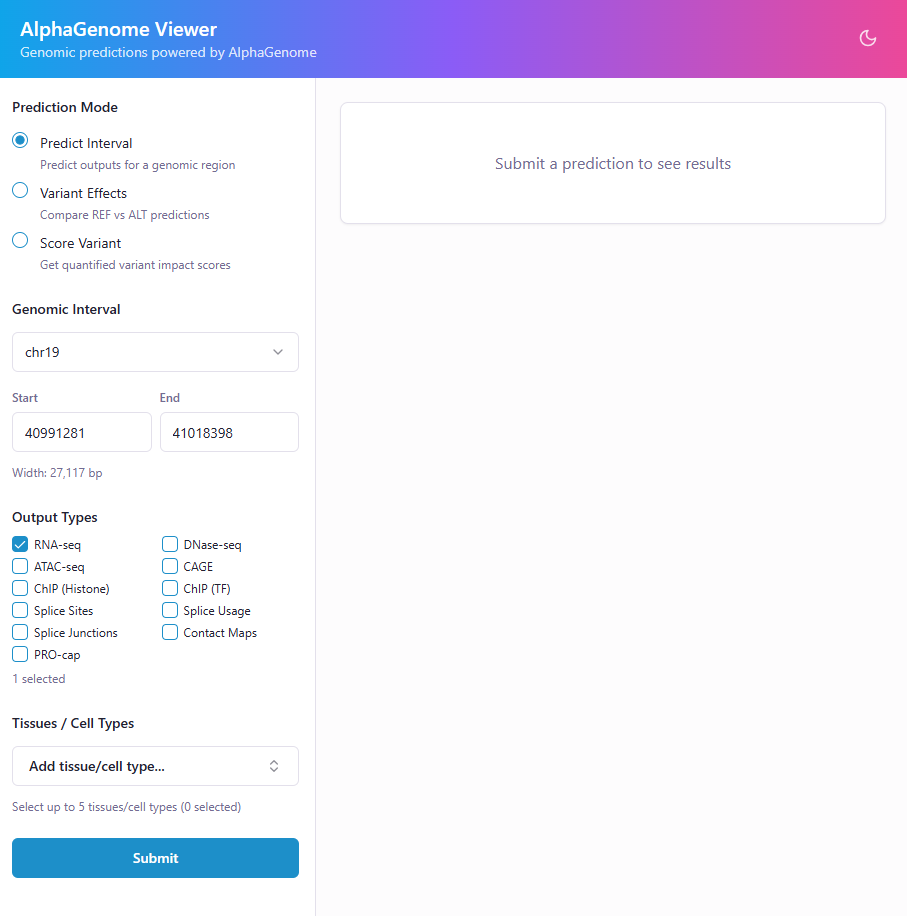
AlphaGenome Viewer gives you a point-and-click interface to query AlphaGenome predictions — no notebook or SDK boilerplate required. Enter a genomic region or variant, pick your output types and tissues, and get back publication-ready plots and scores in seconds.
Features
Interval Predictions — Visualize gene expression, chromatin accessibility, histone marks, and more across any genomic region.
Variant Effect Comparison — Overlay REF vs ALT predictions side-by-side to see exactly how a variant changes the signal.
Variant Scoring — Score variants with AlphaGenome's recommended scorers and get quantile rankings across the genome.
Supported output types
| Category | Types |
|---|---|
| Expression | RNA-seq, CAGE, PRO-cap |
| Accessibility | ATAC-seq, DNase-seq |
| Chromatin | ChIP-seq (histones), ChIP-seq (TFs), Contact maps |
| Splicing | Splice sites, Splice site usage, Splice junctions |
Quick Start
Option A: pip install (simplest)
pip install alphagenome-viewer
alphagenome-viewer
Open http://localhost:8000 and enter your API key when prompted. The command accepts --port, --host, --workers, and --plots-dir flags.
Option B: From source
Prerequisites
- Python 3.10+
- Node.js 18+
- AlphaGenome API key
Install & Run
# Clone the repo
git clone https://github.com/Abrar-Abir/alphagenome-viewer.git
cd alphagenome-viewer

# Install dependencies
cd backend && pip install -r requirements.txt && cd ..
cd frontend && npm install && cd ..

# Start both services
./start.sh
You should see output like this:
Starting AlphaGenome Viewer...

Starting backend on http://localhost:8000...
Backend started (PID 20094, logging to backend/app.log)
Starting frontend on http://localhost:5173...
Frontend started (PID 20134, logging to frontend/app.log)

Both services running. Press Ctrl+C to stop.
  Backend:  http://localhost:8000 (logs: backend/app.log)
  Frontend: http://localhost:5173 (logs: frontend/app.log)
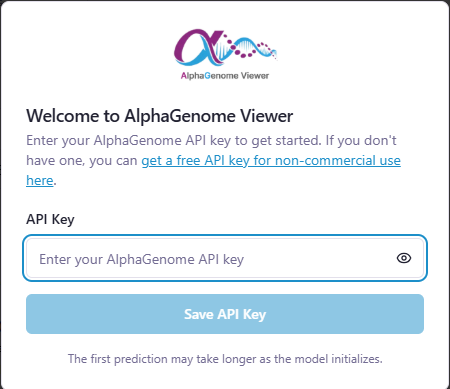
Open http://localhost:5173 and enter your API key when prompted. That's it.
Press Ctrl+C to stop both services:
^C
Shutting down...
[2]+  Terminated              npm run dev > app.log 2>&1
Shutdown complete.
You can also run the services separately — see backend/README.md and frontend/README.md for details.
Deployment
Docker
docker compose up
Open http://localhost:8000. Generated plots persist across restarts via a Docker volume. Your API key is stored in your browser's localStorage.
To build and run manually:
docker build -t alphagenome-viewer .
docker run -p 8000:8000 -v agplots:/app/data/plots alphagenome-viewer
Apptainer / Singularity
For shared servers or HPC environments, build a single container — no Node.js needed at runtime:
apptainer build alphagenome-viewer.sif alphagenome-viewer.def

mkdir -p ./data/plots
apptainer run \
    --bind ./data/plots:/opt/alphagenome-viewer/data/plots \
    alphagenome-viewer.sif
Open http://localhost:8000. Change the port with APPTAINERENV_AGVIEWER_PORT=9000.
See apptainer run-help alphagenome-viewer.sif for the full list of environment variables and bind mount paths.
Tech Stack
- Frontend: React, Vite, Tailwind CSS, shadcn/ui
- Backend: FastAPI, Matplotlib
- API: AlphaGenome SDK
Contributing
Contributions are welcome! Please open an issue first to discuss what you'd like to change.
License
This project uses open-source dependencies under their own licenses. See THIRD-PARTY-NOTICES for details.
1 maintainer

Metadata
1 maintainer
Release files for alphagenome-viewer 1.0.1
For a detailed explanation of source distributions (sdists) and built distributions (wheels), please see the package formats documentation.
Source distribution (sdist)
| File | Size | Uploaded | |
|---|---|---|---|
| alphagenome_viewer-1.0.1.tar.gz | 1.1 MB | Details |
Built distribution (wheel)
| File | Interpreter | ABI | Platform | Reset |
|---|---|---|---|---|
| alphagenome_viewer-1.0.1-py3-none-any.whl | Python 3 | none | any | Details |
Total release size: 2.1 MB
Release files / alphagenome_viewer-1.0.1.tar.gz
| Download URL | alphagenome_viewer-1.0.1.tar.gz |
|---|---|
| Size | 1.1 MB |
| Tags | Source |
|
SHA-256 checksum How to use checksums |
e00c149ac97af0c8707645f53d2c4958cc038f2acceead7af8e9628b3847567e
|
|
BLAKE2b-256 checksum How to use checksums |
6a0706360b136cc8b8f2c218f01b22382fdac9cfdb769fab8abed475ead4d26b
|
| Upload date | |
|
Uploaded using Trusted Publishing? What is trusted publishing? |
Yes |
| Uploaded via |
twine/6.1.0 CPython/3.13.7
|
Provenance
Provenance describes where a file came from. On PyPI, provenance is shared via attestations, which provide a verifiable record of the build or publishing details. View details, limitations and caveats.


PyPI Publish Attestation
PyPI verified that this artifact, at this checksum, originated from the publisher listed below.
Signed by GitHub Actions, verified by PyPI on Feb 14, 2026.
Transparency logRelease files / alphagenome_viewer-1.0.1-py3-none-any.whl
| Download URL | alphagenome_viewer-1.0.1-py3-none-any.whl |
|---|---|
| Size | 1.1 MB |
| Tags | Python 3 |
|
SHA-256 checksum How to use checksums |
34293b87a358be10bdadf1e9adf2c29e02ee6b53233c541e04fa07c4cc5ac9b8
|
|
BLAKE2b-256 checksum How to use checksums |
5159a859a5ab88c4d905d656ad4cd081f9517dd718305f49950b3ebf19fdfdcf
|
| Upload date | |
|
Uploaded using Trusted Publishing? What is trusted publishing? |
Yes |
| Uploaded via |
twine/6.1.0 CPython/3.13.7
|
Provenance
Provenance describes where a file came from. On PyPI, provenance is shared via attestations, which provide a verifiable record of the build or publishing details. View details, limitations and caveats.
PyPI Publish Attestation
PyPI verified that this artifact, at this checksum, originated from the publisher listed below.
Signed by GitHub Actions, verified by PyPI on Feb 14, 2026.
Transparency log













