






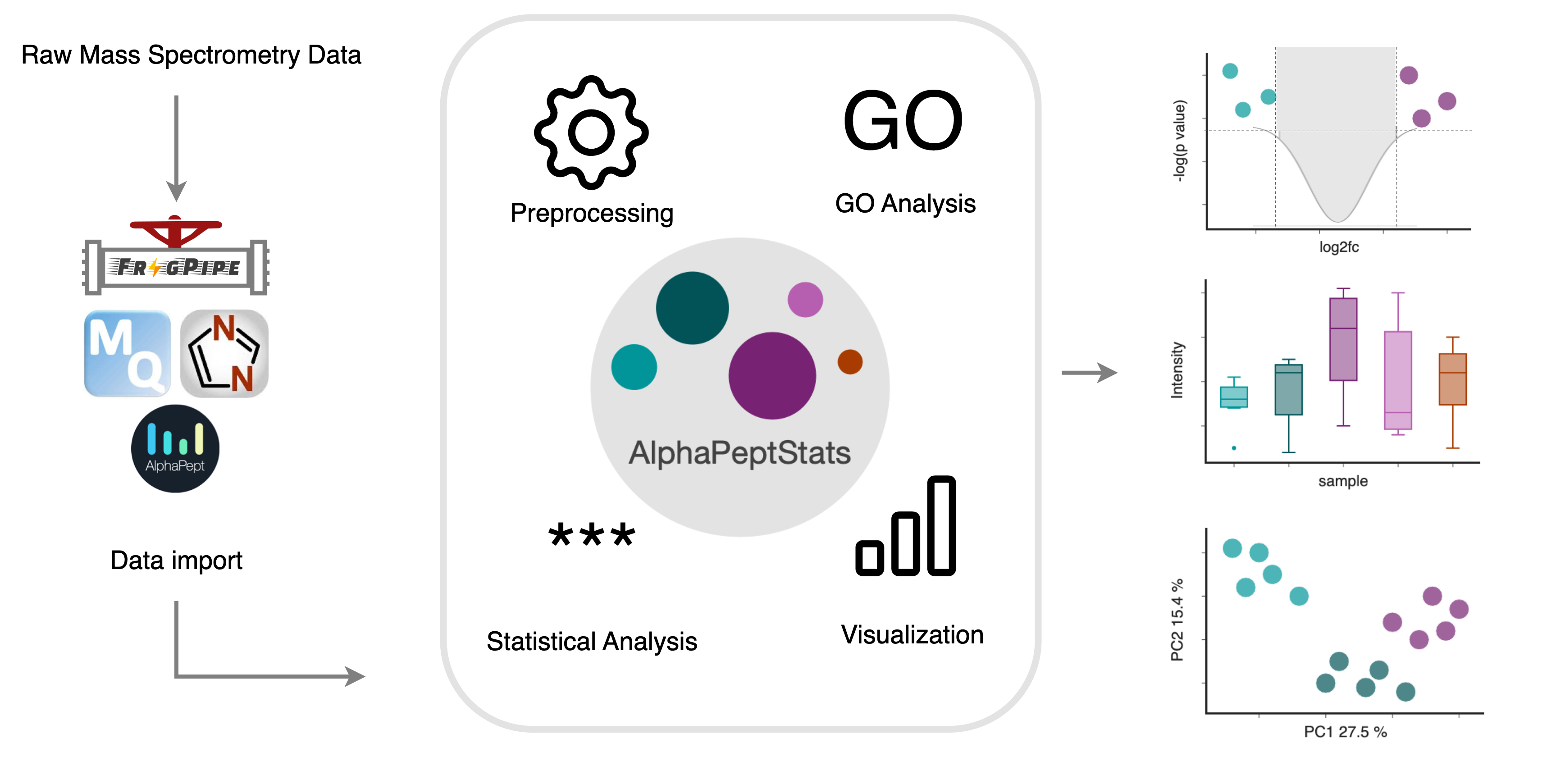
An open-source Python package for mass spectrometry downstream data analysis from the Mann Group at the University of Copenhagen and the Mann Group at the MPI Biochemistry.
Check out alphapept.org for other packages of AlphaPept ecosystem.
GUI Preview

=> Run the app right now in your browser
Installation
AlphaPeptStats can be used
- via a Graphical User Interface,
- as a python library, or
- as a Docker container.
One Click Installer
One-click installers for MacOS, Windows and Linux can be found here.
Windows
Download the latest alphastats-X.Y.Z-windows-amd64.exe build and double click it to install. If you receive a warning during installation click Run anyway.
Important note: always install AlphaPeptStats into a new folder, as the installer will not properly overwrite existing installations.
Linux
Download the latest alphastats-X.Y.Z-linux-x64.deb build and install it via dpkg -i alphastats-X.Y.Z-linux-x64.deb.
MacOS
Download the latest build suitable for your chip architecture
(can be looked up by clicking on the Apple Symbol > About this Mac > Chip ("M1", "M2", "M3" -> arm64, "Intel" -> x64),
alphastats-X.Y.Z-macos-darwin-arm64.pkg or alphastats-X.Y.Z-macos-darwin-x64.pkg. Open the parent folder of the downloaded file in Finder,
right-click and select open. If you receive a warning during installation click Open.
In newer MacOS versions, additional steps are required to enable installation of unverified software.
This is indicated by a dialog telling you “alphastats. ... .pkg” Not Opened.
- Close this dialog by clicking
Done. - Choose
Apple menu>System Settings, thenPrivacy & Securityin the sidebar. (You may need to scroll down.) - Go to
Security, locate the line "alphadia.pkg was blocked to protect your Mac" then clickOpen Anyway. - In the dialog windows, click
Open Anyway.
Pip Installation
AlphaStats can be installed in an existing Python >=3.9 environment with a single bash command.
pip install alphastats
In case you want to use the Graphical User Interface, use following command in the command line:
alphastats gui
If you get an AxiosError: Request failed with status code 403' when uploading files, try running DISABLE_XSRF=1 alphastats gui.
If you receive an error like library 'hdf5' not found, your computer is missing the HDF5 library. Install it via your favorite package manager or use conda create --name alphastats python=3.9 hdf5.
Alternatively, use conda install -c anaconda pytables.
AlphaStats can be imported as a Python package into any Python script or notebook with the command import alphastats.
A brief Jupyter notebook tutorial on how to use the API is also present in the nbs folder.
Docker version
The containerized version can be used to run alphapeptstats without any installation (apart from Docker)
1. Setting up Docker
Install the latest version of docker (https://docs.docker.com/engine/install/).
2. Start the container
PORT=8501
SESSIONS_PATH=./sessions
docker run -p $PORT:8501 -v $SESSIONS_PATH:/app/sessions mannlabs/alphastats:latest
After initial download of the container, alphapeptstats will start running on http://localhost:$PORT.
Note: this will create a directory $SESSIONS_PATH where sessions will be stored.
API Documentation
AlphaPeptStats provides an extensive API documentation.
Troubleshooting
In case of issues, check out the following:
- Issues: Try a few different search terms to find out if a similar problem has been encountered before
Common problems
How to resolve " error: Microsoft Visual C++ 14.0 or greater is required. Get it with "Microsoft C++ Build Tools" " ?
Please, find a description on how to update required tools here.
How to resolve "ERROR: Could not find a local HDF5 installation" on Mac Silicon (M1/M2/M3)?
Before installing AlphaPeptStats you might need to install pytables first:
conda install -c anaconda pytables
License
AlphaStats was developed by the Mann Group at the University of Copenhagen and is now maintained by the Mann Group at the MPI Biochemistry. It is freely available with an Apache License. External Python packages have their own licenses, which can be consulted on their respective websites.
How to contribute
If you like this software, you can give us a star to boost our visibility! All direct contributions are also welcome. Feel free to post a new issue or clone the repository and create a pull request with a new branch. For an even more interactive participation, check out the discussions and the Contributors License Agreement.
Notes for developers
Tagging of changes
In order to have release notes automatically generated, changes need to be tagged with labels.
The following labels are used (should be safe-explanatory):
breaking-change, bug, enhancement.
Release a new version
This package uses a shared release process defined in the alphashared repository. Please see the instructions there.
pre-commit hooks
It is highly recommended to use the provided pre-commit hooks, as the CI pipeline enforces all checks therein to pass in order to merge a branch.
The hooks need to be installed once by
pip install -r requirements_dev.txt
pre-commit install
You can run the checks yourself using:
pre-commit run --all-files
The detect-secrets hook fails
This is because you added some code that was identified as a potential secret.
- Run
detect-secrets scan --exclude-files testfiles --exclude-lines '"(hash|id|image/\w+)":.*' > .secrets.baseline(check.pre-commit-config.yamlfor the exact parameters) - Run
detect-secrets audit .secrets.baselineand check if the detected 'secret' is actually a secret - Commit the latest version of
.secrets.baseline
Changelog
See the GitHub Release Notes for changes from version 0.6.8 on, HISTORY.md for older versions.
Citation
Citation:
Krismer, E., Bludau, I., Strauss M. & Mann M. (2023). AlphaPeptStats: an open-source Python package for automated and scalable statistical analysis of mass spectrometry-based proteomics. Bioinformatics https://doi.org/10.1093/bioinformatics/btad461
1 maintainer

Metadata
1 maintainer
Release files for alphastats 0.7.2
For a detailed explanation of source distributions (sdists) and built distributions (wheels), please see the package formats documentation.
Built distribution (wheel)
| File | Interpreter | ABI | Platform | Reset |
|---|---|---|---|---|
| alphastats-0.7.2-py3-none-any.whl | Python 3 | none | any | Details |
Release files / alphastats-0.7.2-py3-none-any.whl
| Download URL | alphastats-0.7.2-py3-none-any.whl |
|---|---|
| Size | 2.9 MB |
| Tags | Python 3 |
|
SHA-256 checksum How to use checksums |
9822bc86a01e4e5edf704bedecdefd8a37af9ba5c32b677ab9671eb2f64d5cc2
|
|
BLAKE2b-256 checksum How to use checksums |
7d20f362eb245096af454414bbfe667f1ff82d87808adb05430e1a001c183c9b
|
| Upload date | |
|
Uploaded using Trusted Publishing? What is trusted publishing? |
No |
| Uploaded via |
twine/6.1.0 CPython/3.13.7
|














